Essentials · Angular, React and OpenLayers
View animations: pan, zoom, rotate and fly
Build smooth OpenLayers camera transitions in Angular and React: easing pans, flyTo zoom-dip flights, anchor rotation and cancellable guided tours.
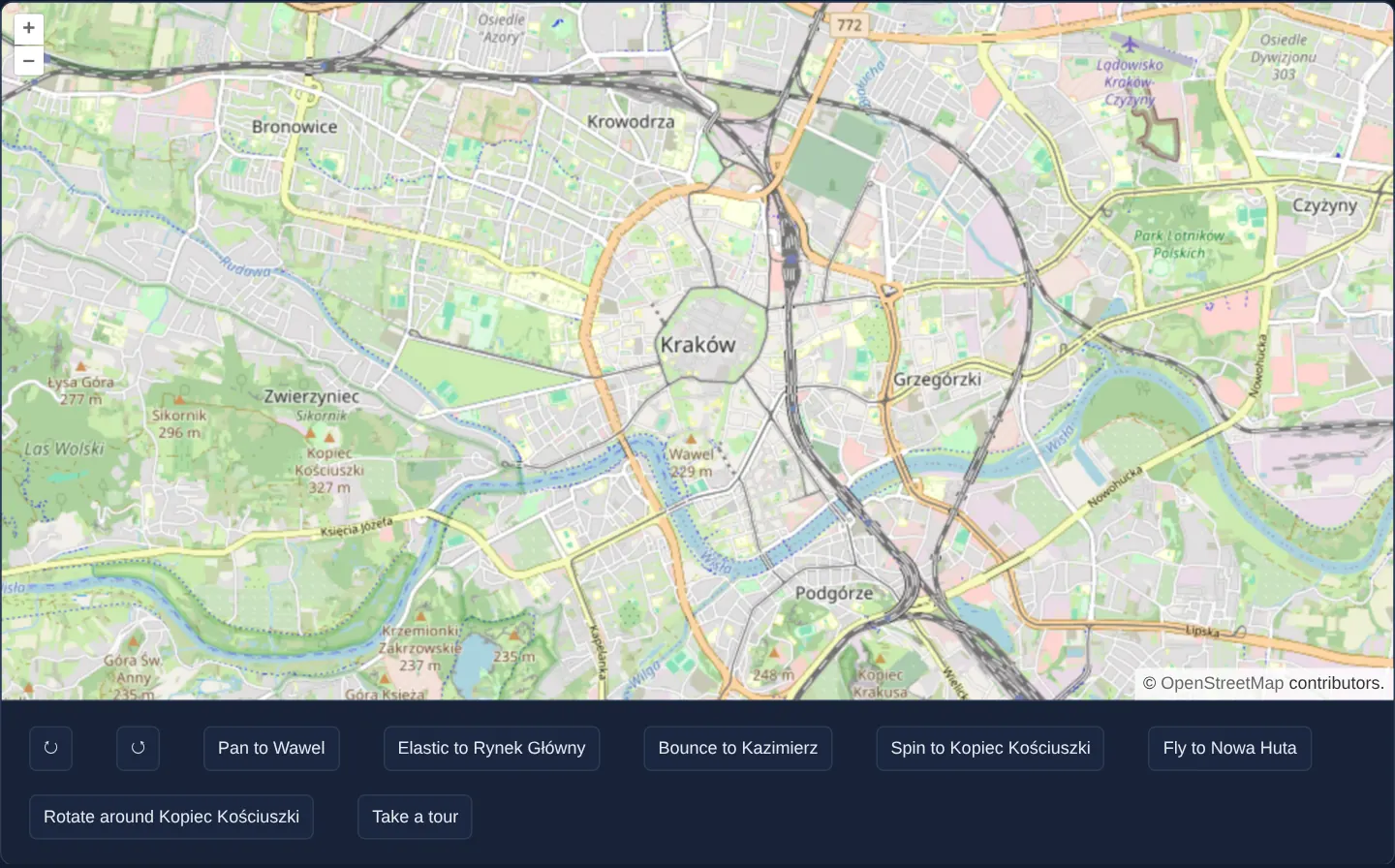
What this example shows
Centred on Kraków, a row of action buttons beneath the map demonstrates every major OpenLayers camera transition: 90-degree clockwise and counter-clockwise turns, eased pans to Wawel, Rynek Główny and Kazimierz, a spinning glide to Kopiec Kościuszki, a parabolic flyTo flight to Nowa Huta, a 360-degree orbit around an off-centre landmark, and a five-stop guided tour.
Coarse parent tiles remain preloaded across lower zoom levels so rapid zoom dips never flash blank white squares, and grabbing or zooming the map mid-flight cancels the active tour cleanly.
When you need it
Abrupt coordinate jumps disorient users whenever they click a distant search result, switch saved bookmarks or step through an interactive story map.
Short eased pans preserve spatial context across neighbouring streets, whereas parabolic zoom-out-and-in flights connect distant districts without triggering dozens of unnecessary high-zoom tile requests along the ground path. Chained tours must also yield immediately when the user takes manual control and clean up timers on component teardown.
The code
The example uses cc-openlayers, my Angular component library for OpenLayers: each aol-… element creates the OpenLayers object it names, updates it from its inputs and disposes of it with the component.
animation.tsimport { ChangeDetectionStrategy, Component, DestroyRef, inject, signal, viewChild } from '@angular/core';
import {
CoordinateComponent,
DefaultControlComponent,
DefaultInteractionComponent,
LayerTileComponent,
MapComponent,
SourceOsmComponent,
ViewComponent,
} from 'cc-openlayers';
import { easeIn, easeOut } from 'ol/easing';
import { Coordinate } from 'ol/coordinate';
import { fromLonLat } from 'ol/proj';
const wawel = fromLonLat([19.9354, 50.054]);
const rynek = fromLonLat([19.9373, 50.0617]);
const kazimierz = fromLonLat([19.9449, 50.0515]);
const kopiec = fromLonLat([19.8933, 50.0549]);
const nowaHuta = fromLonLat([20.0373, 50.0718]);
/** Animated pan, zoom and rotation of the view: easing functions, rotation around a point, a fly-to and a tour. */
@Component({
selector: 'app-animation',
imports: [
CoordinateComponent,
DefaultControlComponent,
DefaultInteractionComponent,
LayerTileComponent,
MapComponent,
SourceOsmComponent,
ViewComponent,
],
changeDetection: ChangeDetectionStrategy.OnPush,
template: `
<aol-map height="480px">
<aol-interaction-default />
<aol-control-defaults />
<aol-view [zoom]="13">
<aol-coordinate [x]="19.9368" [y]="50.0614" srid="EPSG:4326" />
</aol-view>
<aol-layer-tile [preload]="4"><aol-source-osm /></aol-layer-tile>
</aol-map>
<div class="example-controls">
<button type="button" title="Rotate clockwise" (click)="rotate(Math.PI / 2)">↻</button>
<button type="button" title="Rotate counterclockwise" (click)="rotate(-Math.PI / 2)">↺</button>
<button type="button" (click)="panTo(wawel, null)">Pan to Wawel</button>
<button type="button" (click)="panTo(rynek, elastic)">Elastic to Rynek Główny</button>
<button type="button" (click)="panTo(kazimierz, bounce)">Bounce to Kazimierz</button>
<button type="button" (click)="spinTo(kopiec)">Spin to Kopiec Kościuszki</button>
<button type="button" (click)="flyTo(nowaHuta, null)">Fly to Nowa Huta</button>
<button type="button" (click)="rotateAround(kopiec)">Rotate around Kopiec Kościuszki</button>
<button type="button" (click)="tour()">Take a tour</button>
<output>{{ status() }}</output>
</div>
`,
})
export class Animation {
protected readonly Math = Math;
protected readonly wawel = wawel;
protected readonly rynek = rynek;
protected readonly kazimierz = kazimierz;
protected readonly kopiec = kopiec;
protected readonly nowaHuta = nowaHuta;
protected readonly elastic = elastic;
protected readonly bounce = bounce;
protected readonly status = signal('');
private readonly view = viewChild.required(ViewComponent);
private readonly destroyRef = inject(DestroyRef);
/** The pending pauses between each tour's flights. */
private readonly timers = new Set<ReturnType<typeof setTimeout>>();
constructor() {
this.destroyRef.onDestroy(() => {
for (const timer of this.timers) clearTimeout(timer);
this.timers.clear();
});
}
protected rotate(angle: number): void {
const view = this.view().instance;
view.animate({ rotation: view.getRotation() + angle });
}
protected panTo(center: Coordinate, easing: ((t: number) => number) | null): void {
this.view().instance.animate({ center, duration: 2000, easing: easing ?? undefined });
}
/** The rotation animation takes the shortest arc, so a full turn is animated in two parts. */
protected rotateAround(anchor: Coordinate): void {
const view = this.view().instance;
const rotation = view.getRotation();
view.animate(
{ rotation: rotation + Math.PI, anchor, easing: easeIn },
{ rotation: rotation + 2 * Math.PI, anchor, easing: easeOut }
);
}
protected spinTo(target: Coordinate): void {
const view = this.view().instance;
const center = view.getCenter() as Coordinate;
view.animate(
{
center: [center[0] + (target[0] - center[0]) / 2, center[1] + (target[1] - center[1]) / 2],
rotation: Math.PI,
easing: easeIn,
},
{ center: target, rotation: 2 * Math.PI, easing: easeOut }
);
}
/** Pans to the location while the zoom dips by one level and returns; `done` gets whether it completed. */
protected flyTo(location: Coordinate, done: ((complete: boolean) => void) | null): void {
const view = this.view().instance;
const duration = 2000;
const zoom = view.getZoom() as number;
let parts = 2;
let called = false;
const callback = (complete: boolean) => {
--parts;
if (called) return;
if (parts === 0 || !complete) {
called = true;
done?.(complete);
}
};
view.animate({ center: location, duration }, callback);
view.animate({ zoom: zoom - 1, duration: duration / 2 }, { zoom, duration: duration / 2 }, callback);
}
protected tour(): void {
const locations = [wawel, kazimierz, kopiec, nowaHuta, rynek];
let index = -1;
const next = (more: boolean): void => {
if (this.destroyRef.destroyed) return;
if (!more) {
this.status.set('Tour cancelled');
return;
}
++index;
if (index >= locations.length) {
this.status.set('Tour complete');
return;
}
const timer = setTimeout(
() => {
this.timers.delete(timer);
if (this.destroyRef.destroyed) return;
this.flyTo(locations[index], next);
},
index === 0 ? 0 : 750
);
this.timers.add(timer);
};
this.status.set('');
next(true);
}
}
/** A bounce easing (from https://github.com/DmitryBaranovskiy/raphael). */
function bounce(t: number): number {
const s = 7.5625;
const p = 2.75;
if (t < 1 / p) return s * t * t;
if (t < 2 / p) {
t -= 1.5 / p;
return s * t * t + 0.75;
}
if (t < 2.5 / p) {
t -= 2.25 / p;
return s * t * t + 0.9375;
}
t -= 2.625 / p;
return s * t * t + 0.984375;
}
/** An elastic easing (from https://github.com/DmitryBaranovskiy/raphael). */
function elastic(t: number): number {
return Math.pow(2, -10 * t) * Math.sin(((t - 0.075) * (2 * Math.PI)) / 0.3) + 1;
} The React version uses the library's React adapter, cc-openlayers/react: each component creates the OpenLayers object it names when it mounts, updates it from its props and disposes of it when it unmounts.
animation.react.tsximport { useEffect, useRef, useState } from 'react';
import type OLView from 'ol/View.js';
import type { Coordinate as OLCoordinate } from 'ol/coordinate.js';
import { easeIn, easeOut } from 'ol/easing.js';
import { fromLonLat } from 'ol/proj.js';
import { Coordinate, DefaultControls, DefaultInteractions, Map, OSMSource, TileLayer, View } from 'cc-openlayers/react';
const wawel = fromLonLat([19.9354, 50.054]);
const rynek = fromLonLat([19.9373, 50.0617]);
const kazimierz = fromLonLat([19.9449, 50.0515]);
const kopiec = fromLonLat([19.8933, 50.0549]);
const nowaHuta = fromLonLat([20.0373, 50.0718]);
/** Animated pan, zoom and rotation of the view: easing functions, rotation around a point, a fly-to and a tour. */
export function Animation() {
const [status, setStatus] = useState('');
const view = useRef<OLView>(null);
/** The pending pauses between each tour's flights. */
const timers = useRef(new Set<ReturnType<typeof setTimeout>>());
const mounted = useRef(false);
useEffect(() => {
const pendingTimers = timers.current;
mounted.current = true;
return () => {
mounted.current = false;
for (const timer of pendingTimers) clearTimeout(timer);
pendingTimers.clear();
};
}, []);
const rotate = (angle: number) => {
const current = view.current as OLView;
current.animate({ rotation: current.getRotation() + angle });
};
const panTo = (center: OLCoordinate, easing: ((t: number) => number) | null) => {
view.current?.animate({ center, duration: 2000, easing: easing ?? undefined });
};
/** The rotation animation takes the shortest arc, so a full turn is animated in two parts. */
const rotateAround = (anchor: OLCoordinate) => {
const current = view.current as OLView;
const rotation = current.getRotation();
current.animate(
{ rotation: rotation + Math.PI, anchor, easing: easeIn },
{ rotation: rotation + 2 * Math.PI, anchor, easing: easeOut }
);
};
const spinTo = (target: OLCoordinate) => {
const current = view.current as OLView;
const center = current.getCenter() as OLCoordinate;
current.animate(
{
center: [center[0] + (target[0] - center[0]) / 2, center[1] + (target[1] - center[1]) / 2],
rotation: Math.PI,
easing: easeIn,
},
{ center: target, rotation: 2 * Math.PI, easing: easeOut }
);
};
/** Pans to the location while the zoom dips by one level and returns; `done` gets whether it completed. */
const flyTo = (location: OLCoordinate, done: ((complete: boolean) => void) | null) => {
const current = view.current as OLView;
const duration = 2000;
const zoom = current.getZoom() as number;
let parts = 2;
let called = false;
const callback = (complete: boolean) => {
--parts;
if (called) return;
if (parts === 0 || !complete) {
called = true;
done?.(complete);
}
};
current.animate({ center: location, duration }, callback);
current.animate({ zoom: zoom - 1, duration: duration / 2 }, { zoom, duration: duration / 2 }, callback);
};
const tour = () => {
const locations = [wawel, kazimierz, kopiec, nowaHuta, rynek];
let index = -1;
const next = (more: boolean): void => {
if (!mounted.current) return;
if (!more) {
setStatus('Tour cancelled');
return;
}
++index;
if (index >= locations.length) {
setStatus('Tour complete');
return;
}
const timer = setTimeout(
() => {
timers.current.delete(timer);
if (!mounted.current) return;
flyTo(locations[index], next);
},
index === 0 ? 0 : 750
);
timers.current.add(timer);
};
setStatus('');
next(true);
};
return (
<>
<Map height="480px">
<DefaultInteractions />
<DefaultControls />
<View ref={view} zoom={13}>
<Coordinate x={19.9368} y={50.0614} srid="EPSG:4326" />
</View>
<TileLayer preload={4}>
<OSMSource />
</TileLayer>
</Map>
<div className="example-controls">
<button type="button" title="Rotate clockwise" onClick={() => rotate(Math.PI / 2)}>
↻
</button>
<button type="button" title="Rotate counterclockwise" onClick={() => rotate(-Math.PI / 2)}>
↺
</button>
<button type="button" onClick={() => panTo(wawel, null)}>
Pan to Wawel
</button>
<button type="button" onClick={() => panTo(rynek, elastic)}>
Elastic to Rynek Główny
</button>
<button type="button" onClick={() => panTo(kazimierz, bounce)}>
Bounce to Kazimierz
</button>
<button type="button" onClick={() => spinTo(kopiec)}>
Spin to Kopiec Kościuszki
</button>
<button type="button" onClick={() => flyTo(nowaHuta, null)}>
Fly to Nowa Huta
</button>
<button type="button" onClick={() => rotateAround(kopiec)}>
Rotate around Kopiec Kościuszki
</button>
<button type="button" onClick={tour}>
Take a tour
</button>
<output>{status}</output>
</div>
</>
);
}
/** A bounce easing (from https://github.com/DmitryBaranovskiy/raphael). */
function bounce(t: number): number {
const s = 7.5625;
const p = 2.75;
if (t < 1 / p) return s * t * t;
if (t < 2 / p) {
t -= 1.5 / p;
return s * t * t + 0.75;
}
if (t < 2.5 / p) {
t -= 2.25 / p;
return s * t * t + 0.9375;
}
t -= 2.625 / p;
return s * t * t + 0.984375;
}
/** An elastic easing (from https://github.com/DmitryBaranovskiy/raphael). */
function elastic(t: number): number {
return Math.pow(2, -10 * t) * Math.sin(((t - 0.075) * (2 * Math.PI)) / 0.3) + 1;
}How the React version works
Buttons rotate, pan with different easing functions, circle around a point, “fly” with a brief zoom-out and run a tour of five places in Kraków. The tour status says whether it finished or was interrupted.
What both versions share
OpenLayers renders the map and handles the interactions; the cc-openlayers/core layer gives both adapters the same view binding (MapViewBinding) and the same conversion of coordinates from EPSG:4326 to the map's projection. OpenLayers' View.animate runs the animations; the bounce and elastic functions are the same in both versions.
From Angular to React
| Angular | React |
|---|---|
viewChild.required(ViewComponent).instance | useRef<OLView>(null) passed to View |
signal('') for the status | useState('') |
a class-owned Set of pending pause handles | a useRef holding the pending pause Set |
DestroyRef.destroyed guards late callbacks; onDestroy clears every pause | an effect-owned mounted ref guards late callbacks; cleanup clears every pause |
| class methods | functions in the component body |
Who creates, updates and disposes
Map creates the ol/Map in useLayoutEffect and disposes of it on unmount; each layer, source and interaction component adds its object to the parent it gets from context and removes it in its effect's cleanup, as ngOnDestroy does in Angular. Pending pauses between tour flights live in a Set held by useRef, because scheduling them must not render the component. Each pause removes its handle when it runs. Effect cleanup clears every pending pause, including pauses owned by concurrent tours, and marks the component unmounted. Both the tour continuation and the pause callback check that lifetime before starting another flight. Angular uses the same ownership with DestroyRef.destroyed and a class-owned Set.
Architecture and OpenLayers mechanics
OpenLayers’ animate method follows a clean composition rule: multiple step objects passed to a single animate call run sequentially one after another, while separate animate calls invoked simultaneously run in parallel on independent view properties. flyTo combines both—one call interpolates center smoothly from origin to destination while a parallel call dips zoom down at the midpoint and restores it on arrival.
Every animate call optionally passes true (completed) or false (cancelled) to its trailing callback. tour() chains five flyTo hops separated by short setTimeout pauses, halting immediately on the first false or on destroy, while [preload]="4" keeps four coarser tile levels warm in cache.
How it works
animateinterpolates targetcenter,zoomorrotationvalues over a chosendurationandeasingcurve across Kraków landmarks.- Step objects inside a single
animatecall execute sequentially, whereas parallelanimatecalls execute together soflyTocan pan horizontally while dipping and restoringzoom. rotateAroundcompletes a full revolution around Kopiec Kościuszki (anchor) by chaining two half-turn steps.- The completion callback receives
truewhen undisturbed andfalsewhen interrupted;tour()stops playback immediately onfalse. [preload]="4"on the raster layer retains coarse tiles up to four zoom levels below the current view to prevent blank flashes during flights.
Pitfalls
- OpenLayers always animates
rotationalong the shortest angular arc, so requesting a single full-turn step (2 * Math.PI) produces zero motion; split full turns into two half turns asrotateArounddoes. - Manual drags or wheel zooms cancel active animations and pass
falseto callbacks—never assume an animation callback runs only on completion. - Always clear pending
setTimeouthandles when the component unmounts so background tour steps cannot fire against a disposed view.
Related examples
The same feature in the OpenLayers examples .
Background: state and lifecycle of maps in Angular with OpenLayers, which the components of cc-openlayers take care of.