Vector data · Angular, React and OpenLayers
Drop KMZ archives with their icons
Unpack dropped KMZ archives in the browser with a custom OpenLayers KML format that resolves bundled ZIP icons and sanitizes HTML descriptions.
What this example shows
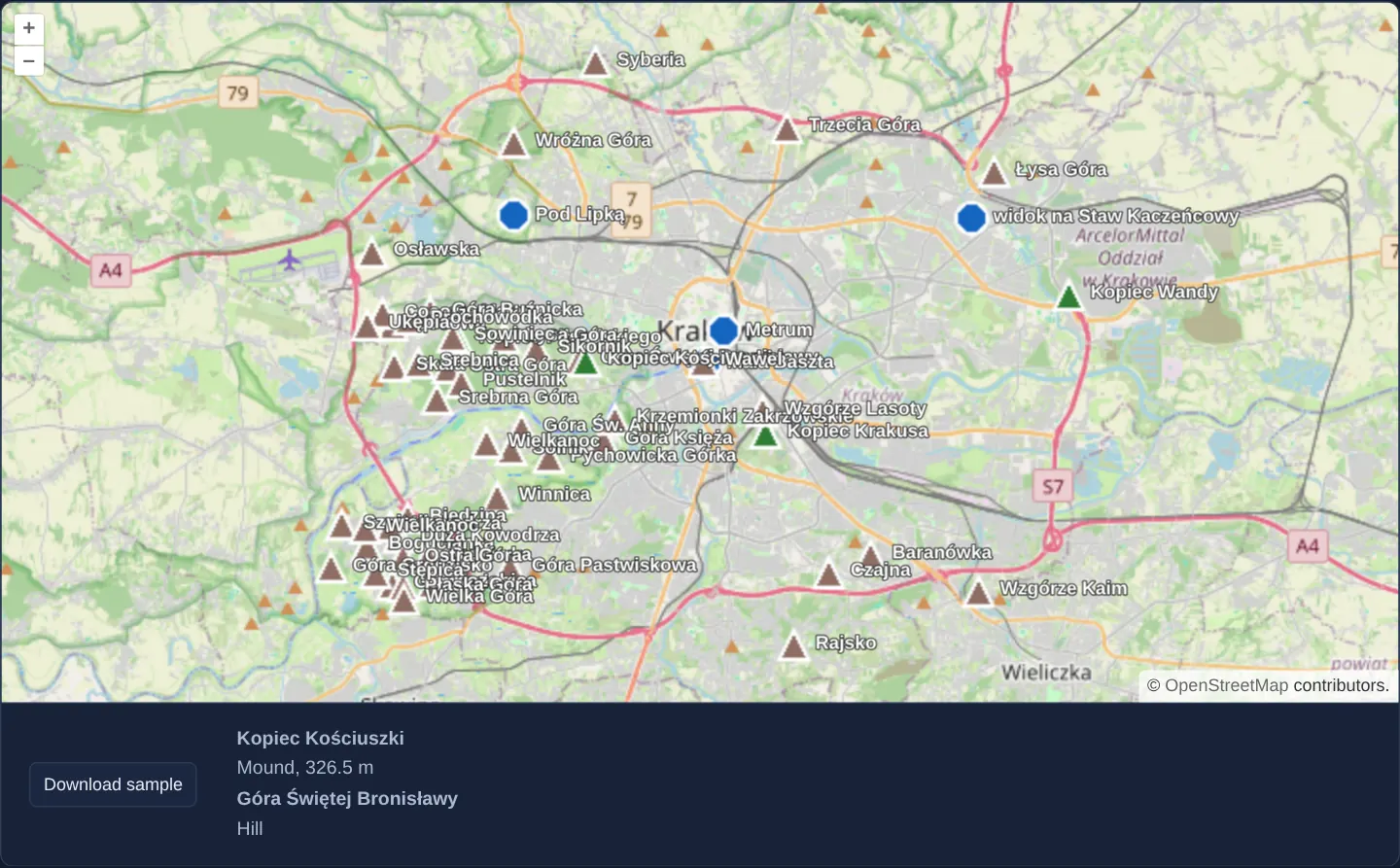
Dropping a compressed .kmz archive onto the OpenStreetMap view of Kraków—or downloading and dropping the bundled sample of 55 local hills, mounds and viewpoints—unzips the package entirely in browser memory, renders each placemark with its embedded peak, mound or viewpoint icon, and displays sanitized HTML descriptions below the map on hover or click.
When you need it
Google Earth, drone mission planners and field survey apps default to exporting .kmz ZIP bundles rather than plain .kml whenever custom marker icons or photos accompany the placemarks.
Unpacking KMZ archives directly in the browser lets users preview self-contained icon-rich exports with zero backend upload or temporary server storage.
The code
The example uses cc-openlayers, my Angular component library for OpenLayers: each aol-… element creates the OpenLayers object it names, updates it from its inputs and disposes of it with the component.
drag-and-drop-custom-kmz.tsimport { ChangeDetectionStrategy, Component, signal, viewChild } from '@angular/core';
import type Feature from 'ol/Feature';
import type MapBrowserEvent from 'ol/MapBrowserEvent';
import GPX from 'ol/format/GPX';
import GeoJSON from 'ol/format/GeoJSON';
import IGC from 'ol/format/IGC';
import KML from 'ol/format/KML';
import TopoJSON from 'ol/format/TopoJSON';
import type { DragAndDropEvent } from 'ol/interaction/DragAndDrop';
import VectorLayer from 'ol/layer/Vector';
import VectorSource from 'ol/source/Vector';
import {
CoordinateComponent,
DefaultControlComponent,
DefaultInteractionComponent,
type DragAndDropFormat,
DragAndDropInteractionComponent,
LayerTileComponent,
MapComponent,
SourceOsmComponent,
ViewComponent,
} from 'cc-openlayers';
import { KMZ } from 'cc-openlayers/io';
/** Files dropped on the map are shown as layers; a KMZ archive is read as its KML document with the icons it packs. */
@Component({
selector: 'app-drag-and-drop-custom-kmz',
imports: [
CoordinateComponent,
DefaultControlComponent,
DefaultInteractionComponent,
DragAndDropInteractionComponent,
LayerTileComponent,
MapComponent,
SourceOsmComponent,
ViewComponent,
],
changeDetection: ChangeDetectionStrategy.OnPush,
template: `
<aol-map height="480px" (pointerMove)="describe($event)" (olClick)="describe($event)">
<aol-interaction-default />
<aol-interaction-draganddrop [formatConstructors]="formats" (addFeatures)="show($event)" />
<aol-control-defaults />
<aol-view [zoom]="10">
<aol-coordinate [x]="19.9368" [y]="50.0614" srid="EPSG:4326" />
</aol-view>
<aol-layer-tile><aol-source-osm /></aol-layer-tile>
</aol-map>
<div class="example-controls">
<button type="button" (click)="download()">Download sample</button>
<output [innerHTML]="info()"></output>
</div>
`,
})
export class DragAndDropCustomKmz {
readonly info = signal('');
private readonly map = viewChild.required(MapComponent);
protected readonly formats: DragAndDropFormat[] = [KMZ, GPX, GeoJSON, IGC, KML, TopoJSON];
/** The descriptions (or names) of the features under the pixel; KML descriptions are HTML. */
protected describe(event: MapBrowserEvent): void {
if (event.dragging) return;
const descriptions: string[] = [];
this.map().instance.forEachFeatureAtPixel(event.pixel, (feature) => {
const description =
feature.get('description') || feature.get('name') || feature.get('_name') || feature.get('layer');
if (description) descriptions.push(description);
});
this.info.set(descriptions.join('<br>'));
}
protected async download(): Promise<void> {
const response = await fetch('assets/krakow/hills.kmz');
const link = document.createElement('a');
link.href = URL.createObjectURL(await response.blob());
link.download = 'krakow-hills.kmz';
link.click();
}
protected show(event: DragAndDropEvent): void {
const source = new VectorSource({ features: event.features as Feature[] });
const map = this.map().instance;
map.addLayer(new VectorLayer({ source }));
map.getView().fit(source.getExtent(), { padding: [40, 40, 40, 40] });
}
} The React version uses the library's React adapter, cc-openlayers/react: each component creates the OpenLayers object it names when it mounts, updates it from its props and disposes of it when it unmounts.
drag-and-drop-custom-kmz.react.tsximport DOMPurify from 'dompurify';
import { useRef, useState } from 'react';
import type { Extent } from 'ol/extent.js';
import type Feature from 'ol/Feature.js';
import type OLMap from 'ol/Map.js';
import type MapBrowserEvent from 'ol/MapBrowserEvent.js';
import GPX from 'ol/format/GPX.js';
import GeoJSON from 'ol/format/GeoJSON.js';
import IGC from 'ol/format/IGC.js';
import KML from 'ol/format/KML.js';
import TopoJSON from 'ol/format/TopoJSON.js';
import type { DragAndDropEvent } from 'ol/interaction/DragAndDrop.js';
import VectorLayer from 'ol/layer/Vector.js';
import VectorSource from 'ol/source/Vector.js';
import {
Coordinate,
DefaultControls,
DefaultInteractions,
DragAndDropInteraction,
Map,
OSMSource,
TileLayer,
View,
} from 'cc-openlayers/react';
import type { DragAndDropFormat } from 'cc-openlayers/core';
import { KMZ } from 'cc-openlayers/io';
const formats: DragAndDropFormat[] = [KMZ, GPX, GeoJSON, IGC, KML, TopoJSON];
async function download(): Promise<void> {
const response = await fetch('assets/krakow/hills.kmz');
const link = document.createElement('a');
link.href = URL.createObjectURL(await response.blob());
link.download = 'krakow-hills.kmz';
link.click();
}
/** Files dropped on the map are shown as layers; a KMZ archive is read as its KML document with the icons it packs. */
export function DragAndDropCustomKmz() {
const [info, setInfo] = useState('');
const map = useRef<OLMap>(null);
/** The descriptions (or names) of the features under the pixel; KML descriptions are HTML. */
const describe = (event: MapBrowserEvent): void => {
if (event.dragging) return;
const descriptions: string[] = [];
map.current?.forEachFeatureAtPixel(event.pixel, (feature) => {
const description =
feature.get('description') || feature.get('name') || feature.get('_name') || feature.get('layer');
if (description) descriptions.push(description);
});
setInfo(descriptions.join('<br>'));
};
const show = (event: DragAndDropEvent): void => {
const source = new VectorSource({ features: event.features as Feature[] });
const current = map.current;
if (!current) return;
current.addLayer(new VectorLayer({ source }));
current.getView().fit(source.getExtent() as Extent, { padding: [40, 40, 40, 40] });
};
return (
<>
<Map ref={map} height="480px" onPointerMove={describe} onClick={describe}>
<DefaultInteractions />
<DragAndDropInteraction formatConstructors={formats} onAddFeatures={show} />
<DefaultControls />
<View zoom={10}>
<Coordinate x={19.9368} y={50.0614} srid="EPSG:4326" />
</View>
<TileLayer>
<OSMSource />
</TileLayer>
</Map>
<div className="example-controls">
<button type="button" onClick={() => void download()}>
Download sample
</button>
<output dangerouslySetInnerHTML={{ __html: DOMPurify.sanitize(info) }} />
</div>
</>
);
}How the React version works
A KMZ archive read as its KML document with the icons it packs; the description of the feature under the pointer shows below the map as HTML.
What both versions share
OpenLayers renders the map and handles the interactions; the cc-openlayers/core layer gives both adapters the same view binding (MapViewBinding) and the same conversion of coordinates from EPSG:4326 to the map's projection. The KMZ format comes from cc-openlayers/io.
From Angular to React
| Angular | React |
|---|---|
<aol-interaction-draganddrop [formatConstructors] (addFeatures)> | <DragAndDropInteraction formatConstructors onAddFeatures>; the format lists are module constants |
[innerHTML] (Angular removes scripts and event attributes itself) | dangerouslySetInnerHTML with DOMPurify.sanitize(…): React sanitises nothing, so DOMPurify does it |
(pointerMove) and viewChild of the map | onPointerMove (and onClick) on Map with useRef<OLMap>; the reading in useState |
Who creates, updates and disposes
Map creates the ol/Map in useLayoutEffect and disposes of it on unmount; each layer, source and interaction component adds its object to the parent it gets from context and removes it in its effect's cleanup, as ngOnDestroy does in Angular. The onAddFeatures handler adds the layers of dropped files to the map; they go away with the map on unmount.
Architecture and OpenLayers mechanics
KMZ from cc-openlayers/io extends OpenLayers’ native KML parser: it reads dropped files as binary array buffers, decompresses the ZIP container, parses the primary KML document inside, and rewrites embedded relative icon paths to in-memory browser object URLs.
Hovering or clicking a placemark extracts its KML description (falling back to its name when absent) and binds it through [innerHTML] so Angular’s HTML sanitizer strips scripts and inline event handlers.
How it works
KMZfromcc-openlayers/iounzips the dropped archive, parses its root KML document and serves bundled icon images via browser object URLs.- Configuring the drag-and-drop reader for binary array buffers allows
KMZto inspect ZIP bytes while decoding text formats cleanly alongside it. - Pointer hover and click display each feature’s
descriptionHTML (or fallback name) beneath the viewport.
Pitfalls
- Embedded KML descriptions contain arbitrary author-supplied HTML—always bind them through
[innerHTML]sanitization and never bypass framework XSS protection. - Browser blob object URLs created for unpacked icons remain allocated for the lifetime of the document unless revoked when layers are removed during long multi-archive sessions.
Related examples
The same feature in the OpenLayers examples .
Background: state and lifecycle of maps in Angular with OpenLayers, which the components of cc-openlayers take care of.