Raster, GeoTIFF and WebGL · Angular, React and OpenLayers
Convolution filters on an orthophoto
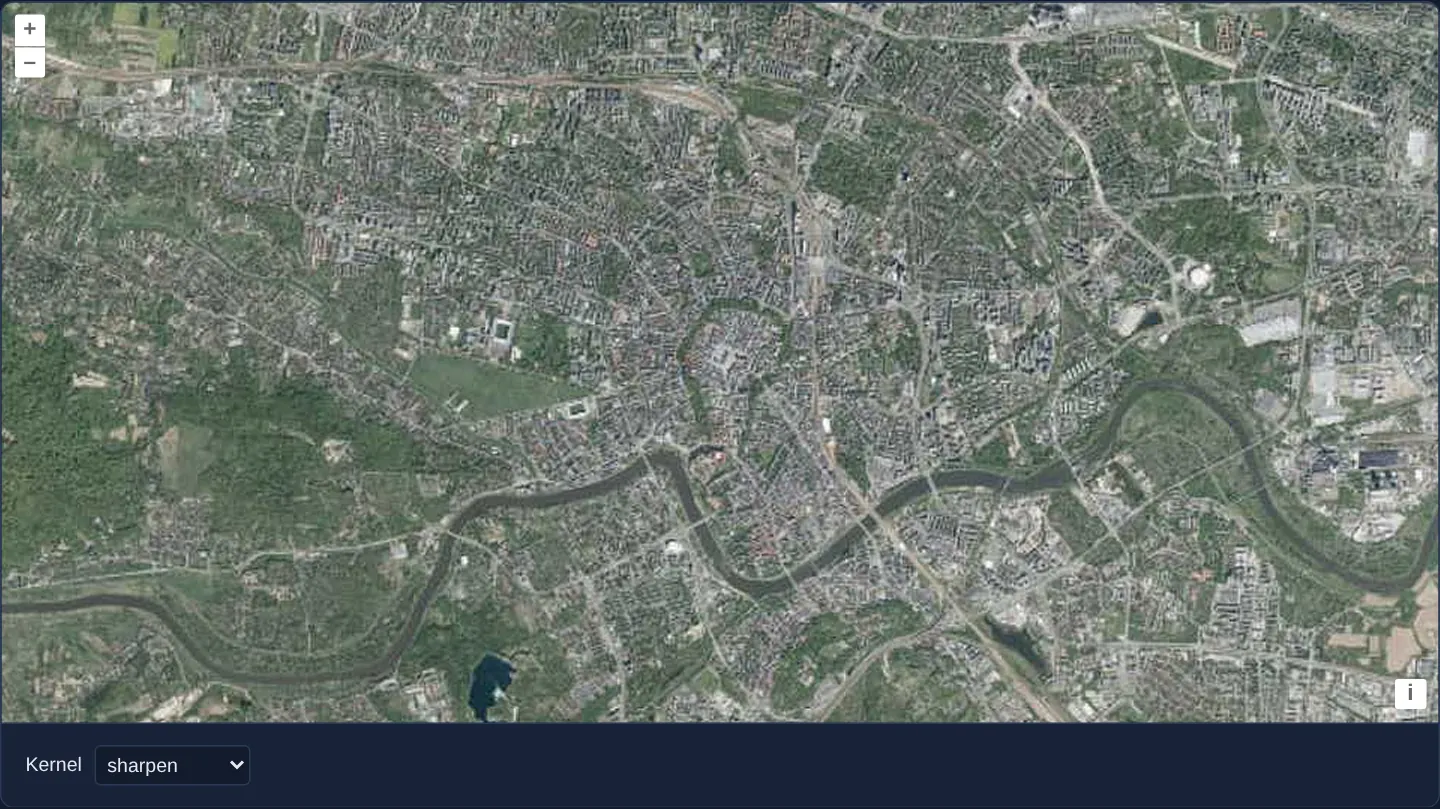
Apply 3x3 sharpening, blur, emboss and edge-detection convolution kernels to OpenLayers WMTS orthophotos in postrender using getImageData().
What this example shows
Over central Kraków—spanning the Old Town, Planty ring, Vistula bends and Błonia meadow—GUGiK’s national WMTS aerial orthophotomap opens sharpened via a 3 × 3 spatial convolution matrix, with a Kernel selector below switching live across seven classic image-processing filters including sharpen, blur, shadow, emboss and edge detection.
When you need it
Photo-interpreters inspecting roof ridgelines, pavement cracks, drainage ditches or crop rows benefit from instant on-screen sharpening or edge-enhancement filters without exporting imagery to desktop software.
Running a 3 × 3 convolution kernel in postrender processes whatever aerial tiles are currently painted on the layer canvas with zero server round-trips.
The code
The example uses cc-openlayers, my Angular component library for OpenLayers: each aol-… element creates the OpenLayers object it names, updates it from its inputs and disposes of it with the component.
image-filter.shared.tsimport { getTopLeft, getWidth } from 'ol/extent';
import { EXTENT } from 'ol/proj/epsg3857';
const size = getWidth(EXTENT) / 256;
/** The tile grid of the national orthophoto's Web Mercator matrix set (20 levels). */
export const ORTHOPHOTO_GRID = {
origin: getTopLeft(EXTENT),
resolutions: Array.from({ length: 20 }, (_, z) => size / 2 ** z),
matrixIds: Array.from({ length: 20 }, (_, z) => `EPSG:3857:${z}`),
};
export const KERNELS: Record<string, number[]> = {
none: [0, 0, 0, 0, 1, 0, 0, 0, 0],
sharpen: [0, -1, 0, -1, 5, -1, 0, -1, 0],
sharpenless: [0, -1, 0, -1, 10, -1, 0, -1, 0],
blur: [1, 1, 1, 1, 1, 1, 1, 1, 1],
shadow: [1, 2, 1, 0, 1, 0, -1, -2, -1],
emboss: [-2, 1, 0, -1, 1, 1, 0, 1, 2],
edge: [0, 1, 0, 1, -4, 1, 0, 1, 0],
};
export const OPTIONS = [
{ value: 'none', label: 'none' },
{ value: 'sharpen', label: 'sharpen' },
{ value: 'sharpenless', label: 'sharpen less' },
{ value: 'blur', label: 'blur' },
{ value: 'shadow', label: 'shadow' },
{ value: 'emboss', label: 'emboss' },
{ value: 'edge', label: 'edge detect' },
];
/** A kernel divided by its sum, so the image keeps its brightness; a kernel summing to 0 or less is left as it is and the result is made opaque. */
export function normalize(kernel: number[]): { weights: number[]; normalized: boolean } {
const sum = kernel.reduce((total, weight) => total + weight, 0);
const normalized = sum > 0;
return { weights: kernel.map((weight) => weight / (normalized ? sum : 1)), normalized };
}
/** Applies a convolution kernel to the canvas: works for any size, but gets slow above 3 x 3. */
export function convolve(context: CanvasRenderingContext2D, kernel: { weights: number[]; normalized: boolean }): void {
const { width, height } = context.canvas;
const { weights, normalized } = kernel;
const kernelSize = Math.sqrt(weights.length);
const half = Math.floor(kernelSize / 2);
const input = context.getImageData(0, 0, width, height).data;
const output = context.createImageData(width, height);
const result = output.data;
for (let pixelY = 0; pixelY < height; ++pixelY) {
for (let pixelX = 0; pixelX < width; ++pixelX) {
let r = 0;
let g = 0;
let b = 0;
let a = 0;
for (let kernelY = 0; kernelY < kernelSize; ++kernelY) {
for (let kernelX = 0; kernelX < kernelSize; ++kernelX) {
const weight = weights[kernelY * kernelSize + kernelX];
const neighborY = Math.min(height - 1, Math.max(0, pixelY + kernelY - half));
const neighborX = Math.min(width - 1, Math.max(0, pixelX + kernelX - half));
const inputIndex = (neighborY * width + neighborX) * 4;
r += input[inputIndex] * weight;
g += input[inputIndex + 1] * weight;
b += input[inputIndex + 2] * weight;
a += input[inputIndex + 3] * weight;
}
}
const outputIndex = (pixelY * width + pixelX) * 4;
result[outputIndex] = r;
result[outputIndex + 1] = g;
result[outputIndex + 2] = b;
result[outputIndex + 3] = normalized ? a : 255;
}
}
context.putImageData(output, 0, 0);
}image-filter.tsimport { ChangeDetectionStrategy, Component, signal, viewChild } from '@angular/core';
import {
CoordinateComponent,
DefaultControlComponent,
DefaultInteractionComponent,
LayerTileComponent,
MapComponent,
SourceTileWMTSComponent,
TileGridWMTSComponent,
ViewComponent,
} from 'cc-openlayers';
import type RenderEvent from 'ol/render/Event';
import { convolve, KERNELS, normalize, OPTIONS, ORTHOPHOTO_GRID } from './image-filter.shared';
/** The national orthophoto filtered after each render with a convolution kernel chosen from a list. */
@Component({
selector: 'app-image-filter',
imports: [
CoordinateComponent,
DefaultControlComponent,
DefaultInteractionComponent,
LayerTileComponent,
MapComponent,
SourceTileWMTSComponent,
TileGridWMTSComponent,
ViewComponent,
],
changeDetection: ChangeDetectionStrategy.OnPush,
template: `
<aol-map height="480px">
<aol-interaction-default />
<aol-control-defaults />
<aol-view [zoom]="13"><aol-coordinate [x]="19.9368" [y]="50.0614" srid="EPSG:4326" /></aol-view>
<aol-layer-tile [postrender]="filter">
<aol-source-tilewmts
attributions='Tiles © <a href="https://www.geoportal.gov.pl/" target="_blank">GUGiK</a>'
url="https://mapy.geoportal.gov.pl/wss/service/PZGIK/ORTO/WMTS/StandardResolution"
layer="ORTOFOTOMAPA"
matrixSet="EPSG:3857"
format="image/jpeg"
projection="EPSG:3857"
crossOrigin="anonymous"
[style]="'default'"
[wrapX]="true"
>
<aol-tilegrid-wmts [origin]="origin" [resolutions]="resolutions" [matrixIds]="matrixIds" />
</aol-source-tilewmts>
</aol-layer-tile>
</aol-map>
<div class="example-controls">
<label>
Kernel
<select (change)="select($event)">
@for (option of options; track option.value) {
<option [value]="option.value" [selected]="option.value === kernel()">{{ option.label }}</option>
}
</select>
</label>
</div>
`,
})
export class ImageFilter {
readonly kernel = signal('sharpen');
protected readonly options = OPTIONS;
protected readonly origin = ORTHOPHOTO_GRID.origin;
protected readonly resolutions = ORTHOPHOTO_GRID.resolutions;
protected readonly matrixIds = ORTHOPHOTO_GRID.matrixIds;
/** Applies the selected kernel on the layer's canvas after it renders. */
protected readonly filter = (event: RenderEvent): void => {
convolve(event.context as CanvasRenderingContext2D, normalize(KERNELS[this.kernel()]));
};
private readonly map = viewChild.required(MapComponent);
protected select(event: Event): void {
this.kernel.set((event.target as HTMLSelectElement).value);
this.map().instance.render();
}
} The React version uses the library's React adapter, cc-openlayers/react: each component creates the OpenLayers object it names when it mounts, updates it from its props and disposes of it when it unmounts.
image-filter.react.tsximport { useEffect, useState, type ChangeEvent } from 'react';
import type OLMap from 'ol/Map.js';
import type RenderEvent from 'ol/render/Event.js';
import {
Coordinate,
DefaultControls,
DefaultInteractions,
Map,
TileLayer,
View,
WMTSSource,
useWMTSTileGrid,
} from 'cc-openlayers/react';
import { convolve, KERNELS, normalize, OPTIONS, ORTHOPHOTO_GRID } from './image-filter.shared';
const gridOptions = ORTHOPHOTO_GRID;
/** The national orthophoto filtered after each render with a convolution kernel chosen from a list. */
export function ImageFilter() {
const [kernel, setKernel] = useState('sharpen');
const [map, setMap] = useState<OLMap | null>(null);
const tileGrid = useWMTSTileGrid(gridOptions);
/** Applies the selected kernel on the layer's canvas after it renders. */
const filter = (event: RenderEvent): void => {
convolve(event.context as CanvasRenderingContext2D, normalize(KERNELS[kernel]));
};
/** The map draws again with the new kernel once the filter that reads it is committed. */
useEffect(() => map?.render(), [map, kernel]);
const select = (event: ChangeEvent<HTMLSelectElement>) => {
setKernel(event.target.value);
};
return (
<>
<Map ref={setMap} height="480px">
<DefaultInteractions />
<DefaultControls />
<View zoom={13}>
<Coordinate x={19.9368} y={50.0614} srid="EPSG:4326" />
</View>
<TileLayer onPostRender={filter}>
<WMTSSource
attributions='Tiles © <a href="https://www.geoportal.gov.pl/" target="_blank">GUGiK</a>'
url="https://mapy.geoportal.gov.pl/wss/service/PZGIK/ORTO/WMTS/StandardResolution"
layer="ORTOFOTOMAPA"
matrixSet="EPSG:3857"
format="image/jpeg"
projection="EPSG:3857"
crossOrigin="anonymous"
style="default"
wrapX={true}
tileGrid={tileGrid}
/>
</TileLayer>
</Map>
<div className="example-controls">
<label>
Kernel
<select value={kernel} onChange={select}>
{OPTIONS.map((option) => (
<option key={option.value} value={option.value}>
{option.label}
</option>
))}
</select>
</label>
</div>
</>
);
}image-filter.shared.tsimport { getTopLeft, getWidth } from 'ol/extent';
import { EXTENT } from 'ol/proj/epsg3857';
const size = getWidth(EXTENT) / 256;
/** The tile grid of the national orthophoto's Web Mercator matrix set (20 levels). */
export const ORTHOPHOTO_GRID = {
origin: getTopLeft(EXTENT),
resolutions: Array.from({ length: 20 }, (_, z) => size / 2 ** z),
matrixIds: Array.from({ length: 20 }, (_, z) => `EPSG:3857:${z}`),
};
export const KERNELS: Record<string, number[]> = {
none: [0, 0, 0, 0, 1, 0, 0, 0, 0],
sharpen: [0, -1, 0, -1, 5, -1, 0, -1, 0],
sharpenless: [0, -1, 0, -1, 10, -1, 0, -1, 0],
blur: [1, 1, 1, 1, 1, 1, 1, 1, 1],
shadow: [1, 2, 1, 0, 1, 0, -1, -2, -1],
emboss: [-2, 1, 0, -1, 1, 1, 0, 1, 2],
edge: [0, 1, 0, 1, -4, 1, 0, 1, 0],
};
export const OPTIONS = [
{ value: 'none', label: 'none' },
{ value: 'sharpen', label: 'sharpen' },
{ value: 'sharpenless', label: 'sharpen less' },
{ value: 'blur', label: 'blur' },
{ value: 'shadow', label: 'shadow' },
{ value: 'emboss', label: 'emboss' },
{ value: 'edge', label: 'edge detect' },
];
/** A kernel divided by its sum, so the image keeps its brightness; a kernel summing to 0 or less is left as it is and the result is made opaque. */
export function normalize(kernel: number[]): { weights: number[]; normalized: boolean } {
const sum = kernel.reduce((total, weight) => total + weight, 0);
const normalized = sum > 0;
return { weights: kernel.map((weight) => weight / (normalized ? sum : 1)), normalized };
}
/** Applies a convolution kernel to the canvas: works for any size, but gets slow above 3 x 3. */
export function convolve(context: CanvasRenderingContext2D, kernel: { weights: number[]; normalized: boolean }): void {
const { width, height } = context.canvas;
const { weights, normalized } = kernel;
const kernelSize = Math.sqrt(weights.length);
const half = Math.floor(kernelSize / 2);
const input = context.getImageData(0, 0, width, height).data;
const output = context.createImageData(width, height);
const result = output.data;
for (let pixelY = 0; pixelY < height; ++pixelY) {
for (let pixelX = 0; pixelX < width; ++pixelX) {
let r = 0;
let g = 0;
let b = 0;
let a = 0;
for (let kernelY = 0; kernelY < kernelSize; ++kernelY) {
for (let kernelX = 0; kernelX < kernelSize; ++kernelX) {
const weight = weights[kernelY * kernelSize + kernelX];
const neighborY = Math.min(height - 1, Math.max(0, pixelY + kernelY - half));
const neighborX = Math.min(width - 1, Math.max(0, pixelX + kernelX - half));
const inputIndex = (neighborY * width + neighborX) * 4;
r += input[inputIndex] * weight;
g += input[inputIndex + 1] * weight;
b += input[inputIndex + 2] * weight;
a += input[inputIndex + 3] * weight;
}
}
const outputIndex = (pixelY * width + pixelX) * 4;
result[outputIndex] = r;
result[outputIndex + 1] = g;
result[outputIndex + 2] = b;
result[outputIndex + 3] = normalized ? a : 255;
}
}
context.putImageData(output, 0, 0);
}How the React version works
The national orthophoto of Kraków filtered after each render with a convolution kernel chosen from a list (sharpen, blur, edge detection and others).
What both versions share
OpenLayers renders the map and handles the interactions; the cc-openlayers/core layer gives both adapters the same view binding (MapViewBinding) and the same conversion of coordinates from EPSG:4326 to the map's projection. Both versions compute the WMTS tile grid of GUGiK's orthophoto (origin, 20 resolutions, ids EPSG:3857:z) in the same way; in React the useWMTSTileGrid hook creates it once from module constants. Both versions import the kernels, their labels, normalize, convolve and the tile grid constants from the example's .shared.ts file, so the logic exists once. The orthophoto is read with cross-origin access so that its pixels can be filtered.
From Angular to React
| Angular | React |
|---|---|
<aol-source-tilewmts> with <aol-tilegrid-wmts> inside | <WMTSSource tileGrid={tileGrid}> with useWMTSTileGrid(...) |
<aol-layer-tile [postrender]="filter"> | <TileLayer onPostRender={filter}> |
the kernel list, a signal and render() on viewChild of the map | useState of the kernel, the map taken through ref={setMap} and a useEffect that renders it again when the kernel changes |
Who creates, updates and disposes
Map creates the ol/Map in useLayoutEffect and disposes of it on unmount; each layer, source and interaction component adds its object to the parent it gets from context and removes it in its effect's cleanup, as ngOnDestroy does in Angular.
Architecture and OpenLayers mechanics
GUGiK’s WMTS orthophoto loads with crossOrigin="anonymous" so its backing 2D canvas remains readable. After each frame paints, [postrender]="filter" invokes convolve with the 9-element matrix chosen by the kernel signal from KERNELS (starting on sharpen, normalized via normalize whenever its weights sum above zero).
convolve reads full canvas pixels via getImageData, computes the weighted 3 × 3 neighbourhood sum per RGB channel, and writes the filtered buffer back with putImageData.
How it works
[postrender]="filter"runsconvolveon the tile layer’s canvas after every render using the matrix selected bykernel.convolvereads rendered pixels viagetImageData, multiplies 3 × 3 pixel neighbourhoods by kernel weights, and writes back viaputImageData.normalizedivides weights by their positive sum across the seven presets inKERNELS(defaulting initially tosharpen).crossOrigin="anonymous"on the GUGiK WMTS source keeps the canvas untainted for pixel access.
Pitfalls
- Omitting
crossOrigin="anonymous"(or using a non-CORS server) taints the canvas and causesgetImageDatato throw a SecurityError. - Main-thread
postrenderconvolution iterates over every physical backing-canvas pixel on every pan frame—on 4K/Retina screens, consider WebGL fragment shaders (webgl-shaded-relief style neighbour sampling) when 60 fps drag performance is critical. - Zero-sum kernels such as
edge detectcannot divide by their weight sum and must force output alpha to opaque (255) so filtered edges remain visible.
Related examples
The same feature in the OpenLayers examples .
Background: state and lifecycle of maps in Angular with OpenLayers, which the components of cc-openlayers take care of.