Interactions · Angular, React and OpenLayers
Select features with a click
Select vector features on click in OpenLayers restricted to a target marker layer via a layers filter and track selected feature IDs in signals.
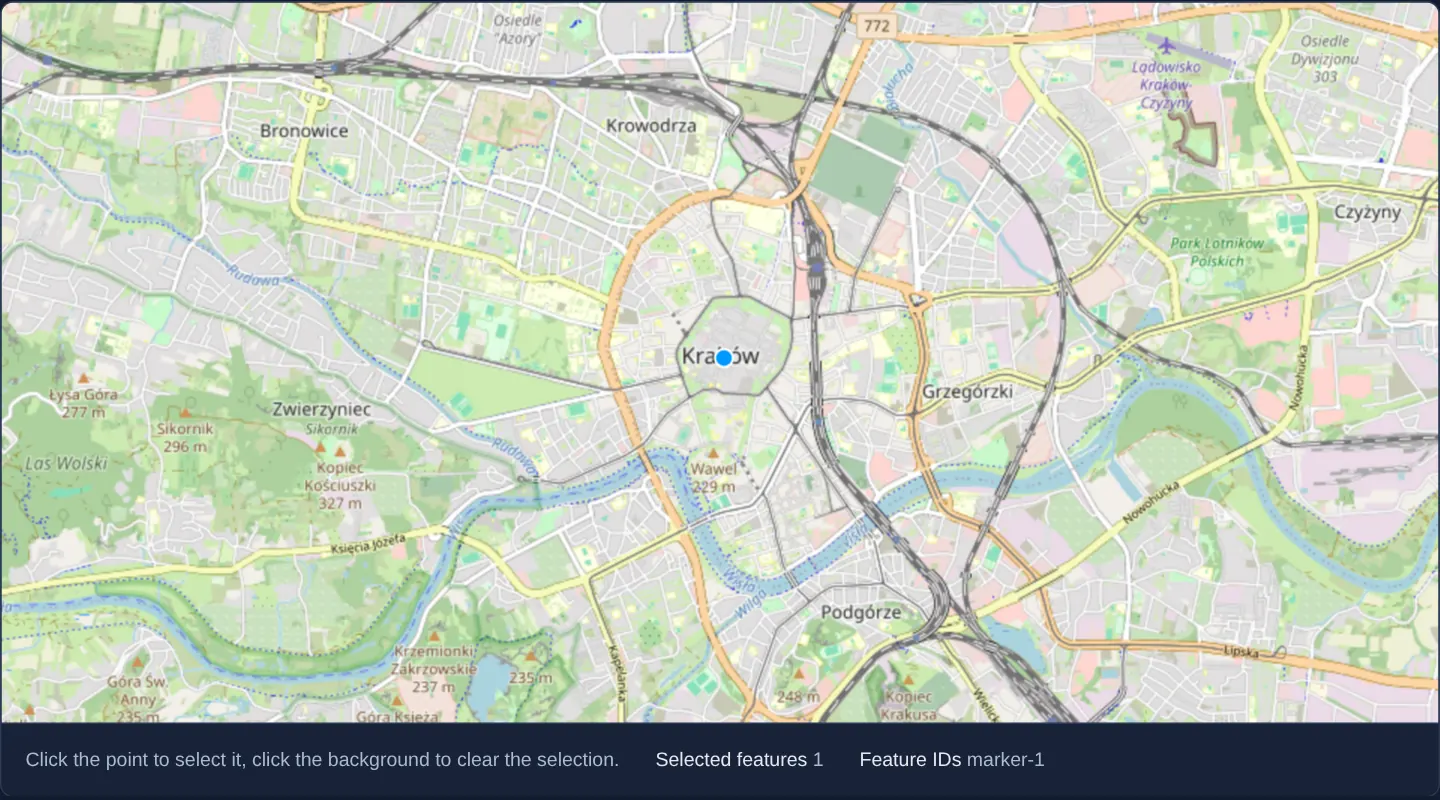
What this example shows
Over central Kraków, clicking a point marker on the Main Square highlights it in OpenLayers’ selection style and updates reactive status readouts below the map with the selected count and exact feature ID (marker-1).
When you need it
Real-world WebGIS screens stack graticules, administrative borders, search radii and clickable POI markers simultaneously—where clicking a marker must inspect only the POI layer without accidentally selecting background reference polygons.
Scoping OpenLayers’ Select interaction with an explicit layer predicate isolates click selection cleanly to business features.
The code
The example uses cc-openlayers, my Angular component library for OpenLayers: each aol-… element creates the OpenLayers object it names, updates it from its inputs and disposes of it with the component.
select-interaction.tsimport { ChangeDetectionStrategy, Component, computed, signal, viewChild } from '@angular/core';
import type { SelectEvent } from 'ol/interaction/Select';
import type Layer from 'ol/layer/Layer';
import {
CoordinateComponent,
DefaultInteractionComponent,
FeatureComponent,
GeometryPointComponent,
LayerTileComponent,
LayerVectorComponent,
MapComponent,
SelectInteractionComponent,
SourceOsmComponent,
SourceVectorComponent,
ViewComponent,
} from 'cc-openlayers';
/** Features selected with the select interaction, limited to the markers layer, with their IDs listed. */
@Component({
selector: 'app-select-interaction',
imports: [
CoordinateComponent,
DefaultInteractionComponent,
FeatureComponent,
GeometryPointComponent,
LayerTileComponent,
LayerVectorComponent,
MapComponent,
SelectInteractionComponent,
SourceOsmComponent,
SourceVectorComponent,
ViewComponent,
],
changeDetection: ChangeDetectionStrategy.OnPush,
template: `
<aol-map height="480px">
<aol-interaction-default />
<aol-interaction-select [layers]="isMarkerLayer" (olSelect)="select($event)" />
<aol-view [zoom]="13">
<aol-coordinate [x]="19.9368" [y]="50.0614" srid="EPSG:4326" />
</aol-view>
<aol-layer-tile><aol-source-osm /></aol-layer-tile>
<aol-layer-vector>
<aol-source-vector [wrapX]="false">
<aol-feature id="marker-1">
<aol-geometry-point><aol-coordinate [x]="19.9373" [y]="50.0617" srid="EPSG:4326" /></aol-geometry-point>
</aol-feature>
</aol-source-vector>
</aol-layer-vector>
</aol-map>
<div class="example-controls">
<p class="example-hint">Click the point to select it, click the background to clear the selection.</p>
<span>
Selected features <output>{{ selectedIds().length }}</output>
</span>
<span>
Feature IDs <output>{{ selectionLabel() }}</output>
</span>
</div>
`,
})
export class SelectInteraction {
readonly selectedIds = signal<Array<string | number>>([]);
readonly selectionLabel = computed(() => this.selectedIds().join(', ') || 'None');
private readonly markers = viewChild.required(LayerVectorComponent);
protected readonly isMarkerLayer = (layer: Layer) => layer === this.markers().instance;
protected select(event: SelectEvent): void {
const removed = new Set(event.deselected.map((feature) => feature.getId()));
const added = event.selected.map((feature) => feature.getId()).filter((id) => id !== undefined);
this.selectedIds.update((ids) => [...new Set([...ids.filter((id) => !removed.has(id)), ...added])]);
}
} The React version uses the library's React adapter, cc-openlayers/react: each component creates the OpenLayers object it names when it mounts, updates it from its props and disposes of it when it unmounts.
select-interaction.react.tsximport { useCallback, useRef, useState } from 'react';
import type { SelectEvent } from 'ol/interaction/Select.js';
import type Layer from 'ol/layer/Layer.js';
import type OLVectorLayer from 'ol/layer/Vector.js';
import {
Coordinate,
DefaultInteractions,
Feature,
Map,
OSMSource,
PointGeometry,
SelectInteraction as SelectControl,
TileLayer,
VectorLayer,
VectorSource,
View,
} from 'cc-openlayers/react';
/** Features selected with the select interaction, limited to the markers layer, with their IDs listed. */
export function SelectInteraction() {
const [selectedIds, setSelectedIds] = useState<Array<string | number>>([]);
const markers = useRef<OLVectorLayer>(null);
const selectionLabel = selectedIds.join(', ') || 'None';
const isMarkerLayer = useCallback((layer: Layer) => layer === markers.current, []);
const select = (event: SelectEvent) => {
const removed = new Set(event.deselected.map((feature) => feature.getId()));
const added = event.selected.map((feature) => feature.getId()).filter((id) => id !== undefined);
setSelectedIds((ids) => [...new Set([...ids.filter((id) => !removed.has(id)), ...added])]);
};
return (
<>
<Map height="480px">
<DefaultInteractions />
<SelectControl layers={isMarkerLayer} onSelect={select} />
<View zoom={13}>
<Coordinate x={19.9368} y={50.0614} srid="EPSG:4326" />
</View>
<TileLayer>
<OSMSource />
</TileLayer>
<VectorLayer ref={markers}>
<VectorSource wrapX={false}>
<Feature id="marker-1">
<PointGeometry>
<Coordinate x={19.9373} y={50.0617} srid="EPSG:4326" />
</PointGeometry>
</Feature>
</VectorSource>
</VectorLayer>
</Map>
<div className="example-controls">
<p className="example-hint">Click the point to select it, click the background to clear the selection.</p>
<span>
Selected features <output>{selectedIds.length}</output>
</span>
<span>
Feature IDs <output>{selectionLabel}</output>
</span>
</div>
</>
);
}How the React version works
Features selected with the select interaction, limited to the markers layer, with the IDs of the selected features listed.
What both versions share
OpenLayers renders the map and handles the interactions; the cc-openlayers/core layer gives both adapters the same view binding (MapViewBinding) and the same conversion of coordinates from EPSG:4326 to the map's projection.
From Angular to React
| Angular | React |
|---|---|
<aol-interaction-select [layers]> with a filter reading viewChild of the layer | <SelectInteraction layers> (imported as SelectControl) with a useCallback filter reading useRef of the layer |
(olSelect) and a computed list | onSelect updating useState |
Who creates, updates and disposes
Map creates the ol/Map in useLayoutEffect and disposes of it on unmount; each layer, source and interaction component adds its object to the parent it gets from context and removes it in its effect's cleanup, as ngOnDestroy does in Angular.
Architecture and OpenLayers mechanics
aol-interaction-select restricts hit-testing via its [layers] predicate, comparing candidate layers against the target marker layer queried with viewChild.required(LayerVectorComponent).
On every olSelect event, the component reads the event’s selected and deselected features, extracts each feature’s OpenLayers ID (assigned from its id attribute, carefully preserving numeric 0 while filtering out undefined), and writes the ID list into a signal.
How it works
aol-interaction-selectemitsolSelectwhenever features enter or leave selection, syncing their IDs into a reactive signal.- Passing a predicate function to
[layers]restricts click selection strictly to theviewChild.required(LayerVectorComponent)marker layer. - Setting the
idinput on a feature assigns its canonical OpenLayers feature identifier (getId()). - Explicitly checking against
undefinedensures valid numeric ID0is never discarded as falsy.
Pitfalls
- Omitting
[layers]letsaol-interaction-selectpick features from every visible vector layer on the map—including decorative boundary masks or measurement sketches. - Assign stable domain IDs to selectable business features up front so selected records can be correlated reliably with external tables and API calls.
Related examples
The same feature in the OpenLayers examples .
Background: state and lifecycle of maps in Angular with OpenLayers, which the components of cc-openlayers take care of.