Layers · Angular, React and OpenLayers
Two maps with one view
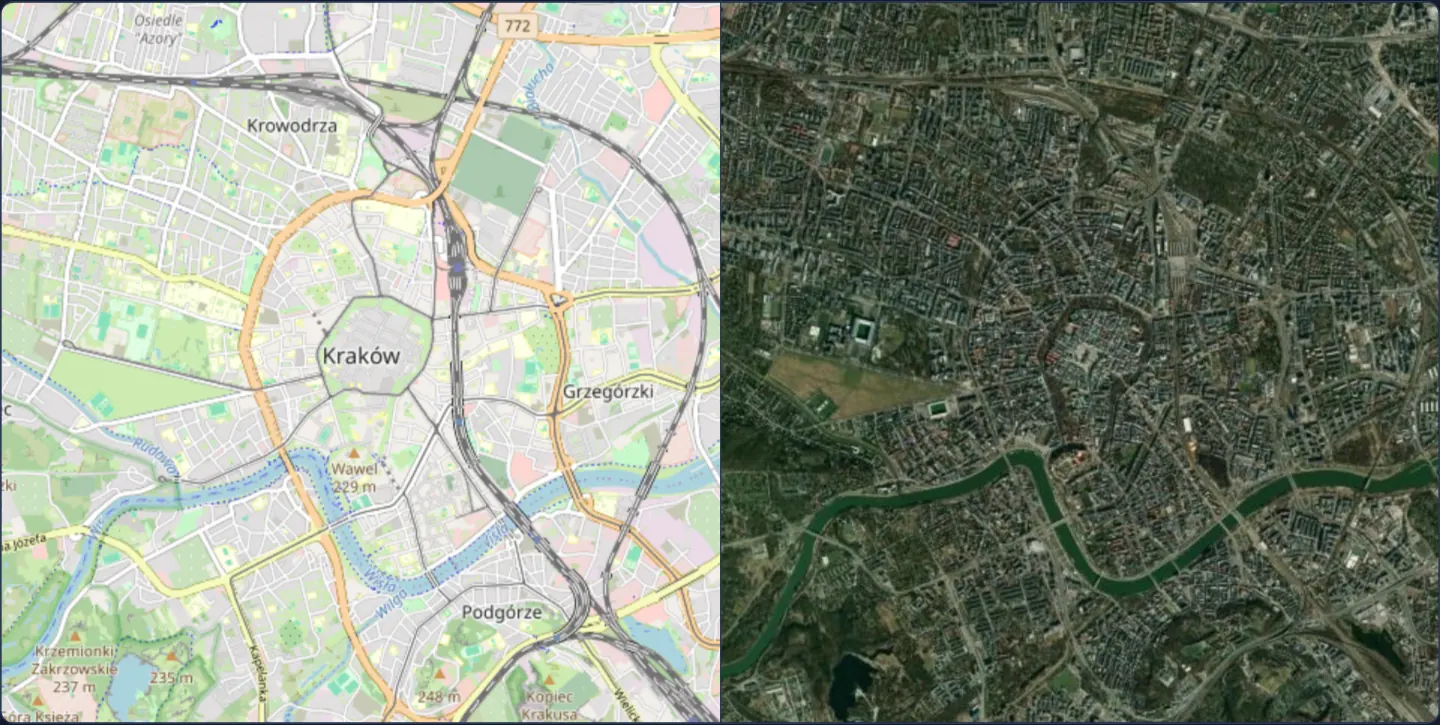
Synchronize two side-by-side OpenLayers maps over Kraków—OpenStreetMap and satellite imagery—by sharing a single View instance via setView.
What this example shows
Two separate map panels sit side by side—OpenStreetMap street cartography on the left and Esri World Imagery on the right—framing the exact same streets of Kraków. Panning, wheel-zooming, pinching or rotating either panel moves its neighbour in instantaneous frame-for-frame lockstep without a trace of lag.
On narrow mobile viewports, CSS stacks the two panels vertically while preserving the shared camera link.
When you need it
Analysts comparing historical versus current orthophotos, street maps versus land-cover classifications, or alternative planning scenarios often want both full maps visible simultaneously rather than hidden behind a swipe curtain.
Sharing a single OpenLayers View instance across both maps eliminates error-prone event-copying code completely—every pan, zoom, rotation and animation is inherently identical on both canvases.
The code
The example uses cc-openlayers, my Angular component library for OpenLayers: each aol-… element creates the OpenLayers object it names, updates it from its inputs and disposes of it with the component.
side-by-side.tsimport { afterNextRender, ChangeDetectionStrategy, Component, viewChild } from '@angular/core';
import {
CoordinateComponent,
DefaultInteractionComponent,
LayerTileComponent,
MapComponent,
SourceOsmComponent,
SourceXYZComponent,
ViewComponent,
} from 'cc-openlayers';
/** Two maps side by side, OpenStreetMap and satellite imagery, that pan and zoom together through one shared view. */
@Component({
selector: 'app-side-by-side',
imports: [
CoordinateComponent,
DefaultInteractionComponent,
LayerTileComponent,
MapComponent,
SourceOsmComponent,
SourceXYZComponent,
ViewComponent,
],
changeDetection: ChangeDetectionStrategy.OnPush,
template: `
<div class="example-maps">
<aol-map height="480px">
<aol-interaction-default />
<aol-view [zoom]="13">
<aol-coordinate [x]="19.9368" [y]="50.0614" srid="EPSG:4326" />
</aol-view>
<aol-layer-tile><aol-source-osm /></aol-layer-tile>
</aol-map>
<aol-map #imagery height="480px">
<aol-interaction-default />
<aol-layer-tile>
<aol-source-xyz
url="https://server.arcgisonline.com/ArcGIS/rest/services/World_Imagery/MapServer/tile/{z}/{y}/{x}"
/>
</aol-layer-tile>
</aol-map>
</div>
`,
})
export class SideBySide {
private readonly view = viewChild.required(ViewComponent);
private readonly imagery = viewChild.required('imagery', { read: MapComponent });
constructor() {
afterNextRender(() => this.imagery().instance.setView(this.view().instance));
}
} The React version uses the library's React adapter, cc-openlayers/react: each component creates the OpenLayers object it names when it mounts, updates it from its props and disposes of it when it unmounts.
side-by-side.react.tsximport { useEffect, useState } from 'react';
import type OLMap from 'ol/Map';
import type OLView from 'ol/View';
import { Coordinate, DefaultInteractions, Map, OSMSource, TileLayer, View, XYZSource } from 'cc-openlayers/react';
/** Two maps side by side, OpenStreetMap and satellite imagery, that pan and zoom together through one shared view. */
export function SideBySide() {
// State, not refs: the view and the second map exist only after the first render, and the effect follows them.
const [view, setView] = useState<OLView | null>(null);
const [imagery, setImagery] = useState<OLMap | null>(null);
useEffect(() => {
if (view && imagery) imagery.setView(view);
}, [view, imagery]);
return (
<div className="example-maps">
<Map height="480px">
<DefaultInteractions />
<View ref={setView} zoom={13}>
<Coordinate x={19.9368} y={50.0614} srid="EPSG:4326" />
</View>
<TileLayer>
<OSMSource />
</TileLayer>
</Map>
<Map ref={setImagery} height="480px">
<DefaultInteractions />
<TileLayer>
<XYZSource url="https://server.arcgisonline.com/ArcGIS/rest/services/World_Imagery/MapServer/tile/{z}/{y}/{x}" />
</TileLayer>
</Map>
</div>
);
}How the React version works
OpenStreetMap and satellite imagery stand side by side and move together, because the second map uses the first one's view.
What both versions share
OpenLayers renders the map and handles the interactions; the cc-openlayers/core layer gives both adapters the same view binding (MapViewBinding) and the same conversion of coordinates from EPSG:4326 to the map's projection.
From Angular to React
| Angular | React |
|---|---|
viewChild of the view and the second map, afterNextRender(() => imagery.setView(view)) | ref={setView}, ref={setImagery} (state) and a useEffect that attaches the view once both objects exist |
Who creates, updates and disposes
Map creates the ol/Map in useLayoutEffect and disposes of it on unmount; each layer, source and interaction component adds its object to the parent it gets from context and removes it in its effect's cleanup, as ngOnDestroy does in Angular.
Architecture and OpenLayers mechanics
The left map declares aol-view normally in markup, while the right map omits aol-view altogether. Inside afterNextRender—once both map components have mounted in the browser—the component passes the first map’s underlying OpenLayers View reference straight into the second map’s setView method.
Responsive .example-maps layout rules place both viewports side by side on wide screens and stack them cleanly on phones.
How it works
- Only the first map declares
aol-view; the second map starts viewless and adopts the first map’s View instance. afterNextRenderwaits until both map instances exist in the browser DOM before linking them withsetView..example-mapsarranges the two canvases side by side on desktop screens and stacks them vertically on narrow layouts.
Pitfalls
- Never synchronise two maps by listening to move events and copying centre/zoom back and forth—event ping-pong introduces frame lag and feedback loops that a shared View object avoids completely.
- Do not leave a declarative
aol-viewinside the second map when callingsetView, or subsequent input bindings on that second child component will overwrite the shared View reference.
Related examples
The same feature in the OpenLayers examples .
Background: state and lifecycle of maps in Angular with OpenLayers, which the components of cc-openlayers take care of.