Raster, GeoTIFF and WebGL · Angular, React and OpenLayers
Exposure, contrast and saturation in WebGL
Tune Esri satellite imagery exposure, contrast and saturation live on the GPU in OpenLayers using reactive WebGLTileLayer style variables.
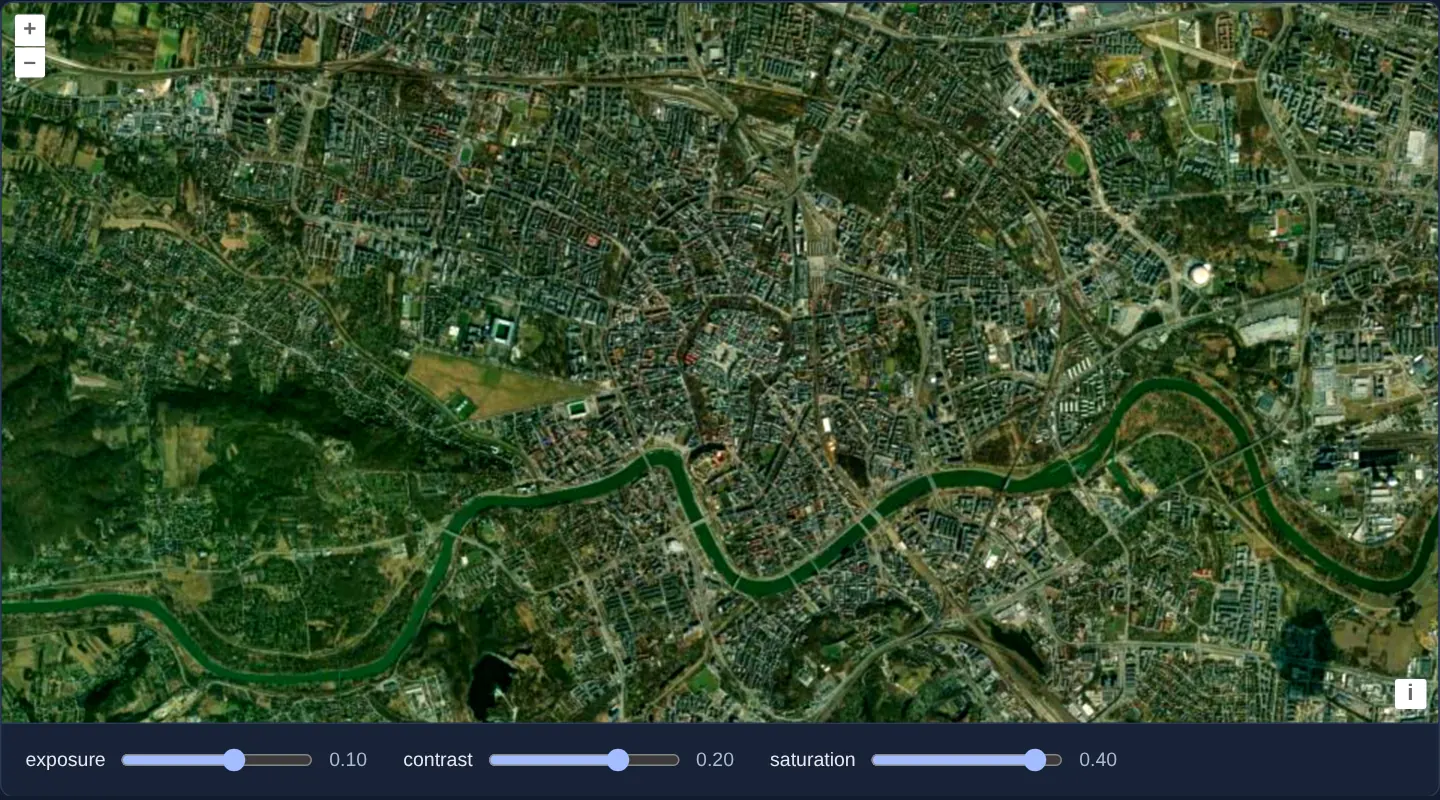
What this example shows
Over central Kraków on Esri World Imagery, three range sliders (Exposure, Contrast and Saturation, each spanning -0.5 to 0.5 in 0.01 increments from 0) grade the satellite backdrop smoothly at full GPU frame rate without re-fetching tiles or recompiling shaders.
When you need it
Bright, saturated aerial photography often visually overwhelms thin cadastral lines, utility networks or point labels drawn above it.
Desaturating, darkening or flattening imagery directly in a WebGL fragment shader lets users tune backdrop legibility instantaneously on both desktop and mobile GPUs.
The code
The example uses cc-openlayers, my Angular component library for OpenLayers: each aol-… element creates the OpenLayers object it names, updates it from its inputs and disposes of it with the component.
webgl-tile-style.shared.tsimport type { Style } from 'ol/layer/WebGLTile.js';
export type Adjustment = 'exposure' | 'contrast' | 'saturation';
export const ADJUSTMENTS: Adjustment[] = ['exposure', 'contrast', 'saturation'];
/** Exposure, contrast and saturation of the imagery, each read from a style variable. */
export const STYLE: Style = {
exposure: ['var', 'exposure'],
contrast: ['var', 'contrast'],
saturation: ['var', 'saturation'],
};webgl-tile-style.tsimport { ChangeDetectionStrategy, Component, signal } from '@angular/core';
import {
CoordinateComponent,
DefaultControlComponent,
DefaultInteractionComponent,
MapComponent,
SourceImageTileComponent,
ViewComponent,
} from 'cc-openlayers';
import { LayerWebGLTileComponent } from 'cc-openlayers/webgl';
import { ADJUSTMENTS, type Adjustment, STYLE } from './webgl-tile-style.shared';
/**
* Esri's World Imagery over Kraków drawn by a WebGL tile layer whose style adjusts exposure, contrast and saturation
* through variables: moving a slider updates the variable in place, without rebuilding the style.
*/
@Component({
selector: 'app-webgl-tile-style',
imports: [
CoordinateComponent,
DefaultControlComponent,
DefaultInteractionComponent,
LayerWebGLTileComponent,
MapComponent,
SourceImageTileComponent,
ViewComponent,
],
changeDetection: ChangeDetectionStrategy.OnPush,
template: `
<aol-map height="480px">
<aol-interaction-default />
<aol-control-defaults />
<aol-view [zoom]="13">
<aol-coordinate [x]="19.9368" [y]="50.0614" srid="EPSG:4326" />
</aol-view>
<aol-layer-webgltile [style]="style" [variables]="variables()">
<aol-source-imagetile
url="https://server.arcgisonline.com/ArcGIS/rest/services/World_Imagery/MapServer/tile/{z}/{y}/{x}"
[maxZoom]="19"
attributions="Tiles © Esri — Source: Esri, Maxar, Earthstar Geographics, and the GIS User Community"
/>
</aol-layer-webgltile>
</aol-map>
<div class="example-controls">
@for (adjustment of adjustments; track adjustment) {
<label>
{{ adjustment }}
<input
type="range"
min="-0.5"
max="0.5"
step="0.01"
[name]="adjustment"
[value]="variables()[adjustment]"
(input)="adjust(adjustment, $event)"
/>
<output>{{ variables()[adjustment].toFixed(2) }}</output>
</label>
}
</div>
`,
})
export class WebglTileStyle {
readonly variables = signal<Record<Adjustment, number>>({ exposure: 0, contrast: 0, saturation: 0 });
protected readonly adjustments = ADJUSTMENTS;
protected readonly style = STYLE;
protected adjust(adjustment: Adjustment, event: Event): void {
const value = (event.target as HTMLInputElement).valueAsNumber;
this.variables.update((variables) => ({ ...variables, [adjustment]: value }));
}
} The React version uses the library's React adapter, cc-openlayers/react: each component creates the OpenLayers object it names when it mounts, updates it from its props and disposes of it when it unmounts.
webgl-tile-style.react.tsximport { useState, type ChangeEvent } from 'react';
import { Coordinate, DefaultControls, DefaultInteractions, ImageTileSource, Map, View } from 'cc-openlayers/react';
import { WebGLTileLayer } from 'cc-openlayers/react/webgl';
import { ADJUSTMENTS, type Adjustment, STYLE } from './webgl-tile-style.shared';
/**
* Esri's World Imagery over Kraków drawn by a WebGL tile layer whose style adjusts exposure, contrast and saturation
* through variables: moving a slider updates the variable in place, without rebuilding the style.
*/
export function WebglTileStyle() {
const [variables, setVariables] = useState<Record<Adjustment, number>>({ exposure: 0, contrast: 0, saturation: 0 });
const adjust = (adjustment: Adjustment, event: ChangeEvent<HTMLInputElement>) => {
const value = event.target.valueAsNumber;
setVariables((current) => ({ ...current, [adjustment]: value }));
};
return (
<>
<Map height="480px">
<DefaultInteractions />
<DefaultControls />
<View zoom={13}>
<Coordinate x={19.9368} y={50.0614} srid="EPSG:4326" />
</View>
<WebGLTileLayer style={STYLE} variables={variables}>
<ImageTileSource
url="https://server.arcgisonline.com/ArcGIS/rest/services/World_Imagery/MapServer/tile/{z}/{y}/{x}"
maxZoom={19}
attributions="Tiles © Esri — Source: Esri, Maxar, Earthstar Geographics, and the GIS User Community"
/>
</WebGLTileLayer>
</Map>
<div className="example-controls">
{ADJUSTMENTS.map((adjustment) => (
<label key={adjustment}>
{adjustment}
<input
type="range"
min="-0.5"
max="0.5"
step="0.01"
name={adjustment}
value={variables[adjustment]}
onChange={(event) => adjust(adjustment, event)}
/>
<output>{variables[adjustment].toFixed(2)}</output>
</label>
))}
</div>
</>
);
}webgl-tile-style.shared.tsimport type { Style } from 'ol/layer/WebGLTile.js';
export type Adjustment = 'exposure' | 'contrast' | 'saturation';
export const ADJUSTMENTS: Adjustment[] = ['exposure', 'contrast', 'saturation'];
/** Exposure, contrast and saturation of the imagery, each read from a style variable. */
export const STYLE: Style = {
exposure: ['var', 'exposure'],
contrast: ['var', 'contrast'],
saturation: ['var', 'saturation'],
};How the React version works
Esri's World Imagery over Kraków drawn by a WebGL tile layer whose style adjusts exposure, contrast and saturation from style variables set by sliders.
What both versions share
OpenLayers renders the map and handles the interactions; the cc-openlayers/core layer gives both adapters the same view binding (MapViewBinding) and the same conversion of coordinates from EPSG:4326 to the map's projection. OpenLayers draws the tiles with WebGL; the style expressions run on the GPU in both versions. Both versions import the adjustments and the style from the example's .shared.ts file, so the logic exists once.
From Angular to React
| Angular | React |
|---|---|
<aol-layer-webgltile [style] [variables]> | <WebGLTileLayer style variables> |
the sliders and a signal of the values | useState of the values; a change updates the variables in place |
Who creates, updates and disposes
Map creates the ol/Map in useLayoutEffect and disposes of it on unmount; each layer, source and interaction component adds its object to the parent it gets from context and removes it in its effect's cleanup, as ngOnDestroy does in Angular.
Architecture and OpenLayers mechanics
On aol-layer-webgltile, [style] binds exposure, contrast and saturation to ['var', 'exposure'], ['var', 'contrast'] and ['var', 'saturation']. Passing slider values through [variables]="variables()" invokes OpenLayers’ fast uniform update (updateStyleVariables) on every drag frame while keeping the compiled WebGL program intact.
How it works
- Layer style properties
exposure,contrastandsaturationreference['var', 'exposure'],['var', 'contrast']and['var', 'saturation']. - Updating
[variables]="variables()"mutates GPU shader uniforms via updateStyleVariables without rebuilding the style object. - All three sliders run from
-0.5to0.5(step0.01) starting at0(unmodified imagery).
Pitfalls
- Constructing and passing a brand-new
styleobject literal on every slider tick forces OpenLayers to recompile WebGL shaders dozens of times per second—keep[style]static and mutate[variables]instead. - Shader colour grading alters screen pixels only; calling layer.getData(pixel) still returns the unmodified source tile RGB values.
Related examples
The same feature in the OpenLayers examples .
Background: state and lifecycle of maps in Angular with OpenLayers, which the components of cc-openlayers take care of.