Raster, GeoTIFF and WebGL · Angular, React and OpenLayers
WMTS image density selected for the device
Select 256-pixel standard or 512-pixel HiDPI WMTS layers from GetCapabilities based on devicePixelRatio while sharing one 256px TileMatrixSet.
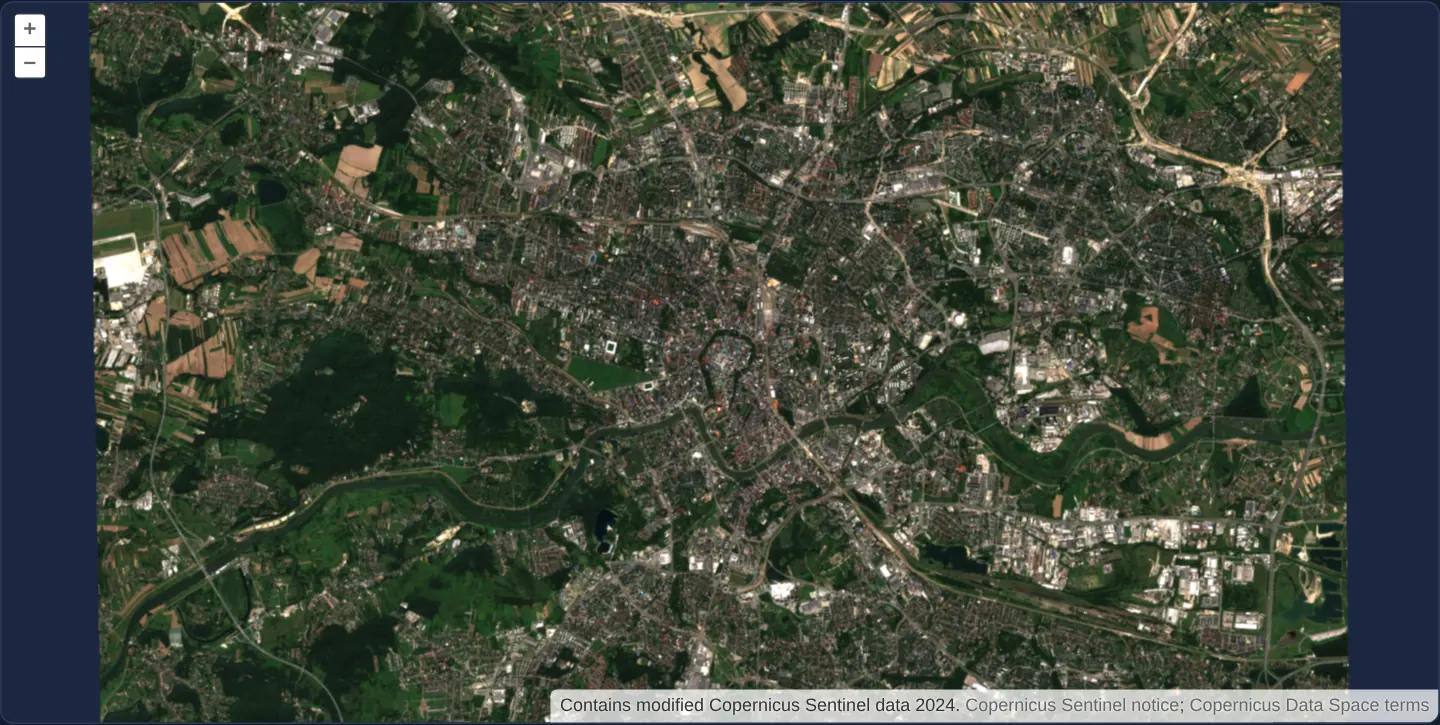
What this example shows
Over Kraków, parsing a local OGC WMTS capabilities document selects either the normal 256-pixel layer (with tilePixelRatio: 1) on standard monitors or the high-density 512-pixel layer (with tilePixelRatio: 2) on Retina / HiDPI screens—keeping identical geographic tile alignment and transparent edge NoData.
When you need it
Enterprise and national WMTS servers often publish paired standard and HiDPI layers sharing a single logical TileMatrixSet so standard screens save bandwidth while Retina screens receive sharp 2x imagery.
Selecting the layer and matching tilePixelRatio from devicePixelRatio at startup delivers crisp high-density WMTS tiles without doubling ground extents.
The code
The example uses cc-openlayers, my Angular component library for OpenLayers: each aol-… element creates the OpenLayers object it names, updates it from its inputs and disposes of it with the component.
wmts-hidpi.shared.tsimport { DEVICE_PIXEL_RATIO } from 'ol/has';
import WMTSCapabilities from 'ol/format/WMTSCapabilities';
import { optionsFromCapabilities, type Options } from 'ol/source/WMTS';
export const WMTS_HIDPI_CAPABILITIES_URL = 'assets/krakow/retina-tiles/wmts-capabilities.xml';
export const WMTS_HIDPI_LAYER = 'sentinel-standard';
export const WMTS_HIDPI_HIGH_DENSITY_LAYER = 'sentinel-high-density';
/** Selects a static capabilities layer by device density while keeping its advertised matrix grid. */
export function optionsForDevicePixelRatio(capabilitiesText: string, devicePixelRatio = DEVICE_PIXEL_RATIO): Options {
const capabilities = new WMTSCapabilities().read(capabilitiesText);
const highDensity = devicePixelRatio > 1;
const layer = highDensity ? WMTS_HIDPI_HIGH_DENSITY_LAYER : WMTS_HIDPI_LAYER;
const options = optionsFromCapabilities(capabilities, { layer, matrixSet: 'WebMercatorQuad' });
if (!options) throw new Error(`The local WMTS capabilities do not advertise ${layer}.`);
return { ...options, tilePixelRatio: highDensity ? 2 : 1, wrapX: false };
}
/** Fetches the local capabilities once; the caller owns and can abort the request. */
export async function loadOptions(signal: AbortSignal, devicePixelRatio = DEVICE_PIXEL_RATIO): Promise<Options> {
const response = await fetch(WMTS_HIDPI_CAPABILITIES_URL, { signal });
if (!response.ok) throw new Error(`The local WMTS capabilities request failed (${response.status}).`);
return optionsForDevicePixelRatio(await response.text(), devicePixelRatio);
}wmts-hidpi.tsimport { ChangeDetectionStrategy, Component, DestroyRef, inject, signal } from '@angular/core';
import {
CoordinateComponent,
DefaultControlComponent,
DefaultInteractionComponent,
LayerTileComponent,
MapComponent,
SourceTileWMTSComponent,
ViewComponent,
} from 'cc-openlayers';
import type { Options } from 'ol/source/WMTS';
import coverage from '../../../assets/krakow/retina-tiles/coverage.json';
import { RETINA_ATTRIBUTIONS, RETINA_ATTRIBUTION_OPTIONS } from '../xyz-retina/xyz-retina.shared';
import { loadOptions } from './wmts-hidpi.shared';
/** Selects the local 256 or 512 pixel WMTS layer at initialization from device pixel ratio. */
@Component({
selector: 'app-wmts-hidpi',
imports: [
CoordinateComponent,
DefaultControlComponent,
DefaultInteractionComponent,
LayerTileComponent,
MapComponent,
SourceTileWMTSComponent,
ViewComponent,
],
changeDetection: ChangeDetectionStrategy.OnPush,
template: `
@if (sourceOptions(); as options) {
<aol-map height="480px" ariaLabel="Kraków Sentinel WMTS density example">
<aol-interaction-default />
<aol-control-defaults [attributionOptions]="attributionOptions" />
<aol-view [extent]="extent" [constrainOnlyCenter]="true" [minZoom]="11" [maxZoom]="13" [zoom]="12">
<aol-coordinate [x]="19.9368" [y]="50.0614" srid="EPSG:4326" />
</aol-view>
<aol-layer-tile [extent]="extent">
<aol-source-tilewmts
[attributions]="attributions"
[layer]="options.layer"
[style]="options.style"
[matrixSet]="options.matrixSet"
[format]="options.format"
[projection]="options.projection"
[requestEncoding]="options.requestEncoding"
[tilePixelRatio]="options.tilePixelRatio"
[tileGrid]="options.tileGrid"
[url]="options.url"
[urls]="options.urls"
[wrapX]="options.wrapX"
/>
</aol-layer-tile>
</aol-map>
} @else if (failed()) {
<p role="alert">The local WMTS capabilities could not be loaded.</p>
} @else {
<p aria-live="polite">Loading local WMTS capabilities…</p>
}
`,
})
export class WmtsHidpi {
protected readonly extent = coverage.extent;
protected readonly attributions = RETINA_ATTRIBUTIONS;
protected readonly attributionOptions = RETINA_ATTRIBUTION_OPTIONS;
protected readonly sourceOptions = signal<Options | null>(null);
protected readonly failed = signal(false);
constructor() {
const destroyRef = inject(DestroyRef);
const controller = new AbortController();
let active = true;
destroyRef.onDestroy(() => {
active = false;
controller.abort();
});
void loadOptions(controller.signal).then(
(options) => {
if (active) this.sourceOptions.set(options);
},
() => {
if (active) this.failed.set(true);
}
);
}
} The React version uses the library's React adapter, cc-openlayers/react: each component creates the OpenLayers object it names when it mounts, updates it from its props and disposes of it when it unmounts.
wmts-hidpi.react.tsximport { useEffect, useState } from 'react';
import {
Coordinate,
DefaultControls,
DefaultInteractions,
Map,
TileLayer,
View,
WMTSSource,
} from 'cc-openlayers/react';
import type { Options } from 'ol/source/WMTS';
import coverage from '../../../assets/krakow/retina-tiles/coverage.json';
import { RETINA_ATTRIBUTIONS, RETINA_ATTRIBUTION_OPTIONS } from '../xyz-retina/xyz-retina.shared';
import { loadOptions } from './wmts-hidpi.shared';
/** Selects the local 256 or 512 pixel WMTS layer at initialization from device pixel ratio. */
export function WmtsHidpiReact() {
const [sourceOptions, setSourceOptions] = useState<Options | null>(null);
const [failed, setFailed] = useState(false);
useEffect(() => {
const controller = new AbortController();
let active = true;
void loadOptions(controller.signal).then(
(options) => {
if (active) setSourceOptions(options);
},
() => {
if (active) setFailed(true);
}
);
return () => {
active = false;
controller.abort();
};
}, []);
if (!sourceOptions) {
return failed ? (
<p role="alert">The local WMTS capabilities could not be loaded.</p>
) : (
<p aria-live="polite">Loading local WMTS capabilities…</p>
);
}
return (
<Map height="480px" ariaLabel="Kraków Sentinel WMTS density example">
<DefaultInteractions />
<DefaultControls attributionOptions={RETINA_ATTRIBUTION_OPTIONS} />
<View extent={coverage.extent} constrainOnlyCenter minZoom={11} maxZoom={13} zoom={12}>
<Coordinate x={19.9368} y={50.0614} srid="EPSG:4326" />
</View>
<TileLayer extent={coverage.extent}>
<WMTSSource {...sourceOptions} attributions={RETINA_ATTRIBUTIONS} />
</TileLayer>
</Map>
);
}wmts-hidpi.shared.tsimport { DEVICE_PIXEL_RATIO } from 'ol/has';
import WMTSCapabilities from 'ol/format/WMTSCapabilities';
import { optionsFromCapabilities, type Options } from 'ol/source/WMTS';
export const WMTS_HIDPI_CAPABILITIES_URL = 'assets/krakow/retina-tiles/wmts-capabilities.xml';
export const WMTS_HIDPI_LAYER = 'sentinel-standard';
export const WMTS_HIDPI_HIGH_DENSITY_LAYER = 'sentinel-high-density';
/** Selects a static capabilities layer by device density while keeping its advertised matrix grid. */
export function optionsForDevicePixelRatio(capabilitiesText: string, devicePixelRatio = DEVICE_PIXEL_RATIO): Options {
const capabilities = new WMTSCapabilities().read(capabilitiesText);
const highDensity = devicePixelRatio > 1;
const layer = highDensity ? WMTS_HIDPI_HIGH_DENSITY_LAYER : WMTS_HIDPI_LAYER;
const options = optionsFromCapabilities(capabilities, { layer, matrixSet: 'WebMercatorQuad' });
if (!options) throw new Error(`The local WMTS capabilities do not advertise ${layer}.`);
return { ...options, tilePixelRatio: highDensity ? 2 : 1, wrapX: false };
}
/** Fetches the local capabilities once; the caller owns and can abort the request. */
export async function loadOptions(signal: AbortSignal, devicePixelRatio = DEVICE_PIXEL_RATIO): Promise<Options> {
const response = await fetch(WMTS_HIDPI_CAPABILITIES_URL, { signal });
if (!response.ok) throw new Error(`The local WMTS capabilities request failed (${response.status}).`);
return optionsForDevicePixelRatio(await response.text(), devicePixelRatio);
}How the React version works
A static WMTS capabilities document exposes standard and high-density Kraków satellite layers on one logical matrix set. Device pixel ratio selects the layer at initialization; the WMTS source uses pixel ratio 1 or 2 for the 256×256 or 512×512 response.
What both versions share
Both versions use the actual OpenLayers capabilities parser and optionsFromCapabilities. The two layers share matrix IDs, origin, resolutions, bounds and limits. The high-density response doubles image pixels without doubling logical TileWidth/TileHeight or geographic footprint. ResourceURL supplies real REST TileMatrix/TileCol/TileRow addresses for the same lossless WebP fixtures used by xyz-retina. The finite 2024 Sentinel crop replaces the original provider basemap; this is not global cartographic coverage. Generated matrix limits must survive actual parsing, including the WMTS-standard casing of MinTileCol, MaxTileCol, MinTileRow and MaxTileRow. A document that parses but loses those limits is insufficient.
From Angular to React
| Angular | React |
|---|---|
A one-shot capability load is owned by DestroyRef | The same load is owned by effect setup/cleanup |
| Signals expose the loaded options or error state | State exposes the loaded options or error state |
<aol-source-tilewmts> receives parsed source options | <WMTSSource> receives the same parsed options |
| View center bounds retain the intended zoom range | The same bounds apply with constrainOnlyCenter |
Who creates, updates and disposes
Each capability request receives an AbortSignal. Teardown aborts transport and prevents a late response or error from replacing current state. The existing adapters own source/layer/map objects; no new service or library wrapper is introduced. Map labels and expanded data-source attribution remain explicit in both frameworks.
Architecture and OpenLayers mechanics
OpenLayers’ WMTS capabilities parser and optionsFromCapabilities read a static capabilities XML where both normal and HiDPI layers reference the exact same 256-pixel logical TileMatrixSet (identical matrix IDs, origin, resolutions and bounds).
On initialisation, devicePixelRatio > 1 picks the 512-pixel layer and sets tilePixelRatio: 2 on the WMTS source so OpenLayers maps each 512 × 512 lossless WebP response onto its 256 CSS-pixel geographic cell.
How it works
- Static WMTS capabilities XML is parsed via OpenLayers’ standard WMTS parser and
optionsFromCapabilitieswith no external API keys. - Both standard and high-density layers share one 256-pixel logical TileMatrixSet, preserving identical origins, resolutions and matrix IDs.
- Startup
devicePixelRatioselects the matching layer and pairs it withtilePixelRatio1 (256 px) or 2 (512 px). - Lossless WebP tiles preserve transparent NoData along the border of the 2024 Sentinel-2 Kraków crop.
Pitfalls
- In WMTS capabilities, a 2x HiDPI layer sharing a 256-pixel logical grid must keep TileWidth and TileHeight at
256in the shared matrix set while serving 512 px images paired with tilePixelRatio: 2—doubling matrix TileWidth changes geographic cell footprints. - Startup
devicePixelRatioselection runs once at initialisation; test 1x and 2x branches in separate browser DPR contexts.
Related examples
The same feature in the OpenLayers examples .
Background: state and lifecycle of maps in Angular with OpenLayers, which the components of cc-openlayers take care of.