Styling and labels · Angular, React and OpenLayers
A gradient fill in canvas pixels
Fill Polish voivodeship polygons with a device-pixel-scaled HTML5 CanvasGradient in an OpenLayers Fill style over a clean white layer background.
What this example shows
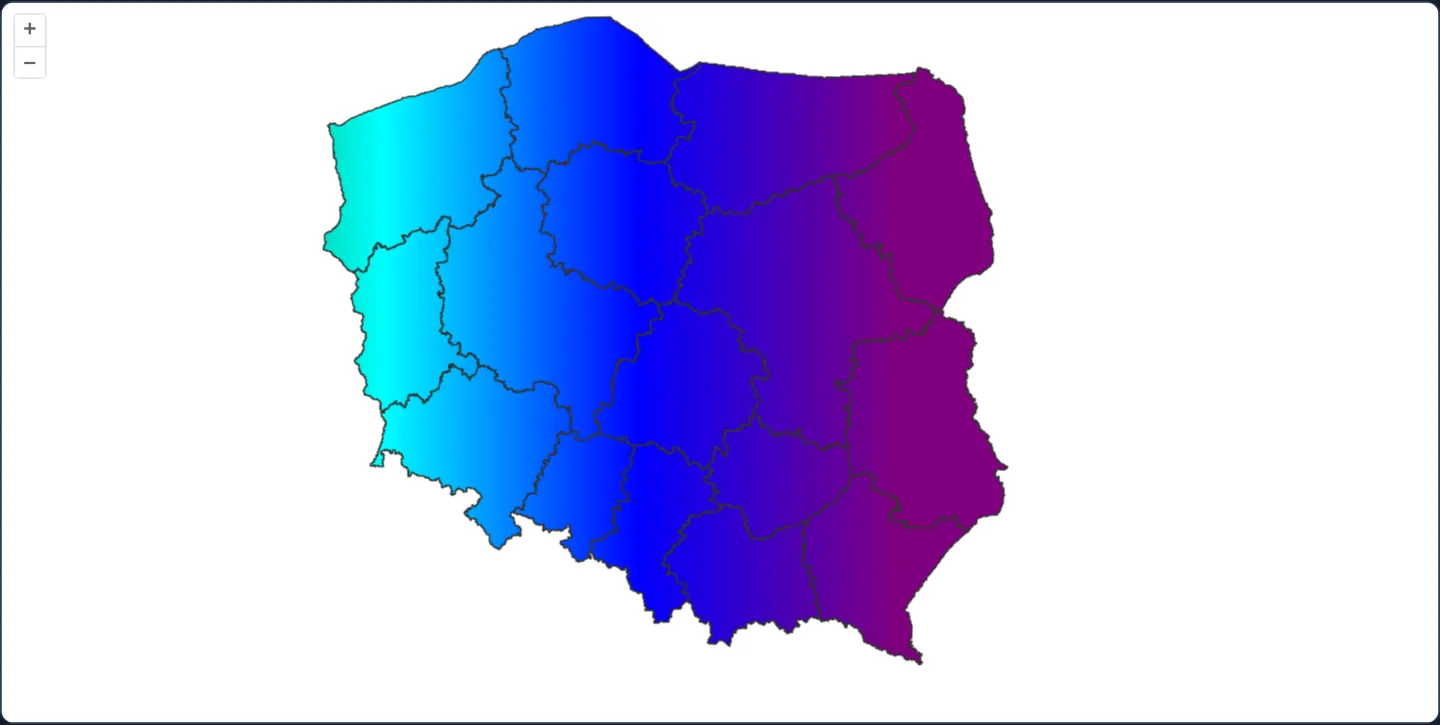
Across a basemap-free white canvas (background="white"), Poland’s 16 voivodeship polygons are outlined in grey and filled with a continuous horizontal rainbow CanvasGradient transitioning smoothly from aqua in western Poland through blue around Kraków to purple in the east.
When you need it
Cartographic fills often require richer visuals than flat RGBA colours—such as diagonal hatching for restricted planning zones, repeating marshland stipple patterns or continuous directional gradients.
Because OpenLayers’ Fill color property natively accepts standard HTML5 CanvasGradient and CanvasPattern instances, custom fills plug directly into normal vector styles.
The code
The example uses cc-openlayers, my Angular component library for OpenLayers: each aol-… element creates the OpenLayers object it names, updates it from its inputs and disposes of it with the component.
canvas-gradient-pattern.tsimport { ChangeDetectionStrategy, Component } from '@angular/core';
import {
CoordinateComponent,
DefaultControlComponent,
DefaultInteractionComponent,
LayerVectorComponent,
MapComponent,
SourceGeoJSONComponent,
ViewComponent,
} from 'cc-openlayers';
import { DEVICE_PIXEL_RATIO } from 'ol/has';
import Fill from 'ol/style/Fill';
import Stroke from 'ol/style/Stroke';
import Style from 'ol/style/Style';
/** Poland's voivodeships filled with a CanvasGradient: a rainbow in canvas pixel space. */
@Component({
selector: 'app-canvas-gradient-pattern',
imports: [
CoordinateComponent,
DefaultControlComponent,
DefaultInteractionComponent,
LayerVectorComponent,
MapComponent,
SourceGeoJSONComponent,
ViewComponent,
],
changeDetection: ChangeDetectionStrategy.OnPush,
template: `
<aol-map height="480px">
<aol-interaction-default />
<aol-control-defaults />
<aol-view [zoom]="6"><aol-coordinate [x]="19.9368" [y]="50.0614" srid="EPSG:4326" /></aol-view>
<aol-layer-vector background="white" [style]="style">
<aol-source-geojson url="assets/poland/voivodeships.geojson" featureProjection="EPSG:3857" />
</aol-layer-vector>
</aol-map>
`,
})
export class CanvasGradientPattern {
protected readonly style = new Style({
fill: new Fill({ color: rainbow() }),
stroke: new Stroke({ color: '#333', width: 1 }),
});
}
/** A gradient and a pattern are in canvas pixel space, so the width is scaled by the renderer's pixel ratio. */
function rainbow(): CanvasGradient {
const context = document.createElement('canvas').getContext('2d');
if (!context) throw new Error('A 2D canvas context is required');
const gradient = context.createLinearGradient(0, 0, 1024 * DEVICE_PIXEL_RATIO, 0);
['red', 'orange', 'yellow', 'green', 'aqua', 'blue', 'purple'].forEach((color, index) =>
gradient.addColorStop(index / 6, color)
);
return gradient;
} The React version uses the library's React adapter, cc-openlayers/react: each component creates the OpenLayers object it names when it mounts, updates it from its props and disposes of it when it unmounts.
canvas-gradient-pattern.react.tsximport { useState } from 'react';
import { DEVICE_PIXEL_RATIO } from 'ol/has.js';
import OLFill from 'ol/style/Fill.js';
import OLStroke from 'ol/style/Stroke.js';
import OLStyle from 'ol/style/Style.js';
import {
Coordinate,
DefaultControls,
DefaultInteractions,
GeoJSONSource,
Map,
VectorLayer,
View,
} from 'cc-openlayers/react';
/** Poland's voivodeships filled with a CanvasGradient: a rainbow in canvas pixel space. */
export function CanvasGradientPattern() {
const [style] = useState(
() =>
new OLStyle({
fill: new OLFill({ color: rainbow() }),
stroke: new OLStroke({ color: '#333', width: 1 }),
})
);
return (
<Map height="480px">
<DefaultInteractions />
<DefaultControls />
<View zoom={6}>
<Coordinate x={19.9368} y={50.0614} srid="EPSG:4326" />
</View>
<VectorLayer background="white" style={style}>
<GeoJSONSource url="assets/poland/voivodeships.geojson" featureProjection="EPSG:3857" />
</VectorLayer>
</Map>
);
}
/** A gradient and a pattern are in canvas pixel space, so the width is scaled by the renderer's pixel ratio. */
function rainbow(): CanvasGradient {
const context = document.createElement('canvas').getContext('2d');
if (!context) throw new Error('A 2D canvas context is required');
const gradient = context.createLinearGradient(0, 0, 1024 * DEVICE_PIXEL_RATIO, 0);
['red', 'orange', 'yellow', 'green', 'aqua', 'blue', 'purple'].forEach((color, index) =>
gradient.addColorStop(index / 6, color)
);
return gradient;
}How the React version works
Poland's voivodeships filled with a CanvasGradient, a rainbow in canvas pixel space, and outlined in grey on a white background.
What both versions share
OpenLayers renders the map and handles the interactions; the cc-openlayers/core layer gives both adapters the same view binding (MapViewBinding) and the same conversion of coordinates from EPSG:4326 to the map's projection.
From Angular to React
| Angular | React |
|---|---|
<aol-layer-vector> with <aol-source-geojson> | <VectorLayer> with <GeoJSONSource> |
a Style created once as a class field | the Style created once in a useState initialiser, because the gradient needs a canvas context |
Who creates, updates and disposes
Map creates the ol/Map in useLayoutEffect and disposes of it on unmount; each layer, source and interaction component adds its object to the parent it gets from context and removes it in its effect's cleanup, as ngOnDestroy does in Angular.
Architecture and OpenLayers mechanics
An off-screen 2D canvas context creates createLinearGradient(0, 0, 1024 * DEVICE_PIXEL_RATIO, 0)—multiplying CSS pixel span by screen pixel density because OpenLayers paints vector layers in physical device pixels—and passes that gradient as the color of one shared Fill used across all 16 voivodeships.
During pans, OpenLayers anchors canvas gradients and repeating patterns to a 512-pixel world-aligned grid so seamlessly tiled patterns (8, 16, 32, 64 px) stay geographically locked inside moving polygons.
How it works
createLinearGradient(0, 0, 1024 * DEVICE_PIXEL_RATIO, 0)scales the rainbow ramp in physical device pixels to match high-density displays.- Passing the
CanvasGradientdirectly ascoloron a standardFilllets one style instance render every voivodeship. background="white"fills empty space around Poland cleanly without needing a base tile layer.- OpenLayers steps pattern/gradient origins in 512-pixel increments so repeating hatch tiles dividing 512 px stay locked to features while panning.
Pitfalls
- Because OpenLayers resets fill origins every 512 pixels during pans, a non-repeating gradient wider than 512 pixels (such as 1024 px here) shifts across features and steps back every 512 pixels of drag—use widths/tiles that divide 512 evenly when fills must stay stationary.
- Forgetting
DEVICE_PIXEL_RATIOcompresses a CSS-pixel gradient to half its intended width on 2x Retina screens.
Related examples
The same feature in the OpenLayers examples .
Background: state and lifecycle of maps in Angular with OpenLayers, which the components of cc-openlayers take care of.