Styling and labels · Angular, React and OpenLayers
Geometries drawn on a plain canvas
Draw OpenLayers vector geometries and styles directly onto a standalone HiDPI HTML5 canvas using the immediate toContext API without a map view.
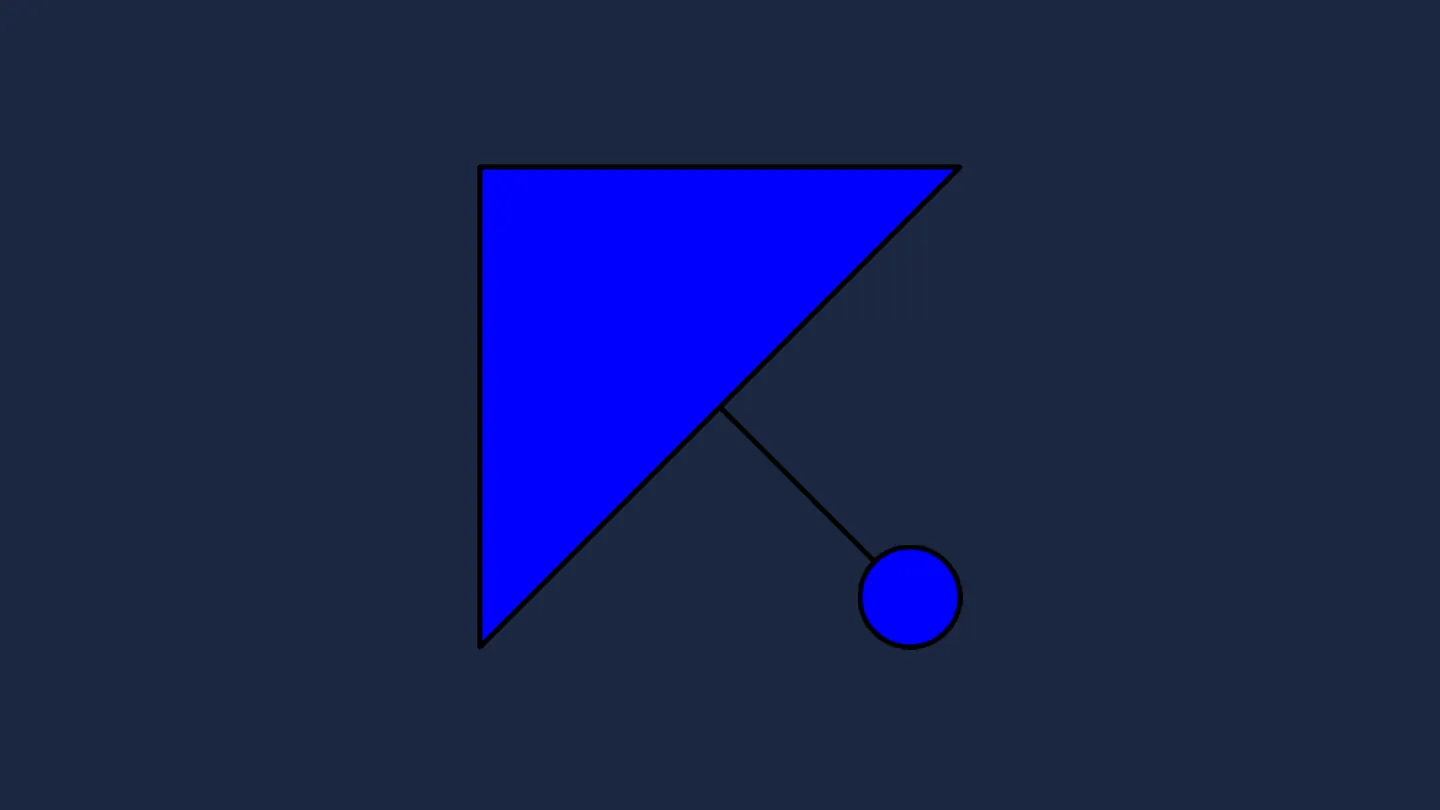
What this example shows
With no OpenLayers Map, View or Layer anywhere on the page, a standalone 100 × 100 CSS-pixel <canvas> swatch renders a diagonal black line, a black-rimmed blue triangle overlapping it, and a 10-pixel rimmed blue circle on top—crisp at native Retina density.
When you need it
Layer legends, style-editor swatch pickers, feature tables and PDF/print headers routinely need miniature symbol previews outside the map that match on-map OpenLayers styling pixel for pixel.
Reusing your exact OpenLayers Style objects on small standalone <canvas> elements avoids maintaining duplicate SVG or CSS mockups that drift away from real map symbology.
The code
The example uses cc-openlayers, my Angular component library for OpenLayers: each aol-… element creates the OpenLayers object it names, updates it from its inputs and disposes of it with the component.
render-geometry.tsimport { afterNextRender, ChangeDetectionStrategy, Component, ElementRef, viewChild } from '@angular/core';
import { LineString, Point, Polygon } from 'ol/geom';
import { toContext } from 'ol/render';
import { Circle as CircleStyle, Fill, Stroke, Style } from 'ol/style';
/** A line, a polygon and a point drawn with an OpenLayers style onto a plain canvas, without a map. */
@Component({
selector: 'app-render-geometry',
changeDetection: ChangeDetectionStrategy.OnPush,
template: `<canvas #canvas width="100" height="100"></canvas>`,
})
export class RenderGeometry {
private readonly canvas = viewChild.required<ElementRef<HTMLCanvasElement>>('canvas');
constructor() {
afterNextRender(() => this.draw());
}
private draw(): void {
const context = this.canvas().nativeElement.getContext('2d');
if (!context) return;
const vectorContext = toContext(context, { size: [100, 100] });
const fill = new Fill({ color: '#0000ff' });
const stroke = new Stroke({ color: '#000000' });
vectorContext.setStyle(new Style({ fill, stroke, image: new CircleStyle({ radius: 10, fill, stroke }) }));
vectorContext.drawGeometry(
new LineString([
[10, 10],
[90, 90],
])
);
vectorContext.drawGeometry(
new Polygon([
[
[2, 2],
[98, 2],
[2, 98],
[2, 2],
],
])
);
vectorContext.drawGeometry(new Point([88, 88]));
}
} The React version uses the library's React adapter, cc-openlayers/react: each component creates the OpenLayers object it names when it mounts, updates it from its props and disposes of it when it unmounts.
render-geometry.react.tsximport { useEffect, useRef } from 'react';
import { LineString, Point, Polygon } from 'ol/geom.js';
import { toContext } from 'ol/render.js';
import { Circle as CircleStyle, Fill, Stroke, Style } from 'ol/style.js';
function draw(canvas: HTMLCanvasElement): void {
const context = canvas.getContext('2d');
if (!context) return;
const vectorContext = toContext(context, { size: [100, 100] });
const fill = new Fill({ color: '#0000ff' });
const stroke = new Stroke({ color: '#000000' });
vectorContext.setStyle(new Style({ fill, stroke, image: new CircleStyle({ radius: 10, fill, stroke }) }));
vectorContext.drawGeometry(
new LineString([
[10, 10],
[90, 90],
])
);
vectorContext.drawGeometry(
new Polygon([
[
[2, 2],
[98, 2],
[2, 98],
[2, 2],
],
])
);
vectorContext.drawGeometry(new Point([88, 88]));
}
/** A line, a polygon and a point drawn with an OpenLayers style onto a plain canvas, without a map. */
export function RenderGeometry() {
const canvas = useRef<HTMLCanvasElement>(null);
useEffect(() => {
if (canvas.current) draw(canvas.current);
}, []);
return <canvas ref={canvas} width="100" height="100"></canvas>;
}How the React version works
A line, a polygon and a point drawn with an OpenLayers style onto a 100 by 100 canvas through toContext, without a map.
What both versions share
OpenLayers draws the geometries with its immediate renderer (ol/render); both versions draw the same geometries with the same style.
From Angular to React
| Angular | React |
|---|---|
viewChild of the canvas element | useRef<HTMLCanvasElement> passed as ref |
afterNextRender(() => this.draw()) | useEffect(…, []), which runs after the canvas is in the DOM |
Who creates, updates and disposes
The component creates no OpenLayers map. The canvas is an ordinary element: React creates it and removes it on unmount, and the drawing happens once in the effect.
Architecture and OpenLayers mechanics
Passing a 2D canvas rendering context to OpenLayers’ toContext helper with { size: [100, 100] } creates an immediate vector renderer that automatically scales physical canvas backing dimensions by devicePixelRatio while keeping the element 100 × 100 CSS pixels square.
Calling setStyle configures the fill, stroke and circle symbol, after which sequential drawGeometry calls paint raw pixel-space geometries immediately from the top-left (0, 0) origin downward.
How it works
toContextwraps a plain 2D canvas context in OpenLayers’ immediate vector renderer, using{ size: [100, 100] }for automatic HiDPI scaling.setStyleapplies standard OpenLayers Fill, Stroke and Circle style definitions before drawing.drawGeometrypaints each geometry synchronously in top-left canvas pixel coordinates (yincreasing downward).- Call order determines overlap: the triangle covers the upper-left half of the line, and the point circle paints over both.
Pitfalls
- Immediate
drawGeometryexpects raw canvas pixel coordinates rather than projected metres or degrees—transform map geometries into swatch pixel space before drawing. - Omitting
{ size: [100, 100] }leaves the canvas buffer unscaled while OpenLayers multiplies drawing coordinates by device pixel ratio, clipping three-quarters of the symbol on 2x Retina screens.
Related examples
The same feature in the OpenLayers examples .
Background: state and lifecycle of maps in Angular with OpenLayers, which the components of cc-openlayers take care of.