Interactions · Angular, React and OpenLayers
Style the sketch while drawing
Customize the active in-progress sketch appearance in OpenLayers Draw interaction per geometry type using flat circle, stroke and fill styles.
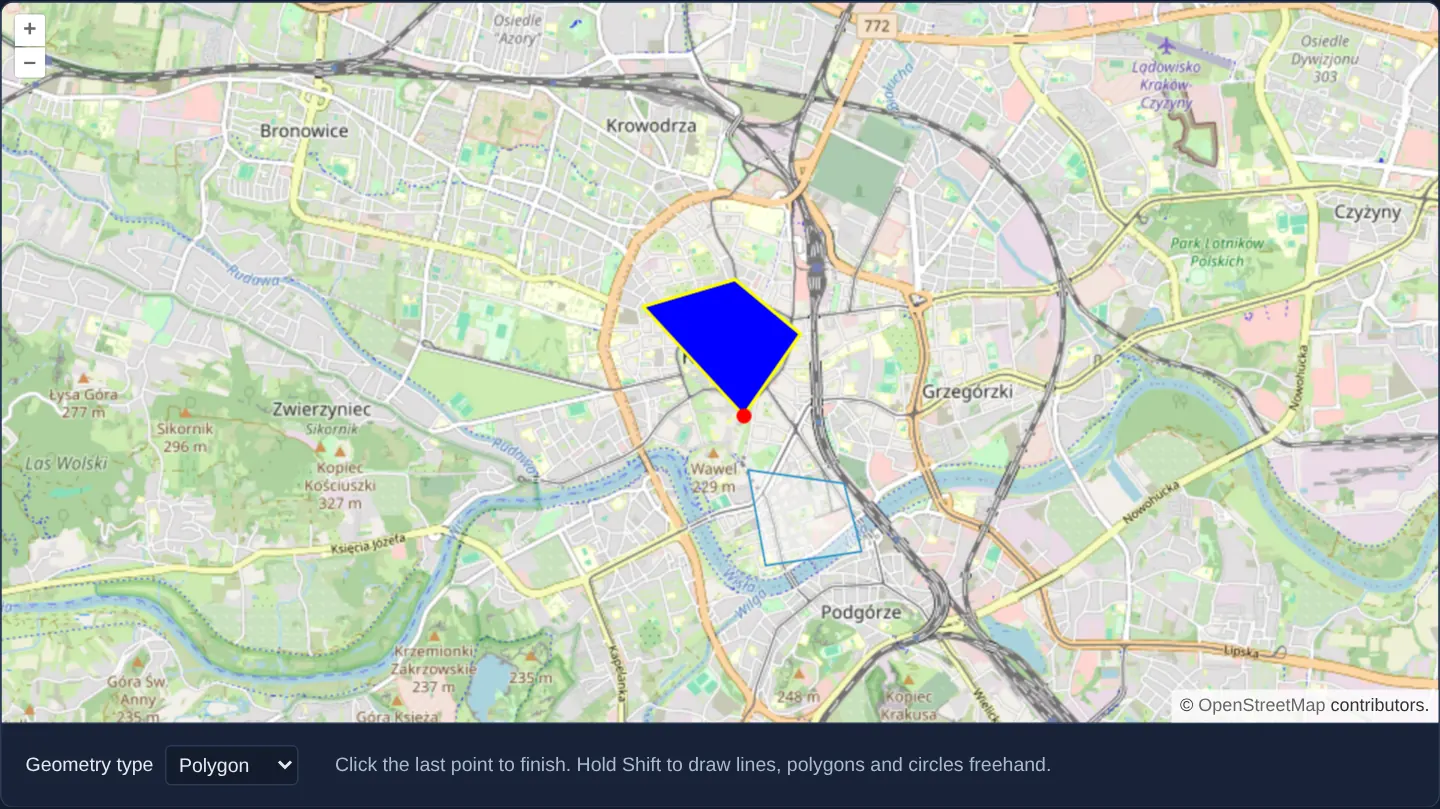
What this example shows
While sketching points, lines, polygons or circles over Kraków, the active rubber-band geometry in progress stands out with a bright red cursor vertex dot, a yellow rubber-band outline for lines and polygons (blue for circles) and an opaque blue or yellow fill—then switches cleanly to OpenLayers’ calm default blue layer style the moment you finish the shape.
When you need it
When users digitise new parcels, routes or exclusion zones on top of dozens of existing features, an unstyled sketch that looks identical to finished polygons makes it hard to tell which vertex is still rubber-banding.
Assigning a high-contrast sketch style on the Draw interaction itself separates “work in progress” visually from committed data.
The code
The example uses cc-openlayers, my Angular component library for OpenLayers: each aol-… element creates the OpenLayers object it names, updates it from its inputs and disposes of it with the component.
draw-features-style.tsimport { ChangeDetectionStrategy, Component, signal } from '@angular/core';
import type { FlatStyleLike } from 'ol/style/flat';
import {
CoordinateComponent,
DefaultControlComponent,
DefaultInteractionComponent,
LayerTileComponent,
LayerVectorComponent,
MapComponent,
SourceOsmComponent,
SourceVectorComponent,
ViewComponent,
} from 'cc-openlayers';
import { DrawInteractionComponent } from 'cc-openlayers/editing';
type DrawType = 'Point' | 'LineString' | 'Polygon' | 'Circle' | 'None';
/** Geometries drawn with the draw interaction, whose sketch is styled for each geometry type. */
@Component({
selector: 'app-draw-features-style',
imports: [
CoordinateComponent,
DefaultControlComponent,
DefaultInteractionComponent,
DrawInteractionComponent,
LayerTileComponent,
LayerVectorComponent,
MapComponent,
SourceOsmComponent,
SourceVectorComponent,
ViewComponent,
],
changeDetection: ChangeDetectionStrategy.OnPush,
template: `
<aol-map height="480px">
<aol-interaction-default />
<aol-control-defaults />
<aol-view [zoom]="13">
<aol-coordinate [x]="19.9368" [y]="50.0614" srid="EPSG:4326" />
</aol-view>
<aol-layer-tile><aol-source-osm /></aol-layer-tile>
<aol-layer-vector><aol-source-vector #source [wrapX]="false" /></aol-layer-vector>
<!-- The interaction is made anew for each type; None draws nothing. -->
@for (current of drawTypes; track current) {
@if (current === type()) {
<aol-interaction-draw [type]="current" [source]="source.instance" [style]="styles[current]" />
}
}
</aol-map>
<div class="example-controls">
<label>
Geometry type
<select (change)="type.set(value($event))">
@for (option of types; track option) {
<option [value]="option" [selected]="option === type()">{{ option }}</option>
}
</select>
</label>
<p class="example-hint">
Click the last point to finish. Hold Shift to draw lines, polygons and circles freehand.
</p>
</div>
`,
})
export class DrawFeaturesStyle {
readonly type = signal<DrawType>('Point');
protected readonly drawTypes: Exclude<DrawType, 'None'>[] = ['Point', 'LineString', 'Polygon', 'Circle'];
protected readonly types: DrawType[] = [...this.drawTypes, 'None'];
protected readonly styles: Record<Exclude<DrawType, 'None'>, FlatStyleLike> = {
Point: {
'circle-radius': 5,
'circle-fill-color': '#ff0000',
},
LineString: {
'circle-radius': 5,
'circle-fill-color': '#ff0000',
'stroke-color': '#ffff00',
'stroke-width': 2,
},
Polygon: {
'circle-radius': 5,
'circle-fill-color': '#ff0000',
'stroke-color': '#ffff00',
'stroke-width': 2,
'fill-color': '#0000ff',
},
Circle: {
'circle-radius': 5,
'circle-fill-color': '#ff0000',
'stroke-color': '#0000ff',
'stroke-width': 2,
'fill-color': '#ffff00',
},
};
protected value(event: Event): DrawType {
return (event.target as HTMLSelectElement).value as DrawType;
}
} The React version uses the library's React adapter, cc-openlayers/react: each component creates the OpenLayers object it names when it mounts, updates it from its props and disposes of it when it unmounts.
draw-features-style.react.tsximport { useState } from 'react';
import type OLVectorSource from 'ol/source/Vector.js';
import type { FlatStyleLike } from 'ol/style/flat.js';
import {
Coordinate,
DefaultControls,
DefaultInteractions,
DrawInteraction,
Map,
OSMSource,
TileLayer,
VectorLayer,
VectorSource,
View,
} from 'cc-openlayers/react';
type DrawType = 'Point' | 'LineString' | 'Polygon' | 'Circle' | 'None';
const drawTypes: Exclude<DrawType, 'None'>[] = ['Point', 'LineString', 'Polygon', 'Circle'];
const types: DrawType[] = [...drawTypes, 'None'];
const styles: Record<Exclude<DrawType, 'None'>, FlatStyleLike> = {
Point: {
'circle-radius': 5,
'circle-fill-color': '#ff0000',
},
LineString: {
'circle-radius': 5,
'circle-fill-color': '#ff0000',
'stroke-color': '#ffff00',
'stroke-width': 2,
},
Polygon: {
'circle-radius': 5,
'circle-fill-color': '#ff0000',
'stroke-color': '#ffff00',
'stroke-width': 2,
'fill-color': '#0000ff',
},
Circle: {
'circle-radius': 5,
'circle-fill-color': '#ff0000',
'stroke-color': '#0000ff',
'stroke-width': 2,
'fill-color': '#ffff00',
},
};
/** Geometries drawn with the draw interaction, whose sketch is styled for each geometry type. */
export function DrawFeaturesStyle() {
const [type, setType] = useState<DrawType>('Point');
// The source is made after the first commit, so the state carries it to the interaction.
const [source, setSource] = useState<OLVectorSource | null>(null);
return (
<>
<Map height="480px">
<DefaultInteractions />
<DefaultControls />
<View zoom={13}>
<Coordinate x={19.9368} y={50.0614} srid="EPSG:4326" />
</View>
<TileLayer>
<OSMSource />
</TileLayer>
<VectorLayer>
<VectorSource ref={setSource} wrapX={false} />
</VectorLayer>
{/* The interaction is made anew for each type; None draws nothing. */}
{source && type !== 'None' ? <DrawInteraction type={type} source={source} style={styles[type]} /> : null}
</Map>
<div className="example-controls">
<label>
Geometry type
<select value={type} onChange={(event) => setType(event.target.value as DrawType)}>
{types.map((option) => (
<option key={option} value={option}>
{option}
</option>
))}
</select>
</label>
<p className="example-hint">
Click the last point to finish. Hold Shift to draw lines, polygons and circles freehand.
</p>
</div>
</>
);
}How the React version works
Points, lines, polygons and circles drawn with a draw interaction whose sketch is styled for each geometry type; None removes the interaction.
What both versions share
OpenLayers renders the map and handles the interactions; the cc-openlayers/core layer gives both adapters the same view binding (MapViewBinding) and the same conversion of coordinates from EPSG:4326 to the map's projection.
From Angular to React
| Angular | React |
|---|---|
the type <select>'s (change) and a signal | onChange and useState |
viewChild of the source handed to the interactions | ref={setSource} into useState; the interactions render once the adapter has made the source |
<aol-interaction-draw [type] [style]> replaced when the type changes | <DrawInteraction type style>; the adapter replaces the interaction when type changes |
Who creates, updates and disposes
Map creates the ol/Map in useLayoutEffect and disposes of it on unmount; each layer, source and interaction component adds its object to the parent it gets from context and removes it in its effect's cleanup, as ngOnDestroy does in Angular.
Architecture and OpenLayers mechanics
Passing a geometry-keyed styles lookup into [style] on aol-interaction-draw styles only OpenLayers’ internal sketch overlay—configuring circle-radius and circle-fill-color for the cursor snap/vertex cursor alongside stroke-color and fill-color for the rubber-band line, polygon or circle.
Clicking the final vertex (or holding Shift to trace freehand) commits the finished feature into the vector source, where the host vector layer’s own style takes over.
How it works
- Per-type flat
stylesbound to[style]onaol-interaction-drawcontrol the active rubber-band sketch overlay. circle-radiusandcircle-fill-colorrender the red cursor vertex indicator whilestroke-colorandfill-colorstyle the unfinished line, polygon or circle.- Clicking the last placed vertex completes lines and polygons, and holding Shift switches temporarily to freehand dragging.
- Committed features move into the vector layer’s source and adopt the layer’s style rather than keeping the temporary sketch style.
Pitfalls
- Styles passed to
aol-interaction-drawapply strictly while drawing is in progress—remember to configure a[style]on your destinationaol-layer-vectoras well if committed features need custom colours. - If your flat sketch style omits circle-* properties (or a point symboliser in a Style function), the cursor vertex dot disappears completely during polygon and line drawing.
Related examples
The same feature in the OpenLayers examples .
Background: state and lifecycle of maps in Angular with OpenLayers, which the components of cc-openlayers take care of.