Interactions · Angular, React and OpenLayers
Draw freehand lines, polygons and circles
Sketch smooth freehand lines, polygons and circles by dragging a mouse, finger or stylus in OpenLayers and toggle back to click-vertex mode.
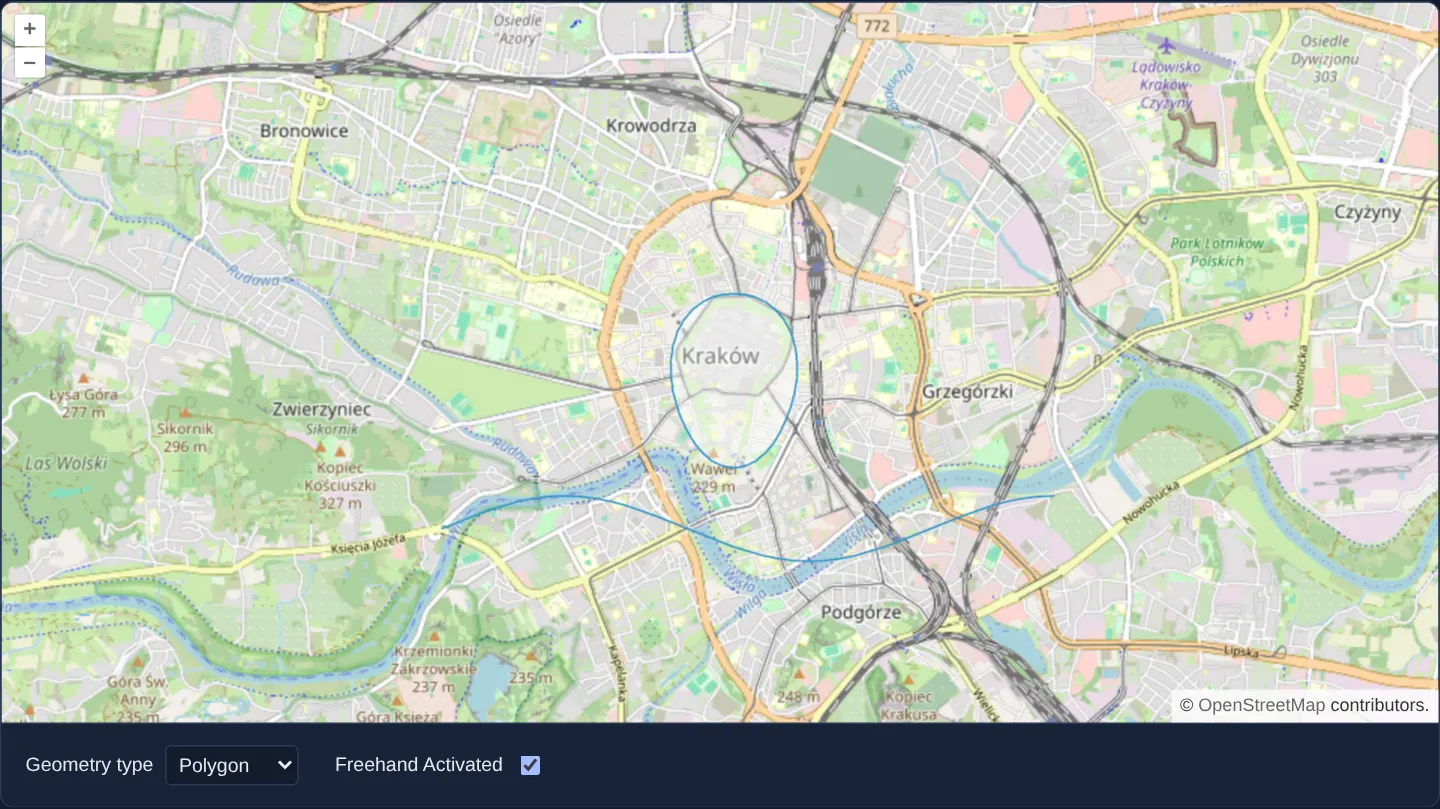
What this example shows
Over a street map of Kraków, selecting LineString, Polygon or Circle with Freehand checked lets you press, drag smoothly across the Vistula or around the Old Town like a marker pen, and release to finish the geometry in one fluid stroke.
Clearing the Freehand checkbox reverts to classic click-by-click vertex placement (where holding Shift still enables temporary freehand), and choosing None restores normal map drag-panning.
When you need it
Field tablets with styluses, tactical incident whiteboards, teacher/presenter annotations and touch-screen search lassos are far faster to draw in one continuous finger stroke than tapping twenty individual vertices.
Giving users a clean toggle between freehand lasso dragging, precise vertex clicking and normal map panning adapts one drawing toolbar to both pen/touch and desktop CAD workflows.
The code
The example uses cc-openlayers, my Angular component library for OpenLayers: each aol-… element creates the OpenLayers object it names, updates it from its inputs and disposes of it with the component.
draw-freehand.tsimport { ChangeDetectionStrategy, Component, computed, signal } from '@angular/core';
import {
CoordinateComponent,
DefaultControlComponent,
DefaultInteractionComponent,
LayerTileComponent,
LayerVectorComponent,
MapComponent,
SourceOsmComponent,
SourceVectorComponent,
ViewComponent,
} from 'cc-openlayers';
import { DrawInteractionComponent } from 'cc-openlayers/editing';
type DrawType = 'LineString' | 'Polygon' | 'Circle' | 'None';
/** Lines, polygons and circles drawn in freehand mode, which a checkbox switches on and off. */
@Component({
selector: 'app-draw-freehand',
imports: [
CoordinateComponent,
DefaultControlComponent,
DefaultInteractionComponent,
DrawInteractionComponent,
LayerTileComponent,
LayerVectorComponent,
MapComponent,
SourceOsmComponent,
SourceVectorComponent,
ViewComponent,
],
changeDetection: ChangeDetectionStrategy.OnPush,
template: `
<aol-map height="480px">
<aol-interaction-default />
<aol-control-defaults />
<aol-view [zoom]="13">
<aol-coordinate [x]="19.9368" [y]="50.0614" srid="EPSG:4326" />
</aol-view>
<aol-layer-tile><aol-source-osm /></aol-layer-tile>
<aol-layer-vector><aol-source-vector #source [wrapX]="false" /></aol-layer-vector>
<!-- The draw interaction is made anew whenever its type or its mode changes. -->
@for (draw of drawings(); track draw.key) {
<aol-interaction-draw [type]="draw.type" [freehand]="draw.freehand" [source]="source.instance" />
}
</aol-map>
<div class="example-controls">
<label>
Geometry type
<select (change)="type.set(value($event))">
@for (option of types; track option) {
<option [value]="option" [selected]="option === type()">{{ option }}</option>
}
</select>
</label>
<label>
Freehand Activated
<input type="checkbox" [checked]="freehand()" (change)="freehand.set(checked($event))" />
</label>
</div>
`,
})
export class DrawFreehand {
readonly type = signal<DrawType>('LineString');
readonly freehand = signal(true);
protected readonly types: DrawType[] = ['LineString', 'Polygon', 'Circle', 'None'];
protected readonly drawings = computed(() => {
const type = this.type();
const freehand = this.freehand();
return type === 'None' ? [] : [{ key: `${type}-${freehand}`, type, freehand }];
});
protected value(event: Event): DrawType {
return (event.target as HTMLSelectElement).value as DrawType;
}
protected checked(event: Event): boolean {
return (event.target as HTMLInputElement).checked;
}
} The React version uses the library's React adapter, cc-openlayers/react: each component creates the OpenLayers object it names when it mounts, updates it from its props and disposes of it when it unmounts.
draw-freehand.react.tsximport { useState } from 'react';
import type OLVectorSource from 'ol/source/Vector.js';
import {
Coordinate,
DefaultControls,
DefaultInteractions,
DrawInteraction,
Map,
OSMSource,
TileLayer,
VectorLayer,
VectorSource,
View,
} from 'cc-openlayers/react';
type DrawType = 'LineString' | 'Polygon' | 'Circle' | 'None';
const types: DrawType[] = ['LineString', 'Polygon', 'Circle', 'None'];
/** Lines, polygons and circles drawn in freehand mode, which a checkbox switches on and off. */
export function DrawFreehand() {
const [type, setType] = useState<DrawType>('LineString');
const [freehand, setFreehand] = useState(true);
// The source is made after the first commit, so the state carries it to the interaction.
const [source, setSource] = useState<OLVectorSource | null>(null);
return (
<>
<Map height="480px">
<DefaultInteractions />
<DefaultControls />
<View zoom={13}>
<Coordinate x={19.9368} y={50.0614} srid="EPSG:4326" />
</View>
<TileLayer>
<OSMSource />
</TileLayer>
<VectorLayer>
<VectorSource ref={setSource} wrapX={false} />
</VectorLayer>
{/* The draw interaction is made anew whenever its type or its mode changes. */}
{source && type !== 'None' ? (
<DrawInteraction key={`${type}-${freehand}`} type={type} freehand={freehand} source={source} />
) : null}
</Map>
<div className="example-controls">
<label>
Geometry type
<select value={type} onChange={(event) => setType(event.target.value as DrawType)}>
{types.map((option) => (
<option key={option} value={option}>
{option}
</option>
))}
</select>
</label>
<label>
Freehand Activated
<input type="checkbox" checked={freehand} onChange={(event) => setFreehand(event.target.checked)} />
</label>
</div>
</>
);
}How the React version works
Lines, polygons and circles drawn in freehand mode, which a checkbox switches on and off.
What both versions share
OpenLayers renders the map and handles the interactions; the cc-openlayers/core layer gives both adapters the same view binding (MapViewBinding) and the same conversion of coordinates from EPSG:4326 to the map's projection.
From Angular to React
| Angular | React |
|---|---|
the type <select>'s (change) and a signal | onChange and useState |
the checkbox's (change) and a computed freehand condition | onChange and useState, with the condition chosen during render |
viewChild of the source handed to the interactions | ref={setSource} into useState; the interactions render once the adapter has made the source |
@if around <aol-interaction-draw>, making a new interaction for each type | <DrawInteraction key={type}>: a new key makes React unmount the old interaction and mount a new one, and nothing is rendered for None |
Who creates, updates and disposes
Map creates the ol/Map in useLayoutEffect and disposes of it on unmount; each layer, source and interaction component adds its object to the parent it gets from context and removes it in its effect's cleanup, as ngOnDestroy does in Angular.
Architecture and OpenLayers mechanics
Binding [freehand] on OpenLayers’ Draw interaction switches pointer-drag handling from map panning to continuous vertex sampling until pointer release. Because OpenLayers reads geometry type and freehand options when constructing a Draw instance, drawings exposes a single-item array whose composite key triggers @for to tear down and recreate the interaction cleanly whenever either selector changes.
How it works
[freehand]switches Draw into press-drag-release sketching where lifting the pointer completes the geometry automatically.- Combining geometry type and freehand state into a composite
@forkeyindrawingsrecreates the Draw interaction cleanly on mode switches. - When
[freehand]is false, clicking places discrete vertices while holding Shift + drag still activates built-in freehand drawing. - Selecting
Noneunmounts the Draw interaction while keeping all previously sketched shapes in the vector source.
Pitfalls
- While
[freehand]is active on a line or polygon tool, single-finger touch drags and left-mouse drags draw onto the map instead of panning—always provide an obviousNone/ Pan tool button so users do not get stuck. - Freehand dragging appends a vertex on nearly every pointer-move pixel, producing hundreds of vertices per loop—run Douglas-Peucker geometry.simplify(...) before persisting shapes to a database.
Related examples
The same feature in the OpenLayers examples .
Background: state and lifecycle of maps in Angular with OpenLayers, which the components of cc-openlayers take care of.