Interactions · Angular, React and OpenLayers
Draw squares, boxes and stars
Draw oriented squares, axis-aligned boxes, circles and custom 12-vertex stars in OpenLayers using Circle Draw interactions, geometryFunction and Undo.
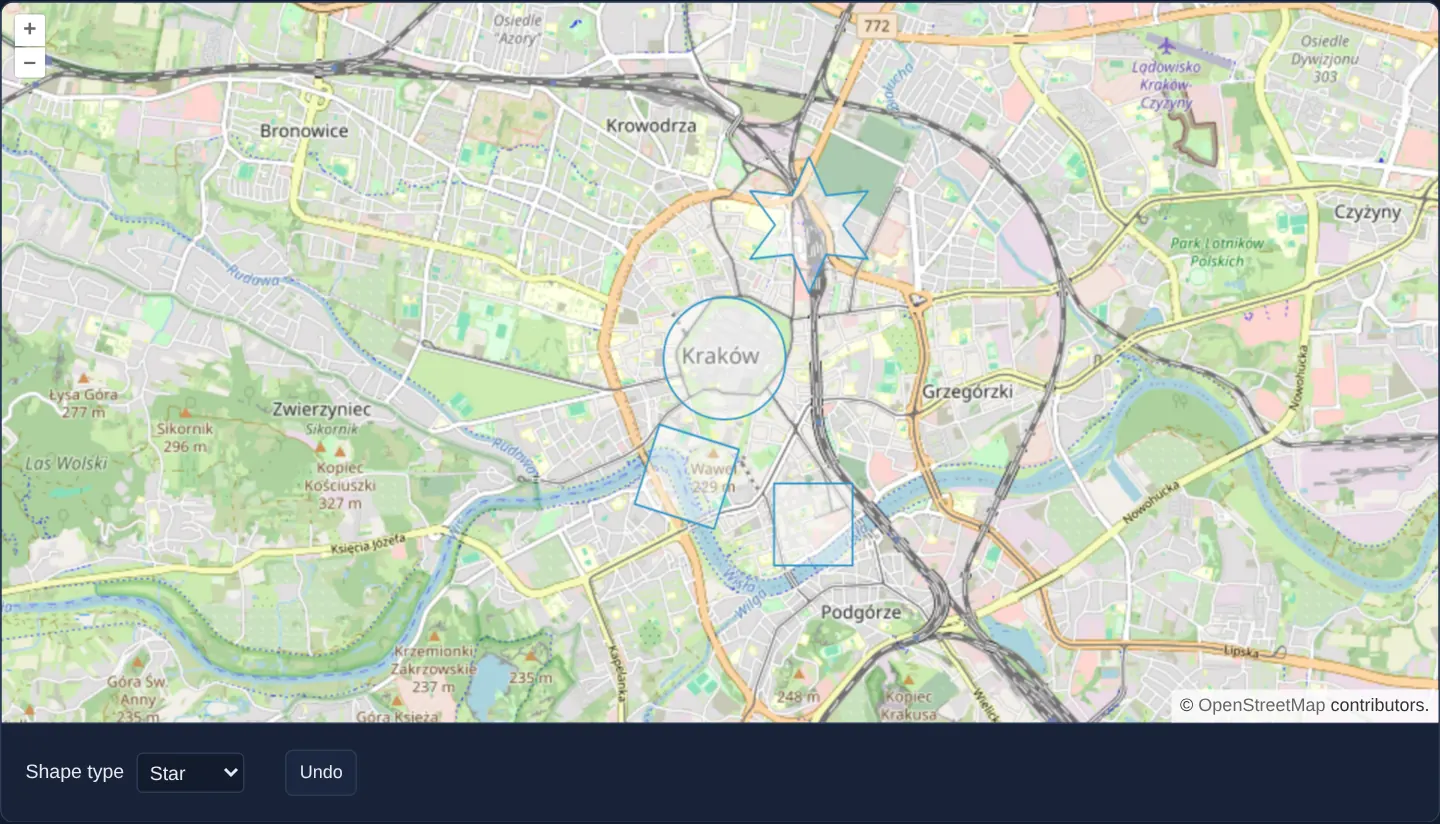
What this example shows
Using two-click centre-and-radius gestures over Kraków, a shape selector lets you place circles on the Main Square, pointer-oriented rotated squares over Wawel, axis-aligned rectangles over Kazimierz, and custom six-pointed (12-vertex) stars north of the main station—paired with an Undo button that cancels an in-progress sketch.
When you need it
Site planners, emergency symbols and buffer tools frequently place parametric shapes—squares aligned with a street frontage, bounding boxes or custom star/hexagon markers—defined by a centre point and an outer radius click rather than clicking five or twelve individual corners.
OpenLayers’ geometryFunction hook lets a single two-click Circle interaction generate any mathematical polygon ring on the fly.
The code
The example uses cc-openlayers, my Angular component library for OpenLayers: each aol-… element creates the OpenLayers object it names, updates it from its inputs and disposes of it with the component.
draw-shapes.tsimport { ChangeDetectionStrategy, Component, computed, signal, viewChild } from '@angular/core';
import type { Coordinate } from 'ol/coordinate';
import type { SimpleGeometry } from 'ol/geom';
import Polygon from 'ol/geom/Polygon';
import { createBox, createRegularPolygon, type GeometryFunction } from 'ol/interaction/Draw';
import {
CoordinateComponent,
DefaultControlComponent,
DefaultInteractionComponent,
LayerTileComponent,
LayerVectorComponent,
MapComponent,
SourceOsmComponent,
SourceVectorComponent,
ViewComponent,
} from 'cc-openlayers';
import { DrawInteractionComponent } from 'cc-openlayers/editing';
type Shape = 'Circle' | 'Square' | 'Box' | 'Star' | 'None';
/** The shapes drawn with a `Circle` draw interaction whose geometry function makes a square, a box or a star. */
@Component({
selector: 'app-draw-shapes',
imports: [
CoordinateComponent,
DefaultControlComponent,
DefaultInteractionComponent,
DrawInteractionComponent,
LayerTileComponent,
LayerVectorComponent,
MapComponent,
SourceOsmComponent,
SourceVectorComponent,
ViewComponent,
],
changeDetection: ChangeDetectionStrategy.OnPush,
template: `
<aol-map height="480px">
<aol-interaction-default />
<aol-control-defaults />
<aol-view [zoom]="13">
<aol-coordinate [x]="19.9368" [y]="50.0614" srid="EPSG:4326" />
</aol-view>
<aol-layer-tile><aol-source-osm /></aol-layer-tile>
<aol-layer-vector><aol-source-vector #source [wrapX]="false" /></aol-layer-vector>
<!-- The draw interaction is made anew for each shape. -->
@for (draw of drawings(); track draw.shape) {
<aol-interaction-draw type="Circle" [geometryFunction]="draw.geometryFunction" [source]="source.instance" />
}
</aol-map>
<div class="example-controls">
<label>
Shape type
<select (change)="shape.set(value($event))">
@for (option of shapes; track option) {
<option [value]="option" [selected]="option === shape()">{{ option }}</option>
}
</select>
</label>
<button type="button" (click)="undo()">Undo</button>
</div>
`,
})
export class DrawShapes {
readonly shape = signal<Shape>('Circle');
protected readonly shapes: Shape[] = ['Circle', 'Square', 'Box', 'Star', 'None'];
protected readonly drawings = computed(() => {
const shape = this.shape();
return shape === 'None' ? [] : [{ shape, geometryFunction: GEOMETRY_FUNCTIONS[shape] }];
});
private readonly draw = viewChild(DrawInteractionComponent);
protected value(event: Event): Shape {
return (event.target as HTMLSelectElement).value as Shape;
}
protected undo(): void {
this.draw()?.instance.removeLastPoint();
}
}
/** A star of twelve points around the centre; the last coordinate of the sketch sets its radius and rotation. */
export const starGeometry: GeometryFunction = (coordinates, geometry) => {
const [center, last] = [(coordinates as Coordinate[])[0], (coordinates as Coordinate[]).at(-1) as Coordinate];
const dx = center[0] - last[0];
const dy = center[1] - last[1];
const radius = Math.sqrt(dx * dx + dy * dy);
const rotation = Math.atan2(dy, dx);
const points = 12;
const ring = Array.from({ length: points }, (_, index) => {
const angle = rotation + (index * 2 * Math.PI) / points;
const fraction = index % 2 === 0 ? 1 : 0.5;
return [center[0] + radius * fraction * Math.cos(angle), center[1] + radius * fraction * Math.sin(angle)];
});
ring.push([...ring[0]]);
const polygon = (geometry as Polygon | undefined) ?? new Polygon([ring]);
polygon.setCoordinates([ring]);
return polygon as SimpleGeometry;
};
/** The geometry function of each shape; a circle keeps the interaction's own. */
const GEOMETRY_FUNCTIONS: Record<Exclude<Shape, 'None'>, GeometryFunction | undefined> = {
Circle: undefined,
Square: createRegularPolygon(4),
Box: createBox(),
Star: starGeometry,
}; The React version uses the library's React adapter, cc-openlayers/react: each component creates the OpenLayers object it names when it mounts, updates it from its props and disposes of it when it unmounts.
draw-shapes.react.tsximport { useRef, useState } from 'react';
import type { Coordinate as OLCoordinate } from 'ol/coordinate.js';
import type { SimpleGeometry } from 'ol/geom.js';
import Polygon from 'ol/geom/Polygon.js';
import type Draw from 'ol/interaction/Draw.js';
import { createBox, createRegularPolygon, type GeometryFunction } from 'ol/interaction/Draw.js';
import type OLVectorSource from 'ol/source/Vector.js';
import {
Coordinate,
DefaultControls,
DefaultInteractions,
DrawInteraction,
Map,
OSMSource,
TileLayer,
VectorLayer,
VectorSource,
View,
} from 'cc-openlayers/react';
type Shape = 'Circle' | 'Square' | 'Box' | 'Star' | 'None';
const shapes: Shape[] = ['Circle', 'Square', 'Box', 'Star', 'None'];
/** A star of twelve points around the centre; the last coordinate of the sketch sets its radius and rotation. */
export const starGeometry: GeometryFunction = (coordinates, geometry) => {
const [center, last] = [(coordinates as OLCoordinate[])[0], (coordinates as OLCoordinate[]).at(-1) as OLCoordinate];
const dx = center[0] - last[0];
const dy = center[1] - last[1];
const radius = Math.sqrt(dx * dx + dy * dy);
const rotation = Math.atan2(dy, dx);
const points = 12;
const ring = Array.from({ length: points }, (_, index) => {
const angle = rotation + (index * 2 * Math.PI) / points;
const fraction = index % 2 === 0 ? 1 : 0.5;
return [center[0] + radius * fraction * Math.cos(angle), center[1] + radius * fraction * Math.sin(angle)];
});
ring.push([...ring[0]]);
const polygon = (geometry as Polygon | undefined) ?? new Polygon([ring]);
polygon.setCoordinates([ring]);
return polygon as SimpleGeometry;
};
/** The geometry function of each shape; a circle keeps the interaction's own. */
const GEOMETRY_FUNCTIONS: Record<Exclude<Shape, 'None'>, GeometryFunction | undefined> = {
Circle: undefined,
Square: createRegularPolygon(4),
Box: createBox(),
Star: starGeometry,
};
/** The shapes drawn with a `Circle` draw interaction whose geometry function makes a square, a box or a star. */
export function DrawShapes() {
const [shape, setShape] = useState<Shape>('Circle');
const draw = useRef<Draw>(null);
// The source is made after the first commit, so the state carries it to the interaction.
const [source, setSource] = useState<OLVectorSource | null>(null);
return (
<>
<Map height="480px">
<DefaultInteractions />
<DefaultControls />
<View zoom={13}>
<Coordinate x={19.9368} y={50.0614} srid="EPSG:4326" />
</View>
<TileLayer>
<OSMSource />
</TileLayer>
<VectorLayer>
<VectorSource ref={setSource} wrapX={false} />
</VectorLayer>
{/* The draw interaction is made anew for each shape. */}
{source && shape !== 'None' ? (
<DrawInteraction
key={shape}
ref={draw}
type="Circle"
geometryFunction={GEOMETRY_FUNCTIONS[shape]}
source={source}
/>
) : null}
</Map>
<div className="example-controls">
<label>
Shape type
<select value={shape} onChange={(event) => setShape(event.target.value as Shape)}>
{shapes.map((option) => (
<option key={option} value={option}>
{option}
</option>
))}
</select>
</label>
<button type="button" onClick={() => draw.current?.removeLastPoint()}>
Undo
</button>
</div>
</>
);
}How the React version works
Circles, squares, boxes and stars drawn with a Circle draw interaction whose geometry function makes the shape; Undo removes the last point of the sketch.
What both versions share
OpenLayers renders the map and handles the interactions; the cc-openlayers/core layer gives both adapters the same view binding (MapViewBinding) and the same conversion of coordinates from EPSG:4326 to the map's projection. Both versions use the same geometry functions, defined once in the module.
From Angular to React
| Angular | React |
|---|---|
the type <select>'s (change) and a signal | onChange and useState |
viewChild of the source handed to the interactions | ref={setSource} into useState; the interactions render once the adapter has made the source |
@if around <aol-interaction-draw>, making a new interaction for each type | <DrawInteraction key={type}>: a new key makes React unmount the old interaction and mount a new one, and nothing is rendered for None |
viewChild of the draw interaction for Undo | useRef<Draw> passed as ref and removeLastPoint() in onClick |
Who creates, updates and disposes
Map creates the ol/Map in useLayoutEffect and disposes of it on unmount; each layer, source and interaction component adds its object to the parent it gets from context and removes it in its effect's cleanup, as ngOnDestroy does in Angular.
Architecture and OpenLayers mechanics
Every preset runs aol-interaction-draw with type="Circle" so click 1 fixes the centre coordinate and click 2 supplies the outer coordinate. Built-in helpers createRegularPolygon(4) and createBox() generate rotated squares and axis-aligned rectangles respectively, while custom starGeometry computes twelve alternating outer-radius and half-radius vertices oriented toward the pointer and closes the ring with ring.push.
Querying the interaction via viewChild lets the Undo button invoke removeLastPoint to abort an active two-click sketch before the second click commits it.
How it works
- Three of the four tools share
type="Circle"where the first click anchors the centre and the second sets radius and orientation, whilecreateBox()treats the first click as one corner and the second as the opposite corner. createRegularPolygon(4)builds a four-sided square rotated toward the cursor, whilecreateBox()builds an axis-aligned rectangle between opposite corners.starGeometrycomputes a custom 12-point alternating-radius polygon ring rotated toward the pointer.- Undo reaches the active Draw instance via
viewChildand callsremoveLastPointto cancel an unfinished sketch.
Pitfalls
removeLastPointaffects only the uncommitted in-progress sketch—once the second click finishes a circle, box or star, removing it requires deleting the feature from the vector source (source.removeFeature(...)).- Custom polygon
geometryFunctionimplementations must close every linear ring explicitly via ring.push(ring[0]) so exported GeoJSON and WKT geometries pass OGC validity checks.
Related examples
The same feature in the OpenLayers examples .
Background: state and lifecycle of maps in Angular with OpenLayers, which the components of cc-openlayers take care of.