Interactions · Angular, React and OpenLayers
Draw and resize a box with Shift
Draw and resize an interactive bounding box with Shift-drag in OpenLayers using ExtentInteraction while keeping unmodified drags for panning.
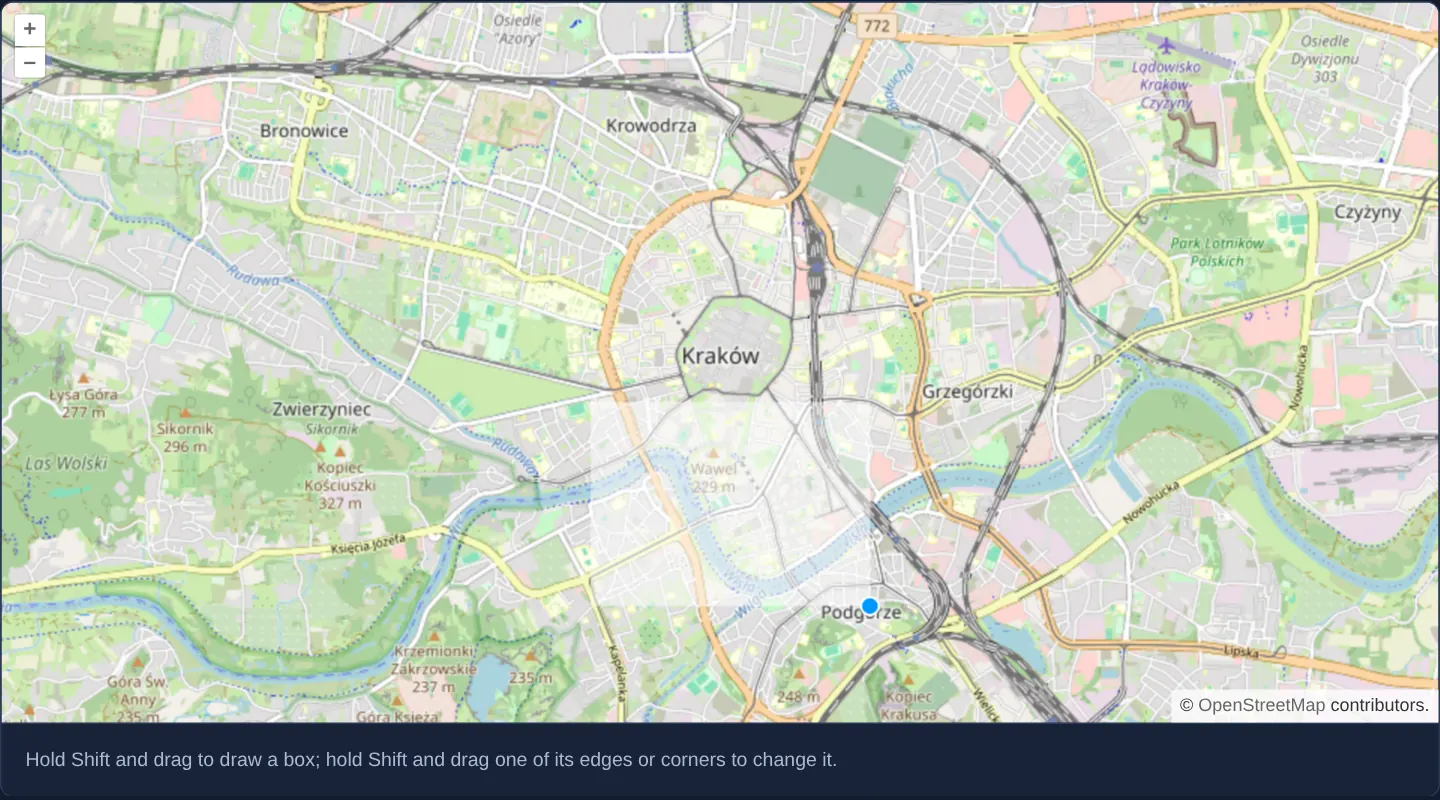
What this example shows
Over Wawel, Kazimierz and the Vistula bend in Kraków, holding Shift and dragging draws an editable rectangular bounding box—after which holding Shift near any of its four edges or four corners reveals a grab handle to resize that side or corner independently, while plain drags without Shift continue panning the map.
When you need it
Raster clippers, tile-package downloaders, print-sheet composers and spatial search filters need an axis-aligned rectangle that users can both draw from scratch and fine-tune edge by edge.
Unlike Draw with createBox()—which requires deleting and redrawing from scratch to adjust one side—OpenLayers’ Extent interaction keeps all four edges and corners live for immediate resizing.
The code
The example uses cc-openlayers, my Angular component library for OpenLayers: each aol-… element creates the OpenLayers object it names, updates it from its inputs and disposes of it with the component.
extent-interaction.tsimport { ChangeDetectionStrategy, Component } from '@angular/core';
import { shiftKeyOnly } from 'ol/events/condition';
import {
CoordinateComponent,
DefaultControlComponent,
DefaultInteractionComponent,
ExtentInteractionComponent,
LayerTileComponent,
MapComponent,
SourceOsmComponent,
ViewComponent,
} from 'cc-openlayers';
/** A box drawn on the map with Shift and drag by the extent interaction, which then lets the user resize it. */
@Component({
selector: 'app-extent-interaction',
imports: [
CoordinateComponent,
DefaultControlComponent,
DefaultInteractionComponent,
ExtentInteractionComponent,
LayerTileComponent,
MapComponent,
SourceOsmComponent,
ViewComponent,
],
changeDetection: ChangeDetectionStrategy.OnPush,
template: `
<aol-map height="480px">
<aol-interaction-default />
<aol-interaction-extent [condition]="shiftKeyOnly" />
<aol-control-defaults />
<aol-view [zoom]="13">
<aol-coordinate [x]="19.9368" [y]="50.0614" srid="EPSG:4326" />
</aol-view>
<aol-layer-tile><aol-source-osm /></aol-layer-tile>
</aol-map>
<div class="example-controls">
<p class="example-hint">
Hold Shift and drag to draw a box; hold Shift and drag one of its edges or corners to change it.
</p>
</div>
`,
})
export class ExtentInteraction {
protected readonly shiftKeyOnly = shiftKeyOnly;
} The React version uses the library's React adapter, cc-openlayers/react: each component creates the OpenLayers object it names when it mounts, updates it from its props and disposes of it when it unmounts.
extent-interaction.react.tsximport { shiftKeyOnly } from 'ol/events/condition.js';
import {
Coordinate,
DefaultControls,
DefaultInteractions,
ExtentInteraction as ExtentInteractionControl,
Map,
OSMSource,
TileLayer,
View,
} from 'cc-openlayers/react';
/** A box drawn on the map with Shift and drag by the extent interaction, which then lets the user resize it. */
export function ExtentInteraction() {
return (
<>
<Map height="480px">
<DefaultInteractions />
<ExtentInteractionControl condition={shiftKeyOnly} />
<DefaultControls />
<View zoom={13}>
<Coordinate x={19.9368} y={50.0614} srid="EPSG:4326" />
</View>
<TileLayer>
<OSMSource />
</TileLayer>
</Map>
<div className="example-controls">
<p className="example-hint">
Hold Shift and drag to draw a box; hold Shift and drag one of its edges or corners to change it.
</p>
</div>
</>
);
}How the React version works
A box drawn with Shift and drag by the extent interaction, which then lets the user resize it.
What both versions share
OpenLayers renders the map and handles the interactions; the cc-openlayers/core layer gives both adapters the same view binding (MapViewBinding) and the same conversion of coordinates from EPSG:4326 to the map's projection.
From Angular to React
| Angular | React |
|---|---|
<aol-interaction-extent [condition]> | <ExtentInteraction condition>, imported as ExtentInteractionControl beside the example's name |
Who creates, updates and disposes
Map creates the ol/Map in useLayoutEffect and disposes of it on unmount; each layer, source and interaction component adds its object to the parent it gets from context and removes it in its effect's cleanup, as ngOnDestroy does in Angular.
Architecture and OpenLayers mechanics
Mounting aol-interaction-extent after the default interaction bundle with shiftKeyOnly as its condition lets it claim Shift+drag ahead of the default DragZoom box zoom while leaving unmodified pointer drags free for DragPan.
Shift-dragging outside the current box starts a brand-new extent, Shift-dragging within 10 pixels of an existing edge or corner resizes that boundary, and Shift-clicking empty space clears the zero-area box.
How it works
aol-interaction-extentwithshiftKeyOnlyconditionactivates exclusively while the Shift key is held.- Shift-dragging within 10 pixels of an existing edge or corner resizes the rectangle; Shift-dragging elsewhere draws a new one.
- A single Shift-click away from the box creates a zero-area extent that automatically clears the rectangle.
- Declaring the interaction after
aol-interaction-defaultoverrides default Shift-drag box zooming cleanly.
Pitfalls
- Omitting
conditionleaves ExtentInteraction active on every unmodified drag, completely disabling normal map drag-panning. - Retrieved extent coordinates [minX, minY, maxX, maxY] are in the view’s Web Mercator projection—convert them with transformExtent before calling geographic
EPSG:4326endpoints. - OpenLayers’ default extent box style uses a borderless 50%-white fill that can blend into pale street maps—pass an explicit boxStyle stroke when strong contrast is needed.
Related examples
The same feature in the OpenLayers examples .
Background: state and lifecycle of maps in Angular with OpenLayers, which the components of cc-openlayers take care of.