Interactions · Angular, React and OpenLayers
Select features with a box
Select multiple OpenLayers polygons by Ctrl/Cmd-dragging a marquee box—even on rotated views—using DragBox, getFeaturesInExtent and geometry tests.
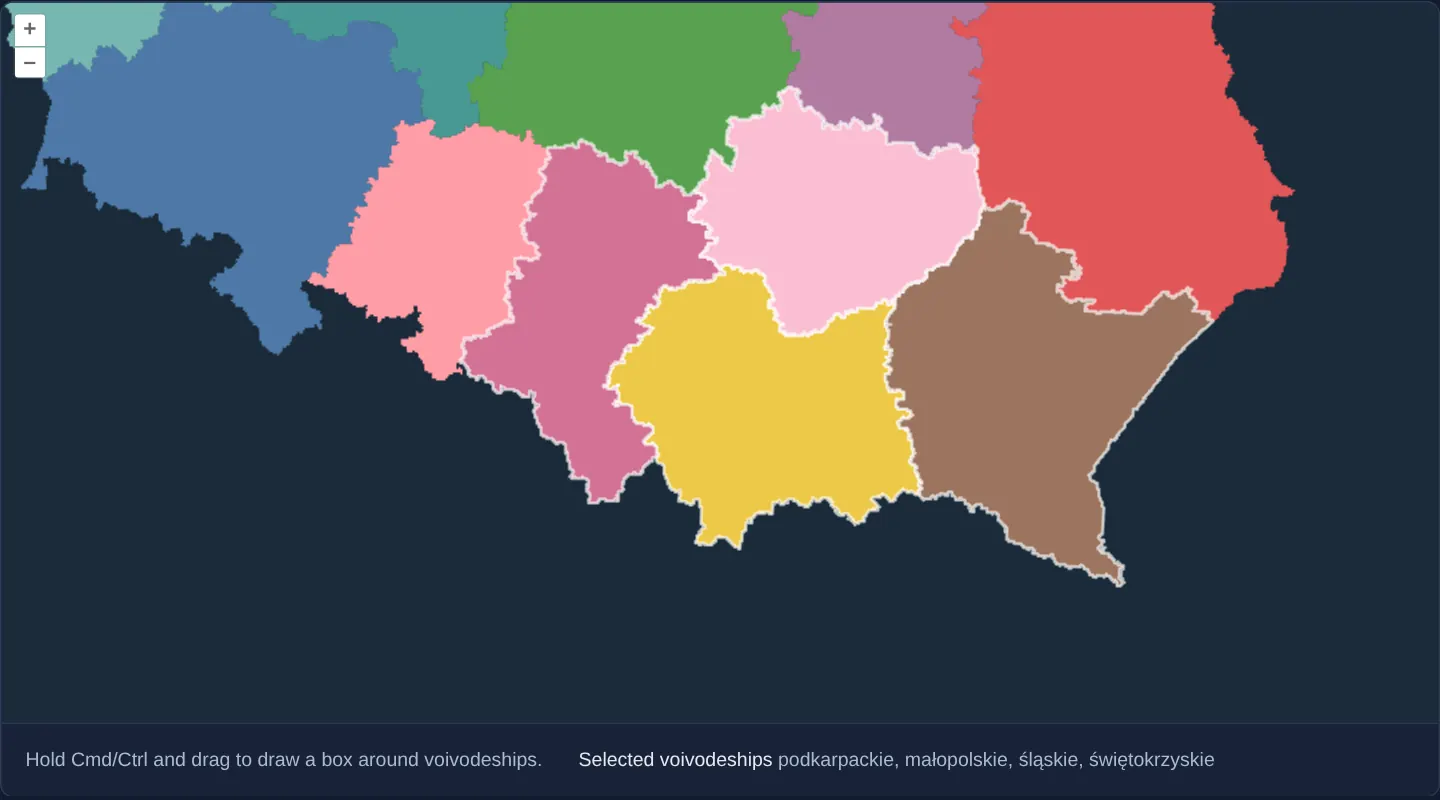
What this example shows
Over southern Poland’s voivodeships on a dark background, holding Cmd (macOS) or Ctrl and dragging sweeps a marquee selection box across the map—highlighting and naming every voivodeship whose actual geometry touches the box, even when the map view is rotated at an oblique 22.5° angle via Alt+Shift+drag.
When you need it
Analysts assembling tax rolls, mailing lists or bulk parcel exports routinely sweep a rectangular marquee across dozens of adjacent polygons in one motion rather than clicking them one by one.
Refining coarse R-tree bounding-box hits against true polygon geometry—and compensating for rotated viewports—prevents false-positive selections along diagonal borders.
The code
The example uses cc-openlayers, my Angular component library for OpenLayers: each aol-… element creates the OpenLayers object it names, updates it from its inputs and disposes of it with the component.
box-selection.tsimport { ChangeDetectionStrategy, Component, signal, viewChild } from '@angular/core';
import {
CoordinateComponent,
DefaultControlComponent,
DefaultInteractionComponent,
DragBoxInteractionComponent,
LayerVectorComponent,
MapComponent,
SelectInteractionComponent,
SourceGeoJSONComponent,
ViewComponent,
} from 'cc-openlayers';
import { platformModifierKeyOnly } from 'ol/events/condition';
import type { FeatureLike } from 'ol/Feature';
import Fill from 'ol/style/Fill';
import Stroke from 'ol/style/Stroke';
import Style from 'ol/style/Style';
/** The colour of each voivodeship, by its position in code order. */
const PALETTE = [
'#4e79a7',
'#f28e2b',
'#e15759',
'#76b7b2',
'#59a14f',
'#edc948',
'#b07aa1',
'#ff9da7',
'#9c755f',
'#bab0ac',
'#86bcb6',
'#d37295',
'#fabfd2',
'#b6992d',
'#499894',
'#79706e',
];
const colorOf = (feature: FeatureLike): string => PALETTE[Number(feature.get('code')) / 2 - 1] ?? '#eeeeee';
/** Voivodeships selected by clicking or by drawing a box with Cmd/Ctrl held; the selected names are listed below the map. */
@Component({
selector: 'app-box-selection',
imports: [
CoordinateComponent,
DefaultControlComponent,
DefaultInteractionComponent,
DragBoxInteractionComponent,
LayerVectorComponent,
MapComponent,
SelectInteractionComponent,
SourceGeoJSONComponent,
ViewComponent,
],
changeDetection: ChangeDetectionStrategy.OnPush,
template: `
<aol-map height="480px">
<aol-interaction-default />
<aol-control-defaults />
<aol-interaction-select [style]="selectedStyle" (olSelect)="listSelected()" />
<aol-interaction-dragbox [condition]="condition" (boxStart)="clear()" (boxEnd)="selectInBox()" />
<aol-view [zoom]="7" [constrainRotation]="16">
<aol-coordinate [x]="19.9368" [y]="50.0614" srid="EPSG:4326" />
</aol-view>
<aol-layer-vector background="#1a2b39" [style]="style">
<aol-source-geojson url="assets/poland/voivodeships.geojson" featureProjection="EPSG:3857" />
</aol-layer-vector>
</aol-map>
<div class="example-controls">
<p class="example-hint">Hold Cmd/Ctrl and drag to draw a box around voivodeships.</p>
<span>
Selected voivodeships <output>{{ names() }}</output>
</span>
</div>
`,
})
export class BoxSelection {
readonly names = signal('None');
protected readonly condition = platformModifierKeyOnly;
protected readonly style = (feature: FeatureLike) => new Style({ fill: new Fill({ color: colorOf(feature) }) });
protected readonly selectedStyle = (feature: FeatureLike) =>
new Style({
fill: new Fill({ color: colorOf(feature) }),
stroke: new Stroke({ color: 'rgba(255, 255, 255, 0.7)', width: 2 }),
});
private readonly map = viewChild.required(MapComponent);
private readonly select = viewChild.required(SelectInteractionComponent);
private readonly dragBox = viewChild.required(DragBoxInteractionComponent);
private readonly source = viewChild.required(SourceGeoJSONComponent);
protected clear(): void {
this.select().instance.clearSelection();
this.listSelected();
}
/** Selects the voivodeships that meet the box; an obliquely rotated view is compared in the box's own frame. */
protected selectInBox(): void {
const select = this.select().instance;
const box = this.dragBox().instance.getGeometry();
const extent = box.getExtent();
const rotation = this.map().instance.getView().getRotation();
const oblique = rotation % (Math.PI / 2) !== 0;
const candidates = this.source()
.instance.getFeaturesInExtent(extent)
.filter((feature) => feature.getGeometry()?.intersectsExtent(extent));
if (oblique) {
const anchor = [0, 0];
const alignedBox = box.clone();
alignedBox.rotate(-rotation, anchor);
const alignedExtent = alignedBox.getExtent();
for (const feature of candidates) {
const aligned = feature.getGeometry()?.clone();
aligned?.rotate(-rotation, anchor);
if (aligned?.intersectsExtent(alignedExtent)) select.selectFeature(feature);
}
} else {
candidates.forEach((feature) => select.selectFeature(feature));
}
this.listSelected();
}
protected listSelected(): void {
const names = this.select()
.instance.getFeatures()
.getArray()
.map((feature) => feature.get('name') as string);
this.names.set(names.length > 0 ? names.join(', ') : 'None');
}
} The React version uses the library's React adapter, cc-openlayers/react: each component creates the OpenLayers object it names when it mounts, updates it from its props and disposes of it when it unmounts.
box-selection.react.tsximport { useRef, useState } from 'react';
import { platformModifierKeyOnly } from 'ol/events/condition.js';
import type { FeatureLike } from 'ol/Feature.js';
import type OLDragBox from 'ol/interaction/DragBox.js';
import type OLSelect from 'ol/interaction/Select.js';
import type OLMap from 'ol/Map.js';
import type OLVectorSource from 'ol/source/Vector.js';
import Fill from 'ol/style/Fill.js';
import Stroke from 'ol/style/Stroke.js';
import Style from 'ol/style/Style.js';
import {
Coordinate,
DefaultControls,
DefaultInteractions,
DragBoxInteraction,
GeoJSONSource,
Map,
SelectInteraction,
VectorLayer,
View,
} from 'cc-openlayers/react';
/** The colour of each voivodeship, by its position in code order. */
const PALETTE = [
'#4e79a7',
'#f28e2b',
'#e15759',
'#76b7b2',
'#59a14f',
'#edc948',
'#b07aa1',
'#ff9da7',
'#9c755f',
'#bab0ac',
'#86bcb6',
'#d37295',
'#fabfd2',
'#b6992d',
'#499894',
'#79706e',
];
const colorOf = (feature: FeatureLike): string => PALETTE[Number(feature.get('code')) / 2 - 1] ?? '#eeeeee';
const style = (feature: FeatureLike) => new Style({ fill: new Fill({ color: colorOf(feature) }) });
const selectedStyle = (feature: FeatureLike) =>
new Style({
fill: new Fill({ color: colorOf(feature) }),
stroke: new Stroke({ color: 'rgba(255, 255, 255, 0.7)', width: 2 }),
});
/** Voivodeships selected by clicking or by drawing a box with Cmd/Ctrl held; the selected names are listed below the map. */
export function BoxSelection() {
const [names, setNames] = useState('None');
const map = useRef<OLMap>(null);
const select = useRef<OLSelect>(null);
const dragBox = useRef<OLDragBox>(null);
const source = useRef<OLVectorSource>(null);
const listSelected = () => {
const selected = (select.current?.getFeatures().getArray() ?? []).map((feature) => feature.get('name') as string);
setNames(selected.length > 0 ? selected.join(', ') : 'None');
};
const clear = () => {
select.current?.clearSelection();
listSelected();
};
/** Selects the voivodeships that meet the box; an obliquely rotated view is compared in the box's own frame. */
const selectInBox = () => {
const interaction = select.current;
const box = dragBox.current?.getGeometry();
const view = map.current?.getView();
if (!interaction || !box || !view || !source.current) return;
const extent = box.getExtent();
const rotation = view.getRotation();
const oblique = rotation % (Math.PI / 2) !== 0;
const candidates = source.current
.getFeaturesInExtent(extent)
.filter((feature) => feature.getGeometry()?.intersectsExtent(extent));
if (oblique) {
const anchor = [0, 0];
const alignedBox = box.clone();
alignedBox.rotate(-rotation, anchor);
const alignedExtent = alignedBox.getExtent();
for (const feature of candidates) {
const aligned = feature.getGeometry()?.clone();
aligned?.rotate(-rotation, anchor);
if (aligned?.intersectsExtent(alignedExtent)) interaction.selectFeature(feature);
}
} else {
candidates.forEach((feature) => interaction.selectFeature(feature));
}
listSelected();
};
return (
<>
<Map ref={map} height="480px">
<DefaultInteractions />
<DefaultControls />
<SelectInteraction ref={select} style={selectedStyle} onSelect={listSelected} />
<DragBoxInteraction
ref={dragBox}
condition={platformModifierKeyOnly}
onBoxStart={clear}
onBoxEnd={selectInBox}
/>
<View zoom={7} constrainRotation={16}>
<Coordinate x={19.9368} y={50.0614} srid="EPSG:4326" />
</View>
<VectorLayer background="#1a2b39" style={style}>
<GeoJSONSource ref={source} url="assets/poland/voivodeships.geojson" featureProjection="EPSG:3857" />
</VectorLayer>
</Map>
<div className="example-controls">
<p className="example-hint">Hold Cmd/Ctrl and drag to draw a box around voivodeships.</p>
<span>
Selected voivodeships <output>{names}</output>
</span>
</div>
</>
);
}How the React version works
Voivodeships selected by a click or by a box drawn with Cmd/Ctrl held; the selected names are listed below the map, also when the view is rotated.
What both versions share
OpenLayers renders the map and handles the interactions; the cc-openlayers/core layer gives both adapters the same view binding (MapViewBinding) and the same conversion of coordinates from EPSG:4326 to the map's projection.
From Angular to React
| Angular | React |
|---|---|
<aol-source-geojson> with the voivodeships | <GeoJSONSource> |
<aol-interaction-dragbox [condition] (boxStart) (boxEnd)> | <DragBoxInteraction condition onBoxStart onBoxEnd ref={dragBox}> |
viewChild of the map, the select and the source | useRef for each, read in the handlers |
(olSelect) and a signal of the names | onSelect and useState |
Who creates, updates and disposes
Map creates the ol/Map in useLayoutEffect and disposes of it on unmount; each layer, source and interaction component adds its object to the parent it gets from context and removes it in its effect's cleanup, as ngOnDestroy does in Angular.
Architecture and OpenLayers mechanics
aol-interaction-select handles ordinary single clicks while aol-interaction-dragbox (platformModifierKeyOnly as condition) draws the marquee when Cmd/Ctrl is held, clearing previous selections via clearSelection on boxStart.
On boxEnd, getFeaturesInExtent retrieves fast R-tree bounding-box candidates and intersectsExtent verifies true geometric intersection—counter-rotating both the dragged box and candidate geometries around a common anchor whenever the view is tilted (constrainRotation) at a non-90° angle—before adding matches via selectFeature.
How it works
aol-interaction-selectandaol-interaction-dragbox(platformModifierKeyOnlycondition) combine single-click and Cmd/Ctrl marquee selection.- On
boxEnd,getFeaturesInExtentgathers R-tree candidates andintersectsExtentfilters them to true geometric hits. - Calling
selectFeatureregisters each matched voivodeship properly with Select so both styles andolSelectlisteners stay in sync. - Counter-rotating the marquee and candidate geometries handles oblique view rotations cleanly, while
boxStartresets state withclearSelection.
Pitfalls
- Relying on
getFeaturesInExtentalone selects L-shaped or diagonal neighbours whose bounding box overlaps your marquee even though their actual polygon boundary never touches it—always verify candidates withintersectsExtent. - Pushing features directly into select.getFeatures() bypasses layer filters and suppresses
selectevents; useselectFeature(or dispatch matching state updates) so downstream UI stays notified.
Related examples
The same feature in the OpenLayers examples .
Background: state and lifecycle of maps in Angular with OpenLayers, which the components of cc-openlayers take care of.