Overlays and animation · Angular, React and OpenLayers
Flash each new point with a ring
Animate expanding easeOut pulse rings around newly arriving OpenLayers point features in a single shared postrender loop using getVectorContext.
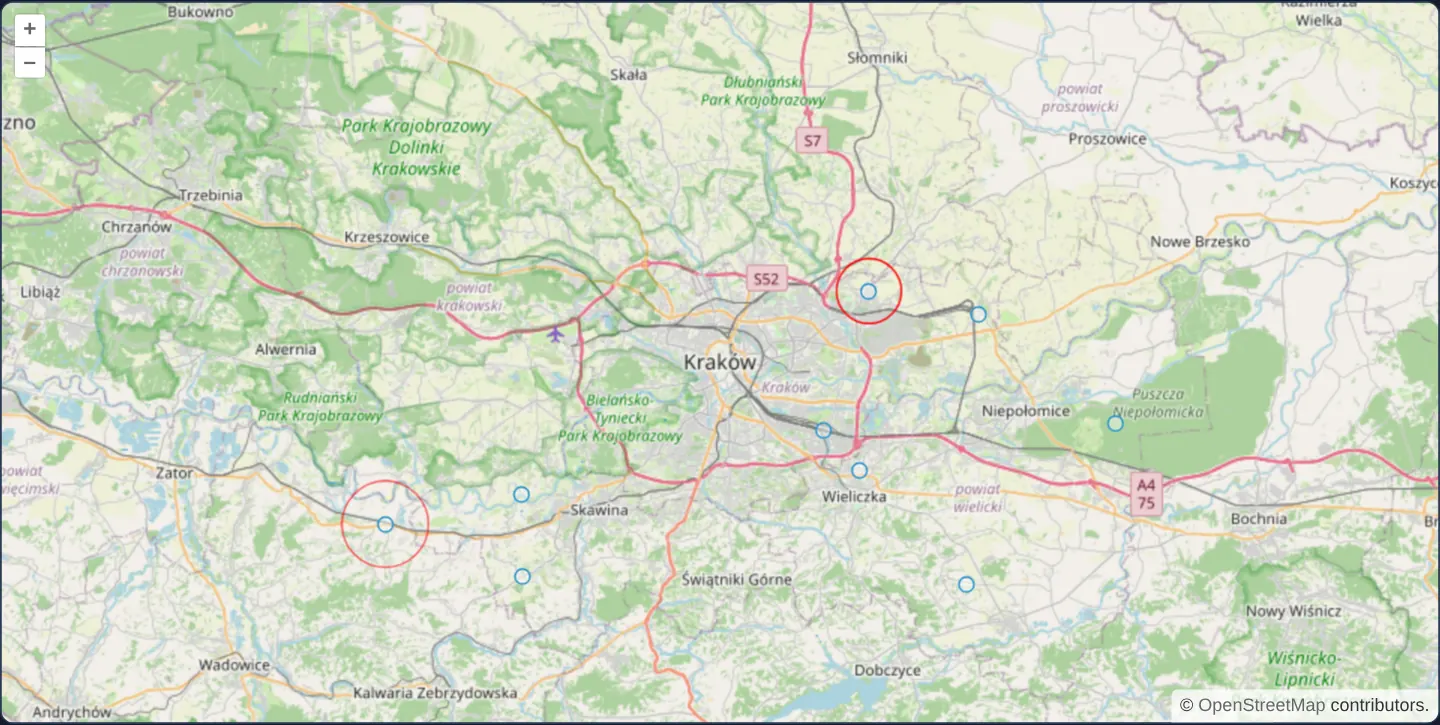
What this example shows
Every second a new point feature drops onto the Kraków region while an expanding red pulse ring radiates outward around it from 5 pixels to 30 pixels and fades smoothly to transparent over 3 seconds—highlighting fresh arrivals even when several pulses overlap simultaneously.
When you need it
Real-time operations dashboards—live lightning strikes, incoming emergency calls, transit arrivals or IoT sensor alerts—need a transient visual pulse that draws the operator’s eye to new events without permanently altering marker styles.
Driving all active pulse rings from one shared postrender listener scales cleanly without attaching and detaching separate listeners per feature.
The code
The example uses cc-openlayers, my Angular component library for OpenLayers: each aol-… element creates the OpenLayers object it names, updates it from its inputs and disposes of it with the component.
feature-animation.tsimport { ChangeDetectionStrategy, Component, DestroyRef, inject, signal, viewChild } from '@angular/core';
import {
CoordinateComponent,
DefaultControlComponent,
DefaultInteractionComponent,
FeatureComponent,
GeometryPointComponent,
LayerTileComponent,
LayerVectorComponent,
MapComponent,
SourceOsmComponent,
SourceVectorComponent,
ViewComponent,
} from 'cc-openlayers';
import { easeOut } from 'ol/easing';
import Point from 'ol/geom/Point';
import { fromLonLat } from 'ol/proj';
import { getVectorContext } from 'ol/render';
import type RenderEvent from 'ol/render/Event';
import CircleStyle from 'ol/style/Circle';
import Stroke from 'ol/style/Stroke';
import Style from 'ol/style/Style';
const duration = 3000;
interface Flash {
x: number;
y: number;
start: number;
}
/** A new point appears somewhere around Kraków every second and flashes as a growing, fading ring drawn on each frame. */
@Component({
selector: 'app-feature-animation',
imports: [
CoordinateComponent,
DefaultControlComponent,
DefaultInteractionComponent,
FeatureComponent,
GeometryPointComponent,
LayerTileComponent,
LayerVectorComponent,
MapComponent,
SourceOsmComponent,
SourceVectorComponent,
ViewComponent,
],
changeDetection: ChangeDetectionStrategy.OnPush,
template: `
<aol-map height="480px">
<aol-interaction-default />
<aol-control-defaults />
<aol-view [zoom]="10"><aol-coordinate [x]="19.9368" [y]="50.0614" srid="EPSG:4326" /></aol-view>
<aol-layer-tile [postrender]="animate">
<aol-source-osm [wrapX]="false" />
</aol-layer-tile>
<aol-layer-vector>
<aol-source-vector [wrapX]="false">
@for (flash of flashes(); track flash.start) {
<aol-feature>
<aol-geometry-point><aol-coordinate [x]="flash.x" [y]="flash.y" srid="EPSG:4326" /></aol-geometry-point>
</aol-feature>
}
</aol-source-vector>
</aol-layer-vector>
</aol-map>
`,
})
export class FeatureAnimation {
protected readonly flashes = signal<Flash[]>([]);
private readonly map = viewChild.required(MapComponent);
constructor() {
const timer = setInterval(() => this.addRandomFeature(), 1000);
inject(DestroyRef).onDestroy(() => clearInterval(timer));
}
/** On each render of the tile layer: a ring for every flash younger than the duration, then another frame. */
protected readonly animate = (event: RenderEvent): void => {
const time = event.frameState?.time;
if (time === undefined) return;
const vectorContext = getVectorContext(event);
let running = false;
for (const flash of this.flashes()) {
const elapsed = time - flash.start;
if (elapsed >= duration) continue;
running = true;
const elapsedRatio = elapsed / duration;
// The radius grows from 5 to 30 pixels while the opacity fades out.
const radius = easeOut(elapsedRatio) * 25 + 5;
const opacity = easeOut(1 - elapsedRatio);
vectorContext.setStyle(
new Style({
image: new CircleStyle({
radius,
stroke: new Stroke({ color: `rgba(255, 0, 0, ${opacity})`, width: 0.25 + opacity }),
}),
})
);
vectorContext.drawGeometry(new Point(fromLonLat([flash.x, flash.y])));
}
if (running) this.map().instance.render();
};
private addRandomFeature(): void {
const between = (from: number, to: number) => Math.round((Math.random() * (to - from) + from) * 1e4) / 1e4;
this.flashes.update((flashes) => [
...flashes,
{ x: between(19.6, 20.3), y: between(49.9, 50.2), start: Date.now() },
]);
}
} The React version uses the library's React adapter, cc-openlayers/react: each component creates the OpenLayers object it names when it mounts, updates it from its props and disposes of it when it unmounts.
feature-animation.react.tsximport { useCallback, useEffect, useRef, useState } from 'react';
import { easeOut } from 'ol/easing.js';
import Point from 'ol/geom/Point.js';
import type OLMap from 'ol/Map.js';
import { fromLonLat } from 'ol/proj.js';
import { getVectorContext } from 'ol/render.js';
import type RenderEvent from 'ol/render/Event.js';
import CircleStyle from 'ol/style/Circle.js';
import Stroke from 'ol/style/Stroke.js';
import Style from 'ol/style/Style.js';
import {
Coordinate,
DefaultControls,
DefaultInteractions,
Feature,
Map,
OSMSource,
PointGeometry,
TileLayer,
VectorLayer,
VectorSource,
View,
} from 'cc-openlayers/react';
const duration = 3000;
interface Flash {
x: number;
y: number;
start: number;
}
/** A new point appears somewhere around Kraków every second and flashes as a growing, fading ring drawn on each frame. */
export function FeatureAnimation() {
const [flashes, setFlashes] = useState<Flash[]>([]);
const map = useRef<OLMap>(null);
useEffect(() => {
const between = (from: number, to: number) => Math.round((Math.random() * (to - from) + from) * 1e4) / 1e4;
const timer = setInterval(
() =>
setFlashes((current) => [...current, { x: between(19.6, 20.3), y: between(49.9, 50.2), start: Date.now() }]),
1000
);
return () => clearInterval(timer);
}, []);
/** On each render of the tile layer: a ring for every flash younger than the duration, then another frame. */
const animate = useCallback(
(event: RenderEvent) => {
const time = event.frameState?.time;
if (time === undefined) return;
const vectorContext = getVectorContext(event);
let running = false;
for (const flash of flashes) {
const elapsed = time - flash.start;
if (elapsed >= duration) continue;
running = true;
const elapsedRatio = elapsed / duration;
// The radius grows from 5 to 30 pixels while the opacity fades out.
const radius = easeOut(elapsedRatio) * 25 + 5;
const opacity = easeOut(1 - elapsedRatio);
vectorContext.setStyle(
new Style({
image: new CircleStyle({
radius,
stroke: new Stroke({ color: `rgba(255, 0, 0, ${opacity})`, width: 0.25 + opacity }),
}),
})
);
vectorContext.drawGeometry(new Point(fromLonLat([flash.x, flash.y])));
}
if (running) map.current?.render();
},
[flashes]
);
return (
<Map ref={map} height="480px">
<DefaultInteractions />
<DefaultControls />
<View zoom={10}>
<Coordinate x={19.9368} y={50.0614} srid="EPSG:4326" />
</View>
<TileLayer onPostRender={animate}>
<OSMSource wrapX={false} />
</TileLayer>
<VectorLayer>
<VectorSource wrapX={false}>
{flashes.map((flash) => (
<Feature key={flash.start}>
<PointGeometry>
<Coordinate x={flash.x} y={flash.y} srid="EPSG:4326" />
</PointGeometry>
</Feature>
))}
</VectorSource>
</VectorLayer>
</Map>
);
}How the React version works
Every second a point appears near Kraków and flashes a ring that grows and fades for three seconds. The tile layer's postrender event draws the ring through getVectorContext, and the map asks for further frames while any flash lasts.
What both versions share
OpenLayers renders the map and handles the interactions; the cc-openlayers/core layer gives both adapters the same view binding (MapViewBinding) and the same conversion of coordinates from EPSG:4326 to the map's projection. The easeOut curve, the radius from 5 to 30 pixels and the ring style are the same in both versions.
From Angular to React
| Angular | React |
|---|---|
setInterval in the constructor and clearInterval in DestroyRef.onDestroy | useEffect with setInterval and clearInterval in its cleanup |
[postrender]="animate" on aol-layer-tile | onPostRender={animate} on TileLayer, with a useCallback that depends on the list of flashes |
@for over the flashes with aol-feature | flashes.map(...) with key and <Feature> |
Who creates, updates and disposes
Map creates the ol/Map in useLayoutEffect and disposes of it on unmount; each layer, source and interaction component adds its object to the parent it gets from context and removes it in its effect's cleanup, as ngOnDestroy does in Angular. A new onPostRender handler after each change of the list does not resubscribe: the adapter always calls the latest version.
Architecture and OpenLayers mechanics
setInterval appends a timestamped record (Date.now()) to the flashes signal once per second, which @for renders as persistent aol-feature points. Meanwhile, [postrender]="animate" on the base tile layer obtains an immediate canvas renderer via getVectorContext(event).
For every flash younger than duration (3000 ms) relative to frameState.time, animate interpolates radius (5 to 30 px) and opacity (1 to 0) through easeOut, draws the transient ring, and requests the next animation frame via this.map().instance.render().
How it works
setIntervalappends a new point around Kraków toflashesevery second, rendered declaratively via@forandaol-feature.[postrender]="animate"usesgetVectorContext(event)to paint transient pulse rings directly onto the tile layer’s canvas.- Over
duration(3000ms),easeOutexpands ring radius from 5 to 30 pixels while fading stroke opacity down to zero. - One shared listener animates all active rings simultaneously, calling
this.map().instance.render()only while young flashes remain.
Pitfalls
- Stamp start times with epoch milliseconds (
Date.now()), never performance.now(): OpenLayers’ frameState.time usesDate.now(), so monotonic performance.now() timestamps appear decades old and never render. - Pulse rings painted via
getVectorContextare transient canvas strokes rather than selectable Features. - In long-running wallboard sessions, prune expired entries or cap maximum feature history so unbounded
setIntervalstreams do not grow indefinitely.
Related examples
The same feature in the OpenLayers examples .
Background: state and lifecycle of maps in Angular with OpenLayers, which the components of cc-openlayers take care of.