Styling and labels · Angular, React and OpenLayers
An icon with a popup on click
Place a pixel-anchored OpenLayers Icon marker on Wawel Royal Castle that opens an HTML popup on click and dismisses it automatically on map move.
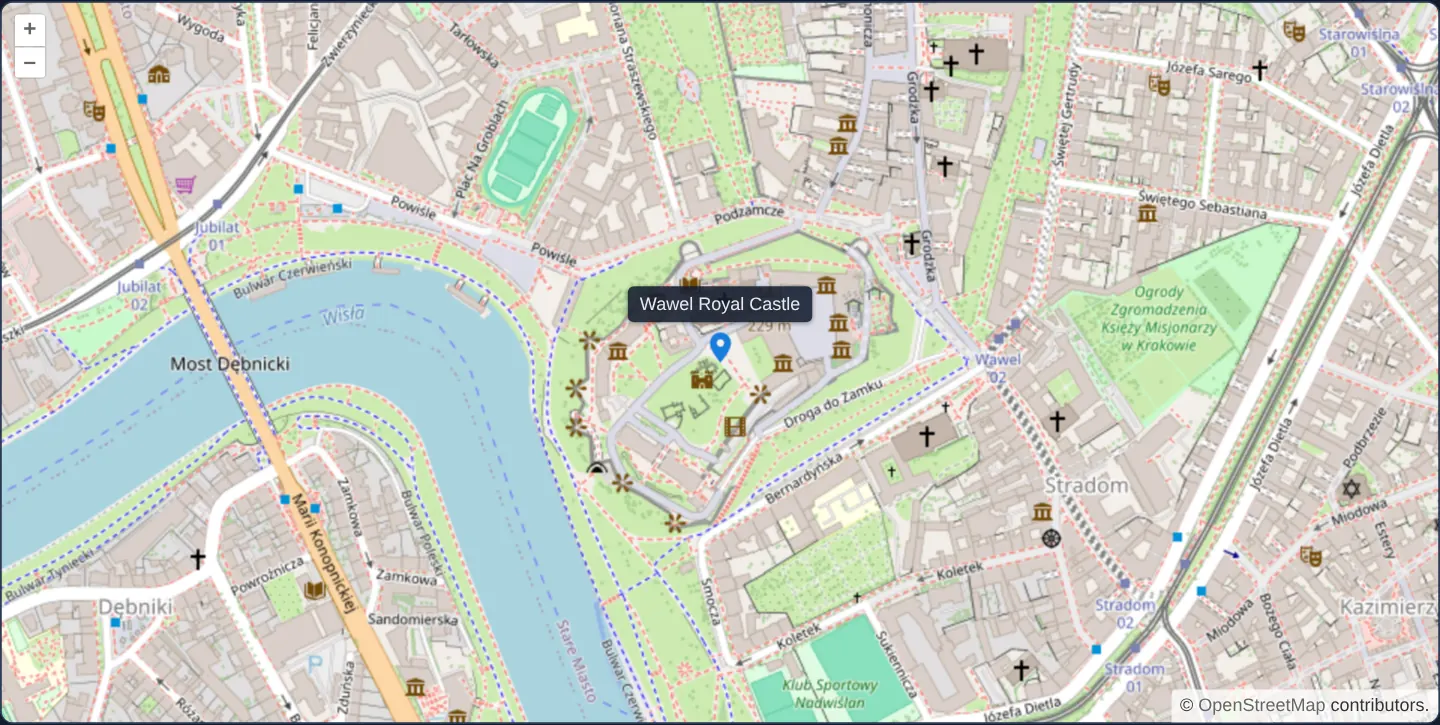
What this example shows
Zoomed to level 16 over Wawel Hill in Kraków on OpenStreetMap, a crisp 24-pixel map pin marks the Wawel Royal Castle. Hovering over painted pixels of the pin switches the cursor to a hand, clicking opens a clean HTML popup naming the landmark right at the clicked spot, and panning or zooming dismisses the popup immediately.
When you need it
Point-of-interest pins that open an info callout on click—and stay out of the way when the user resumes panning—are the foundational UI pattern of store locators, hotel maps and asset directories.
Mixing fractional horizontal anchoring with exact pixel vertical anchoring keeps asymmetrical or drop-shadowed marker graphics registered accurately on their coordinate.
The code
The example uses cc-openlayers, my Angular component library for OpenLayers: each aol-… element creates the OpenLayers object it names, updates it from its inputs and disposes of it with the component.
icon.tsimport { afterNextRender, ChangeDetectionStrategy, Component, signal, viewChild } from '@angular/core';
import Feature from 'ol/Feature';
import type MapBrowserEvent from 'ol/MapBrowserEvent';
import Point from 'ol/geom/Point';
import { fromLonLat } from 'ol/proj';
import Icon from 'ol/style/Icon';
import Style from 'ol/style/Style';
import {
ContentComponent,
CoordinateComponent,
DefaultControlComponent,
DefaultInteractionComponent,
LayerTileComponent,
LayerVectorComponent,
MapComponent,
OverlayComponent,
SourceOsmComponent,
SourceVectorComponent,
ViewComponent,
} from 'cc-openlayers';
/** The courtyard of the Wawel Royal Castle. */
const WAWEL = [19.9354, 50.0541];
/**
* An icon symbolizing a point, the Wawel Royal Castle: the feature has its own icon style, anchored at the pin's
* tip; a click on it opens a popup with its name, and moving the map closes it.
*/
@Component({
selector: 'app-icon',
imports: [
ContentComponent,
CoordinateComponent,
DefaultControlComponent,
DefaultInteractionComponent,
LayerTileComponent,
LayerVectorComponent,
MapComponent,
OverlayComponent,
SourceOsmComponent,
SourceVectorComponent,
ViewComponent,
],
changeDetection: ChangeDetectionStrategy.OnPush,
template: `
<aol-map height="480px" (olClick)="click($event)" (pointerMove)="hover($event)" (moveStart)="close()">
<aol-interaction-default />
<aol-control-defaults />
<aol-view [zoom]="16">
<aol-coordinate [x]="wawel[0]" [y]="wawel[1]" srid="EPSG:4326" />
</aol-view>
<aol-layer-tile><aol-source-osm /></aol-layer-tile>
<aol-layer-vector><aol-source-vector /></aol-layer-vector>
<aol-overlay positioning="bottom-center" [offset]="[0, -8]" [stopEvent]="false">
<aol-content>
@if (popup(); as name) {
<span class="example-label">{{ name }}</span>
}
</aol-content>
</aol-overlay>
</aol-map>
`,
})
export class IconExample {
/** The name shown in the popup while it is open. */
readonly popup = signal<string | undefined>(undefined);
protected readonly wawel = WAWEL;
readonly iconFeature = new Feature({
geometry: new Point(fromLonLat(WAWEL)),
name: 'Wawel Royal Castle',
});
private readonly map = viewChild.required(MapComponent);
private readonly overlay = viewChild.required(OverlayComponent);
private readonly source = viewChild.required(SourceVectorComponent);
constructor() {
this.iconFeature.setStyle(
new Style({
image: new Icon({
anchor: [0.5, 22],
anchorXUnits: 'fraction',
anchorYUnits: 'pixels',
src: 'assets/marker.svg',
}),
})
);
afterNextRender(() => this.source().instance.addFeature(this.iconFeature));
}
// display popup on click
protected click(event: MapBrowserEvent): void {
const feature = this.map().instance.forEachFeatureAtPixel(event.pixel, (found) => found);
this.close();
if (!feature) {
return;
}
this.overlay().instance.setPosition(event.coordinate);
this.popup.set(feature.get('name'));
}
// change mouse cursor when over marker
protected hover(event: MapBrowserEvent): void {
const map = this.map().instance;
(map.getTargetElement() as HTMLElement).style.cursor = map.hasFeatureAtPixel(event.pixel) ? 'pointer' : '';
}
// Close the popup when the map is moved
protected close(): void {
this.overlay().instance.setPosition(undefined);
this.popup.set(undefined);
}
} The React version uses the library's React adapter, cc-openlayers/react: each component creates the OpenLayers object it names when it mounts, updates it from its props and disposes of it when it unmounts.
icon.react.tsximport { useEffect, useRef, useState } from 'react';
import Feature from 'ol/Feature';
import type OLMap from 'ol/Map';
import type MapBrowserEvent from 'ol/MapBrowserEvent';
import type OLOverlay from 'ol/Overlay';
import type OLVectorSource from 'ol/source/Vector';
import Point from 'ol/geom/Point';
import { fromLonLat } from 'ol/proj';
import Icon from 'ol/style/Icon';
import Style from 'ol/style/Style';
import {
Coordinate,
DefaultControls,
DefaultInteractions,
Map,
OSMSource,
Overlay,
TileLayer,
VectorLayer,
VectorSource,
View,
} from 'cc-openlayers/react';
/** The courtyard of the Wawel Royal Castle. */
const WAWEL = [19.9354, 50.0541];
const OFFSET = [0, -8];
function createIconFeature(): Feature {
const iconFeature = new Feature({
geometry: new Point(fromLonLat(WAWEL)),
name: 'Wawel Royal Castle',
});
iconFeature.setStyle(
new Style({
image: new Icon({
anchor: [0.5, 22],
anchorXUnits: 'fraction',
anchorYUnits: 'pixels',
src: 'assets/marker.svg',
}),
})
);
return iconFeature;
}
/**
* An icon symbolizing a point, the Wawel Royal Castle: the feature has its own icon style, anchored at the pin's
* tip; a click on it opens a popup with its name, and moving the map closes it.
*/
export function IconExample() {
/** The name shown in the popup while it is open. */
const [popup, setPopup] = useState<string | undefined>(undefined);
const [iconFeature] = useState(createIconFeature);
const map = useRef<OLMap>(null);
const overlay = useRef<OLOverlay>(null);
// The source is made after the first commit, so the state carries it to the effect.
const [source, setSource] = useState<OLVectorSource | null>(null);
useEffect(() => {
source?.addFeature(iconFeature);
return () => source?.removeFeature(iconFeature);
}, [source, iconFeature]);
// display popup on click
const click = (event: MapBrowserEvent) => {
const feature = map.current?.forEachFeatureAtPixel(event.pixel, (found) => found);
close();
if (!feature) {
return;
}
overlay.current?.setPosition(event.coordinate);
setPopup(feature.get('name'));
};
// change mouse cursor when over marker
const hover = (event: MapBrowserEvent) => {
const current = map.current;
if (!current) return;
(current.getTargetElement() as HTMLElement).style.cursor = current.hasFeatureAtPixel(event.pixel) ? 'pointer' : '';
};
// Close the popup when the map is moved
const close = () => {
overlay.current?.setPosition(undefined);
setPopup(undefined);
};
return (
<Map ref={map} height="480px" onClick={click} onPointerMove={hover} onMoveStart={close}>
<DefaultInteractions />
<DefaultControls />
<View zoom={16}>
<Coordinate x={WAWEL[0]} y={WAWEL[1]} srid="EPSG:4326" />
</View>
<TileLayer>
<OSMSource />
</TileLayer>
<VectorLayer>
<VectorSource ref={setSource} />
</VectorLayer>
<Overlay ref={overlay} positioning="bottom-center" offset={OFFSET} stopEvent={false}>
{popup ? <span className="example-label">{popup}</span> : null}
</Overlay>
</Map>
);
}How the React version works
The Wawel Royal Castle as an icon anchored at the tip of its pin; a click on it opens a popup with its name, a click beside it or moving the map closes it, and the cursor turns to a pointer over the icon.
What both versions share
OpenLayers renders the map and handles the interactions; the cc-openlayers/core layer gives both adapters the same view binding (MapViewBinding) and the same conversion of coordinates from EPSG:4326 to the map's projection. Both versions create the feature with its own icon style once and position the popup through the overlay.
From Angular to React
| Angular | React |
|---|---|
afterNextRender and viewChild of the source | ref={setSource} into useState and a useEffect keyed on the source: the adapter makes the source after the first commit, so a plain ref is still empty in the first effect |
(olClick), (pointerMove) and (moveStart) on the map | onClick, onPointerMove and onMoveStart on Map |
<aol-overlay> with <aol-content> and viewChild of it | <Overlay> with useRef<OLOverlay> for setPosition |
a signal of the popup's text and @if | useState and a conditional <span> |
Who creates, updates and disposes
Map creates the ol/Map in useLayoutEffect and disposes of it on unmount; each layer, source and interaction component adds its object to the parent it gets from context and removes it in its effect's cleanup, as ngOnDestroy does in Angular. The effect adds the feature to the source and removes it in its cleanup.
Architecture and OpenLayers mechanics
The point feature carries an Icon style mixing anchorXUnits: 'fraction' and anchorYUnits: 'pixels' so anchor: [0.5, 22] places the pin’s tip—located 22 pixels down from the top of the 24-pixel graphic—precisely on the castle coordinate.
(olClick) queries the map at the clicked pixel and positions an aol-overlay popup ([stopEvent]="false") at the clicked coordinate, (moveStart) clears the popup as soon as camera movement begins, and (pointerMove) toggles cursor affordance.
How it works
IconcombinesanchorXUnits: 'fraction'andanchorYUnits: 'pixels'withanchor: [0.5, 22]to pin the 24 px marker’s tip onto the point.(olClick)detects hits on the icon and anchors anaol-overlaypopup displaying the feature’s name at the click coordinate.(moveStart)hides the open popup automatically whenever a pan or zoom begins, while(pointerMove)sets a pointer cursor over the icon.
Pitfalls
- Anchoring the popup to the raw click coordinate rather than the feature’s point geometry places the callout wherever on a tall icon the user clicked—use the feature geometry coordinate instead when popups should always sit directly above the pin head.
- Setting
[stopEvent]="false"lets pointer drags starting on top of the popup pan the map smoothly, though interactive links or buttons inside a popup require event propagation control. - OpenLayers hit-tests actual painted alpha pixels on CORS-cleared icons—clicking right inside a transparent cut-out hole in a pin head registers no hit.
Related examples
The same feature in the OpenLayers examples .
Background: state and lifecycle of maps in Angular with OpenLayers, which the components of cc-openlayers take care of.