Styling and labels · Angular, React and OpenLayers
An icon drawn as its negative when selected
Highlight a selected OpenLayers marker by inverting its RGB image pixels once on an off-screen canvas using getImageData and caching the result.
What this example shows
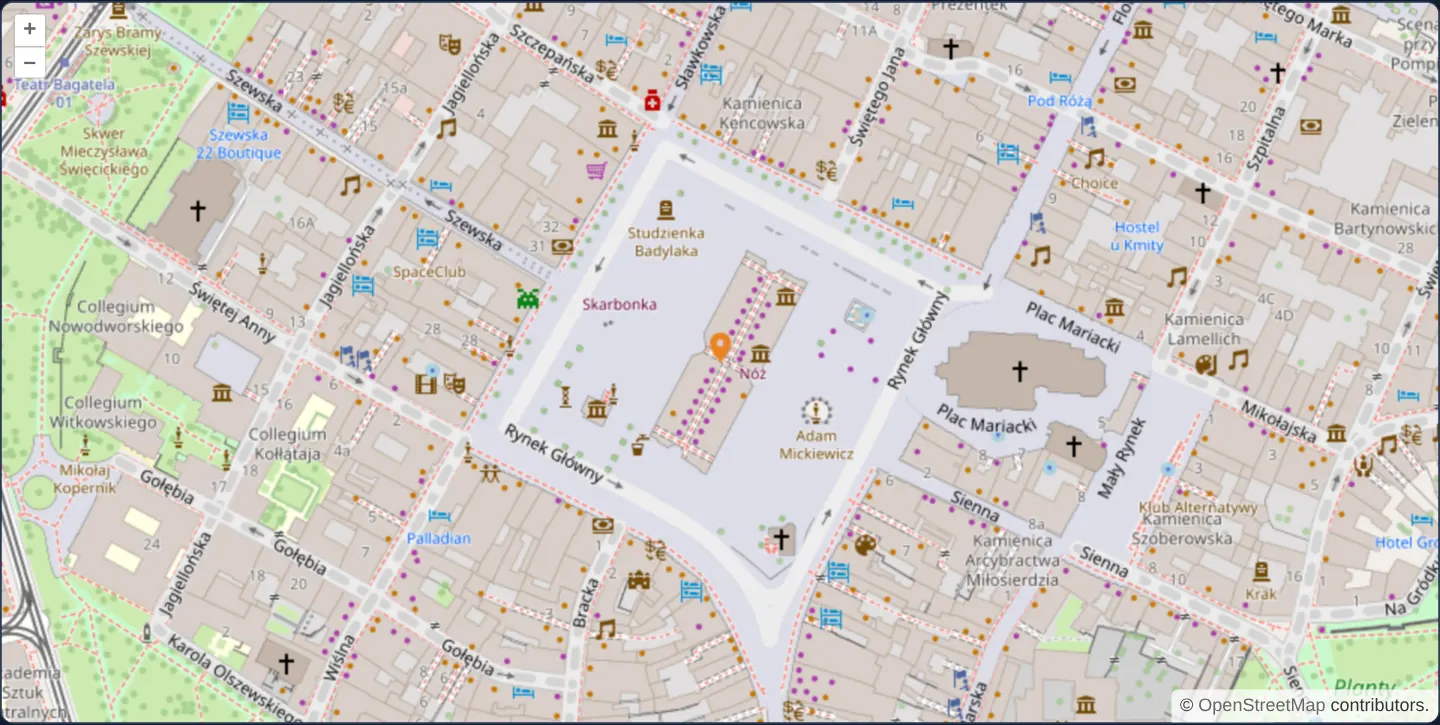
At zoom 17 on Kraków’s Main Market Square over OpenStreetMap, clicking the blue pin on the Cloth Hall (Sukiennice) selects it and redraws the marker in its inverted negative colours—turning the blue pin vivid orange without shipping a second selected-state image asset.
When you need it
Applications displaying dozens of distinct category icons—utility symbols, fleet vehicle types or tourism POI badges—often need a clear selected state without authoring and maintaining double the SVG/PNG files.
Deriving the selected icon programmatically on an HTML5 canvas (negative inversion, tinting, brightness boost or desaturation) guarantees visual consistency for every icon URL.
The code
The example uses cc-openlayers, my Angular component library for OpenLayers: each aol-… element creates the OpenLayers object it names, updates it from its inputs and disposes of it with the component.
icon-negative.tsimport { afterNextRender, ChangeDetectionStrategy, Component, viewChild } from '@angular/core';
import Feature, { type FeatureLike } from 'ol/Feature';
import type MapBrowserEvent from 'ol/MapBrowserEvent';
import Point from 'ol/geom/Point';
import { fromLonLat } from 'ol/proj';
import Icon from 'ol/style/Icon';
import Style from 'ol/style/Style';
import {
CoordinateComponent,
DefaultControlComponent,
DefaultInteractionComponent,
LayerTileComponent,
LayerVectorComponent,
MapComponent,
SelectInteractionComponent,
SourceOsmComponent,
SourceVectorComponent,
ViewComponent,
} from 'cc-openlayers';
/** The Cloth Hall in the middle of the Main Market Square. */
const CLOTH_HALL = [19.9373, 50.0617];
function createStyle(src: string | undefined, img: HTMLCanvasElement | undefined): Style {
return new Style({
image: new Icon({
// marker.svg's pin has its tip 2 of its 24 pixels above the bottom.
anchor: [0.5, 0.92],
crossOrigin: 'anonymous',
src: src,
img: img,
}),
});
}
const selectStyle: Record<string, Style> = {};
/**
* An icon on the Cloth Hall in Kraków's Main Market Square; a click selects it, and the selection draws the icon's
* negative, made once by inverting the pixels of the icon's image on a canvas.
*/
@Component({
selector: 'app-icon-negative',
imports: [
CoordinateComponent,
DefaultControlComponent,
DefaultInteractionComponent,
LayerTileComponent,
LayerVectorComponent,
MapComponent,
SelectInteractionComponent,
SourceOsmComponent,
SourceVectorComponent,
ViewComponent,
],
changeDetection: ChangeDetectionStrategy.OnPush,
template: `
<aol-map height="480px" (pointerMove)="hover($event)">
<aol-interaction-default />
<aol-interaction-select [style]="selectStyleFunction" />
<aol-control-defaults />
<aol-view [zoom]="17">
<aol-coordinate [x]="clothHall[0]" [y]="clothHall[1]" srid="EPSG:4326" />
</aol-view>
<aol-layer-tile><aol-source-osm /></aol-layer-tile>
<aol-layer-vector [style]="featureStyle">
<aol-source-vector />
</aol-layer-vector>
</aol-map>
`,
})
export class IconNegative {
protected readonly clothHall = CLOTH_HALL;
readonly iconFeature = new Feature(new Point(fromLonLat(CLOTH_HALL)));
private readonly map = viewChild.required(MapComponent);
private readonly source = viewChild.required(SourceVectorComponent);
constructor() {
this.iconFeature.set('style', createStyle('assets/marker.svg', undefined));
afterNextRender(() => this.source().instance.addFeature(this.iconFeature));
}
protected readonly featureStyle = function (feature: FeatureLike): Style {
return feature.get('style');
};
protected readonly selectStyleFunction = function (feature: FeatureLike): Style {
const image = feature.get('style').getImage().getImage() as HTMLImageElement;
if (!selectStyle[image.src]) {
const canvas = document.createElement('canvas');
const context = canvas.getContext('2d') as CanvasRenderingContext2D;
canvas.width = image.width;
canvas.height = image.height;
context.drawImage(image, 0, 0, image.width, image.height);
const imageData = context.getImageData(0, 0, canvas.width, canvas.height);
const data = imageData.data;
for (let i = 0, ii = data.length; i < ii; i = i + (i % 4 == 2 ? 2 : 1)) {
data[i] = 255 - data[i];
}
context.putImageData(imageData, 0, 0);
selectStyle[image.src] = createStyle(undefined, canvas);
}
return selectStyle[image.src];
};
protected hover(evt: MapBrowserEvent): void {
const map = this.map().instance;
(map.getTargetElement() as HTMLElement).style.cursor = map.hasFeatureAtPixel(evt.pixel) ? 'pointer' : '';
}
} The React version uses the library's React adapter, cc-openlayers/react: each component creates the OpenLayers object it names when it mounts, updates it from its props and disposes of it when it unmounts.
icon-negative.react.tsximport { useCallback, useState } from 'react';
import Feature, { type FeatureLike } from 'ol/Feature.js';
import type MapBrowserEvent from 'ol/MapBrowserEvent.js';
import Point from 'ol/geom/Point.js';
import { fromLonLat } from 'ol/proj.js';
import type OLVectorSource from 'ol/source/Vector.js';
import Icon from 'ol/style/Icon.js';
import Style from 'ol/style/Style.js';
import {
Coordinate,
DefaultControls,
DefaultInteractions,
Map,
OSMSource,
SelectInteraction,
TileLayer,
VectorLayer,
VectorSource,
View,
} from 'cc-openlayers/react';
/** The Cloth Hall in the middle of the Main Market Square. */
const CLOTH_HALL = [19.9373, 50.0617];
function createStyle(src: string | undefined, img: HTMLCanvasElement | undefined): Style {
return new Style({
image: new Icon({
// marker.svg's pin has its tip 2 of its 24 pixels above the bottom.
anchor: [0.5, 0.92],
crossOrigin: 'anonymous',
src: src,
img: img,
}),
});
}
const selectStyle: Record<string, Style> = {};
function featureStyle(feature: FeatureLike): Style {
return feature.get('style');
}
function selectStyleFunction(feature: FeatureLike): Style {
const image = feature.get('style').getImage().getImage() as HTMLImageElement;
if (!selectStyle[image.src]) {
const canvas = document.createElement('canvas');
const context = canvas.getContext('2d') as CanvasRenderingContext2D;
canvas.width = image.width;
canvas.height = image.height;
context.drawImage(image, 0, 0, image.width, image.height);
const imageData = context.getImageData(0, 0, canvas.width, canvas.height);
const data = imageData.data;
for (let i = 0, ii = data.length; i < ii; i = i + (i % 4 == 2 ? 2 : 1)) {
data[i] = 255 - data[i];
}
context.putImageData(imageData, 0, 0);
selectStyle[image.src] = createStyle(undefined, canvas);
}
return selectStyle[image.src];
}
function hover(evt: MapBrowserEvent): void {
const map = evt.map;
(map.getTargetElement() as HTMLElement).style.cursor = map.hasFeatureAtPixel(evt.pixel) ? 'pointer' : '';
}
/**
* An icon on the Cloth Hall in Kraków's Main Market Square; a click selects it, and the selection draws the icon's
* negative, made once by inverting the pixels of the icon's image on a canvas.
*/
export function IconNegative() {
const [iconFeature] = useState(() => {
const feature = new Feature(new Point(fromLonLat(CLOTH_HALL)));
feature.set('style', createStyle('assets/marker.svg', undefined));
return feature;
});
const addIcon = useCallback(
(source: OLVectorSource | null) => {
source?.addFeature(iconFeature);
},
[iconFeature]
);
return (
<Map height="480px" onPointerMove={hover}>
<DefaultInteractions />
<SelectInteraction style={selectStyleFunction} />
<DefaultControls />
<View zoom={17}>
<Coordinate x={CLOTH_HALL[0]} y={CLOTH_HALL[1]} srid="EPSG:4326" />
</View>
<TileLayer>
<OSMSource />
</TileLayer>
<VectorLayer style={featureStyle}>
<VectorSource ref={addIcon} />
</VectorLayer>
</Map>
);
}How the React version works
An icon on the Cloth Hall in the Main Market Square; a click selects it, and the selection draws the icon's negative, made once by inverting the pixels of its image on a canvas.
What both versions share
OpenLayers renders the map and handles the interactions; the cc-openlayers/core layer gives both adapters the same view binding (MapViewBinding) and the same conversion of coordinates from EPSG:4326 to the map's projection. Both versions keep the negatives in a module cache keyed by the image source.
From Angular to React
| Angular | React |
|---|---|
afterNextRender adding the feature to viewChild of the source | a ref callback from useCallback on <VectorSource> that adds the feature when the source arrives |
<aol-interaction-select [style]> | <SelectInteraction style> with the style function in the module |
(pointerMove) setting the cursor | onPointerMove on Map with a module function that reads the map from the event |
Who creates, updates and disposes
Map creates the ol/Map in useLayoutEffect and disposes of it on unmount; each layer, source and interaction component adds its object to the parent it gets from context and removes it in its effect's cleanup, as ngOnDestroy does in Angular.
Architecture and OpenLayers mechanics
When OpenLayers’ Select interaction styles a chosen feature, selectStyle checks a URL-keyed dictionary first; on a cache miss, it draws the loaded source image (crossOrigin: 'anonymous') onto an off-screen 2D canvas, inverts every pixel’s R, G and B channels (255 - value) via getImageData and putImageData while preserving alpha, and wraps that canvas as the img of a cached Icon anchored at [0.5, 0.92].
How it works
- The select style function paints the base icon onto an off-screen canvas, inverts RGB channels with
getImageDataandputImageData, and passes the canvas asimgto a new Icon. selectStylecaches each inverted Icon by source URL so pixel manipulation runs only once per icon asset.crossOrigin: 'anonymous'ensures cross-origin marker images arrive CORS-cleared for canvas pixel reads.- Anchor
[0.5, 0.92]places the pin tip (2 pixels above the bottom of the 24-pixel graphic) onto the coordinate.
Pitfalls
- Loading an icon from another domain without CORS headers taints the off-screen canvas and causes
getImageDatato throw a DOM SecurityError. - Rasterising a 24 × 24 SVG into a 24 × 24 bitmap canvas locks its resolution at 1x—multiply canvas dimensions by devicePixelRatio and apply inverse icon scale if you want Retina sharpness on selected SVG markers.
Related examples
The same feature in the OpenLayers examples .
Background: state and lifecycle of maps in Angular with OpenLayers, which the components of cc-openlayers take care of.