Layers · Angular, React and OpenLayers
Clip a layer to a shape
Clip an OpenLayers tile layer to an upright, HiDPI-aware vector shape on the canvas using prerender clip paths, inversePixelTransform and postrender.
What this example shows
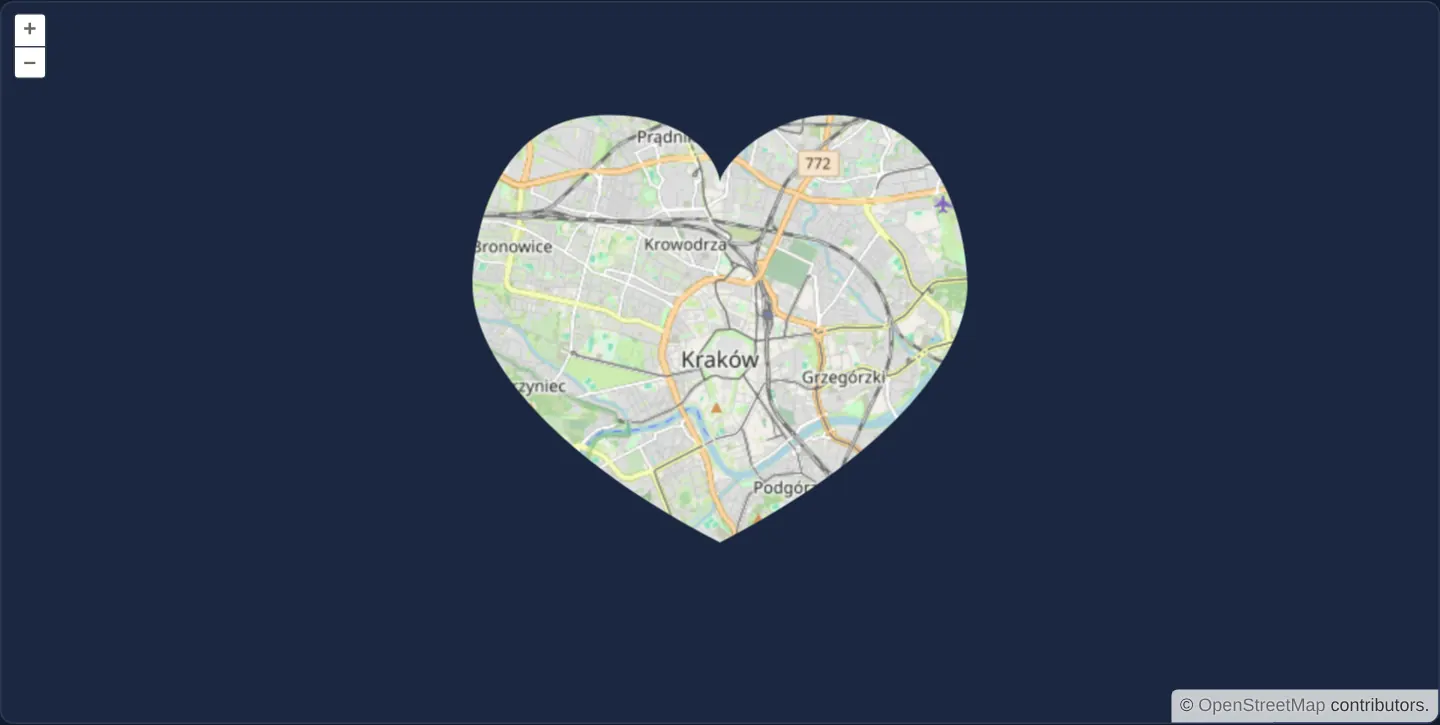
Instead of filling the rectangular viewport, OpenStreetMap’s street map of central Kraków at zoom 12 is visible exclusively through a crisp, upright 330 × 285 CSS-pixel heart window centred in the middle of the frame.
Panning, zooming and even rotating the map with Alt+Shift+drag moves streets smoothly behind the stationary upright heart aperture across standard and Retina screens alike.
When you need it
Spotlight lenses, custom circular/hexagonal inspection apertures and artistic presentation frames reveal a target layer inside an arbitrary 2D silhouette without modifying underlying map data or building static image masks.
Canvas 2D path clipping runs purely on the GPU/canvas during frame composition and leaves sibling layers below or above completely unaffected when state is properly bracketed.
The code
The example uses cc-openlayers, my Angular component library for OpenLayers: each aol-… element creates the OpenLayers object it names, updates it from its inputs and disposes of it with the component.
layer-clipping.tsimport { ChangeDetectionStrategy, Component } from '@angular/core';
import type RenderEvent from 'ol/render/Event';
import {
CoordinateComponent,
DefaultControlComponent,
DefaultInteractionComponent,
LayerTileComponent,
MapComponent,
SourceOsmComponent,
ViewComponent,
} from 'cc-openlayers';
/** A tile layer clipped to a heart before it renders and unclipped after, whatever the map's rotation. */
@Component({
selector: 'app-layer-clipping',
imports: [
CoordinateComponent,
DefaultControlComponent,
DefaultInteractionComponent,
LayerTileComponent,
MapComponent,
SourceOsmComponent,
ViewComponent,
],
changeDetection: ChangeDetectionStrategy.OnPush,
template: `
<aol-map height="480px">
<aol-interaction-default />
<aol-control-defaults />
<aol-view [zoom]="12"><aol-coordinate [x]="19.9368" [y]="50.0614" srid="EPSG:4326" /></aol-view>
<aol-layer-tile [prerender]="clip" [postrender]="restore"><aol-source-osm /></aol-layer-tile>
</aol-map>
`,
})
export class LayerClipping {
protected readonly clip = (event: RenderEvent): void => {
const ctx = event.context as CanvasRenderingContext2D;
// calculate the pixel ratio and rotation of the canvas
const matrix = event.inversePixelTransform;
const canvasPixelRatio = Math.sqrt(matrix[0] * matrix[0] + matrix[1] * matrix[1]);
const canvasRotation = -Math.atan2(matrix[1], matrix[0]);
ctx.save();
// center the canvas and remove rotation to position clipping
ctx.translate(ctx.canvas.width / 2, ctx.canvas.height / 2);
ctx.rotate(-canvasRotation);
ctx.scale(3 * canvasPixelRatio, 3 * canvasPixelRatio);
ctx.translate(-75, -80);
ctx.beginPath();
ctx.moveTo(75, 40);
ctx.bezierCurveTo(75, 37, 70, 25, 50, 25);
ctx.bezierCurveTo(20, 25, 20, 62.5, 20, 62.5);
ctx.bezierCurveTo(20, 80, 40, 102, 75, 120);
ctx.bezierCurveTo(110, 102, 130, 80, 130, 62.5);
ctx.bezierCurveTo(130, 62.5, 130, 25, 100, 25);
ctx.bezierCurveTo(85, 25, 75, 37, 75, 40);
ctx.clip();
ctx.translate(75, 80);
ctx.scale(1 / 3 / canvasPixelRatio, 1 / 3 / canvasPixelRatio);
// reapply canvas rotation and position
ctx.rotate(canvasRotation);
ctx.translate(-ctx.canvas.width / 2, -ctx.canvas.height / 2);
};
protected readonly restore = (event: RenderEvent): void => {
(event.context as CanvasRenderingContext2D).restore();
};
} The React version uses the library's React adapter, cc-openlayers/react: each component creates the OpenLayers object it names when it mounts, updates it from its props and disposes of it when it unmounts.
layer-clipping.react.tsximport type RenderEvent from 'ol/render/Event';
import { Coordinate, DefaultControls, DefaultInteractions, Map, OSMSource, TileLayer, View } from 'cc-openlayers/react';
const clip = (event: RenderEvent): void => {
const ctx = event.context as CanvasRenderingContext2D;
// calculate the pixel ratio and rotation of the canvas
const matrix = event.inversePixelTransform as number[];
const canvasPixelRatio = Math.sqrt(matrix[0] * matrix[0] + matrix[1] * matrix[1]);
const canvasRotation = -Math.atan2(matrix[1], matrix[0]);
ctx.save();
// center the canvas and remove rotation to position clipping
ctx.translate(ctx.canvas.width / 2, ctx.canvas.height / 2);
ctx.rotate(-canvasRotation);
ctx.scale(3 * canvasPixelRatio, 3 * canvasPixelRatio);
ctx.translate(-75, -80);
ctx.beginPath();
ctx.moveTo(75, 40);
ctx.bezierCurveTo(75, 37, 70, 25, 50, 25);
ctx.bezierCurveTo(20, 25, 20, 62.5, 20, 62.5);
ctx.bezierCurveTo(20, 80, 40, 102, 75, 120);
ctx.bezierCurveTo(110, 102, 130, 80, 130, 62.5);
ctx.bezierCurveTo(130, 62.5, 130, 25, 100, 25);
ctx.bezierCurveTo(85, 25, 75, 37, 75, 40);
ctx.clip();
ctx.translate(75, 80);
ctx.scale(1 / 3 / canvasPixelRatio, 1 / 3 / canvasPixelRatio);
// reapply canvas rotation and position
ctx.rotate(canvasRotation);
ctx.translate(-ctx.canvas.width / 2, -ctx.canvas.height / 2);
};
const restore = (event: RenderEvent): void => {
(event.context as CanvasRenderingContext2D).restore();
};
/** A tile layer clipped to a heart before it renders and unclipped after, whatever the map's rotation. */
export function LayerClipping() {
return (
<Map height="480px">
<DefaultInteractions />
<DefaultControls />
<View zoom={12}>
<Coordinate x={19.9368} y={50.0614} srid="EPSG:4326" />
</View>
<TileLayer onPreRender={clip} onPostRender={restore}>
<OSMSource />
</TileLayer>
</Map>
);
}How the React version works
Before rendering, the layer is clipped to a heart shape in the middle of the canvas, and after rendering the canvas state is restored. The clip takes the map's rotation and the pixel density into account.
What both versions share
OpenLayers renders the map and handles the interactions; the cc-openlayers/core layer gives both adapters the same view binding (MapViewBinding) and the same conversion of coordinates from EPSG:4326 to the map's projection. The clip and restore functions are the same in both versions.
From Angular to React
| Angular | React |
|---|---|
[prerender]="clip", [postrender]="restore" | onPreRender={clip}, onPostRender={restore} (module functions) |
Who creates, updates and disposes
Map creates the ol/Map in useLayoutEffect and disposes of it on unmount; each layer, source and interaction component adds its object to the parent it gets from context and removes it in its effect's cleanup, as ngOnDestroy does in Angular.
Architecture and OpenLayers mechanics
In the tile layer’s [prerender] listener, the 2D canvas context state is saved (ctx.save()), a Bezier heart path is constructed around the viewport midpoint, ctx.clip() restricts subsequent tile drawing to that path, and [postrender] calls ctx.restore() so later layers or controls are not clipped.
Because OpenLayers renders tile layers onto an unrotated backing canvas scaled by devicePixelRatio—and applies view rotation via CSS transforms—converting screen-centred coordinates through event.inversePixelTransform scales the path by pixel density and counter-rotates it against view heading so the 330 × 285 CSS-pixel heart stays upright and identically sized on every display.
How it works
[prerender]saves the 2D canvas state and applies a Bezier clip path before tiles paint;[postrender]restores the state immediately afterward.inversePixelTransformmaps CSS viewport pixels into the layer’s backing canvas pixels—accounting for both devicePixelRatio and active view rotation.- Scaling around the midpoint and counter-rotating keeps the heart window upright at 330 × 285 CSS pixels regardless of Retina density or map heading.
Pitfalls
- Canvas clipping only masks painted pixels: OpenLayers still downloads and decodes tiles for the entire rectangular viewport outside the clip shape unless you also set a bounding [extent] on the layer.
- Omitting
inversePixelTransform(or devicePixelRatio scaling) shrinks the aperture to half size on 2x Retina screens, though it stays centred.
Related examples
The same feature in the OpenLayers examples .
Background: state and lifecycle of maps in Angular with OpenLayers, which the components of cc-openlayers take care of.