Styling and labels · Angular, React and OpenLayers
Stroke options of a line style
Test every OpenLayers Stroke option live—width, color, cap, join, miterLimit, dash pattern and lateral pixel offset—with draw, modify and snap.
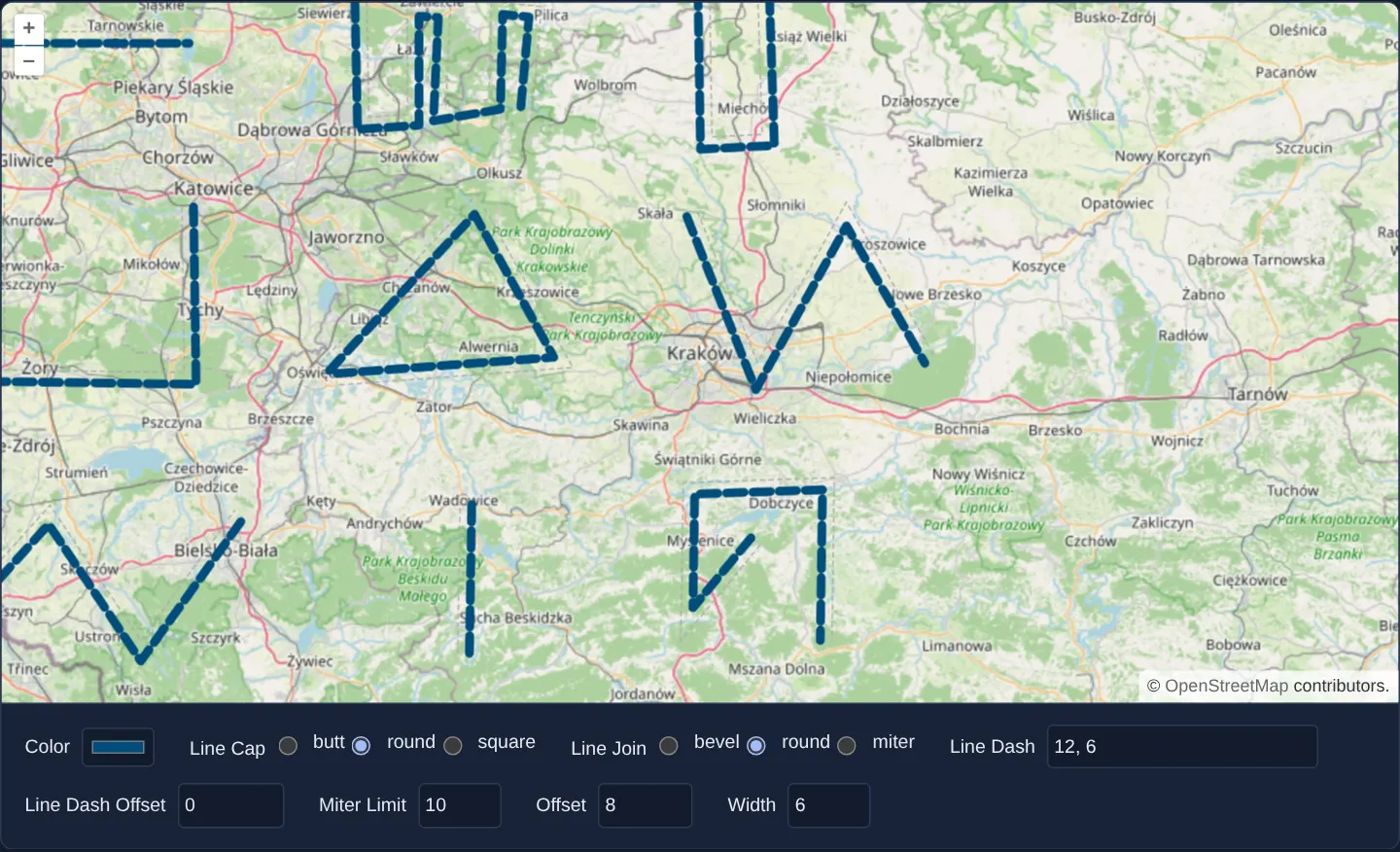
What this example shows
Around Kraków at zoom 9 over OpenStreetMap, nine multi-angle sample lines and any new polygons you sketch respond immediately to a comprehensive stroke-styling form controlling colour, width, line cap, line join, miter limit, dash array, dash offset and sideways pixel offset (accompanied by a thin grey dashed reference line showing true geometry position whenever offset is non-zero).
When you need it
Technical cartography relies heavily on advanced stroke parameters: lateral pixel offset separates parallel bus routes or dual-circuit power lines sharing one centreline, dash arrays mark planned vs existing pipes, and miterLimit prevents spiky acute road corners.
Experimenting with all Stroke properties simultaneously on sharp corners and drawn polygons reveals exact rendering behaviour before codifying enterprise SLD/cartographic standards.
The code
The example uses cc-openlayers, my Angular component library for OpenLayers: each aol-… element creates the OpenLayers object it names, updates it from its inputs and disposes of it with the component.
line-styles.tsimport { ChangeDetectionStrategy, Component, computed, signal } from '@angular/core';
import {
CoordinateComponent,
DefaultControlComponent,
DefaultInteractionComponent,
LayerTileComponent,
LayerVectorComponent,
MapComponent,
SourceGeoJSONComponent,
SourceOsmComponent,
ViewComponent,
} from 'cc-openlayers';
import { DrawInteractionComponent, ModifyInteractionComponent, SnapInteractionComponent } from 'cc-openlayers/editing';
import Stroke from 'ol/style/Stroke';
import Style from 'ol/style/Style';
/** Sample lines styled by a form of stroke options, editable with the draw, modify and snap interactions. */
@Component({
selector: 'app-line-styles',
imports: [
CoordinateComponent,
DefaultControlComponent,
DefaultInteractionComponent,
DrawInteractionComponent,
LayerTileComponent,
LayerVectorComponent,
MapComponent,
ModifyInteractionComponent,
SnapInteractionComponent,
SourceGeoJSONComponent,
SourceOsmComponent,
ViewComponent,
],
changeDetection: ChangeDetectionStrategy.OnPush,
template: `
<aol-map height="480px">
<aol-interaction-default />
<aol-control-defaults />
<aol-view [zoom]="9">
<aol-coordinate [x]="19.9368" [y]="50.0614" srid="EPSG:4326" />
</aol-view>
<aol-layer-tile><aol-source-osm /></aol-layer-tile>
<aol-layer-vector [style]="styles()">
<aol-source-geojson #source url="assets/line-samples.geojson" featureProjection="EPSG:3857" />
</aol-layer-vector>
<aol-interaction-modify [source]="source.instance" />
<aol-interaction-draw type="Polygon" [source]="source.instance" />
<aol-interaction-snap [source]="source.instance" />
</aol-map>
<div class="example-controls">
<label> Color <input id="color" type="color" [value]="color()" (change)="color.set(text($event))" /> </label>
<span>
Line Cap
@for (cap of caps; track cap) {
<label>
<input type="radio" name="lineCap" [value]="cap" [checked]="lineCap() === cap" (click)="lineCap.set(cap)" />
{{ cap }}
</label>
}
</span>
<span>
Line Join
@for (join of joins; track join) {
<label>
<input
type="radio"
name="lineJoin"
[value]="join"
[checked]="lineJoin() === join"
(click)="lineJoin.set(join)"
/>
{{ join }}
</label>
}
</span>
<label>
Line Dash
<input
id="lineDash"
type="text"
placeholder="1, 3"
[value]="lineDash()"
(change)="lineDash.set(text($event))"
/>
</label>
<label>
Line Dash Offset
<input
id="lineDashOffset"
type="number"
min="-200"
max="20"
[value]="lineDashOffset()"
(change)="lineDashOffset.set(number($event))"
/>
</label>
<label>
Miter Limit
<input
id="miterLimit"
type="number"
min="1"
max="20"
[value]="miterLimit()"
(change)="miterLimit.set(number($event))"
/>
</label>
<label>
Offset
<input id="offset" type="number" min="-20" max="20" [value]="offset()" (change)="offset.set(number($event))" />
</label>
<label>
Width
<input id="width" type="number" min="1" max="40" [value]="width()" (change)="width.set(number($event))" />
</label>
</div>
`,
})
export class LineStyles {
protected readonly caps = ['butt', 'round', 'square'] as const;
protected readonly joins = ['bevel', 'round', 'miter'] as const;
protected readonly color = signal('#004D7D');
protected readonly lineCap = signal<(typeof this.caps)[number]>('round');
protected readonly lineJoin = signal<(typeof this.joins)[number]>('round');
protected readonly lineDash = signal('');
protected readonly lineDashOffset = signal(0);
protected readonly miterLimit = signal(10);
protected readonly offset = signal(0);
protected readonly width = signal(2);
/** The line's style and, while it is offset, a dashed grey copy of the line where it really is. */
protected readonly styles = computed(() => {
const dash = this.lineDash()
.split(',')
.filter((value) => value.trim() !== '')
.map(Number);
const styles = [
new Style({
stroke: new Stroke({
color: this.color(),
lineCap: this.lineCap(),
lineJoin: this.lineJoin(),
lineDash: dash.length > 0 ? dash : undefined,
lineDashOffset: this.lineDashOffset(),
miterLimit: this.miterLimit(),
width: this.width(),
offset: this.offset(),
}),
}),
];
if (Math.abs(this.offset()) > 0) {
styles.push(new Style({ stroke: new Stroke({ color: '#aaa', width: 1, lineDash: [3, 3] }) }));
}
return styles;
});
protected number(event: Event): number {
return (event.target as HTMLInputElement).valueAsNumber;
}
protected text(event: Event): string {
return (event.target as HTMLInputElement).value;
}
} The React version uses the library's React adapter, cc-openlayers/react: each component creates the OpenLayers object it names when it mounts, updates it from its props and disposes of it when it unmounts.
line-styles.react.tsximport { useMemo, useState, type ChangeEvent } from 'react';
import type OLVectorSource from 'ol/source/Vector.js';
import Stroke from 'ol/style/Stroke.js';
import Style from 'ol/style/Style.js';
import {
Coordinate,
DefaultControls,
DefaultInteractions,
DrawInteraction,
GeoJSONSource,
Map,
ModifyInteraction,
OSMSource,
SnapInteraction,
TileLayer,
VectorLayer,
View,
} from 'cc-openlayers/react';
const CAPS = ['butt', 'round', 'square'] as const;
const JOINS = ['bevel', 'round', 'miter'] as const;
function number(event: ChangeEvent<HTMLInputElement>): number {
return event.target.valueAsNumber;
}
function text(event: ChangeEvent<HTMLInputElement>): string {
return event.target.value;
}
/** Sample lines styled by a form of stroke options, editable with the draw, modify and snap interactions. */
export function LineStyles() {
const [source, setSource] = useState<OLVectorSource | null>(null);
const [color, setColor] = useState('#004D7D');
const [lineCap, setLineCap] = useState<(typeof CAPS)[number]>('round');
const [lineJoin, setLineJoin] = useState<(typeof JOINS)[number]>('round');
const [lineDash, setLineDash] = useState('');
const [lineDashOffset, setLineDashOffset] = useState(0);
const [miterLimit, setMiterLimit] = useState(10);
const [offset, setOffset] = useState(0);
const [width, setWidth] = useState(2);
/** The line's style and, while it is offset, a dashed grey copy of the line where it really is. */
const styles = useMemo(() => {
const dash = lineDash
.split(',')
.filter((value) => value.trim() !== '')
.map(Number);
const result = [
new Style({
stroke: new Stroke({
color,
lineCap,
lineJoin,
lineDash: dash.length > 0 ? dash : undefined,
lineDashOffset,
miterLimit,
width,
offset,
}),
}),
];
if (Math.abs(offset) > 0) {
result.push(new Style({ stroke: new Stroke({ color: '#aaa', width: 1, lineDash: [3, 3] }) }));
}
return result;
}, [color, lineCap, lineJoin, lineDash, lineDashOffset, miterLimit, offset, width]);
return (
<>
<Map height="480px">
<DefaultInteractions />
<DefaultControls />
<View zoom={9}>
<Coordinate x={19.9368} y={50.0614} srid="EPSG:4326" />
</View>
<TileLayer>
<OSMSource />
</TileLayer>
<VectorLayer style={styles}>
<GeoJSONSource ref={setSource} url="assets/line-samples.geojson" featureProjection="EPSG:3857" />
</VectorLayer>
{source ? (
<>
<ModifyInteraction source={source} />
<DrawInteraction type="Polygon" source={source} />
<SnapInteraction source={source} />
</>
) : null}
</Map>
<div className="example-controls">
<label>
Color <input id="color" type="color" value={color} onChange={(event) => setColor(text(event))} />
</label>
<span>
Line Cap
{CAPS.map((cap) => (
<label key={cap}>
<input
type="radio"
name="lineCap"
value={cap}
checked={lineCap === cap}
onChange={() => setLineCap(cap)}
/>
{cap}
</label>
))}
</span>
<span>
Line Join
{JOINS.map((join) => (
<label key={join}>
<input
type="radio"
name="lineJoin"
value={join}
checked={lineJoin === join}
onChange={() => setLineJoin(join)}
/>
{join}
</label>
))}
</span>
<label>
Line Dash
<input
id="lineDash"
type="text"
placeholder="1, 3"
value={lineDash}
onChange={(event) => setLineDash(text(event))}
/>
</label>
<label>
Line Dash Offset
<input
id="lineDashOffset"
type="number"
min="-200"
max="20"
value={lineDashOffset}
onChange={(event) => setLineDashOffset(number(event))}
/>
</label>
<label>
Miter Limit
<input
id="miterLimit"
type="number"
min="1"
max="20"
value={miterLimit}
onChange={(event) => setMiterLimit(number(event))}
/>
</label>
<label>
Offset
<input
id="offset"
type="number"
min="-20"
max="20"
value={offset}
onChange={(event) => setOffset(number(event))}
/>
</label>
<label>
Width
<input
id="width"
type="number"
min="1"
max="40"
value={width}
onChange={(event) => setWidth(number(event))}
/>
</label>
</div>
</>
);
}How the React version works
Sample lines styled by a form of stroke options (colour, cap, join, dash, dash offset, miter limit, offset and width), editable with the draw, modify and snap interactions; an offset other than zero adds a dashed reference line.
What both versions share
OpenLayers renders the map and handles the interactions; the cc-openlayers/core layer gives both adapters the same view binding (MapViewBinding) and the same conversion of coordinates from EPSG:4326 to the map's projection. The fields restyle the lines in React at every change of their value, and in Angular when the value is committed (change).
From Angular to React
| Angular | React |
|---|---|
<aol-interaction-draw>, -modify and -snap on one source | <DrawInteraction>, <ModifyInteraction> and <SnapInteraction> with the source from ref={setSource} |
the form's (change)/(click) and signals | onChange and useState |
a computed of the styles | useMemo on the form values |
Who creates, updates and disposes
Map creates the ol/Map in useLayoutEffect and disposes of it on unmount; each layer, source and interaction component adds its object to the parent it gets from context and removes it in its effect's cleanup, as ngOnDestroy does in Angular.
Architecture and OpenLayers mechanics
Form controls feed a reactive computed signal that returns a fresh Style array bound to [style] on the vector layer—automatically including a secondary thin grey dashed reference stroke whenever lateral offset is non-zero so you can see how positive offsets shift strokes to the right of digitisation direction.
Draw, Modify and Snap interactions share the exact same vector source so newly sketched or dragged shapes inherit the active stroke configuration immediately.
How it works
- A
computedsignal builds a fresh array of OpenLayers Style instances bound to[style]whenever any form field changes. offsetshifts the rendered stroke laterally in pixels (to the right of line direction for positive numbers) beside a grey dashed true-centreline guide.- Comma-separated Line Dash numbers define pixel dash/gap lengths (leaving the input empty restores a solid stroke).
- Line Join and Miter Limit control whether acute vertices form sharp miters, round bends or clipped bevels.
- Shared Draw, Modify and Snap interactions let you draw new snapped polygons and drag existing vertices under the live stroke style.
Pitfalls
- Mutating an existing OpenLayers
Strokeobject in place via setters does not notify the layer to repaint—either return a new Style/array reference from acomputedsignal as done here, or call layer.changed() explicitly. - Lateral stroke
offsetis relative to vertex digitisation order: two adjoining road segments drawn in opposite directions will shift to opposite sides of the centreline under the same positive offset.
Related examples
The same feature in the OpenLayers examples .
Background: state and lifecycle of maps in Angular with OpenLayers, which the components of cc-openlayers take care of.