Styling and labels · Angular, React and OpenLayers
Several styles for one feature
Compose three concentric OpenLayers circle styles on one feature—halo, rimmed ring and core dot—ordered deterministically with zIndex in Angular.
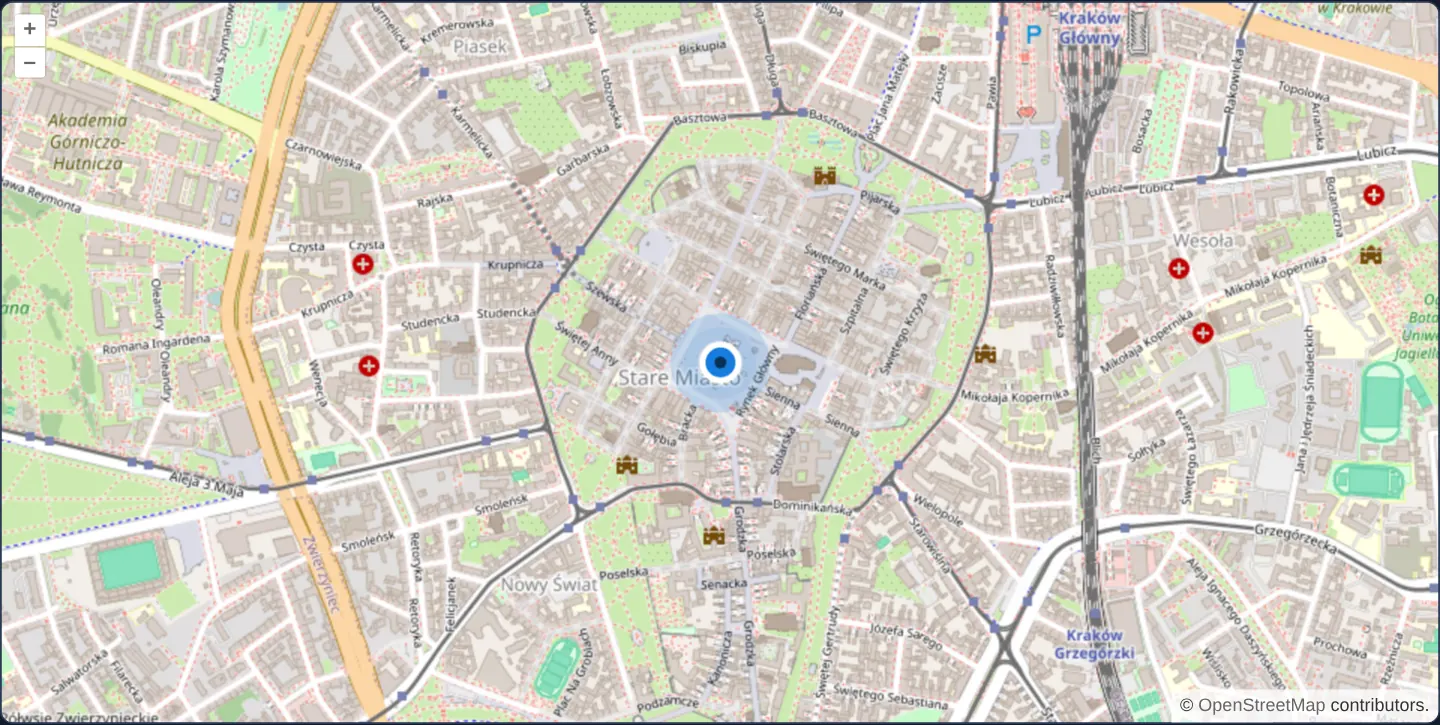
What this example shows
Directly on Kraków’s Main Square, a single point feature renders as a crisp multi-layered cartographic target: a wide translucent outer halo, a white-rimmed middle ring and a solid dark centre dot—built entirely from vector circle primitives without external PNG or SVG assets.
When you need it
Single-stroke or single-circle symbols easily disappear against busy aerial orthophotos or dense street networks.
Stacking a contrasting casing or translucent halo underneath a foreground symbol keeps markers, GPS locks and selected vertices legible over dark forests and bright rooftops alike.
The code
The example uses cc-openlayers, my Angular component library for OpenLayers: each aol-… element creates the OpenLayers object it names, updates it from its inputs and disposes of it with the component.
styles-composition.tsimport { ChangeDetectionStrategy, Component } from '@angular/core';
import {
CoordinateComponent,
DefaultControlComponent,
DefaultInteractionComponent,
FeatureComponent,
GeometryPointComponent,
LayerTileComponent,
LayerVectorComponent,
MapComponent,
SourceOsmComponent,
SourceVectorComponent,
StyleCircleComponent,
StyleComponent,
StyleFillComponent,
StylesComponent,
StyleStrokeComponent,
ViewComponent,
} from 'cc-openlayers';
/** A point drawn with three stacked circle styles: a halo, a ring and a centre dot. */
@Component({
selector: 'app-styles-composition',
imports: [
CoordinateComponent,
DefaultControlComponent,
DefaultInteractionComponent,
FeatureComponent,
GeometryPointComponent,
LayerTileComponent,
LayerVectorComponent,
MapComponent,
SourceOsmComponent,
SourceVectorComponent,
StyleCircleComponent,
StyleComponent,
StyleFillComponent,
StylesComponent,
StyleStrokeComponent,
ViewComponent,
],
changeDetection: ChangeDetectionStrategy.OnPush,
template: `
<aol-map height="480px">
<aol-interaction-default />
<aol-control-defaults />
<aol-view [zoom]="15"><aol-coordinate [x]="19.9373" [y]="50.0617" srid="EPSG:4326" /></aol-view>
<aol-layer-tile><aol-source-osm /></aol-layer-tile>
<aol-layer-vector>
<aol-source-vector>
<aol-feature>
<aol-geometry-point><aol-coordinate [x]="19.9373" [y]="50.0617" srid="EPSG:4326" /></aol-geometry-point>
<aol-styles>
<aol-style [zIndex]="1">
<aol-style-circle [radius]="24">
<aol-style-stroke color="rgba(22, 125, 222, 0.18)" [width]="18" />
<aol-style-fill color="rgba(22, 125, 222, 0.08)" />
</aol-style-circle>
</aol-style>
<aol-style [zIndex]="2">
<aol-style-circle [radius]="12">
<aol-style-stroke color="#ffffff" [width]="4" />
<aol-style-fill color="#167dde" />
</aol-style-circle>
</aol-style>
<aol-style [zIndex]="3">
<aol-style-circle [radius]="4"><aol-style-fill color="#0b2f57" /></aol-style-circle>
</aol-style>
</aol-styles>
</aol-feature>
</aol-source-vector>
</aol-layer-vector>
</aol-map>
`,
})
export class StylesComposition {} The React version uses the library's React adapter, cc-openlayers/react: each component creates the OpenLayers object it names when it mounts, updates it from its props and disposes of it when it unmounts.
styles-composition.react.tsximport {
CircleStyle,
Coordinate,
DefaultControls,
DefaultInteractions,
Feature,
Fill,
Map,
OSMSource,
PointGeometry,
Stroke,
Style,
Styles,
TileLayer,
VectorLayer,
VectorSource,
View,
} from 'cc-openlayers/react';
/** A point drawn with three stacked circle styles: a halo, a ring and a centre dot. */
export function StylesComposition() {
return (
<Map height="480px">
<DefaultInteractions />
<DefaultControls />
<View zoom={15}>
<Coordinate x={19.9373} y={50.0617} srid="EPSG:4326" />
</View>
<TileLayer>
<OSMSource />
</TileLayer>
<VectorLayer>
<VectorSource>
<Feature>
<PointGeometry>
<Coordinate x={19.9373} y={50.0617} srid="EPSG:4326" />
</PointGeometry>
<Styles>
<Style zIndex={1}>
<CircleStyle radius={24}>
<Stroke color="rgba(22, 125, 222, 0.18)" width={18} />
<Fill color="rgba(22, 125, 222, 0.08)" />
</CircleStyle>
</Style>
<Style zIndex={2}>
<CircleStyle radius={12}>
<Stroke color="#ffffff" width={4} />
<Fill color="#167dde" />
</CircleStyle>
</Style>
<Style zIndex={3}>
<CircleStyle radius={4}>
<Fill color="#0b2f57" />
</CircleStyle>
</Style>
</Styles>
</Feature>
</VectorSource>
</VectorLayer>
</Map>
);
}How the React version works
One point drawn with three circle styles on top of each other: a halo, a ring and a centre dot.
What both versions share
OpenLayers renders the map and handles the interactions; the cc-openlayers/core layer gives both adapters the same view binding (MapViewBinding) and the same conversion of coordinates from EPSG:4326 to the map's projection.
From Angular to React
| Angular | React |
|---|---|
<aol-feature> with <aol-geometry-point> and <aol-coordinate> | <Feature> with <PointGeometry> and <Coordinate> |
<aol-styles> holding three <aol-style> elements | <Styles> holding three <Style> elements, drawn in their order |
<aol-style-circle> with <aol-style-fill> and <aol-style-stroke> | <CircleStyle> with <Fill> and <Stroke> |
Who creates, updates and disposes
Map creates the ol/Map in useLayoutEffect and disposes of it on unmount; each layer, source and interaction component adds its object to the parent it gets from context and removes it in its effect's cleanup, as ngOnDestroy does in Angular.
Architecture and OpenLayers mechanics
Wrapping multiple aol-style elements inside aol-styles attaches an array of OpenLayers Style instances to the single point feature. Assigning explicit [zIndex] integers orders the passes deterministically from bottom to top—painting the wide translucent halo first, the white-rimmed ring second and the inner dot last.
How it works
aol-stylesbinds an array of styles to one feature, with each childaol-stylecontributing one rendering pass.[zIndex]fixes the draw order from lowest to highest: outer translucent halo, white-rimmed ring, then dark centre dot.- Constructing all three passes from vector circles of different radii requires zero external image downloads and scales sharply on any screen.
Pitfalls
- Leaving
zIndexunset relies purely on array order, which dynamic template updates can inadvertently reshuffle—specify explicit[zIndex]values on multi-pass symbols. - Each extra style in
aol-stylesadds another draw pass per feature; for layers holding tens of thousands of identical markers, pre-render the composite symbol once onto an off-screen canvas icon instead.
Related examples
The same feature in the OpenLayers examples .
Background: state and lifecycle of maps in Angular with OpenLayers, which the components of cc-openlayers take care of.