Interactions · Angular, React and OpenLayers
Scale and rotate shapes by a vertex
Scale and rotate OpenLayers polygons and lines around their centroid by dragging outer vertices, or translate whole shapes with Ctrl/Cmd-drag.
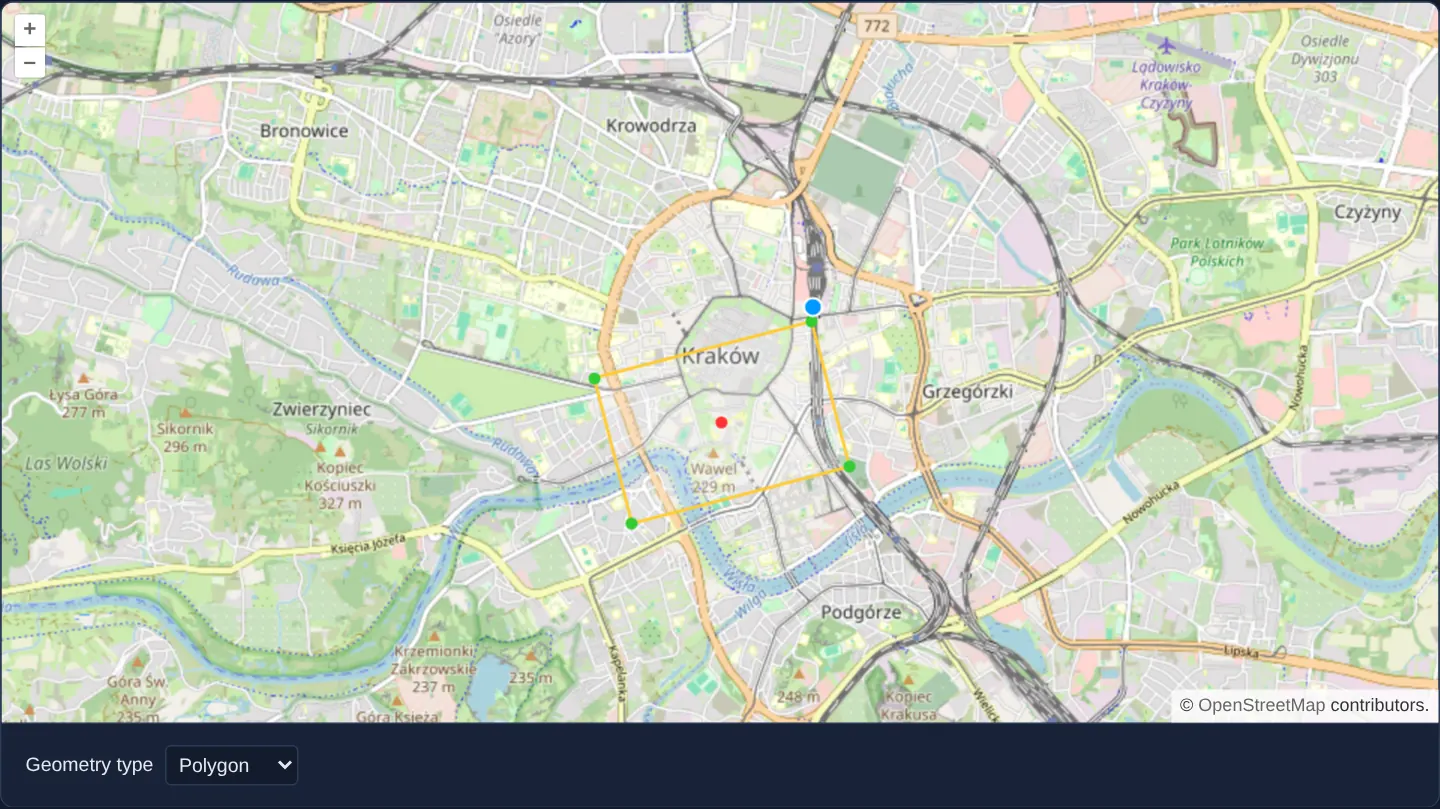
What this example shows
Over Kraków’s Old Town and Wawel, dragging any green outer corner handle of a polygon or line smoothly scales and rotates the entire shape rigidly around its red central anchor without distorting internal angles, while holding Ctrl (or Cmd on macOS) and dragging translates the shape across the map.
When you need it
Placing building footprints, stage/tent layouts, solar-panel arrays or schematic symbols requires rigid CAD-style scale, rotation and translation rather than freeform corner-by-corner distortion.
Combining custom Modify geometry cloning with a modifier-gated Translate interaction delivers a clean transform gizmo using built-in OpenLayers primitives.
The code
The example uses cc-openlayers, my Angular component library for OpenLayers: each aol-… element creates the OpenLayers object it names, updates it from its inputs and disposes of it with the component.
modify-scale-and-rotate.tsimport { ChangeDetectionStrategy, Component, signal } from '@angular/core';
import type { Coordinate } from 'ol/coordinate';
import { never, platformModifierKeyOnly, primaryAction } from 'ol/events/condition';
import type MapBrowserEvent from 'ol/MapBrowserEvent';
import { getCenter, getHeight, getWidth } from 'ol/extent';
import type Feature from 'ol/Feature';
import type { FeatureLike } from 'ol/Feature';
import type Geometry from 'ol/geom/Geometry';
import type LineString from 'ol/geom/LineString';
import MultiPoint from 'ol/geom/MultiPoint';
import Point from 'ol/geom/Point';
import type Polygon from 'ol/geom/Polygon';
import Modify, { type ModifyEvent } from 'ol/interaction/Modify';
import VectorSource from 'ol/source/Vector';
import CircleStyle from 'ol/style/Circle';
import Fill from 'ol/style/Fill';
import Stroke from 'ol/style/Stroke';
import Style, { type StyleFunction } from 'ol/style/Style';
import {
CoordinateComponent,
DefaultControlComponent,
DefaultInteractionComponent,
LayerTileComponent,
LayerVectorComponent,
MapComponent,
SourceOsmComponent,
SourceVectorComponent,
ViewComponent,
} from 'cc-openlayers';
import {
DrawInteractionComponent,
ModifyInteractionComponent,
TranslateInteractionComponent,
} from 'cc-openlayers/editing';
type DrawType = 'Point' | 'LineString' | 'Polygon' | 'Circle';
/** The geometry being scaled and rotated while a vertex is dragged, with what the drag started from. */
interface ModifyGeometry {
geometry: Geometry;
geometry0?: Geometry;
point?: Coordinate;
center?: Coordinate;
minRadius?: number;
}
/** The anchor a geometry is scaled and rotated about, its vertices, and the distance within which they do not count. */
interface Anchor {
center: Coordinate;
coordinates?: Coordinate[];
minRadius: number;
sqDistances?: number[];
}
/**
* The centroid of a polygon's vertices or the midpoint of a line (which stay put as the shape rotates, unlike the
* centre of its extent), else the centre of the extent; only vertices more than a third of the farthest one's
* distance away scale and rotate it.
*/
function calculateCenter(geometry: Geometry): Anchor {
let center: Coordinate;
let coordinates: Coordinate[] | undefined;
const type = geometry.getType();
if (type === 'Polygon') {
coordinates = (geometry as Polygon).getCoordinates()[0].slice(1);
const sum = coordinates.reduce(([x, y], coordinate) => [x + coordinate[0], y + coordinate[1]], [0, 0]);
center = [sum[0] / coordinates.length, sum[1] / coordinates.length];
} else if (type === 'LineString') {
center = (geometry as LineString).getCoordinateAt(0.5);
coordinates = (geometry as LineString).getCoordinates();
} else {
center = getCenter(geometry.getExtent());
}
if (!coordinates) {
const extent = geometry.getExtent();
return { center, minRadius: Math.max(getWidth(extent), getHeight(extent)) / 3 };
}
const sqDistances = coordinates.map(([x, y]) => (x - center[0]) ** 2 + (y - center[1]) ** 2);
return { center, coordinates, minRadius: Math.sqrt(Math.max(...sqDistances)) / 3, sqDistances };
}
const style = new Style({
geometry: (feature) =>
(feature.get('modifyGeometry') as ModifyGeometry | undefined)?.geometry ?? feature.getGeometry(),
fill: new Fill({ color: 'rgba(255, 255, 255, 0.2)' }),
stroke: new Stroke({ color: '#ffcc33', width: 2 }),
image: new CircleStyle({ radius: 7, fill: new Fill({ color: '#ffcc33' }) }),
});
const anchorImage = new CircleStyle({ radius: 4, fill: new Fill({ color: '#ff3333' }) });
const vertexImage = new CircleStyle({ radius: 4, fill: new Fill({ color: '#33cc33' }) });
/** The feature in its style, with its anchor in red and the vertices that scale and rotate it in green. */
function featureStyle(feature: FeatureLike): Style[] {
const geometry = (feature.get('modifyGeometry') as ModifyGeometry | undefined)?.geometry ?? feature.getGeometry();
if (!geometry) return [style];
const { center, coordinates, minRadius, sqDistances } = calculateCenter(geometry as Geometry);
const styles = [style, new Style({ geometry: new Point(center), image: anchorImage })];
if (coordinates && sqDistances) {
const points = coordinates.filter((_, index) => sqDistances[index] > minRadius * minRadius);
styles.push(new Style({ geometry: new MultiPoint(points), image: vertexImage }));
}
return styles;
}
/** The modify interaction's own vertex style. */
const defaultStyle = new Modify({ source: new VectorSource() }).getOverlay().getStyleFunction() as StyleFunction;
/**
* The vertex style of the modify interaction, which also scales and rotates the dragged features' geometry about
* their anchor by how far and in which direction the vertex moved from where the drag started.
*/
const modifyStyle: StyleFunction = (vertex, resolution) => {
for (const feature of vertex.get('features') as Feature[]) {
const modifyGeometry = feature.get('modifyGeometry') as ModifyGeometry | undefined;
if (!modifyGeometry) continue;
const point = (vertex.getGeometry() as Point).getCoordinates();
if (!modifyGeometry.point) {
// save the initial geometry and vertex position, and the anchor and minimum radius of the vertices used
modifyGeometry.point = point;
modifyGeometry.geometry0 = modifyGeometry.geometry;
const { center, minRadius } = calculateCenter(modifyGeometry.geometry0);
modifyGeometry.center = center;
modifyGeometry.minRadius = minRadius;
}
const { point: start, center, minRadius, geometry0 } = modifyGeometry as Required<ModifyGeometry>;
const initialRadius = Math.hypot(start[0] - center[0], start[1] - center[1]);
if (initialRadius <= minRadius) continue;
const currentRadius = Math.hypot(point[0] - center[0], point[1] - center[1]);
if (currentRadius <= 0) continue;
const initialAngle = Math.atan2(start[1] - center[1], start[0] - center[0]);
const currentAngle = Math.atan2(point[1] - center[1], point[0] - center[0]);
const geometry = geometry0.clone();
geometry.scale(currentRadius / initialRadius, undefined, center);
geometry.rotate(currentAngle - initialAngle, center);
modifyGeometry.geometry = geometry;
}
return defaultStyle(vertex, resolution);
};
/**
* Shapes drawn over Kraków are scaled and rotated by dragging one of their outer vertices, and moved with Ctrl+drag
* (⌘+drag on a Mac): the modify and translate interactions have conditions that exclude each other.
*/
@Component({
selector: 'app-modify-scale-and-rotate',
imports: [
CoordinateComponent,
DefaultControlComponent,
DefaultInteractionComponent,
DrawInteractionComponent,
LayerTileComponent,
LayerVectorComponent,
MapComponent,
ModifyInteractionComponent,
SourceOsmComponent,
SourceVectorComponent,
TranslateInteractionComponent,
ViewComponent,
],
changeDetection: ChangeDetectionStrategy.OnPush,
template: `
<aol-map height="480px">
<aol-interaction-default />
<aol-control-defaults />
<aol-view [zoom]="13">
<aol-coordinate [x]="19.9368" [y]="50.0614" srid="EPSG:4326" />
</aol-view>
<aol-layer-tile><aol-source-osm /></aol-layer-tile>
<aol-layer-vector #layer [style]="featureStyle"><aol-source-vector #source /></aol-layer-vector>
<aol-interaction-modify
[source]="source.instance"
[condition]="modifyCondition"
[deleteCondition]="never"
[insertVertexCondition]="never"
[style]="modifyStyle"
(olModifyStart)="start($event)"
(olModifyEnd)="end($event)"
/>
<aol-interaction-translate [condition]="translateCondition" [layers]="[layer.instance]" />
@for (current of types; track current) {
@if (current === type()) {
<aol-interaction-draw [type]="current" [source]="source.instance" />
}
}
</aol-map>
<div class="example-controls">
<label>
Geometry type
<select name="type" (change)="choose($event)">
@for (option of types; track option) {
<option [value]="option" [selected]="option === type()">{{ option }}</option>
}
</select>
</label>
</div>
`,
})
export class ModifyScaleAndRotate {
readonly type = signal<DrawType>('Polygon');
protected readonly types: DrawType[] = ['Point', 'LineString', 'Polygon', 'Circle'];
protected readonly featureStyle = featureStyle;
protected readonly modifyStyle = modifyStyle;
protected readonly never = never;
protected readonly modifyCondition = (event: MapBrowserEvent): boolean =>
primaryAction(event) && !platformModifierKeyOnly(event);
protected readonly translateCondition = (event: MapBrowserEvent): boolean =>
primaryAction(event) && platformModifierKeyOnly(event);
protected choose(event: Event): void {
this.type.set((event.target as HTMLSelectElement).value as DrawType);
}
/** Keeps a copy of each feature's geometry to scale and rotate while the drag lasts. */
protected start(event: ModifyEvent): void {
event.features.forEach((feature) => {
feature.set('modifyGeometry', { geometry: feature.getGeometry()?.clone() }, true);
});
}
/** Gives each feature the scaled and rotated geometry. */
protected end(event: ModifyEvent): void {
event.features.forEach((feature) => {
const modifyGeometry = feature.get('modifyGeometry') as ModifyGeometry | undefined;
if (!modifyGeometry) return;
feature.setGeometry(modifyGeometry.geometry);
feature.unset('modifyGeometry', true);
});
}
} The React version uses the library's React adapter, cc-openlayers/react: each component creates the OpenLayers object it names when it mounts, updates it from its props and disposes of it when it unmounts.
modify-scale-and-rotate.react.tsximport { useMemo, useState } from 'react';
import type { Coordinate as OLCoordinate } from 'ol/coordinate.js';
import { never, platformModifierKeyOnly, primaryAction } from 'ol/events/condition.js';
import type MapBrowserEvent from 'ol/MapBrowserEvent.js';
import { getCenter, getHeight, getWidth } from 'ol/extent.js';
import type Feature from 'ol/Feature.js';
import type { FeatureLike } from 'ol/Feature.js';
import type Geometry from 'ol/geom/Geometry.js';
import type LineString from 'ol/geom/LineString.js';
import MultiPoint from 'ol/geom/MultiPoint.js';
import Point from 'ol/geom/Point.js';
import type Polygon from 'ol/geom/Polygon.js';
import Modify, { type ModifyEvent } from 'ol/interaction/Modify.js';
import type OLVectorLayer from 'ol/layer/Vector.js';
import OLVectorSource from 'ol/source/Vector.js';
import CircleStyle from 'ol/style/Circle.js';
import Fill from 'ol/style/Fill.js';
import Stroke from 'ol/style/Stroke.js';
import Style, { type StyleFunction } from 'ol/style/Style.js';
import {
Coordinate,
DefaultControls,
DefaultInteractions,
DrawInteraction,
Map,
ModifyInteraction,
OSMSource,
TileLayer,
TranslateInteraction,
VectorLayer,
VectorSource,
View,
} from 'cc-openlayers/react';
type DrawType = 'Point' | 'LineString' | 'Polygon' | 'Circle';
/** The geometry being scaled and rotated while a vertex is dragged, with what the drag started from. */
interface ModifyGeometry {
geometry: Geometry;
geometry0?: Geometry;
point?: OLCoordinate;
center?: OLCoordinate;
minRadius?: number;
}
/** The anchor a geometry is scaled and rotated about, its vertices, and the distance within which they do not count. */
interface Anchor {
center: OLCoordinate;
coordinates?: OLCoordinate[];
minRadius: number;
sqDistances?: number[];
}
/**
* The centroid of a polygon's vertices or the midpoint of a line (which stay put as the shape rotates, unlike the
* centre of its extent), else the centre of the extent; only vertices more than a third of the farthest one's
* distance away scale and rotate it.
*/
function calculateCenter(geometry: Geometry): Anchor {
let center: OLCoordinate;
let coordinates: OLCoordinate[] | undefined;
const type = geometry.getType();
if (type === 'Polygon') {
coordinates = (geometry as Polygon).getCoordinates()[0].slice(1);
const sum = coordinates.reduce(([x, y], coordinate) => [x + coordinate[0], y + coordinate[1]], [0, 0]);
center = [sum[0] / coordinates.length, sum[1] / coordinates.length];
} else if (type === 'LineString') {
center = (geometry as LineString).getCoordinateAt(0.5);
coordinates = (geometry as LineString).getCoordinates();
} else {
center = getCenter(geometry.getExtent());
}
if (!coordinates) {
const extent = geometry.getExtent();
return { center, minRadius: Math.max(getWidth(extent), getHeight(extent)) / 3 };
}
const sqDistances = coordinates.map(([x, y]) => (x - center[0]) ** 2 + (y - center[1]) ** 2);
return { center, coordinates, minRadius: Math.sqrt(Math.max(...sqDistances)) / 3, sqDistances };
}
const style = new Style({
geometry: (feature) =>
(feature.get('modifyGeometry') as ModifyGeometry | undefined)?.geometry ?? feature.getGeometry(),
fill: new Fill({ color: 'rgba(255, 255, 255, 0.2)' }),
stroke: new Stroke({ color: '#ffcc33', width: 2 }),
image: new CircleStyle({ radius: 7, fill: new Fill({ color: '#ffcc33' }) }),
});
const anchorImage = new CircleStyle({ radius: 4, fill: new Fill({ color: '#ff3333' }) });
const vertexImage = new CircleStyle({ radius: 4, fill: new Fill({ color: '#33cc33' }) });
/** The feature in its style, with its anchor in red and the vertices that scale and rotate it in green. */
function featureStyle(feature: FeatureLike): Style[] {
const geometry = (feature.get('modifyGeometry') as ModifyGeometry | undefined)?.geometry ?? feature.getGeometry();
if (!geometry) return [style];
const { center, coordinates, minRadius, sqDistances } = calculateCenter(geometry as Geometry);
const styles = [style, new Style({ geometry: new Point(center), image: anchorImage })];
if (coordinates && sqDistances) {
const points = coordinates.filter((_, index) => sqDistances[index] > minRadius * minRadius);
styles.push(new Style({ geometry: new MultiPoint(points), image: vertexImage }));
}
return styles;
}
/** The modify interaction's own vertex style. */
const defaultStyle = new Modify({ source: new OLVectorSource() }).getOverlay().getStyleFunction() as StyleFunction;
/**
* The vertex style of the modify interaction, which also scales and rotates the dragged features' geometry about
* their anchor by how far and in which direction the vertex moved from where the drag started.
*/
const modifyStyle: StyleFunction = (vertex, resolution) => {
for (const feature of vertex.get('features') as Feature[]) {
const modifyGeometry = feature.get('modifyGeometry') as ModifyGeometry | undefined;
if (!modifyGeometry) continue;
const point = (vertex.getGeometry() as Point).getCoordinates();
if (!modifyGeometry.point) {
// save the initial geometry and vertex position, and the anchor and minimum radius of the vertices used
modifyGeometry.point = point;
modifyGeometry.geometry0 = modifyGeometry.geometry;
const { center, minRadius } = calculateCenter(modifyGeometry.geometry0);
modifyGeometry.center = center;
modifyGeometry.minRadius = minRadius;
}
const { point: start, center, minRadius, geometry0 } = modifyGeometry as Required<ModifyGeometry>;
const initialRadius = Math.hypot(start[0] - center[0], start[1] - center[1]);
if (initialRadius <= minRadius) continue;
const currentRadius = Math.hypot(point[0] - center[0], point[1] - center[1]);
if (currentRadius <= 0) continue;
const initialAngle = Math.atan2(start[1] - center[1], start[0] - center[0]);
const currentAngle = Math.atan2(point[1] - center[1], point[0] - center[0]);
const geometry = geometry0.clone();
geometry.scale(currentRadius / initialRadius, undefined, center);
geometry.rotate(currentAngle - initialAngle, center);
modifyGeometry.geometry = geometry;
}
return defaultStyle(vertex, resolution);
};
const types: DrawType[] = ['Point', 'LineString', 'Polygon', 'Circle'];
const modifyCondition = (event: MapBrowserEvent): boolean => primaryAction(event) && !platformModifierKeyOnly(event);
const translateCondition = (event: MapBrowserEvent): boolean => primaryAction(event) && platformModifierKeyOnly(event);
/** Keeps a copy of each feature's geometry to scale and rotate while the drag lasts. */
function start(event: ModifyEvent): void {
event.features.forEach((feature) => {
feature.set('modifyGeometry', { geometry: feature.getGeometry()?.clone() }, true);
});
}
/** Gives each feature the scaled and rotated geometry. */
function end(event: ModifyEvent): void {
event.features.forEach((feature) => {
const modifyGeometry = feature.get('modifyGeometry') as ModifyGeometry | undefined;
if (!modifyGeometry) return;
feature.setGeometry(modifyGeometry.geometry);
feature.unset('modifyGeometry', true);
});
}
/**
* Shapes drawn over Kraków are scaled and rotated by dragging one of their outer vertices, and moved with Ctrl+drag
* (⌘+drag on a Mac): the modify and translate interactions have conditions that exclude each other.
*/
export function ModifyScaleAndRotate() {
const [type, setType] = useState<DrawType>('Polygon');
// The layer and the source are made after the first commit, so state carries them to the interactions.
const [layer, setLayer] = useState<OLVectorLayer | null>(null);
const [source, setSource] = useState<OLVectorSource | null>(null);
const layers = useMemo(() => (layer ? [layer] : undefined), [layer]);
return (
<>
<Map height="480px">
<DefaultInteractions />
<DefaultControls />
<View zoom={13}>
<Coordinate x={19.9368} y={50.0614} srid="EPSG:4326" />
</View>
<TileLayer>
<OSMSource />
</TileLayer>
<VectorLayer ref={setLayer} style={featureStyle}>
<VectorSource ref={setSource} />
</VectorLayer>
{source ? (
<ModifyInteraction
source={source}
condition={modifyCondition}
deleteCondition={never}
insertVertexCondition={never}
style={modifyStyle}
onModifyStart={start}
onModifyEnd={end}
/>
) : null}
{layers ? <TranslateInteraction condition={translateCondition} layers={layers} /> : null}
{source ? <DrawInteraction key={type} type={type} source={source} /> : null}
</Map>
<div className="example-controls">
<label>
Geometry type
<select name="type" value={type} onChange={(event) => setType(event.target.value as DrawType)}>
{types.map((option) => (
<option key={option} value={option}>
{option}
</option>
))}
</select>
</label>
</div>
</>
);
}How the React version works
Shapes drawn over Kraków scaled and rotated about their centroid by dragging an outer vertex, and moved with Ctrl+drag (⌘+drag on a Mac): the modify and translate interactions have conditions that exclude each other.
What both versions share
OpenLayers renders the map and handles the interactions; the cc-openlayers/core layer gives both adapters the same view binding (MapViewBinding) and the same conversion of coordinates from EPSG:4326 to the map's projection. Both versions share the style function that marks the anchor and the vertices that scale and rotate, and the modify handlers.
From Angular to React
| Angular | React |
|---|---|
the type <select>'s (change) and a signal | onChange and useState |
viewChild of the source handed to the interactions | ref={setSource} into useState; the interactions render once the adapter has made the source |
@if around <aol-interaction-draw>, making a new interaction for each type | <DrawInteraction key={type}>: a new key makes React unmount the old interaction and mount a new one, and nothing is rendered for None |
<aol-interaction-translate [layers]> | <TranslateInteraction layers> with the layer list from useMemo, so it changes only with the layer |
(olModifyStart) and (olModifyEnd) | onModifyStart and onModifyEnd |
Who creates, updates and disposes
Map creates the ol/Map in useLayoutEffect and disposes of it on unmount; each layer, source and interaction component adds its object to the parent it gets from context and removes it in its effect's cleanup, as ngOnDestroy does in Angular.
Architecture and OpenLayers mechanics
On olModifyStart, the original geometry is snapshotted into modifyGeometry; the pivot is then derived from that snapshot when the drag begins, using the vertex centroid of a polygon or the midpoint of a line (which—unlike bounding-box extent centres—never drifts as an irregular shape rotates). During drags, Modify’s vertex style scales and rotates that snapshot around the red anchor according to how far and at what angle the grabbed green outer vertex moved, committing the transformed shape on olModifyEnd.
Mutually exclusive modifyCondition (plain drag) and translateCondition (Ctrl/Cmd + drag) prevent gesture collisions, while setting deleteCondition and insertVertexCondition to never locks vertex count.
How it works
olModifyStartsnapshots each shape intomodifyGeometry, previewing live transforms during drags and committing them atolModifyEnd.- Modify’s vertex style computes rigid
scaleandrotatefactors from pointer travel relative to the shape’s fixed anchor. - Using polygon vertex centroids and line midpoints provides a rotation-invariant red anchor, with outer handles (> 1/3 max radius) highlighted green.
- Mutually exclusive
modifyConditionandtranslateConditionseparate plain-drag scaling/rotation from Ctrl/Cmd-drag translation. - Setting
deleteConditionandinsertVertexConditiontoneverpreserves exact template topology.
Pitfalls
- Calling geometry.scale() or geometry.rotate() around
getExtent()’s midpoint causes irregular shapes to wobble off-centre across consecutive rotations because an axis-aligned bounding box changes shape as a polygon turns—always compute a true vertex/area centroid. - Never attach Modify and Translate to the same unmodified pointer drag without mutually exclusive condition functions, or both interactions will fight over every drag pixel.
Related examples
The same feature in the OpenLayers examples .
Background: state and lifecycle of maps in Angular with OpenLayers, which the components of cc-openlayers take care of.