Interactions · Angular, React and OpenLayers
Edit every kind of geometry
Select and edit Points, LineStrings, holed Polygons, multi-part geometries and GeometryCollections in OpenLayers with vertex-insertion guards.
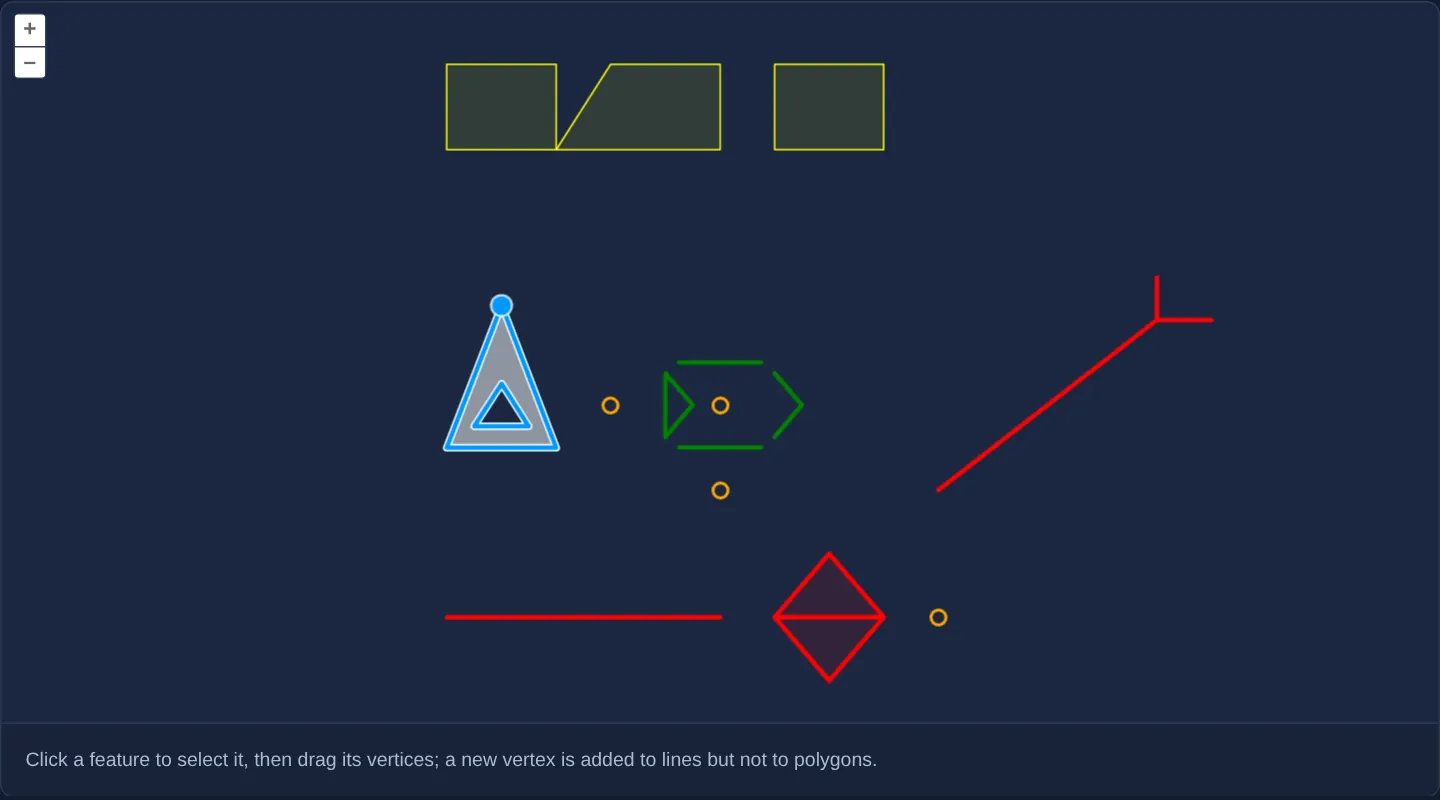
What this example shows
On a clean distraction-free canvas around Kraków, sample features of every GeoJSON geometry type—single and multi-points, single and multi-lines, a triangle polygon with an interior hole, multi-polygons and a mixed GeometryCollection—can be clicked to highlight in white-haloed blue and reshaped by dragging vertices.
Dragging midpoints along lines inserts new vertices as usual, whereas polygon edges block new vertex insertion so existing vertex counts stay fixed.
When you need it
Enterprise GIS importers ingesting WFS, PostGIS or KML layers inevitably encounter mixed MultiPolygon enclaves, polygons with interior holes and composite GeometryCollection records on the same editing screen.
Testing selection overlays and conditional vertex rules across all seven geometry classes ensures your editor never crashes or loses sub-geometries.
The code
The example uses cc-openlayers, my Angular component library for OpenLayers: each aol-… element creates the OpenLayers object it names, updates it from its inputs and disposes of it with the component.
modify-test.tsimport { ChangeDetectionStrategy, Component, viewChild } from '@angular/core';
import type { FeatureLike } from 'ol/Feature';
import CircleStyle from 'ol/style/Circle';
import Fill from 'ol/style/Fill';
import Stroke from 'ol/style/Stroke';
import Style from 'ol/style/Style';
import {
CoordinateComponent,
DefaultControlComponent,
DefaultInteractionComponent,
LayerVectorComponent,
MapComponent,
SelectInteractionComponent,
SourceGeoJSONComponent,
ViewComponent,
} from 'cc-openlayers';
import { ModifyInteractionComponent } from 'cc-openlayers/editing';
const image = new CircleStyle({ radius: 5, stroke: new Stroke({ color: 'orange', width: 2 }) });
const polygonStyle = new Style({
stroke: new Stroke({ color: 'blue', width: 3 }),
fill: new Fill({ color: 'rgba(0, 0, 255, 0.1)' }),
});
const featureStyles: Record<string, Style> = {
Point: new Style({ image }),
Polygon: polygonStyle,
MultiLineString: new Style({ stroke: new Stroke({ color: 'green', width: 3 }) }),
MultiPolygon: new Style({
stroke: new Stroke({ color: 'yellow', width: 1 }),
fill: new Fill({ color: 'rgba(255, 255, 0, 0.1)' }),
}),
default: new Style({
stroke: new Stroke({ color: 'red', width: 3 }),
fill: new Fill({ color: 'rgba(255, 0, 0, 0.1)' }),
image,
}),
};
const whiteStroke = (width: number) => new Style({ stroke: new Stroke({ color: [255, 255, 255, 1], width }) });
const blueStroke = new Style({ stroke: new Stroke({ color: [0, 153, 255, 1], width: 3 }) });
const polygonOverlay = [new Style({ fill: new Fill({ color: [255, 255, 255, 0.5] }) }), whiteStroke(5), blueStroke];
const lineOverlay = [whiteStroke(5), blueStroke];
const pointOverlay = [
new Style({
image: new CircleStyle({
radius: 7,
fill: new Fill({ color: [0, 153, 255, 1] }),
stroke: new Stroke({ color: [255, 255, 255, 0.75], width: 1.5 }),
}),
zIndex: 100000,
}),
];
const overlayStyles: Record<string, Style[]> = {
Polygon: polygonOverlay,
MultiPolygon: polygonOverlay,
LineString: lineOverlay,
MultiLineString: lineOverlay,
Point: pointOverlay,
MultiPoint: pointOverlay,
GeometryCollection: [...polygonOverlay, ...pointOverlay],
};
/** Every kind of geometry around Kraków, selected and modified; vertices are never added to polygons. */
@Component({
selector: 'app-modify-test',
imports: [
CoordinateComponent,
DefaultControlComponent,
DefaultInteractionComponent,
LayerVectorComponent,
MapComponent,
ModifyInteractionComponent,
SelectInteractionComponent,
SourceGeoJSONComponent,
ViewComponent,
],
changeDetection: ChangeDetectionStrategy.OnPush,
template: `
<aol-map height="480px">
<aol-interaction-default />
<aol-control-defaults />
<aol-interaction-select #select [style]="overlayStyle" />
<aol-interaction-modify
[features]="select.instance.getFeatures()"
[style]="overlayStyle"
[insertVertexCondition]="insertVertexCondition"
/>
<aol-view [zoom]="10" [multiWorld]="true">
<aol-coordinate [x]="19.9368" [y]="50.0614" srid="EPSG:4326" />
</aol-view>
<aol-layer-vector [style]="style">
<aol-source-geojson url="assets/modify-test.geojson" featureProjection="EPSG:3857" />
</aol-layer-vector>
</aol-map>
<div class="example-controls">
<p class="example-hint">
Click a feature to select it, then drag its vertices; a new vertex is added to lines but not to polygons.
</p>
</div>
`,
})
export class ModifyTest {
protected readonly style = (feature: FeatureLike) =>
featureStyles[feature.getGeometry()?.getType() ?? ''] ?? featureStyles['default'];
protected readonly overlayStyle = (feature: FeatureLike) => overlayStyles[feature.getGeometry()?.getType() ?? ''];
private readonly select = viewChild.required(SelectInteractionComponent);
/** Prevents new vertices on the polygons: it holds unless every selected feature is a polygon. */
protected readonly insertVertexCondition = () =>
!this.select()
.instance.getFeatures()
.getArray()
.every((feature) => /Polygon/.test(feature.getGeometry()?.getType() ?? ''));
} The React version uses the library's React adapter, cc-openlayers/react: each component creates the OpenLayers object it names when it mounts, updates it from its props and disposes of it when it unmounts.
modify-test.react.tsximport { useCallback, useState } from 'react';
import Collection from 'ol/Collection.js';
import type OLFeature from 'ol/Feature.js';
import type { FeatureLike } from 'ol/Feature.js';
import CircleStyle from 'ol/style/Circle.js';
import Fill from 'ol/style/Fill.js';
import Stroke from 'ol/style/Stroke.js';
import Style from 'ol/style/Style.js';
import {
Coordinate,
DefaultControls,
DefaultInteractions,
GeoJSONSource,
Map,
ModifyInteraction,
SelectInteraction,
VectorLayer,
View,
} from 'cc-openlayers/react';
const image = new CircleStyle({ radius: 5, stroke: new Stroke({ color: 'orange', width: 2 }) });
const polygonStyle = new Style({
stroke: new Stroke({ color: 'blue', width: 3 }),
fill: new Fill({ color: 'rgba(0, 0, 255, 0.1)' }),
});
const featureStyles: Record<string, Style> = {
Point: new Style({ image }),
Polygon: polygonStyle,
MultiLineString: new Style({ stroke: new Stroke({ color: 'green', width: 3 }) }),
MultiPolygon: new Style({
stroke: new Stroke({ color: 'yellow', width: 1 }),
fill: new Fill({ color: 'rgba(255, 255, 0, 0.1)' }),
}),
default: new Style({
stroke: new Stroke({ color: 'red', width: 3 }),
fill: new Fill({ color: 'rgba(255, 0, 0, 0.1)' }),
image,
}),
};
const whiteStroke = (width: number) => new Style({ stroke: new Stroke({ color: [255, 255, 255, 1], width }) });
const blueStroke = new Style({ stroke: new Stroke({ color: [0, 153, 255, 1], width: 3 }) });
const polygonOverlay = [new Style({ fill: new Fill({ color: [255, 255, 255, 0.5] }) }), whiteStroke(5), blueStroke];
const lineOverlay = [whiteStroke(5), blueStroke];
const pointOverlay = [
new Style({
image: new CircleStyle({
radius: 7,
fill: new Fill({ color: [0, 153, 255, 1] }),
stroke: new Stroke({ color: [255, 255, 255, 0.75], width: 1.5 }),
}),
zIndex: 100000,
}),
];
const overlayStyles: Record<string, Style[]> = {
Polygon: polygonOverlay,
MultiPolygon: polygonOverlay,
LineString: lineOverlay,
MultiLineString: lineOverlay,
Point: pointOverlay,
MultiPoint: pointOverlay,
GeometryCollection: [...polygonOverlay, ...pointOverlay],
};
const style = (feature: FeatureLike) =>
featureStyles[feature.getGeometry()?.getType() ?? ''] ?? featureStyles['default'];
const overlayStyle = (feature: FeatureLike) => overlayStyles[feature.getGeometry()?.getType() ?? ''];
/** Every kind of geometry around Kraków, selected and modified; vertices are never added to polygons. */
export function ModifyTest() {
const [selected] = useState(() => new Collection<OLFeature>());
/** Prevents new vertices on the polygons: it holds unless every selected feature is a polygon. */
const insertVertexCondition = useCallback(
() => !selected.getArray().every((feature) => /Polygon/.test(feature.getGeometry()?.getType() ?? '')),
[selected]
);
return (
<>
<Map height="480px">
<DefaultInteractions />
<DefaultControls />
<SelectInteraction features={selected} style={overlayStyle} />
<ModifyInteraction features={selected} style={overlayStyle} insertVertexCondition={insertVertexCondition} />
<View zoom={10} multiWorld={true}>
<Coordinate x={19.9368} y={50.0614} srid="EPSG:4326" />
</View>
<VectorLayer style={style}>
<GeoJSONSource url="assets/modify-test.geojson" featureProjection="EPSG:3857" />
</VectorLayer>
</Map>
<div className="example-controls">
<p className="example-hint">
Click a feature to select it, then drag its vertices; a new vertex is added to lines but not to polygons.
</p>
</div>
</>
);
}How the React version works
Every kind of geometry around Kraków from a GeoJSON file, styled by kind, selected and modified; a vertex can be added to a line but never to a selection of polygons only.
What both versions share
OpenLayers renders the map and handles the interactions; the cc-openlayers/core layer gives both adapters the same view binding (MapViewBinding) and the same conversion of coordinates from EPSG:4326 to the map's projection.
From Angular to React
| Angular | React |
|---|---|
<aol-interaction-select> and <aol-interaction-modify [features] [insertVertexCondition]> with viewChild of the select | <SelectInteraction features> and <ModifyInteraction features insertVertexCondition> sharing one Collection from useState; the condition is a useCallback reading it |
<aol-source-geojson> | <GeoJSONSource> |
Who creates, updates and disposes
Map creates the ol/Map in useLayoutEffect and disposes of it on unmount; each layer, source and interaction component adds its object to the parent it gets from context and removes it in its effect's cleanup, as ngOnDestroy does in Angular.
Architecture and OpenLayers mechanics
aol-interaction-modify binds to the active selection via [features], sharing a multi-type overlayStyle array with Select: white-haloed blue strokes for lines and polygons plus elevated zIndex blue handles for points and vertices.
Evaluating insertVertexCondition dynamically on every pointer move checks the current selection and returns false whenever all selected features are Polygon or MultiPolygon—allowing existing polygon corners to move while preventing new edge vertices.
How it works
aol-interaction-modifyedits the live collection exposed by Select through[features].- Shared
overlayStylerules cover lines, polygons and high-zIndexpoint handles across every geometry class. - Dynamic
insertVertexConditionblocks edge-midpoint vertex insertion on polygons and multi-polygons while keeping it active on lines. - A geometry-type style lookup colours base features distinctly with a fallback style for unhandled types.
Pitfalls
- A
GeometryCollectioncontains heterogeneous child geometries (for example a polygon plus a point)—ensure youroverlayStyledefines symbolisers for points, lines and fills alike so no part turns invisible when selected. - Because OpenLayers evaluates
insertVertexConditionon every pointer move, read the live selection collection inside the condition rather than caching a stale boolean from an earlier click.
Related examples
The same feature in the OpenLayers examples .
Background: state and lifecycle of maps in Angular with OpenLayers, which the components of cc-openlayers take care of.