Interactions · Angular, React and OpenLayers
Snap new shapes to existing ones
Snap newly drawn OpenLayers polygon vertices and edges cleanly to existing features within a 20px tolerance while tracking live snap events.
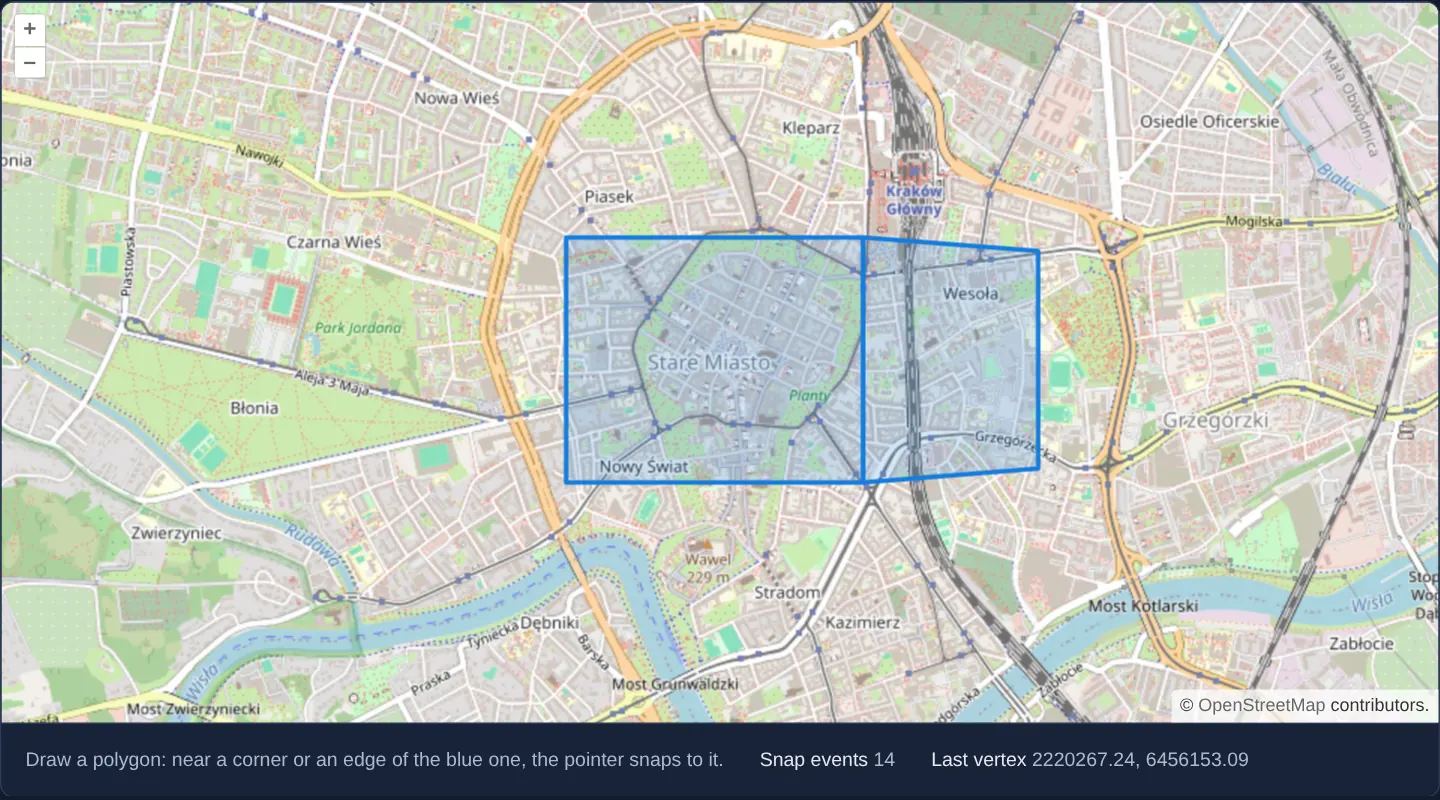
What this example shows
Adjacent to an existing polygon over Kraków’s Old Town, sketching a neighbouring eastern zone automatically pulls your cursor onto shared corners and boundary segments whenever the pointer comes within 20 pixels—incrementing a live snap counter and displaying exact snapped map coordinates below.
When you need it
Subdividing cadastral plots, drawing adjoining zoning districts or connecting utility service lines requires exact vertex-for-vertex shared boundaries with zero microscopic gaps or overlaps.
Client-side snapping locks new coordinates onto existing geometry coordinates in memory before the vertex is even placed.
The code
The example uses cc-openlayers, my Angular component library for OpenLayers: each aol-… element creates the OpenLayers object it names, updates it from its inputs and disposes of it with the component.
snap-interaction.tsimport { ChangeDetectionStrategy, Component, signal } from '@angular/core';
import type { SnapEvent } from 'ol/events/SnapEvent';
import {
CollectionCoordinatesComponent,
CoordinateComponent,
DefaultControlComponent,
DefaultInteractionComponent,
FeatureComponent,
GeometryPolygonComponent,
LayerTileComponent,
LayerVectorComponent,
MapComponent,
SourceOsmComponent,
SourceVectorComponent,
StyleComponent,
StyleFillComponent,
StyleStrokeComponent,
ViewComponent,
} from 'cc-openlayers';
import { DrawInteractionComponent, SnapInteractionComponent } from 'cc-openlayers/editing';
/** New polygons drawn with their vertices snapped to an existing polygon, and the snap events counted. */
@Component({
selector: 'app-snap-interaction',
imports: [
CollectionCoordinatesComponent,
CoordinateComponent,
DefaultControlComponent,
DefaultInteractionComponent,
DrawInteractionComponent,
FeatureComponent,
GeometryPolygonComponent,
LayerTileComponent,
LayerVectorComponent,
MapComponent,
SnapInteractionComponent,
SourceOsmComponent,
SourceVectorComponent,
StyleComponent,
StyleFillComponent,
StyleStrokeComponent,
ViewComponent,
],
changeDetection: ChangeDetectionStrategy.OnPush,
template: `
<aol-map height="480px">
<aol-interaction-default />
<aol-control-defaults />
<aol-view [zoom]="14">
<aol-coordinate [x]="19.9368" [y]="50.0614" srid="EPSG:4326" />
</aol-view>
<aol-layer-tile><aol-source-osm /></aol-layer-tile>
<aol-layer-vector>
<aol-style>
<aol-style-stroke color="#167dde" [width]="3" />
<aol-style-fill color="rgba(22, 125, 222, 0.18)" />
</aol-style>
<aol-source-vector #source>
<aol-feature>
<aol-geometry-polygon>
<aol-collection-coordinates [coordinates]="polygon" srid="EPSG:4326" />
</aol-geometry-polygon>
</aol-feature>
</aol-source-vector>
</aol-layer-vector>
<!-- Snap after the drawing: it adjusts the pointer for the interactions added before it. -->
<aol-interaction-draw type="Polygon" [source]="source.instance" />
<aol-interaction-snap [pixelTolerance]="20" [source]="source.instance" (snap)="snapped($event)" />
</aol-map>
<div class="example-controls">
<p class="example-hint">Draw a polygon: near a corner or an edge of the blue one, the pointer snaps to it.</p>
<span>
Snap events <output>{{ snaps() }}</output>
</span>
<span>
Last vertex <output>{{ lastVertex() }}</output>
</span>
</div>
`,
})
export class SnapInteraction {
readonly snaps = signal(0);
readonly lastVertex = signal('-');
protected readonly polygon = [
[
[19.928, 50.057],
[19.945, 50.057],
[19.945, 50.066],
[19.928, 50.066],
[19.928, 50.057],
],
];
protected snapped(event: SnapEvent): void {
this.snaps.update((count) => count + 1);
this.lastVertex.set(event.vertex.map((coordinate) => coordinate.toFixed(2)).join(', '));
}
} The React version uses the library's React adapter, cc-openlayers/react: each component creates the OpenLayers object it names when it mounts, updates it from its props and disposes of it when it unmounts.
snap-interaction.react.tsximport { useState } from 'react';
import type OLVectorSource from 'ol/source/Vector.js';
import type { SnapEvent } from 'ol/events/SnapEvent.js';
import {
CollectionCoordinates,
Coordinate,
DefaultControls,
DefaultInteractions,
DrawInteraction,
Feature,
Fill,
Map,
OSMSource,
PolygonGeometry,
SnapInteraction as SnapControl,
Stroke,
Style,
TileLayer,
VectorLayer,
VectorSource,
View,
} from 'cc-openlayers/react';
const polygon = [
[
[19.928, 50.057],
[19.945, 50.057],
[19.945, 50.066],
[19.928, 50.066],
[19.928, 50.057],
],
];
/** New polygons drawn with their vertices snapped to an existing polygon, and the snap events counted. */
export function SnapInteraction() {
const [snaps, setSnaps] = useState(0);
const [lastVertex, setLastVertex] = useState('-');
const [source, setSource] = useState<OLVectorSource | null>(null);
const snapped = (event: SnapEvent) => {
setSnaps((count) => count + 1);
setLastVertex(event.vertex.map((coordinate) => coordinate.toFixed(2)).join(', '));
};
return (
<>
<Map height="480px">
<DefaultInteractions />
<DefaultControls />
<View zoom={14}>
<Coordinate x={19.9368} y={50.0614} srid="EPSG:4326" />
</View>
<TileLayer>
<OSMSource />
</TileLayer>
<VectorLayer>
<Style>
<Stroke color="#167dde" width={3} />
<Fill color="rgba(22, 125, 222, 0.18)" />
</Style>
<VectorSource ref={setSource}>
<Feature>
<PolygonGeometry>
<CollectionCoordinates coordinates={polygon} srid="EPSG:4326" />
</PolygonGeometry>
</Feature>
</VectorSource>
</VectorLayer>
{/* Snap after the drawing: it adjusts the pointer for the interactions added before it. */}
{source ? (
<>
<DrawInteraction type="Polygon" source={source} />
<SnapControl pixelTolerance={20} source={source} onSnap={snapped} />
</>
) : null}
</Map>
<div className="example-controls">
<p className="example-hint">
Draw a polygon: near a corner or an edge of the blue one, the pointer snaps to it.
</p>
<span>
Snap events <output>{snaps}</output>
</span>
<span>
Last vertex <output>{lastVertex}</output>
</span>
</div>
</>
);
}How the React version works
New polygons drawn with their vertices snapped to an existing polygon; the snap events are counted and the last snapped vertex is shown.
What both versions share
OpenLayers renders the map and handles the interactions; the cc-openlayers/core layer gives both adapters the same view binding (MapViewBinding) and the same conversion of coordinates from EPSG:4326 to the map's projection. The snap interaction is rendered after the draw and modify interactions in both versions, because OpenLayers lets the last added interaction handle a pointer event first.
From Angular to React
| Angular | React |
|---|---|
viewChild of the source handed to the interactions | ref={setSource} into useState; the interactions render once the adapter has made the source |
(snap) on <aol-interaction-snap> | onSnap on <SnapInteraction>, imported as SnapControl beside the example's name |
the count and vertex in signals | useState |
Who creates, updates and disposes
Map creates the ol/Map in useLayoutEffect and disposes of it on unmount; each layer, source and interaction component adds its object to the parent it gets from context and removes it in its effect's cleanup, as ngOnDestroy does in Angular.
Architecture and OpenLayers mechanics
Declaring aol-interaction-snap after aol-interaction-draw on the same vector source places Snap at the front of OpenLayers’ reverse-order event pipeline—allowing it to rewrite pointer coordinates to the nearest vertex or edge within [pixelTolerance]="20" before Draw records the click.
Because finished shapes enter the same shared source, every newly drawn polygon immediately becomes a snap target for subsequent neighbours, while (snap) events report snapped coordinates.
How it works
- Placing
aol-interaction-snapafteraol-interaction-drawlets Snap intercept and adjust pointer coordinates for active sketches. - Sharing one vector source turns every completed polygon into an immediate snap target for the next shape.
[pixelTolerance]="20"sets a comfortable 20 CSS-pixel attraction radius for both mouse and touch input.- Listening to
snapevents counts snap locks and displays the exact snapped coordinate below the viewport.
Pitfalls
- Declaring
aol-interaction-snapbeforeaol-interaction-drawbreaks snapping completely because Draw processes the raw unadjusted pointer event before Snap ever sees it. - Avoid overly large pixel tolerances (such as 50+ px) in dense parcel maps, which yank the cursor onto distant corners and prevent placing nearby independent points.
Related examples
The same feature in the OpenLayers examples .
Background: state and lifecycle of maps in Angular with OpenLayers, which the components of cc-openlayers take care of.