Raster, GeoTIFF and WebGL · Angular, React and OpenLayers
Display a Sentinel-2 STAC item
Open and display a Copernicus Sentinel-2 SpatioTemporal Asset Catalog (STAC) item over Kraków in OpenLayers using ol-stac and proj4 support.
What this example shows
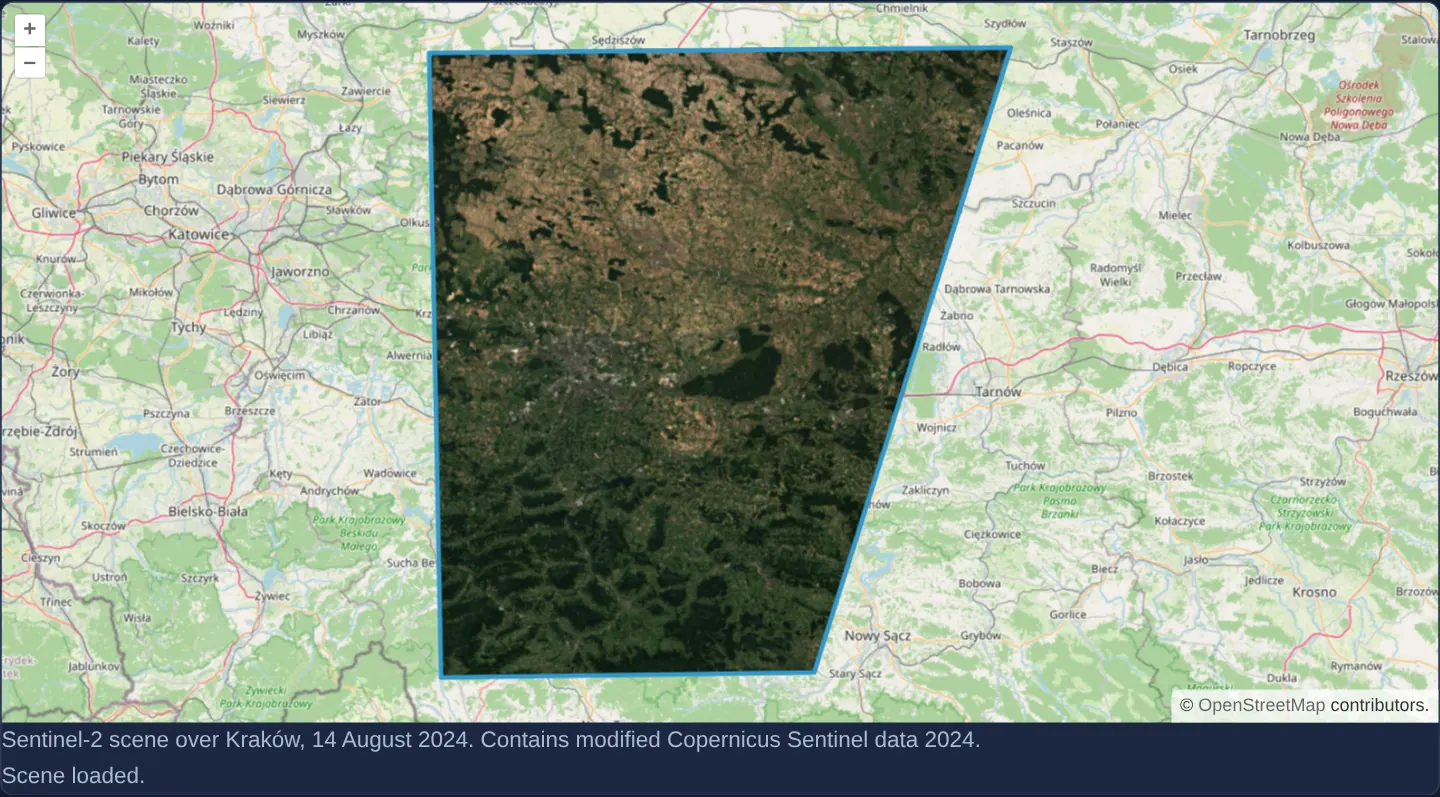
Over OpenStreetMap of Kraków with a live status line below, parsing a SpatioTemporal Asset Catalog (STAC) JSON item automatically discovers, georeferences and renders its linked 14 August 2024 Copernicus Sentinel-2 visual Cloud Optimized GeoTIFF asset.
When you need it
Modern earth-observation APIs (Element84 Earth Search, Microsoft Planetary Computer, Copernicus Data Space) expose imagery through standardized STAC Item and Collection JSON documents rather than raw TIFF URLs.
Using ol-stac lets an OpenLayers map ingest STAC metadata directly—resolving visual asset roles, footprints, projections and credits automatically.
The code
The example uses cc-openlayers, my Angular component library for OpenLayers: each aol-… element creates the OpenLayers object it names, updates it from its inputs and disposes of it with the component.
stac-item.html<aol-map height="480px"
><aol-interaction-default /><aol-control-defaults /><aol-view [zoom]="10"
><aol-coordinate [x]="19.9368" [y]="50.0614" srid="EPSG:4326" /></aol-view
><aol-layer-tile><aol-source-osm /></aol-layer-tile
></aol-map>
<p class="example-hint">
Sentinel-2 scene over Kraków, 14 August 2024. Contains modified Copernicus Sentinel data 2024.
</p>
<p role="status">{{ status() }}</p>stac-item.shared.tsimport STAC from 'ol-stac';
import proj4 from 'proj4';
import { register } from 'ol/proj/proj4.js';
import type Map from 'ol/Map.js';
import LayerGroup from 'ol/layer/Group.js';
import Layer from 'ol/layer/Layer.js';
import type BaseLayer from 'ol/layer/Base.js';
const SCENE =
'https://sentinel-cogs.s3.us-west-2.amazonaws.com/sentinel-s2-l2a-cogs/34/U/DA/2024/8/S2B_34UDA_20240814_0_L2A';
export const STAC_URL = `${SCENE}/S2B_34UDA_20240814_0_L2A.json`;
function disposeScene(layer: BaseLayer): void {
if (layer instanceof LayerGroup) layer.getLayers().forEach(disposeScene);
if (layer instanceof Layer) layer.getSource()?.dispose();
layer.dispose();
}
/** Cancel metadata loading on unmount; the example owns the package's complete scene group. */
export function attachStac(map: Map, status: (message: string) => void = () => undefined): () => void {
const controller = new AbortController();
let layer: STAC | undefined;
let stopped = false;
const ready = () => {
if (stopped || !layer) return;
const extent = layer.getExtent();
if (extent) map.getView().fit(extent, { padding: [30, 30, 30, 30], maxZoom: 12 });
status('Scene loaded.');
};
const failed = () => {
if (!stopped) status('The scene could not be loaded.');
};
void fetch(STAC_URL, { signal: controller.signal })
.then(async (response) => {
if (!response.ok) throw new Error(`STAC HTTP ${response.status}`);
const data: unknown = await response.json();
if (stopped) return;
register(proj4);
layer = new STAC({ url: STAC_URL, data, assets: ['visual'] });
layer.addEventListener('sourceready', ready);
layer.addEventListener('error', failed);
map.addLayer(layer);
})
.catch(() => {
if (!controller.signal.aborted) failed();
});
return () => {
stopped = true;
controller.abort();
if (layer) {
layer.removeEventListener('sourceready', ready);
layer.removeEventListener('error', failed);
map.removeLayer(layer);
disposeScene(layer);
}
};
}stac-item.tsimport {
ChangeDetectionStrategy,
Component,
DestroyRef,
inject,
signal,
viewChild,
type AfterViewInit,
} from '@angular/core';
import {
CoordinateComponent,
DefaultControlComponent,
DefaultInteractionComponent,
LayerTileComponent,
MapComponent,
SourceOsmComponent,
ViewComponent,
} from 'cc-openlayers';
import { attachStac } from './stac-item.shared';
@Component({
selector: 'app-stac-item',
imports: [
CoordinateComponent,
DefaultControlComponent,
DefaultInteractionComponent,
LayerTileComponent,
MapComponent,
SourceOsmComponent,
ViewComponent,
],
templateUrl: './stac-item.html',
changeDetection: ChangeDetectionStrategy.OnPush,
})
export class StacItem implements AfterViewInit {
protected readonly status = signal('Loading scene…');
private readonly map = viewChild.required(MapComponent);
private readonly destroy = inject(DestroyRef);
ngAfterViewInit() {
this.destroy.onDestroy(attachStac(this.map().instance, (message) => this.status.set(message)));
}
} The React version uses the library's React adapter, cc-openlayers/react: each component creates the OpenLayers object it names when it mounts, updates it from its props and disposes of it when it unmounts.
stac-item.react.tsximport { useEffect, useState } from 'react';
import {
Coordinate,
DefaultControls,
DefaultInteractions,
Map,
View,
TileLayer,
OSMSource,
useMap,
} from 'cc-openlayers/react';
import { attachStac } from './stac-item.shared';
function Scene() {
const map = useMap();
const [status, setStatus] = useState('Loading scene…');
useEffect(() => attachStac(map, setStatus), [map]);
return <p role="status">{status}</p>;
}
export function StacItem() {
return (
<>
<Map height="480px">
<DefaultInteractions />
<DefaultControls />
<View zoom={10}>
<Coordinate x={19.9368} y={50.0614} srid="EPSG:4326" />
</View>
<TileLayer>
<OSMSource />
</TileLayer>
<Scene />
</Map>
<p className="example-hint">
Sentinel-2 scene over Kraków, 14 August 2024. Contains modified Copernicus Sentinel data 2024.
</p>
</>
);
}stac-item.shared.tsimport STAC from 'ol-stac';
import proj4 from 'proj4';
import { register } from 'ol/proj/proj4.js';
import type Map from 'ol/Map.js';
import LayerGroup from 'ol/layer/Group.js';
import Layer from 'ol/layer/Layer.js';
import type BaseLayer from 'ol/layer/Base.js';
const SCENE =
'https://sentinel-cogs.s3.us-west-2.amazonaws.com/sentinel-s2-l2a-cogs/34/U/DA/2024/8/S2B_34UDA_20240814_0_L2A';
export const STAC_URL = `${SCENE}/S2B_34UDA_20240814_0_L2A.json`;
function disposeScene(layer: BaseLayer): void {
if (layer instanceof LayerGroup) layer.getLayers().forEach(disposeScene);
if (layer instanceof Layer) layer.getSource()?.dispose();
layer.dispose();
}
/** Cancel metadata loading on unmount; the example owns the package's complete scene group. */
export function attachStac(map: Map, status: (message: string) => void = () => undefined): () => void {
const controller = new AbortController();
let layer: STAC | undefined;
let stopped = false;
const ready = () => {
if (stopped || !layer) return;
const extent = layer.getExtent();
if (extent) map.getView().fit(extent, { padding: [30, 30, 30, 30], maxZoom: 12 });
status('Scene loaded.');
};
const failed = () => {
if (!stopped) status('The scene could not be loaded.');
};
void fetch(STAC_URL, { signal: controller.signal })
.then(async (response) => {
if (!response.ok) throw new Error(`STAC HTTP ${response.status}`);
const data: unknown = await response.json();
if (stopped) return;
register(proj4);
layer = new STAC({ url: STAC_URL, data, assets: ['visual'] });
layer.addEventListener('sourceready', ready);
layer.addEventListener('error', failed);
map.addLayer(layer);
})
.catch(() => {
if (!controller.signal.aborted) failed();
});
return () => {
stopped = true;
controller.abort();
if (layer) {
layer.removeEventListener('sourceready', ready);
layer.removeEventListener('error', failed);
map.removeLayer(layer);
disposeScene(layer);
}
};
}How the React version works
Read a STAC item and display its Sentinel-2 visual asset over Kraków.
What both versions share
ol-stac reads the visual asset of the 14 August 2024 scene; proj4 supports its projection.
From Angular to React
| Angular | React |
|---|---|
| ngAfterViewInit attaches the scene and DestroyRef runs its cleanup. | A useMap child attaches the scene in useEffect and returns the cleanup. |
| An external Angular template declares the example. | JSX declares the example and its controls. |
| The Angular lifecycle releases the mounted resources. | Effect or subscription cleanup releases the mounted resources. |
Who creates, updates and disposes
The shared loader aborts metadata requests on removal and refuses late attachment. It owns the STAC layer group and its scene resources.
Architecture and OpenLayers mechanics
In AfterViewInit, helper attachStac mounts an ol-stac layer pointed at the 14 August 2024 Sentinel-2 STAC Item JSON, backed by proj4 projection support so native UTM assets reproject cleanly onto the map, while DestroyRef aborts the STAC JSON fetch and disposes of the scene layer with its sources if the user navigates away early; tile loads themselves are not signal-cancelled.
How it works
- The ol-stac integration reads the STAC Item JSON for the 14 August 2024 Kraków Sentinel-2 scene and renders its visual COG asset with proj4 CRS support.
Pitfalls
- Live STAC item rendering depends on network reachability and CORS headers on both the STAC JSON catalogue endpoint and the underlying cloud object-storage bucket; always cancel in-flight loads on component destroy.
Related examples
The same feature in the OpenLayers examples .
Background: state and lifecycle of maps in Angular with OpenLayers, which the components of cc-openlayers take care of.