Styling and labels · Angular, React and OpenLayers
Text style options for points, lines and polygons
Explore interactive OpenLayers Text style options—fonts, offsets, wrapping, max resolution, line placement and web fonts—on points, lines and areas.
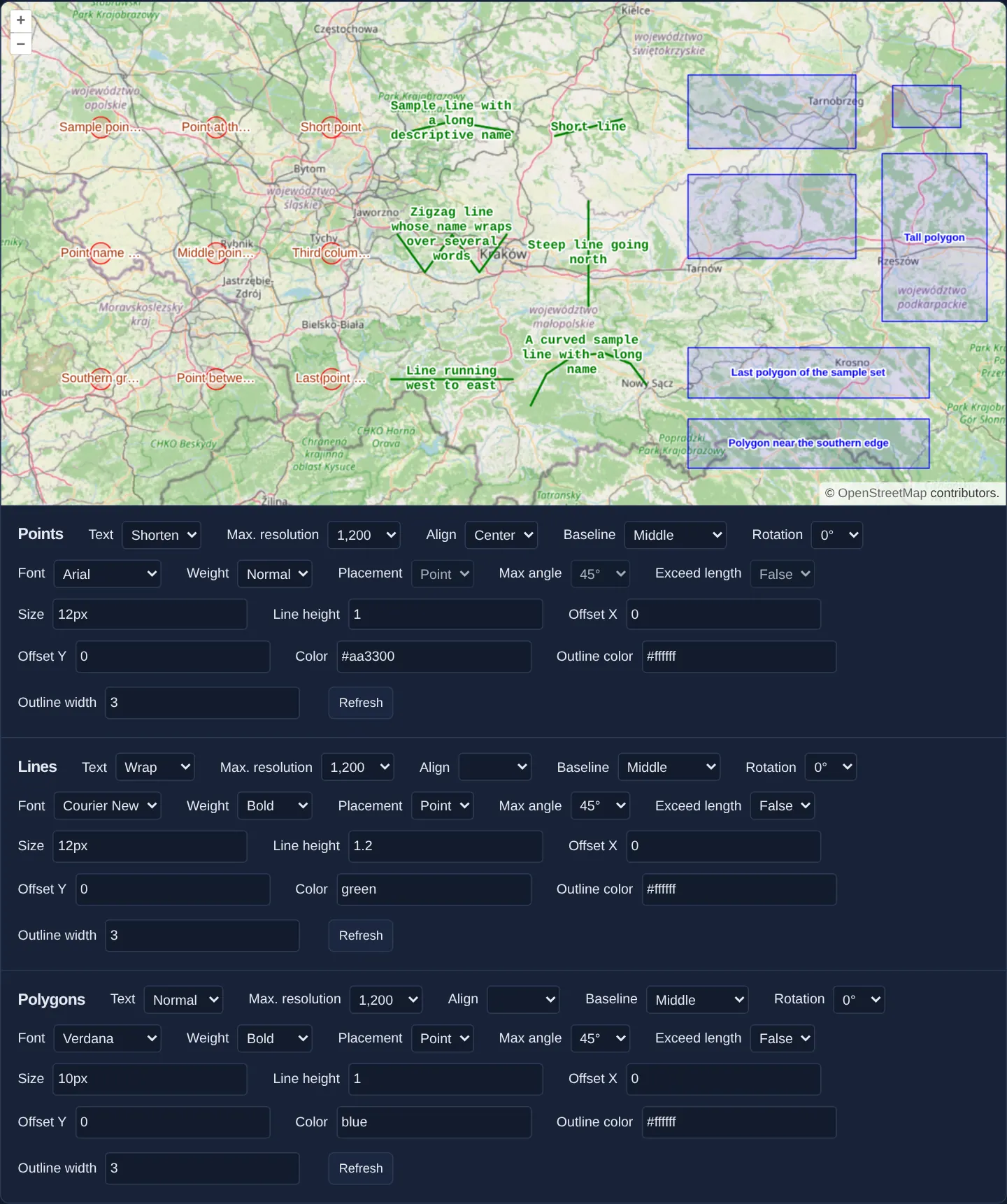
What this example shows
Around Kraków at zoom 8 over OpenStreetMap, nine red points, six green lines and six blue polygons sit above three interactive configuration forms that let you test every OpenLayers Text style parameter live: font weight/size/line-height/family (including async Google Fonts), alignment, baseline, rotation, X/Y pixel offsets, halo outlines, truncation/wrapping, max resolution, line placement, max bend angle and length overflow.
When you need it
Fine-tuning cartographic typography across points, linear networks and polygons involves subtle interactions between anchor alignment, line-bend tolerances, resolution cut-offs and web-font loading.
Testing combinations interactively against real geometries reveals edge cases immediately before baking rules into production stylesheets.
The code
The example uses cc-openlayers, my Angular component library for OpenLayers: each aol-… element creates the OpenLayers object it names, updates it from its inputs and disposes of it with the component.
vector-labels.tsimport { ChangeDetectionStrategy, Component, computed, signal } from '@angular/core';
import {
CoordinateComponent,
DefaultControlComponent,
DefaultInteractionComponent,
LayerTileComponent,
LayerVectorComponent,
MapComponent,
SourceGeoJSONComponent,
SourceOsmComponent,
ViewComponent,
} from 'cc-openlayers';
import type { FeatureLike } from 'ol/Feature';
import CircleStyle from 'ol/style/Circle';
import Fill from 'ol/style/Fill';
import Stroke from 'ol/style/Stroke';
import Style, { type StyleFunction } from 'ol/style/Style';
import Text from 'ol/style/Text';
type Kind = 'points' | 'lines' | 'polygons';
type Choice = { value: string; label: string };
/** The text style options of one feature type, as the strings the form holds. */
interface Settings {
text: string;
maxreso: string;
align: string;
baseline: string;
rotation: string;
font: string;
weight: string;
placement: string;
maxangle: string;
overflow: string;
size: string;
height: string;
offsetX: string;
offsetY: string;
color: string;
outline: string;
outlineWidth: string;
}
const choices = (...pairs: [string, string][]): Choice[] => pairs.map(([value, label]) => ({ value, label }));
const SELECTS: { key: keyof Settings; label: string; options: Choice[]; lineOnly?: boolean }[] = [
{
key: 'text',
label: 'Text',
options: choices(['hide', 'Hide'], ['normal', 'Normal'], ['shorten', 'Shorten'], ['wrap', 'Wrap']),
},
{
key: 'maxreso',
label: 'Max. resolution',
options: ['38400', '19200', '9600', '4800', '2400', '1200', '600', '300', '150', '75', '32', '16', '8'].map(
(value) => ({ value, label: Number(value).toLocaleString('en-US') })
),
},
{
key: 'align',
label: 'Align',
options: choices(
['', ''],
['center', 'Center'],
['end', 'End'],
['left', 'Left'],
['right', 'Right'],
['start', 'Start']
),
},
{
key: 'baseline',
label: 'Baseline',
options: choices(
['alphabetic', 'Alphabetic'],
['bottom', 'Bottom'],
['hanging', 'Hanging'],
['ideographic', 'Ideographic'],
['middle', 'Middle'],
['top', 'Top']
),
},
{
key: 'rotation',
label: 'Rotation',
options: choices(['0', '0°'], ['0.785398164', '45°'], ['1.570796327', '90°']),
},
{
key: 'font',
label: 'Font',
options: choices(
['Arial', 'Arial'],
["'Courier New'", 'Courier New'],
["'Open Sans'", 'Open Sans'],
['Verdana', 'Verdana']
),
},
{ key: 'weight', label: 'Weight', options: choices(['bold', 'Bold'], ['normal', 'Normal']) },
{ key: 'placement', label: 'Placement', options: choices(['line', 'Line'], ['point', 'Point']), lineOnly: true },
{
key: 'maxangle',
label: 'Max angle',
options: choices(['0.7853981633974483', '45°'], ['2.0943951023931953', '120°'], ['6.283185307179586', '360°']),
lineOnly: true,
},
{ key: 'overflow', label: 'Exceed length', options: choices(['true', 'True'], ['false', 'False']), lineOnly: true },
];
/** The generic family that follows each font, for the browser to use where the font is missing. */
const GENERIC: Record<string, string> = {
Arial: 'sans-serif',
"'Courier New'": 'monospace',
"'Open Sans'": 'sans-serif',
Verdana: 'sans-serif',
};
const INPUTS: { key: keyof Settings; label: string }[] = [
{ key: 'size', label: 'Size' },
{ key: 'height', label: 'Line height' },
{ key: 'offsetX', label: 'Offset X' },
{ key: 'offsetY', label: 'Offset Y' },
{ key: 'color', label: 'Color' },
{ key: 'outline', label: 'Outline color' },
{ key: 'outlineWidth', label: 'Outline width' },
];
const SHARED: Omit<Settings, 'text' | 'align' | 'font' | 'weight' | 'size' | 'height' | 'color'> = {
maxreso: '1200',
baseline: 'middle',
rotation: '0',
placement: 'point',
maxangle: '0.7853981633974483',
overflow: 'false',
offsetX: '0',
offsetY: '0',
outline: '#ffffff',
outlineWidth: '3',
};
const INITIAL: Record<Kind, Settings> = {
points: {
...SHARED,
text: 'shorten',
align: 'center',
font: 'Arial',
weight: 'normal',
size: '12px',
height: '1',
color: '#aa3300',
},
lines: {
...SHARED,
text: 'wrap',
align: '',
font: "'Courier New'",
weight: 'bold',
size: '12px',
height: '1.2',
color: 'green',
},
polygons: {
...SHARED,
text: 'normal',
align: '',
font: 'Verdana',
weight: 'bold',
size: '10px',
height: '1',
color: 'blue',
},
};
const GROUPS: { kind: Kind; title: string; url: string }[] = [
{ kind: 'points', title: 'Points', url: 'assets/label-point-samples.geojson' },
{ kind: 'lines', title: 'Lines', url: 'assets/label-line-samples.geojson' },
{ kind: 'polygons', title: 'Polygons', url: 'assets/label-polygon-samples.geojson' },
];
/** The text of `string` cut to `n` characters, ending with an ellipsis. */
function truncate(string: string, n: number): string {
return string.length > n ? string.slice(0, n - 1) + '…' : string;
}
/** The text broken into lines of at most `width` characters, at spaces and hyphens where it can. */
function stringDivider(text: string, width: number, spaceReplacer: string): string {
if (text.length > width) {
let p = width;
while (p > 0 && text[p] !== ' ' && text[p] !== '-') p--;
if (p > 0) {
const left = text.substring(p, p + 1) === '-' ? text.substring(0, p + 1) : text.substring(0, p);
return left + spaceReplacer + stringDivider(text.substring(p + 1), width, spaceReplacer);
}
}
return text;
}
function labelText(feature: FeatureLike, resolution: number, kind: Kind, settings: Settings): string {
const text: string = feature.get('name');
if (resolution > Number(settings.maxreso) || settings.text === 'hide') return '';
if (settings.text === 'shorten') return truncate(text, 12);
if (settings.text === 'wrap' && (kind === 'points' || settings.placement !== 'line'))
return stringDivider(text, 16, '\n');
return text;
}
function textStyle(feature: FeatureLike, resolution: number, kind: Kind, settings: Settings): Text {
const linear = kind !== 'points';
return new Text({
textAlign: settings.align === '' ? undefined : (settings.align as CanvasTextAlign),
textBaseline: settings.baseline as CanvasTextBaseline,
font: `${settings.weight} ${settings.size}/${settings.height} ${settings.font}, ${GENERIC[settings.font]}`,
text: labelText(feature, resolution, kind, settings),
fill: new Fill({ color: settings.color }),
stroke: new Stroke({ color: settings.outline, width: parseInt(settings.outlineWidth, 10) }),
offsetX: parseInt(settings.offsetX, 10),
offsetY: parseInt(settings.offsetY, 10),
placement: linear ? (settings.placement as 'line' | 'point') : undefined,
maxAngle: linear ? parseFloat(settings.maxangle) : undefined,
overflow: linear ? settings.overflow === 'true' : undefined,
rotation: parseFloat(settings.rotation),
});
}
const BASES: Record<Kind, () => Style> = {
polygons: () =>
new Style({ stroke: new Stroke({ color: 'blue', width: 1 }), fill: new Fill({ color: 'rgba(0, 0, 255, 0.1)' }) }),
lines: () => new Style({ stroke: new Stroke({ color: 'green', width: 2 }) }),
points: () =>
new Style({
image: new CircleStyle({
radius: 10,
fill: new Fill({ color: 'rgba(255, 0, 0, 0.1)' }),
stroke: new Stroke({ color: 'red', width: 1 }),
}),
}),
};
function styleFunction(kind: Kind, settings: Settings): StyleFunction {
return (feature, resolution) => {
const style = BASES[kind]();
style.setText(textStyle(feature, resolution, kind, settings));
return style;
};
}
/** Adds the stylesheet of the Open Sans web font to the page, once. */
function loadOpenSans(): void {
if (document.head.querySelector('link[data-font="open-sans"]')) return;
const link = document.createElement('link');
link.href = 'https://fonts.googleapis.com/css?family=Open+Sans';
link.rel = 'stylesheet';
link.dataset['font'] = 'open-sans';
document.head.appendChild(link);
}
/** Sample points, lines and polygons with labels, styled by the text options of three forms that Refresh applies. */
@Component({
selector: 'app-vector-labels',
imports: [
CoordinateComponent,
DefaultControlComponent,
DefaultInteractionComponent,
LayerTileComponent,
LayerVectorComponent,
MapComponent,
SourceGeoJSONComponent,
SourceOsmComponent,
ViewComponent,
],
changeDetection: ChangeDetectionStrategy.OnPush,
template: `
<aol-map height="480px">
<aol-interaction-default />
<aol-control-defaults />
<aol-view [zoom]="8"><aol-coordinate [x]="19.9368" [y]="50.0614" srid="EPSG:4326" /></aol-view>
<aol-layer-tile><aol-source-osm /></aol-layer-tile>
@for (group of groups; track group.kind) {
<aol-layer-vector [style]="styles()[group.kind]">
<aol-source-geojson [url]="group.url" featureProjection="EPSG:3857" />
</aol-layer-vector>
}
</aol-map>
@for (group of groups; track group.kind) {
<div class="example-controls" [attr.aria-label]="group.title">
<h3>{{ group.title }}</h3>
@for (select of selects; track select.key) {
<label>
{{ select.label }}
<select
[disabled]="select.lineOnly && group.kind === 'points'"
(change)="edit(group.kind, select.key, value($event))"
>
@for (option of select.options; track option.value) {
@if (option.value !== '' || group.kind !== 'points' || select.key !== 'align') {
<option [value]="option.value" [selected]="drafts()[group.kind][select.key] === option.value">
{{ option.label }}
</option>
}
}
</select>
</label>
}
@for (input of inputs; track input.key) {
<label>
{{ input.label }}
<input
type="text"
[value]="drafts()[group.kind][input.key]"
(input)="edit(group.kind, input.key, value($event))"
/>
</label>
}
<button type="button" (click)="refresh(group.kind)">Refresh</button>
</div>
}
`,
})
export class VectorLabels {
protected readonly groups = GROUPS;
protected readonly selects = SELECTS;
protected readonly inputs = INPUTS;
protected readonly drafts = signal(INITIAL);
private readonly applied = signal(INITIAL);
protected readonly styles = computed(() => ({
points: styleFunction('points', this.applied().points),
lines: styleFunction('lines', this.applied().lines),
polygons: styleFunction('polygons', this.applied().polygons),
}));
protected value(event: Event): string {
return (event.target as HTMLInputElement | HTMLSelectElement).value;
}
protected edit(kind: Kind, key: keyof Settings, value: string): void {
this.drafts.update((drafts) => ({ ...drafts, [kind]: { ...drafts[kind], [key]: value } }));
}
/** Applies the form of one feature type to its layer, as the Refresh button of the original does. */
protected refresh(kind: Kind): void {
const settings = this.drafts()[kind];
if (settings.font === "'Open Sans'") loadOpenSans();
this.applied.update((applied) => ({ ...applied, [kind]: settings }));
}
} The React version uses the library's React adapter, cc-openlayers/react: each component creates the OpenLayers object it names when it mounts, updates it from its props and disposes of it when it unmounts.
vector-labels.react.tsximport { useMemo, useState, type ChangeEvent } from 'react';
import {
Coordinate,
DefaultControls,
DefaultInteractions,
GeoJSONSource,
Map,
OSMSource,
TileLayer,
VectorLayer,
View,
} from 'cc-openlayers/react';
import type { FeatureLike } from 'ol/Feature';
import CircleStyle from 'ol/style/Circle';
import Fill from 'ol/style/Fill';
import Stroke from 'ol/style/Stroke';
import Style, { type StyleFunction } from 'ol/style/Style';
import Text from 'ol/style/Text';
type Kind = 'points' | 'lines' | 'polygons';
type Choice = { value: string; label: string };
/** The text style options of one feature type, as the strings the form holds. */
interface Settings {
text: string;
maxreso: string;
align: string;
baseline: string;
rotation: string;
font: string;
weight: string;
placement: string;
maxangle: string;
overflow: string;
size: string;
height: string;
offsetX: string;
offsetY: string;
color: string;
outline: string;
outlineWidth: string;
}
const choices = (...pairs: [string, string][]): Choice[] => pairs.map(([value, label]) => ({ value, label }));
const SELECTS: { key: keyof Settings; label: string; options: Choice[]; lineOnly?: boolean }[] = [
{
key: 'text',
label: 'Text',
options: choices(['hide', 'Hide'], ['normal', 'Normal'], ['shorten', 'Shorten'], ['wrap', 'Wrap']),
},
{
key: 'maxreso',
label: 'Max. resolution',
options: ['38400', '19200', '9600', '4800', '2400', '1200', '600', '300', '150', '75', '32', '16', '8'].map(
(value) => ({ value, label: Number(value).toLocaleString('en-US') })
),
},
{
key: 'align',
label: 'Align',
options: choices(
['', ''],
['center', 'Center'],
['end', 'End'],
['left', 'Left'],
['right', 'Right'],
['start', 'Start']
),
},
{
key: 'baseline',
label: 'Baseline',
options: choices(
['alphabetic', 'Alphabetic'],
['bottom', 'Bottom'],
['hanging', 'Hanging'],
['ideographic', 'Ideographic'],
['middle', 'Middle'],
['top', 'Top']
),
},
{
key: 'rotation',
label: 'Rotation',
options: choices(['0', '0°'], ['0.785398164', '45°'], ['1.570796327', '90°']),
},
{
key: 'font',
label: 'Font',
options: choices(
['Arial', 'Arial'],
["'Courier New'", 'Courier New'],
["'Open Sans'", 'Open Sans'],
['Verdana', 'Verdana']
),
},
{ key: 'weight', label: 'Weight', options: choices(['bold', 'Bold'], ['normal', 'Normal']) },
{ key: 'placement', label: 'Placement', options: choices(['line', 'Line'], ['point', 'Point']), lineOnly: true },
{
key: 'maxangle',
label: 'Max angle',
options: choices(['0.7853981633974483', '45°'], ['2.0943951023931953', '120°'], ['6.283185307179586', '360°']),
lineOnly: true,
},
{ key: 'overflow', label: 'Exceed length', options: choices(['true', 'True'], ['false', 'False']), lineOnly: true },
];
/** The generic family that follows each font, for the browser to use where the font is missing. */
const GENERIC: Record<string, string> = {
Arial: 'sans-serif',
"'Courier New'": 'monospace',
"'Open Sans'": 'sans-serif',
Verdana: 'sans-serif',
};
const INPUTS: { key: keyof Settings; label: string }[] = [
{ key: 'size', label: 'Size' },
{ key: 'height', label: 'Line height' },
{ key: 'offsetX', label: 'Offset X' },
{ key: 'offsetY', label: 'Offset Y' },
{ key: 'color', label: 'Color' },
{ key: 'outline', label: 'Outline color' },
{ key: 'outlineWidth', label: 'Outline width' },
];
const SHARED: Omit<Settings, 'text' | 'align' | 'font' | 'weight' | 'size' | 'height' | 'color'> = {
maxreso: '1200',
baseline: 'middle',
rotation: '0',
placement: 'point',
maxangle: '0.7853981633974483',
overflow: 'false',
offsetX: '0',
offsetY: '0',
outline: '#ffffff',
outlineWidth: '3',
};
const INITIAL: Record<Kind, Settings> = {
points: {
...SHARED,
text: 'shorten',
align: 'center',
font: 'Arial',
weight: 'normal',
size: '12px',
height: '1',
color: '#aa3300',
},
lines: {
...SHARED,
text: 'wrap',
align: '',
font: "'Courier New'",
weight: 'bold',
size: '12px',
height: '1.2',
color: 'green',
},
polygons: {
...SHARED,
text: 'normal',
align: '',
font: 'Verdana',
weight: 'bold',
size: '10px',
height: '1',
color: 'blue',
},
};
const GROUPS: { kind: Kind; title: string; url: string }[] = [
{ kind: 'points', title: 'Points', url: 'assets/label-point-samples.geojson' },
{ kind: 'lines', title: 'Lines', url: 'assets/label-line-samples.geojson' },
{ kind: 'polygons', title: 'Polygons', url: 'assets/label-polygon-samples.geojson' },
];
/** The text of `string` cut to `n` characters, ending with an ellipsis. */
function truncate(string: string, n: number): string {
return string.length > n ? string.slice(0, n - 1) + '…' : string;
}
/** The text broken into lines of at most `width` characters, at spaces and hyphens where it can. */
function stringDivider(text: string, width: number, spaceReplacer: string): string {
if (text.length > width) {
let p = width;
while (p > 0 && text[p] !== ' ' && text[p] !== '-') p--;
if (p > 0) {
const left = text.substring(p, p + 1) === '-' ? text.substring(0, p + 1) : text.substring(0, p);
return left + spaceReplacer + stringDivider(text.substring(p + 1), width, spaceReplacer);
}
}
return text;
}
function labelText(feature: FeatureLike, resolution: number, kind: Kind, settings: Settings): string {
const text: string = feature.get('name');
if (resolution > Number(settings.maxreso) || settings.text === 'hide') return '';
if (settings.text === 'shorten') return truncate(text, 12);
if (settings.text === 'wrap' && (kind === 'points' || settings.placement !== 'line'))
return stringDivider(text, 16, '\n');
return text;
}
function textStyle(feature: FeatureLike, resolution: number, kind: Kind, settings: Settings): Text {
const linear = kind !== 'points';
return new Text({
textAlign: settings.align === '' ? undefined : (settings.align as CanvasTextAlign),
textBaseline: settings.baseline as CanvasTextBaseline,
font: `${settings.weight} ${settings.size}/${settings.height} ${settings.font}, ${GENERIC[settings.font]}`,
text: labelText(feature, resolution, kind, settings),
fill: new Fill({ color: settings.color }),
stroke: new Stroke({ color: settings.outline, width: parseInt(settings.outlineWidth, 10) }),
offsetX: parseInt(settings.offsetX, 10),
offsetY: parseInt(settings.offsetY, 10),
placement: linear ? (settings.placement as 'line' | 'point') : undefined,
maxAngle: linear ? parseFloat(settings.maxangle) : undefined,
overflow: linear ? settings.overflow === 'true' : undefined,
rotation: parseFloat(settings.rotation),
});
}
const BASES: Record<Kind, () => Style> = {
polygons: () =>
new Style({ stroke: new Stroke({ color: 'blue', width: 1 }), fill: new Fill({ color: 'rgba(0, 0, 255, 0.1)' }) }),
lines: () => new Style({ stroke: new Stroke({ color: 'green', width: 2 }) }),
points: () =>
new Style({
image: new CircleStyle({
radius: 10,
fill: new Fill({ color: 'rgba(255, 0, 0, 0.1)' }),
stroke: new Stroke({ color: 'red', width: 1 }),
}),
}),
};
function styleFunction(kind: Kind, settings: Settings): StyleFunction {
return (feature, resolution) => {
const style = BASES[kind]();
style.setText(textStyle(feature, resolution, kind, settings));
return style;
};
}
/** Adds the stylesheet of the Open Sans web font to the page, once. */
function loadOpenSans(): void {
if (document.head.querySelector('link[data-font="open-sans"]')) return;
const link = document.createElement('link');
link.href = 'https://fonts.googleapis.com/css?family=Open+Sans';
link.rel = 'stylesheet';
link.dataset['font'] = 'open-sans';
document.head.appendChild(link);
}
/** Sample points, lines and polygons with labels, styled by the text options of three forms that Refresh applies. */
export function VectorLabels() {
const [drafts, setDrafts] = useState(INITIAL);
const [applied, setApplied] = useState(INITIAL);
const styles = useMemo(
() => ({
points: styleFunction('points', applied.points),
lines: styleFunction('lines', applied.lines),
polygons: styleFunction('polygons', applied.polygons),
}),
[applied]
);
const edit = (kind: Kind, key: keyof Settings, value: string) =>
setDrafts((current) => ({ ...current, [kind]: { ...current[kind], [key]: value } }));
/** Applies the form of one feature type to its layer, as the Refresh button of the original does. */
const refresh = (kind: Kind) => {
const settings = drafts[kind];
if (settings.font === "'Open Sans'") loadOpenSans();
setApplied((current) => ({ ...current, [kind]: settings }));
};
const value = (event: ChangeEvent<HTMLInputElement | HTMLSelectElement>) => event.target.value;
return (
<>
<Map height="480px">
<DefaultInteractions />
<DefaultControls />
<View zoom={8}>
<Coordinate x={19.9368} y={50.0614} srid="EPSG:4326" />
</View>
<TileLayer>
<OSMSource />
</TileLayer>
{GROUPS.map((group) => (
<VectorLayer key={group.kind} style={styles[group.kind]}>
<GeoJSONSource url={group.url} featureProjection="EPSG:3857" />
</VectorLayer>
))}
</Map>
{GROUPS.map((group) => (
<div key={group.kind} className="example-controls" aria-label={group.title}>
<h3>{group.title}</h3>
{SELECTS.map((select) => (
<label key={select.key}>
{select.label}
<select
disabled={select.lineOnly && group.kind === 'points'}
value={drafts[group.kind][select.key]}
onChange={(event) => edit(group.kind, select.key, value(event))}
>
{select.options.map(
(option) =>
(option.value !== '' || group.kind !== 'points' || select.key !== 'align') && (
<option key={option.value} value={option.value}>
{option.label}
</option>
)
)}
</select>
</label>
))}
{INPUTS.map((input) => (
<label key={input.key}>
{input.label}
<input
type="text"
value={drafts[group.kind][input.key]}
onChange={(event) => edit(group.kind, input.key, value(event))}
/>
</label>
))}
<button type="button" onClick={() => refresh(group.kind)}>
Refresh
</button>
</div>
))}
</>
);
}How the React version works
Sample points, lines and polygons in three layers, each labelled by the text options of its own form (text, alignment, font, size, colour, offset, rotation, placement and more); Refresh applies a form to its layer only.
What both versions share
OpenLayers renders the map and handles the interactions; the cc-openlayers/core layer gives both adapters the same view binding (MapViewBinding) and the same conversion of coordinates from EPSG:4326 to the map's projection. Point labels are shortened to twelve characters and line labels wrapped at sixteen by the same style code in both versions.
From Angular to React
| Angular | React |
|---|---|
<aol-layer-vector> with <aol-source-geojson> | <VectorLayer> with <GeoJSONSource> |
the forms' (change)/(input) and signals of drafts and applied options | onChange and two useState objects, the drafts and the applied options; Refresh copies one layer's draft |
a computed style per layer | useMemo on the applied options, so a layer gets a new style only when its form is applied |
@for over the three layers and their fields | groups.map(…) with <VectorLayer key={group.kind}> and the fields mapped from one description |
Who creates, updates and disposes
Map creates the ol/Map in useLayoutEffect and disposes of it on unmount; each layer, source and interaction component adds its object to the parent it gets from context and removes it in its effect's cleanup, as ngOnDestroy does in Angular.
Architecture and OpenLayers mechanics
Each of the three forms backs one vector layer and rebuilds its style function when Refresh is clicked. Helper transformations demonstrate shortened ellipses (12 chars), word-wrapping with \n (16 chars at spaces/hyphens) and resolution gating (hiding labels whenever view resolution exceeds Max. resolution, such as zooming out past 1,200 map units/px).
Selecting Open Sans triggers asynchronous Google Fonts loading; OpenLayers detects font availability automatically and repaints the canvas once glyphs finish downloading.
How it works
- Three independent forms configure point, line and polygon Text style factories, applied cleanly on Refresh.
- CSS font strings combine weight, pixel size, line height and primary family with an unquoted generic fallback.
- Text helpers compare truncation, multi-line
\nword wrapping and resolution-based hiding above 1,200 map units per pixel. - Line and polygon controls test point vs line placement (running polygon labels along perimeter rings), max bend angle and Exceed length (
overflow). - OpenLayers automatically re-renders vector text once dynamically loaded web fonts (such as Open Sans) become ready.
Pitfalls
- With Exceed length (
overflow) disabled, lines shorter than their label and polygons narrower than their text at the anchor chord suppress their labels—which is why most of the narrower sample polygons stay unlabelled until Exceed length is enabled. - Multi-line
\nwrapping applies strictly to point-placed labels (placement: 'point'); OpenLayers does not stack multi-line paragraphs curved along alinepath.
Related examples
The same feature in the OpenLayers examples .
Background: state and lifecycle of maps in Angular with OpenLayers, which the components of cc-openlayers take care of.