Styling and labels · Angular, React and OpenLayers
Alignment and justification of label boxes
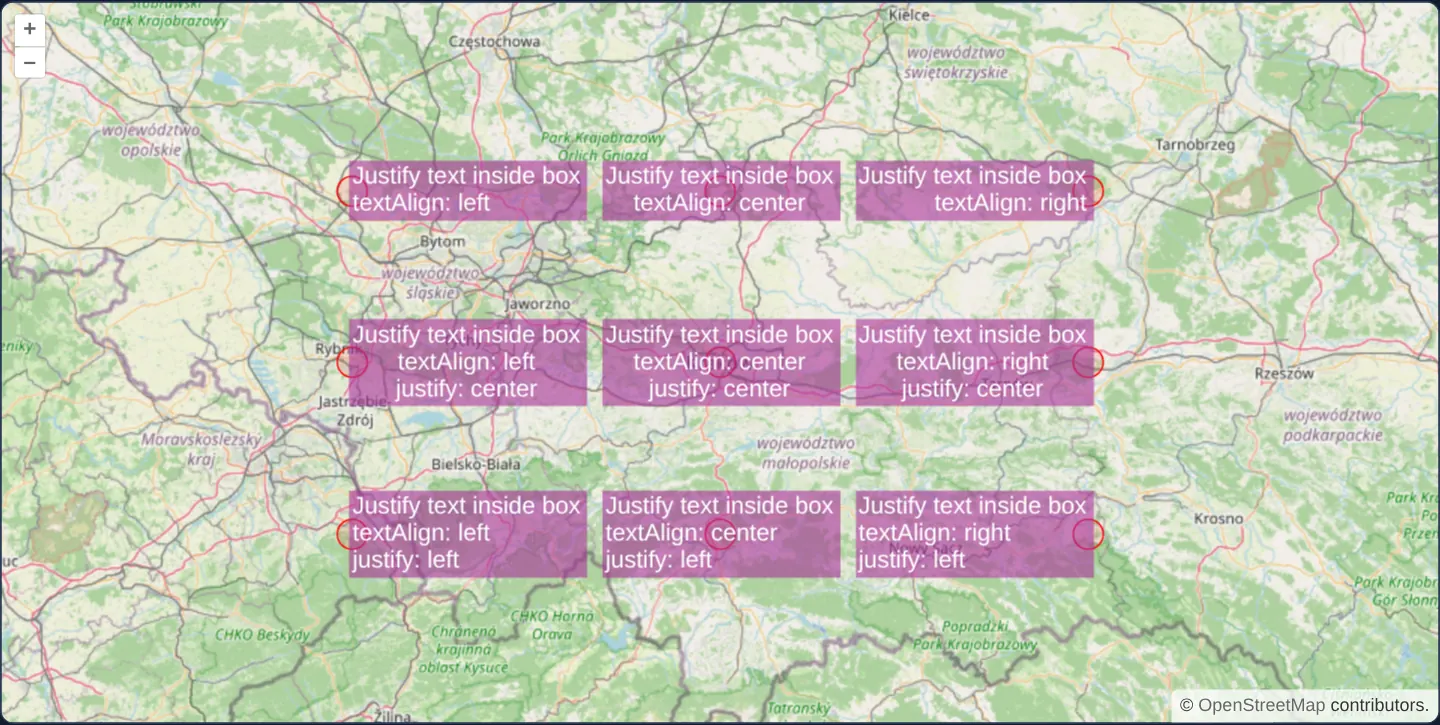
Compare textAlign box positioning and multi-line text justification independently across nine styled callout badges in OpenLayers around Kraków.
What this example shows
Nine red reference points arranged in a 3 × 3 matrix around Kraków at zoom 8 each carry a translucent purple multi-line callout box (backgroundFill with 2-pixel padding) illustrating every combination of horizontal box anchor (textAlign: left, center, right) across the columns and internal line justification (justify: unset, center, left) down the rows.
When you need it
Multi-line callout badges—showing a parcel number on line 1, area in m² on line 2 and zoning code on line 3—often need the badge anchored to the right of a pin while keeping text lines neatly left-aligned or centred inside the box.
Separating textAlign from justify prevents ugly ragged text inside right-anchored callout boxes.
The code
The example uses cc-openlayers, my Angular component library for OpenLayers: each aol-… element creates the OpenLayers object it names, updates it from its inputs and disposes of it with the component.
vector-labels-justify-text.tsimport { ChangeDetectionStrategy, Component } from '@angular/core';
import {
CoordinateComponent,
DefaultControlComponent,
DefaultInteractionComponent,
FeatureComponent,
LayerTileComponent,
LayerVectorComponent,
MapComponent,
SourceOsmComponent,
SourceVectorComponent,
ViewComponent,
} from 'cc-openlayers';
import type { FeatureLike } from 'ol/Feature';
import Point from 'ol/geom/Point';
import { fromLonLat } from 'ol/proj';
import CircleStyle from 'ol/style/Circle';
import Fill from 'ol/style/Fill';
import Stroke from 'ol/style/Stroke';
import Style from 'ol/style/Style';
import Text, { type TextJustify } from 'ol/style/Text';
type TextAlign = 'left' | 'center' | 'right';
/** The label options each of the nine points shows; the first row sets no justification. */
const LABELS: { dx: number; dy: number; textAlign: TextAlign; justify?: TextJustify }[] = (
[undefined, 'center', 'left'] as const
).flatMap((justify, row) =>
(['left', 'center', 'right'] as const).map((textAlign, column) => ({
dx: (column - 1) * 150000,
dy: (1 - row) * 70000,
textAlign,
justify,
}))
);
const CENTER = fromLonLat([19.9368, 50.0614]);
function createStyle({ textAlign, justify }: (typeof LABELS)[number]): Style {
return new Style({
image: new CircleStyle({
radius: 10,
fill: new Fill({ color: 'rgba(255, 0, 0, 0.1)' }),
stroke: new Stroke({ color: 'red', width: 1 }),
}),
text: new Text({
font: '16px sans-serif',
textAlign,
justify,
text: `Justify text inside box\ntextAlign: ${textAlign}` + (justify ? `\njustify: ${justify}` : ''),
fill: new Fill({ color: [255, 255, 255, 1] }),
backgroundFill: new Fill({ color: [168, 50, 153, 0.6] }),
padding: [2, 2, 2, 2],
}),
});
}
/** Nine points labelled with text boxes that combine every text alignment with the justification of the lines. */
@Component({
selector: 'app-vector-labels-justify-text',
imports: [
CoordinateComponent,
DefaultControlComponent,
DefaultInteractionComponent,
FeatureComponent,
LayerTileComponent,
LayerVectorComponent,
MapComponent,
SourceOsmComponent,
SourceVectorComponent,
ViewComponent,
],
changeDetection: ChangeDetectionStrategy.OnPush,
template: `
<aol-map height="480px">
<aol-interaction-default />
<aol-control-defaults />
<aol-view [zoom]="8"><aol-coordinate [x]="19.9368" [y]="50.0614" srid="EPSG:4326" /></aol-view>
<aol-layer-tile><aol-source-osm /></aol-layer-tile>
<aol-layer-vector [style]="style">
<aol-source-vector>
@for (label of labels; track $index) {
<aol-feature [id]="$index" [geometry]="point(label)" />
}
</aol-source-vector>
</aol-layer-vector>
</aol-map>
`,
})
export class VectorLabelsJustifyText {
protected readonly labels = LABELS;
private readonly styles = LABELS.map(createStyle);
protected readonly style = (feature: FeatureLike) => this.styles[feature.getId() as number];
protected point({ dx, dy }: (typeof LABELS)[number]): Point {
return new Point([CENTER[0] + dx, CENTER[1] + dy]);
}
} The React version uses the library's React adapter, cc-openlayers/react: each component creates the OpenLayers object it names when it mounts, updates it from its props and disposes of it when it unmounts.
vector-labels-justify-text.react.tsximport { useState } from 'react';
import {
Coordinate,
DefaultControls,
DefaultInteractions,
Feature,
Map,
OSMSource,
TileLayer,
VectorLayer,
VectorSource,
View,
} from 'cc-openlayers/react';
import type { FeatureLike } from 'ol/Feature';
import Point from 'ol/geom/Point';
import { fromLonLat } from 'ol/proj';
import CircleStyle from 'ol/style/Circle';
import Fill from 'ol/style/Fill';
import Stroke from 'ol/style/Stroke';
import Style from 'ol/style/Style';
import Text, { type TextJustify } from 'ol/style/Text';
type TextAlign = 'left' | 'center' | 'right';
/** The label options each of the nine points shows; the first row sets no justification. */
const LABELS: { dx: number; dy: number; textAlign: TextAlign; justify?: TextJustify }[] = (
[undefined, 'center', 'left'] as const
).flatMap((justify, row) =>
(['left', 'center', 'right'] as const).map((textAlign, column) => ({
dx: (column - 1) * 150000,
dy: (1 - row) * 70000,
textAlign,
justify,
}))
);
const CENTER = fromLonLat([19.9368, 50.0614]);
function createStyle({ textAlign, justify }: (typeof LABELS)[number]): Style {
return new Style({
image: new CircleStyle({
radius: 10,
fill: new Fill({ color: 'rgba(255, 0, 0, 0.1)' }),
stroke: new Stroke({ color: 'red', width: 1 }),
}),
text: new Text({
font: '16px sans-serif',
textAlign,
justify,
text: `Justify text inside box\ntextAlign: ${textAlign}` + (justify ? `\njustify: ${justify}` : ''),
fill: new Fill({ color: [255, 255, 255, 1] }),
backgroundFill: new Fill({ color: [168, 50, 153, 0.6] }),
padding: [2, 2, 2, 2],
}),
});
}
function point({ dx, dy }: (typeof LABELS)[number]): Point {
return new Point([CENTER[0] + dx, CENTER[1] + dy]);
}
/** Nine points labelled with text boxes that combine every text alignment with the justification of the lines. */
export function VectorLabelsJustifyText() {
const [styles] = useState(() => LABELS.map(createStyle));
const [points] = useState(() => LABELS.map(point));
const [style] = useState(() => (feature: FeatureLike) => styles[feature.getId() as number]);
return (
<Map height="480px">
<DefaultInteractions />
<DefaultControls />
<View zoom={8}>
<Coordinate x={19.9368} y={50.0614} srid="EPSG:4326" />
</View>
<TileLayer>
<OSMSource />
</TileLayer>
<VectorLayer style={style}>
<VectorSource>
{points.map((geometry, index) => (
<Feature key={index} id={index} geometry={geometry} />
))}
</VectorSource>
</VectorLayer>
</Map>
);
}How the React version works
Nine points over Kraków labelled with purple text boxes that combine each text alignment with the justification of their lines.
What both versions share
OpenLayers renders the map and handles the interactions; the cc-openlayers/core layer gives both adapters the same view binding (MapViewBinding) and the same conversion of coordinates from EPSG:4326 to the map's projection.
From Angular to React
| Angular | React |
|---|---|
@for over the labels with <aol-feature [geometry]> | points.map(…) with <Feature key={index} id={index} geometry>; the points come from a useState initialiser |
| a style function that picks the style of a feature by its id | the same function, created once in a useState initialiser with the nine styles |
Who creates, updates and disposes
Map creates the ol/Map in useLayoutEffect and disposes of it on unmount; each layer, source and interaction component adds its object to the parent it gets from context and removes it in its effect's cleanup, as ngOnDestroy does in Angular.
Architecture and OpenLayers mechanics
In OpenLayers’ Text style, textAlign (left, right, center) controls where the entire label box sits relative to the anchor coordinate—extending rightward from the point for left, leftward for right, or centred over it for center.
When justify is omitted (top row), individual text lines inherit textAlign; setting justify explicitly (center in row 2, left in row 3) aligns shorter and longer lines inside the backgroundFill + padding box independently of which side of the point the box sits on.
How it works
- Columns vary
textAlign(left,center,right) to position the entire callout box relative to its red anchor dot. - Rows vary
justify(unset,center,left) to align multi-line text inside the box independently of box placement. backgroundFilland 2-pixelpaddingmake each callout’s bounding box and internal line alignment clearly visible.- Nine pre-built styles map deterministically to the nine matrix points by feature ID.
Pitfalls
- Both
justifyand rectangular text boxes (backgroundFill/ backgroundStroke) apply exclusively to point-placed labels—OpenLayers ignores them when placement is set tolineor inside immediate toContext canvas drawing.
Related examples
The same feature in the OpenLayers examples .
Background: state and lifecycle of maps in Angular with OpenLayers, which the components of cc-openlayers take care of.