Layers · Angular, React and OpenLayers
Zoomify image tiles
Display high-resolution pre-tiled imagery in OpenLayers with the Zoomify source and switch live between Standard (1x) and Retina (2x) tile delivery.
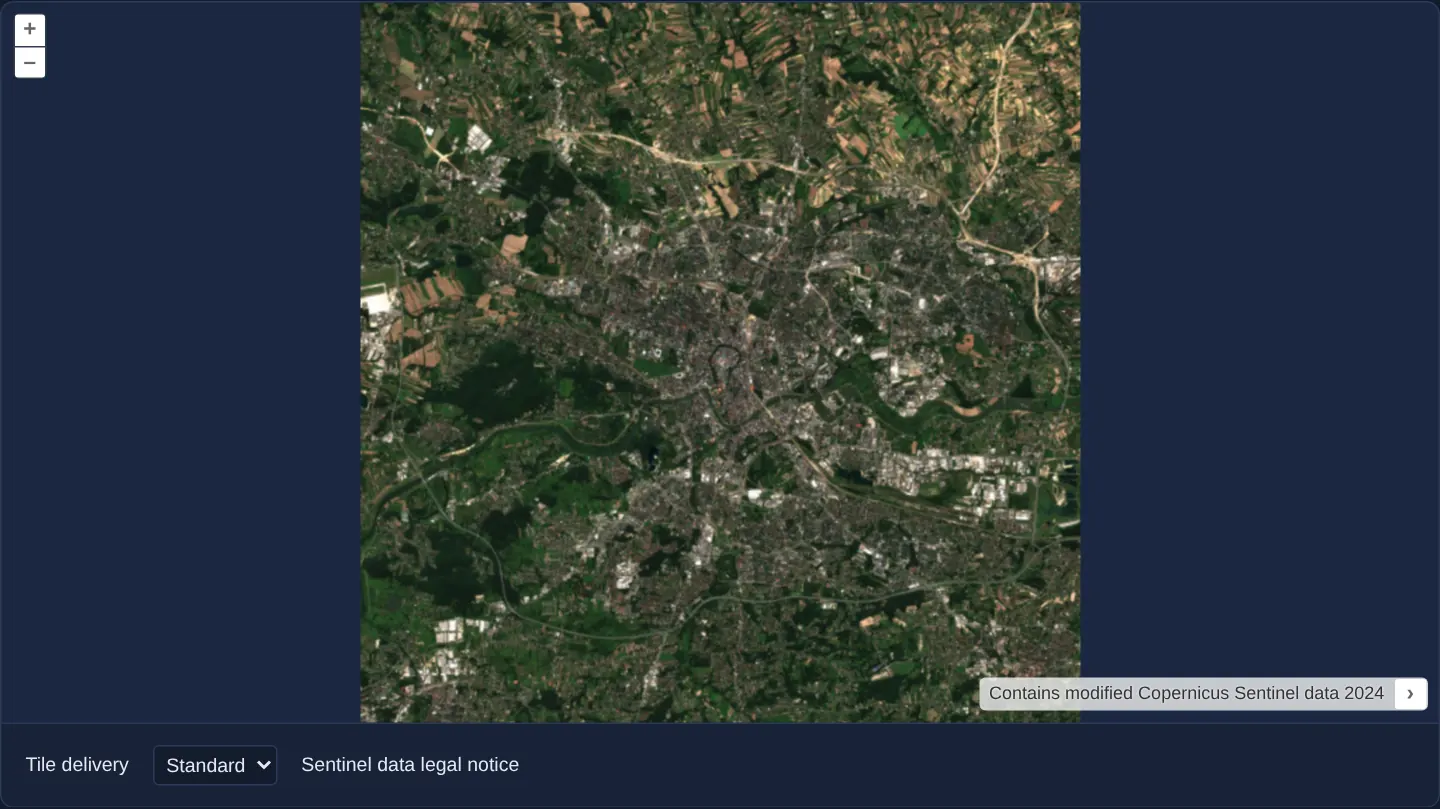
What this example shows
A 2048 × 2048 pixel Copernicus Sentinel satellite crop over Kraków opens in a pure pixel-coordinate viewer powered by OpenLayers’ Zoomify tile protocol. Below the viewport, a delivery-mode selector lets you toggle between Standard (1x) and Retina (2x) rendering at any moment.
Switching modes swaps the underlying Zoomify source adapter on the fly while preserving your exact camera centre and zoom level, letting you compare standard 256-pixel CSS tile sizing against high-DPI 128-pixel CSS tile sizing over the exact same pre-generated JPEG files.
When you need it
Deep-zoom image pyramids let users inspect gigapixel aerial scans, historical cadastral sheets, museum photography or microscopy slides without downloading and decoding an enormous raster file up front.
Zoomify is one of the longest-standing static deep-zoom formats: because it distributes tiles across deterministic TileGroup0, TileGroup1, ... folders on any plain HTTP static host or CDN, organisations can publish massive archival scans with zero dynamic image-server infrastructure.
The code
The example uses cc-openlayers, my Angular component library for OpenLayers: each aol-… element creates the OpenLayers object it names, updates it from its inputs and disposes of it with the component.
zoomify.css:host {
display: block;
}
.zoomify-map {
display: block;
width: 100%;
}
.zoomify-controls {
align-items: center;
flex-wrap: wrap;
gap: 0.5rem 1rem;
}zoomify.html<aol-map class="zoomify-map" height="480px" role="application" ariaLabel="Zoomify image map">
<aol-interaction-default />
<aol-control-defaults [attributionOptions]="{ collapsed: false }" />
<aol-view [extent]="imageExtent" [resolutions]="viewResolutions" [constrainOnlyCenter]="true" />
<aol-layer-tile>
<aol-source-zoomify
[url]="imageUrl"
[size]="imageSize"
[tileSize]="tileSize()"
[tilePixelRatio]="tilePixelRatio()"
[crossOrigin]="'anonymous'"
[zDirection]="-1"
[attributions]="imageAttribution"
/>
</aol-layer-tile>
</aol-map>
<div class="example-controls zoomify-controls" role="group" aria-label="Zoomify controls">
<label for="zoomify-tile-delivery">Tile delivery</label>
<select
id="zoomify-tile-delivery"
aria-label="Tile delivery"
[value]="tileDelivery()"
(change)="chooseTileDelivery($event)"
>
<option value="standard">Standard</option>
<option value="retina">Retina</option>
</select>
<a [href]="licenseUrl" target="_blank" rel="noreferrer">Sentinel data legal notice</a>
</div>zoomify.tsimport { AfterViewInit, ChangeDetectionStrategy, Component, computed, signal, viewChild } from '@angular/core';
import {
DefaultControlComponent,
DefaultInteractionComponent,
LayerTileComponent,
MapComponent,
SourceZoomifyComponent,
ViewComponent,
} from 'cc-openlayers';
import type { Extent } from 'ol/extent.js';
const IMAGE_SIZE: [number, number] = [2048, 2048];
const IMAGE_EXTENT: Extent = [0, -2048, 2048, 0];
const VIEW_RESOLUTIONS = [16, 8, 4, 2, 1];
const IMAGE_URL = 'assets/krakow/zoomify/sentinel-krakow/';
const IMAGE_ATTRIBUTION = 'Contains modified Copernicus Sentinel data 2024';
const LICENSE_URL = 'https://sentinels.copernicus.eu/documents/247904/690755/Sentinel_Data_Legal_Notice';
type TileDelivery = 'standard' | 'retina';
/** A local Zoomify pyramid of native-resolution Sentinel imagery with the standard and Retina profiles. */
@Component({
selector: 'app-zoomify-image',
imports: [
DefaultControlComponent,
DefaultInteractionComponent,
LayerTileComponent,
MapComponent,
SourceZoomifyComponent,
ViewComponent,
],
changeDetection: ChangeDetectionStrategy.OnPush,
templateUrl: './zoomify.html',
styleUrl: './zoomify.css',
})
export class Zoomify implements AfterViewInit {
protected readonly imageSize = IMAGE_SIZE;
protected readonly imageExtent = IMAGE_EXTENT;
protected readonly viewResolutions = VIEW_RESOLUTIONS;
protected readonly imageUrl = IMAGE_URL;
protected readonly imageAttribution = IMAGE_ATTRIBUTION;
protected readonly licenseUrl = LICENSE_URL;
protected readonly tileDelivery = signal<TileDelivery>('standard');
protected readonly tileSize = computed(() => (this.tileDelivery() === 'retina' ? 128 : 256));
protected readonly tilePixelRatio = computed(() => (this.tileDelivery() === 'retina' ? 2 : 1));
private readonly map = viewChild.required(MapComponent);
private readonly view = viewChild.required(ViewComponent);
ngAfterViewInit(): void {
const map = this.map().instance;
this.view().instance.fit(IMAGE_EXTENT, { size: map.getSize() ?? undefined });
}
protected chooseTileDelivery(event: Event): void {
this.tileDelivery.set((event.target as HTMLSelectElement).value === 'retina' ? 'retina' : 'standard');
}
} The React version uses the library's React adapter, cc-openlayers/react: each component creates the OpenLayers object it names when it mounts, updates it from its props and disposes of it when it unmounts.
zoomify.react.tsximport { useEffect, useState } from 'react';
import {
DefaultControls,
DefaultInteractions,
Map,
TileLayer,
View,
ZoomifySource,
useMap,
useView,
} from 'cc-openlayers/react';
import type { Extent } from 'ol/extent.js';
const IMAGE_SIZE: [number, number] = [2048, 2048];
const IMAGE_EXTENT: Extent = [0, -2048, 2048, 0];
const VIEW_RESOLUTIONS = [16, 8, 4, 2, 1];
const IMAGE_URL = 'assets/krakow/zoomify/sentinel-krakow/';
const IMAGE_ATTRIBUTION = 'Contains modified Copernicus Sentinel data 2024';
const LICENSE_URL = 'https://sentinels.copernicus.eu/documents/247904/690755/Sentinel_Data_Legal_Notice';
type TileDelivery = 'standard' | 'retina';
interface ZoomifyMapContentProps {
readonly tileSize: number;
readonly tilePixelRatio: number;
}
function FitImageExtent() {
const map = useMap();
const view = useView();
useEffect(() => {
view.fit(IMAGE_EXTENT, { size: map.getSize() ?? undefined });
}, [map, view]);
return null;
}
function ZoomifyMapContent({ tileSize, tilePixelRatio }: ZoomifyMapContentProps) {
return (
<>
<DefaultInteractions />
<DefaultControls attributionOptions={{ collapsed: false }} />
<View extent={IMAGE_EXTENT} resolutions={VIEW_RESOLUTIONS} constrainOnlyCenter>
<FitImageExtent />
</View>
<TileLayer>
<ZoomifySource
url={IMAGE_URL}
size={IMAGE_SIZE}
tileSize={tileSize}
tilePixelRatio={tilePixelRatio}
crossOrigin="anonymous"
zDirection={-1}
attributions={IMAGE_ATTRIBUTION}
/>
</TileLayer>
</>
);
}
/** A local Zoomify pyramid of native-resolution Sentinel imagery with the standard and Retina profiles. */
export function Zoomify() {
const [tileDelivery, setTileDelivery] = useState<TileDelivery>('standard');
const tileSize = tileDelivery === 'retina' ? 128 : 256;
const tilePixelRatio = tileDelivery === 'retina' ? 2 : 1;
return (
<>
<Map height="480px" role="application" ariaLabel="Zoomify image map">
<ZoomifyMapContent tileSize={tileSize} tilePixelRatio={tilePixelRatio} />
</Map>
<div className="example-controls zoomify-controls" role="group" aria-label="Zoomify controls">
<label htmlFor="zoomify-tile-delivery">Tile delivery</label>
<select
id="zoomify-tile-delivery"
aria-label="Tile delivery"
value={tileDelivery}
onChange={(event) => setTileDelivery(event.target.value === 'retina' ? 'retina' : 'standard')}
>
<option value="standard">Standard</option>
<option value="retina">Retina</option>
</select>
<a href={LICENSE_URL} target="_blank" rel="noreferrer">
Sentinel data legal notice
</a>
</div>
</>
);
}How the React version works
Explore the local Sentinel image and switch between standard and Retina tile delivery. Both profiles reuse the same native 2048 × 2048 pixel Kraków crop. Switching replaces the tile source while keeping the current camera position and resolution.
What both versions share
The existing Zoomify adapters bind the image size, URL, attribution and source options to OpenLayers. Standard delivery uses a 256-pixel tile size with a ratio of 1; Retina delivery uses 128 and 2. The deterministic fixture maps the IIIF example's 85 unchanged JPEGs to Zoomify tile groups and coordinates. Its provenance records each source region and tile hash. Retina does not add detail beyond the native image, and this pixel view does not retain the crop's geographic positioning.
From Angular to React
| Angular | React |
|---|---|
| a signal stores the selected delivery profile | useState stores the same choice |
| computed values supply tile size and pixel ratio | values derived during rendering supply the same options |
SourceZoomifyComponent binds the source | ZoomifySource binds the source |
ngAfterViewInit fits the image once | a child effect fits the image after its map and view exist |
| stable image dimensions, extent and resolutions belong to the module | the same stable values avoid replacing the view during a profile change |
Who creates, updates and disposes
The adapters own source creation and replacement; OpenLayers owns the map and tile cache. The example only selects a delivery profile and fits the initial image extent. A profile switch leaves the live camera unchanged. Map teardown releases its source through the existing adapter lifecycle. The example needs no runtime image server, upstream acquisition or account.
Architecture and OpenLayers mechanics
Unlike geographic map projections measured in metres or degrees, a Zoomify viewer establishes a custom Cartesian pixel space spanning [0, -height, width, 0] so every zoom level fetches only the 256 × 256 JPEG blocks intersecting the current screen.
In Standard mode, OpenLayers maps each 256-pixel JPEG to 256 CSS pixels (pixel ratio 1). In Retina mode, the adapter declares a logical tile size of 128 CSS pixels and a tile pixel ratio of 2 over the identical 85 static JPEG files—doubling pixel density on HiDPI / Retina screens by pulling one pyramid tier deeper for the same visual scale while preserving the live camera state.
How it works
- The viewer serves a native 2048 × 2048 pixel Kraków Sentinel scene pre-cut into 85 static JPEG tiles mapped deterministically into Zoomify tile-group and z-x-y paths.
- Standard delivery pairs a 256-pixel tile grid with pixel ratio 1, whereas Retina delivery pairs a 128-pixel CSS grid with pixel ratio 2 over the exact same underlying JPEG bytes.
- Changing the delivery selector replaces the Zoomify source through the Angular or React component wrapper without resetting the active view centre or resolution.
- A bundled provenance manifest records the Sentinel acquisition metadata, crop checksums and tile hashes alongside the mandatory Copernicus attribution notice.
Pitfalls
- Enabling Retina tile delivery increases sharpness on high-DPI displays until you reach the deepest pyramid tier, after which it cannot invent optical detail beyond the native 2048 × 2048 source resolution.
- Zoomify operates in unprojected image pixel coordinates: even when the original raster came from satellite imagery, Geographic WGS84 or Web Mercator overlays will not align unless you use a georeferenced source such as Cloud Optimized GeoTIFF instead.
- Verify exact image width and height declarations when instantiating Zoomify—off-by-one dimensions shift pyramid tier boundaries and cause missing edge tiles at high zoom.
Related examples
The same feature in the OpenLayers examples .
Background: state and lifecycle of maps in Angular with OpenLayers, which the components of cc-openlayers take care of.