Interactions · Angular, React and OpenLayers
Select several features with clicks
Toggle multiple Polish voivodeship polygons in and out of selection with single clicks in OpenLayers using toggleCondition always and multi.
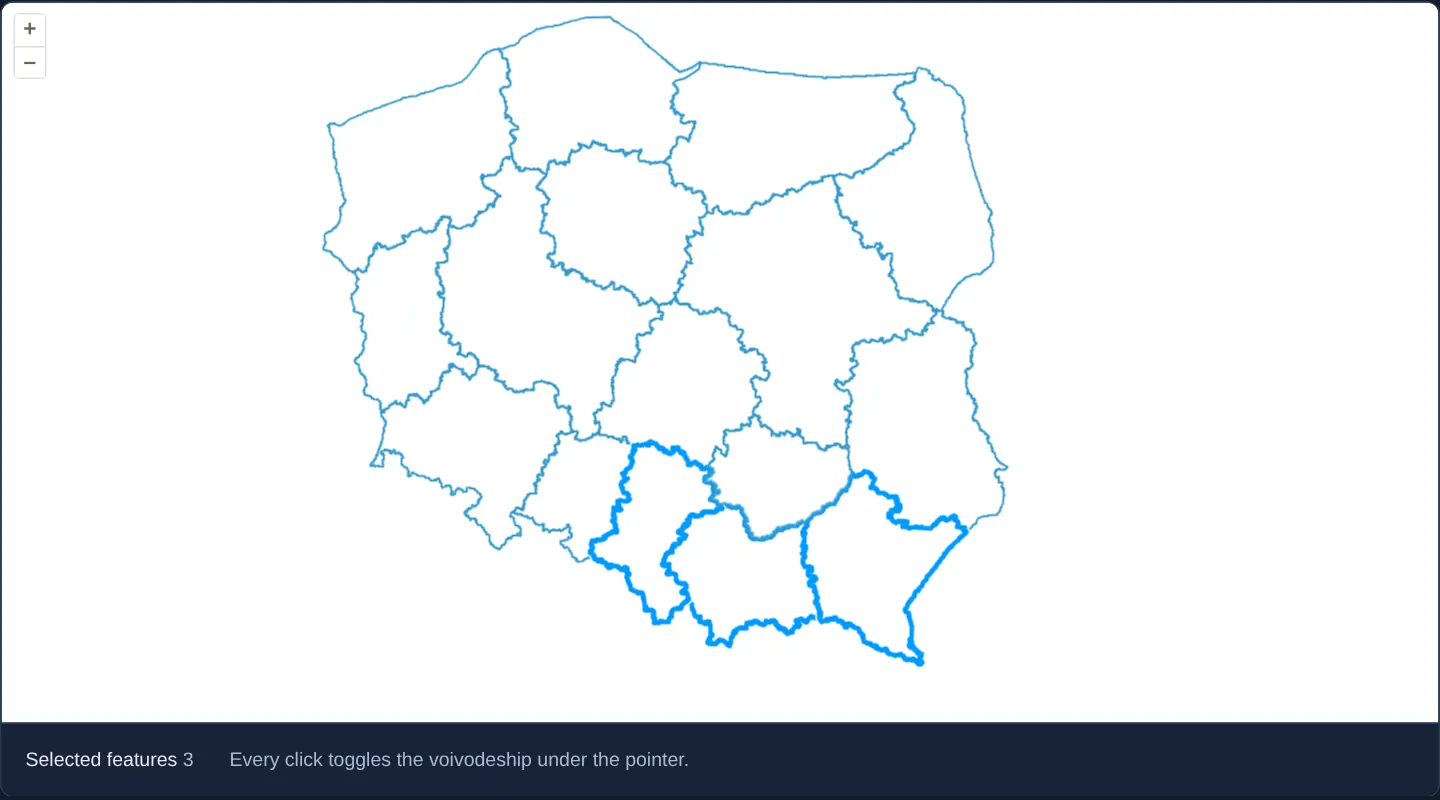
What this example shows
Starting over Poland’s voivodeships outlined in blue, every single click on a province toggles it into or out of the active selection—allowing you to accumulate Silesia, Małopolska and Subcarpathia with one hand and zero keyboard modifiers while tracking the live selected count below.
When you need it
Export wizards, territory assignment tools and multi-parcel comparison baskets on tablets, phones and kiosk screens cannot rely on users knowing or holding Shift+Click.
Setting toggleCondition to always turns every tap or click on a feature into an intuitive add/remove checkbox toggle.
The code
The example uses cc-openlayers, my Angular component library for OpenLayers: each aol-… element creates the OpenLayers object it names, updates it from its inputs and disposes of it with the component.
select-multiple-features.tsimport { ChangeDetectionStrategy, Component, signal, viewChild } from '@angular/core';
import {
CoordinateComponent,
DefaultControlComponent,
DefaultInteractionComponent,
LayerVectorComponent,
MapComponent,
SelectInteractionComponent,
SourceGeoJSONComponent,
ViewComponent,
} from 'cc-openlayers';
import { always } from 'ol/events/condition';
/** Voivodeships selected and deselected one by one with a click, the selected ones counted. */
@Component({
selector: 'app-select-multiple-features',
imports: [
CoordinateComponent,
DefaultControlComponent,
DefaultInteractionComponent,
LayerVectorComponent,
MapComponent,
SelectInteractionComponent,
SourceGeoJSONComponent,
ViewComponent,
],
changeDetection: ChangeDetectionStrategy.OnPush,
template: `
<aol-map height="480px">
<aol-interaction-default />
<aol-control-defaults />
<aol-interaction-select [toggleCondition]="always" [multi]="true" (olSelect)="count()" />
<aol-view [zoom]="6"><aol-coordinate [x]="19.9368" [y]="50.0614" srid="EPSG:4326" /></aol-view>
<aol-layer-vector background="white">
<aol-source-geojson url="assets/poland/voivodeships.geojson" featureProjection="EPSG:3857" />
</aol-layer-vector>
</aol-map>
<div class="example-controls">
<span>
Selected features <output>{{ selected() }}</output>
</span>
<p class="example-hint">Every click toggles the voivodeship under the pointer.</p>
</div>
`,
})
export class SelectMultipleFeatures {
readonly selected = signal(0);
protected readonly always = always;
private readonly select = viewChild.required(SelectInteractionComponent);
protected count(): void {
this.selected.set(this.select().instance.getFeatures().getLength());
}
} The React version uses the library's React adapter, cc-openlayers/react: each component creates the OpenLayers object it names when it mounts, updates it from its props and disposes of it when it unmounts.
select-multiple-features.react.tsximport { useRef, useState } from 'react';
import { always } from 'ol/events/condition.js';
import type OLSelect from 'ol/interaction/Select.js';
import {
Coordinate,
DefaultControls,
DefaultInteractions,
GeoJSONSource,
Map,
SelectInteraction,
VectorLayer,
View,
} from 'cc-openlayers/react';
/** Voivodeships selected and deselected one by one with a click, the selected ones counted. */
export function SelectMultipleFeatures() {
const [selected, setSelected] = useState(0);
const select = useRef<OLSelect>(null);
const count = () => setSelected(select.current?.getFeatures().getLength() ?? 0);
return (
<>
<Map height="480px">
<DefaultInteractions />
<DefaultControls />
<SelectInteraction ref={select} toggleCondition={always} multi={true} onSelect={count} />
<View zoom={6}>
<Coordinate x={19.9368} y={50.0614} srid="EPSG:4326" />
</View>
<VectorLayer background="white">
<GeoJSONSource url="assets/poland/voivodeships.geojson" featureProjection="EPSG:3857" />
</VectorLayer>
</Map>
<div className="example-controls">
<span>
Selected features <output>{selected}</output>
</span>
<p className="example-hint">Every click toggles the voivodeship under the pointer.</p>
</div>
</>
);
}How the React version works
Voivodeships selected and deselected one by one with a click, the selected ones counted.
What both versions share
OpenLayers renders the map and handles the interactions; the cc-openlayers/core layer gives both adapters the same view binding (MapViewBinding) and the same conversion of coordinates from EPSG:4326 to the map's projection.
From Angular to React
| Angular | React |
|---|---|
<aol-source-geojson> with the voivodeships | <GeoJSONSource> |
<aol-interaction-select [multi] [toggleCondition]> with viewChild | <SelectInteraction multi toggleCondition ref={select}>; the ref holds the ol/interaction/Select |
(olSelect) updating a count | onSelect reading select.current.getFeatures() into useState |
Who creates, updates and disposes
Map creates the ol/Map in useLayoutEffect and disposes of it on unmount; each layer, source and interaction component adds its object to the parent it gets from context and removes it in its effect's cleanup, as ngOnDestroy does in Angular.
Architecture and OpenLayers mechanics
Configuring [toggleCondition]="always" on aol-interaction-select replaces OpenLayers’ default shiftKeyOnly toggle rule so plain clicks accumulate and toggle features rather than replacing the previous selection.
Enabling [multi]="true" instructs single clicks to select all stacked features intersecting the clicked pixel rather than stopping at the topmost feature, while olSelect reads the updated total from getFeatures.
How it works
[toggleCondition]="always"makes every plain click add an unselected feature or deselect an already selected one.[multi]="true"includes all overlapping features at the clicked pixel instead of only the topmost geometry.olSelectreads the current collection length fromgetFeaturesto display the live selection count.- Selected provinces adopt OpenLayers’ default white-haloed blue highlight style.
Pitfalls
- Do not confuse
[multi]="true"with multi-click accumulation:multionly selects stacked features under one click, whereas[toggleCondition]="always"is what preserves earlier clicks across separate regions. - When every click acts as a toggle, clicking empty space outside all polygons no longer clears the selection—provide an explicit Clear selection button in your toolbar.
Related examples
The same feature in the OpenLayers examples .
Background: state and lifecycle of maps in Angular with OpenLayers, which the components of cc-openlayers take care of.