Interactions · Angular, React and OpenLayers
Smooth a drawn line
Sketch polylines over Kraków in OpenLayers and smooth sharp corners iteratively using the Chaikin corner-cutting algorithm in Angular and React.
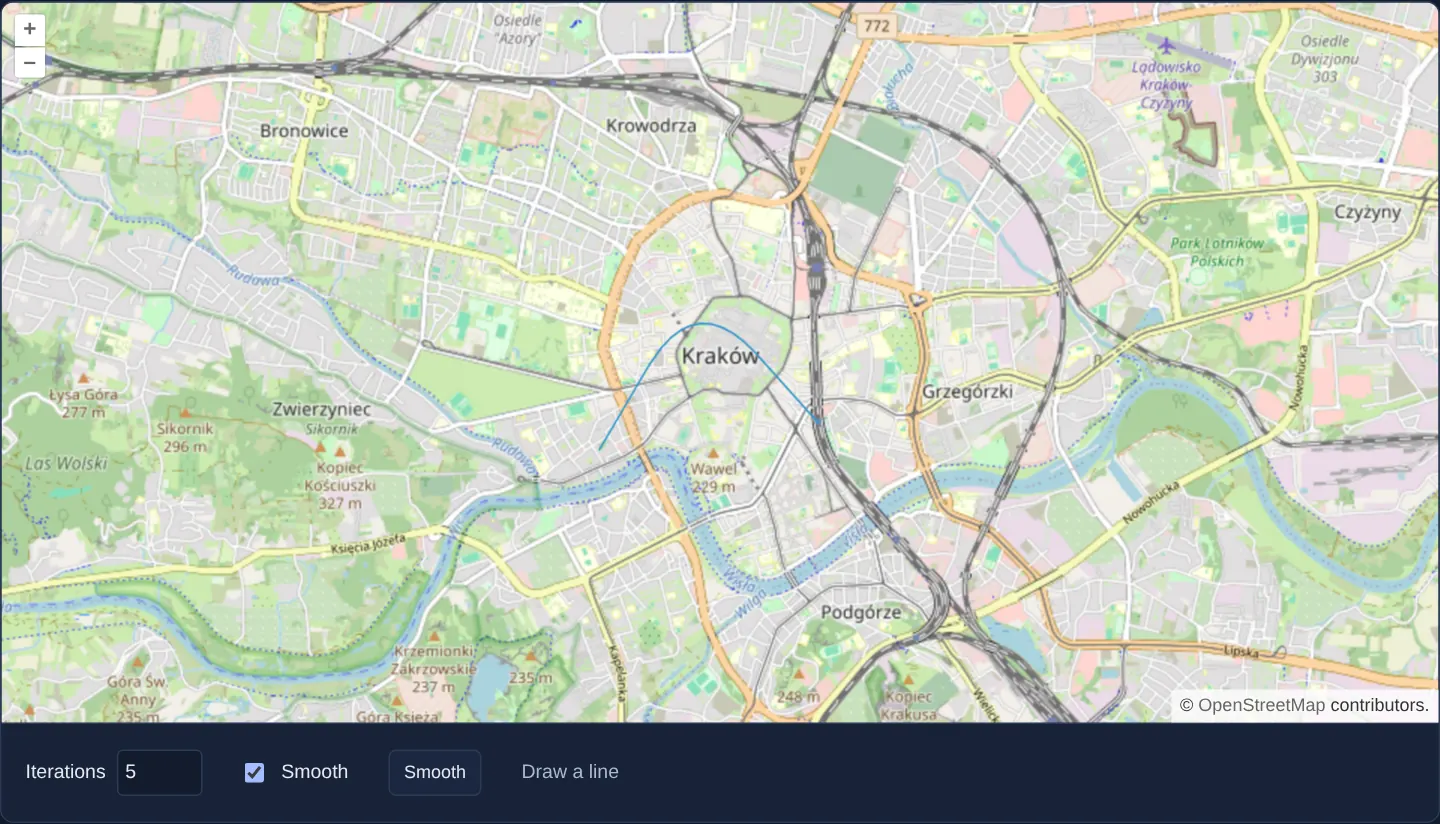
What this example shows
Over OpenStreetMap of Kraków, sketching a coarse polygonal route smooths that same line in place with Chaikin’s corner-cutting algorithm, with an iteration control adjusting how gently corners round out before the next draw or Smooth click.
When you need it
Hand-clicked hiking trails, schematic flow arrows, sketched contour lines and illustrative story-map routes look jagged when drawn with a handful of mouse clicks.
Applying Chaikin subdivision produces smooth cartographic curves from sparse control points without forcing users to manipulate Bezier handles.
The code
The example uses cc-openlayers, my Angular component library for OpenLayers: each aol-… element creates the OpenLayers object it names, updates it from its inputs and disposes of it with the component.
chaikin-packages.tsdeclare module 'chaikin-smooth' {
export default function smooth(input: number[][], output?: number[][]): number[][];
}chaikin.html<aol-map height="480px"
><aol-control-defaults /><aol-interaction-default /><aol-view [zoom]="13" [maxZoom]="19"
><aol-coordinate [x]="19.9368" [y]="50.0614" srid="EPSG:4326" /></aol-view
><aol-layer-tile><aol-source-osm /></aol-layer-tile
></aol-map>
<div class="example-controls">
<label
>Iterations <input type="number" min="1" max="10" [value]="iterations()" (input)="setIterations($event)" /></label
><label><input type="checkbox" [checked]="enabled()" (change)="setEnabled($event)" />Smooth</label
><button type="button" (click)="smooth()">Smooth</button>
<p class="example-hint">Draw a line</p>
</div>chaikin.shared.tsimport './chaikin-packages';
import smooth from 'chaikin-smooth';
export function smoothLine(path: number[][], iterations: number): number[][] {
let result = path.map((p) => p.slice());
for (let i = 0; i < Math.min(10, Math.max(1, Math.trunc(iterations) || 5)); i++) result = smooth(result);
return result;
}chaikin.tsimport { AfterViewInit, ChangeDetectionStrategy, Component, OnDestroy, signal, viewChild } from '@angular/core';
import {
MapComponent,
ViewComponent,
CoordinateComponent,
LayerTileComponent,
SourceOsmComponent,
DefaultControlComponent,
DefaultInteractionComponent,
} from 'cc-openlayers';
import VectorLayer from 'ol/layer/Vector';
import Feature from 'ol/Feature';
import LineString from 'ol/geom/LineString';
import VectorSource from 'ol/source/Vector';
import Draw from 'ol/interaction/Draw';
import { fromLonLat } from 'ol/proj';
import { smoothLine } from './chaikin.shared';
@Component({
selector: 'app-chaikin',
imports: [
MapComponent,
ViewComponent,
CoordinateComponent,
LayerTileComponent,
SourceOsmComponent,
DefaultControlComponent,
DefaultInteractionComponent,
],
changeDetection: ChangeDetectionStrategy.OnPush,
templateUrl: './chaikin.html',
})
export class Chaikin implements AfterViewInit, OnDestroy {
private readonly map = viewChild.required(MapComponent);
readonly iterations = signal(5);
readonly enabled = signal(true);
private readonly source = new VectorSource({
features: [
new Feature(
new LineString(
[
[19.923, 50.055],
[19.934, 50.067],
[19.948, 50.057],
].map((p) => fromLonLat(p))
)
),
],
});
private cleanup = () => {};
ngAfterViewInit(): void {
const map = this.map().instance,
layer = new VectorLayer({ source: this.source }),
draw = new Draw({ source: this.source, type: 'LineString' });
map.addLayer(layer);
map.addInteraction(draw);
draw.on('drawend', (e) => {
if (this.enabled()) {
const geometry = e.feature.getGeometry() as LineString;
geometry.setCoordinates(smoothLine(geometry.getCoordinates(), this.iterations()));
}
});
this.cleanup = () => {
map.removeInteraction(draw);
draw.dispose();
map.removeLayer(layer);
};
}
ngOnDestroy(): void {
this.cleanup();
}
smooth(): void {
this.source.getFeatures().forEach((f) => {
const geometry = f.getGeometry() as LineString;
geometry.setCoordinates(smoothLine(geometry.getCoordinates(), this.iterations()));
});
}
setIterations(e: Event): void {
this.iterations.set((e.target as HTMLInputElement).valueAsNumber);
}
setEnabled(e: Event): void {
this.enabled.set((e.target as HTMLInputElement).checked);
}
} The React version uses the library's React adapter, cc-openlayers/react: each component creates the OpenLayers object it names when it mounts, updates it from its props and disposes of it when it unmounts.
chaikin.react.tsximport { useEffect, useRef, useState } from 'react';
import { Map, View, Coordinate, TileLayer, OSMSource, DefaultControls, DefaultInteractions } from 'cc-openlayers/react';
import type OLMap from 'ol/Map';
import VectorLayer from 'ol/layer/Vector';
import Feature from 'ol/Feature';
import LineString from 'ol/geom/LineString';
import VectorSource from 'ol/source/Vector';
import Draw from 'ol/interaction/Draw';
import { fromLonLat } from 'ol/proj';
import { smoothLine } from './chaikin.shared';
export function Chaikin() {
const [map, setMap] = useState<OLMap | null>(null);
const [source] = useState(
() =>
new VectorSource({
features: [
new Feature(
new LineString(
[
[19.923, 50.055],
[19.934, 50.067],
[19.948, 50.057],
].map((p) => fromLonLat(p))
)
),
],
})
);
const [iterations, setIterations] = useState(5),
[enabled, setEnabled] = useState(true);
const settings = useRef({ iterations, enabled });
useEffect(() => {
settings.current = { iterations, enabled };
}, [iterations, enabled]);
useEffect(() => {
if (!map) return;
const layer = new VectorLayer({ source }),
draw = new Draw({ source, type: 'LineString' });
map.addLayer(layer);
map.addInteraction(draw);
draw.on('drawend', (e) => {
if (settings.current.enabled) {
const geometry = e.feature.getGeometry() as LineString;
geometry.setCoordinates(smoothLine(geometry.getCoordinates(), settings.current.iterations));
}
});
return () => {
map.removeInteraction(draw);
draw.dispose();
map.removeLayer(layer);
};
}, [map, source]);
return (
<>
<Map ref={setMap} height="480px">
<DefaultControls />
<DefaultInteractions />
<View zoom={13} maxZoom={19}>
<Coordinate x={19.9368} y={50.0614} srid="EPSG:4326" />
</View>
<TileLayer>
<OSMSource />
</TileLayer>
</Map>
<div className="example-controls">
<label>
Iterations{' '}
<input
type="number"
min="1"
max="10"
value={iterations}
onChange={(e) => setIterations(e.currentTarget.valueAsNumber)}
/>
</label>
<label>
<input type="checkbox" checked={enabled} onChange={(e) => setEnabled(e.currentTarget.checked)} />
Smooth
</label>
<button
type="button"
onClick={() =>
source.getFeatures().forEach((f) => {
const g = f.getGeometry() as LineString;
g.setCoordinates(smoothLine(g.getCoordinates(), iterations));
})
}
>
Smooth
</button>
<p className="example-hint">Draw a line</p>
</div>
</>
);
}chaikin.shared.tsimport './chaikin-packages';
import smooth from 'chaikin-smooth';
export function smoothLine(path: number[][], iterations: number): number[][] {
let result = path.map((p) => p.slice());
for (let i = 0; i < Math.min(10, Math.max(1, Math.trunc(iterations) || 5)); i++) result = smooth(result);
return result;
}How the React version works
Draw a route around Kraków and smooth its corners with the Chaikin algorithm.
What both versions share
chaikin-smooth applies corner cutting to the example geometry. The iteration control changes the amount of smoothing.
From Angular to React
| Angular | React |
|---|---|
| Signals hold smoothing iterations and whether smoothing is enabled. | useState holds the same values; a ref supplies current settings to the draw callback. |
| An external Angular template declares the example. | JSX declares the example and its controls. |
| The Angular lifecycle releases the mounted resources. | Effect or subscription cleanup releases the mounted resources. |
Who creates, updates and disposes
Both versions use the same line smoother and draw interaction. Their lifecycle cleanup removes the interaction and vector layer.
Architecture and OpenLayers mechanics
Shared geometry logic passes the raw LineString coordinate array through chaikin-smooth for the configured iteration count—replacing each sharp vertex corner with pairs of 1/4 and 3/4 edge points—and rewrites the drawn feature when the sketch ends or the Smooth button is pressed, using whatever iteration count the control currently holds.
How it works
- The chaikin-smooth helper applies iterative corner-cutting to the drawn geometry controlled by the smoothing iteration input.
Pitfalls
- Corner-cutting pulls curves slightly inside sharp turns and multiplies vertex count by 2^iterations—treat the smoothed curve as a cartographic visualisation rather than a legally surveyed boundary or exact road alignment.
Related examples
The same feature in the OpenLayers examples .
Background: state and lifecycle of maps in Angular with OpenLayers, which the components of cc-openlayers take care of.