Styling and labels · Angular, React and OpenLayers
A hit area of its own for a custom renderer
Separate visual Canvas 2D rendering from pointer hit-testing in OpenLayers with a dedicated hitDetectionRenderer targeting only the text label.
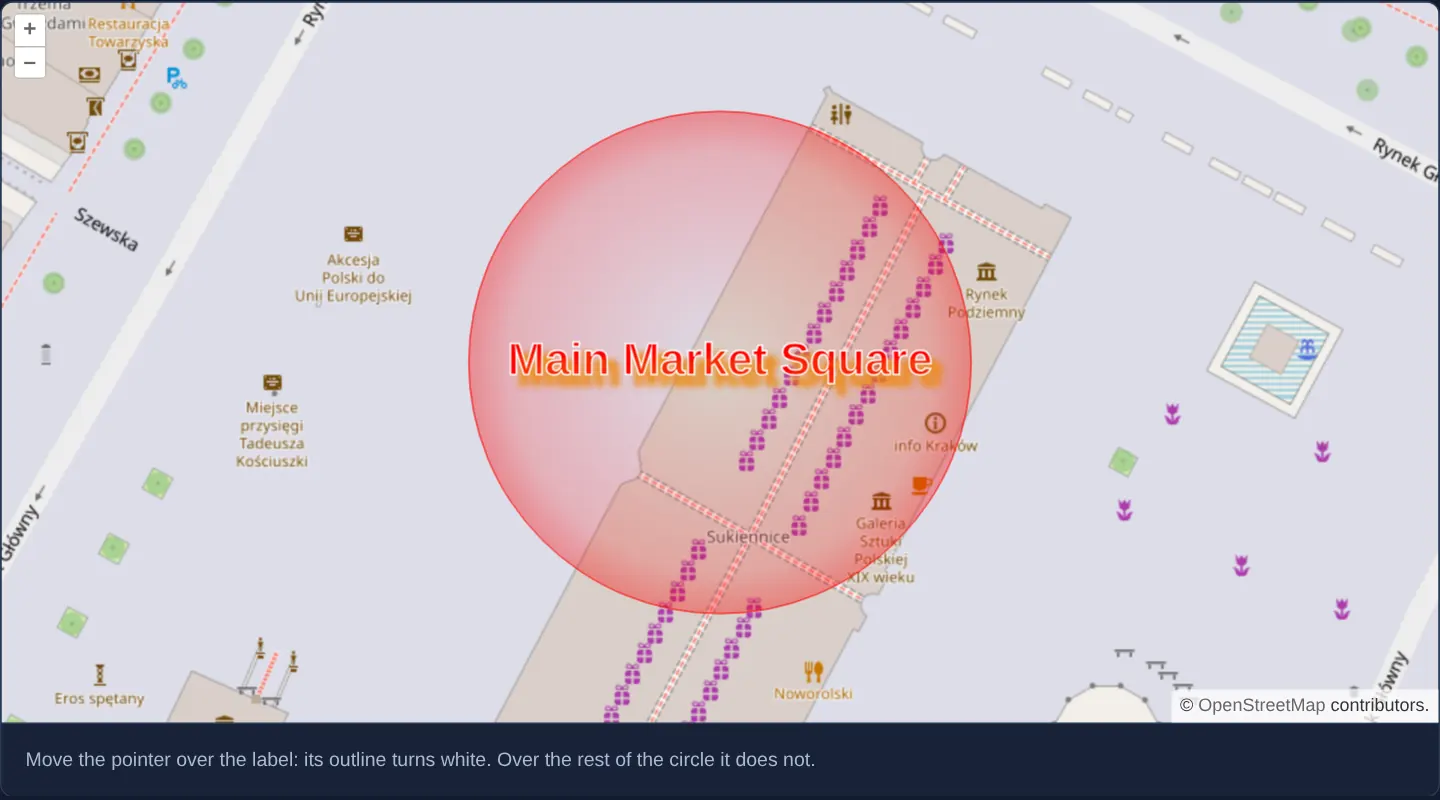
What this example shows
Over Kraków’s Main Market Square at zoom 19, a large radial-gradient circle surrounds a bold Main Market Square text label with an orange drop shadow. Moving the pointer across the wide gradient circle leaves the feature unselected—only hovering directly over the central text label turns its outline crisp white.
When you need it
Large decorative range rings, wind roses, wireless coverage halos and callout leader lines cover wide swaths of the map that would otherwise intercept clicks and hover events meant for streets or parcels underneath.
Supplying a separate hitDetectionRenderer lets a feature paint an expansive visual graphic while keeping its clickable/hoverable target strictly confined to its central badge or label.
The code
The example uses cc-openlayers, my Angular component library for OpenLayers: each aol-… element creates the OpenLayers object it names, updates it from its inputs and disposes of it with the component.
custom-hit-detection-renderer.tsimport { ChangeDetectionStrategy, Component, signal, viewChild } from '@angular/core';
import type Feature from 'ol/Feature';
import type MapBrowserEvent from 'ol/MapBrowserEvent';
import type { Coordinate } from 'ol/coordinate';
import type { RenderFunction } from 'ol/style/Style';
import Style from 'ol/style/Style';
import {
CoordinateComponent,
DefaultControlComponent,
DefaultInteractionComponent,
FeatureComponent,
GeometryCircleComponent,
LayerTileComponent,
LayerVectorComponent,
MapComponent,
SourceOsmComponent,
SourceVectorComponent,
ViewComponent,
} from 'cc-openlayers';
const LABEL = 'Main Market Square';
const LABEL_STROKE = 'rgba(120, 120, 120, 1)';
const LABEL_STROKE_OVER = 'rgba(255, 255, 255, 1)';
/**
* Draws the label `scale` times its size in CSS pixels: the map's canvas counts device pixels, so the renderer passes
* the screen's density, while hit detection draws in CSS pixels.
*/
function drawLabel(context: CanvasRenderingContext2D, [x, y]: Coordinate, stroke: string, scale: number): void {
context.fillStyle = 'rgba(255,0,0,1)';
context.strokeStyle = stroke;
context.lineWidth = scale;
context.textAlign = 'center';
context.textBaseline = 'middle';
context.font = `bold ${30 * scale}px verdana, sans-serif`;
context.filter = `drop-shadow(${7 * scale}px ${7 * scale}px ${2 * scale}px #e81)`;
context.fillText(LABEL, x, y);
context.strokeText(LABEL, x, y);
}
/** The circle is drawn as a radial gradient with a label; only the label counts when the pointer is over it. */
const renderer: RenderFunction = (coordinates, state) => {
const [[x, y], [x1, y1]] = coordinates as Coordinate[];
const context = state.context;
const radius = Math.sqrt((x1 - x) ** 2 + (y1 - y) ** 2);
const gradient = context.createRadialGradient(x, y, 0, x, y, radius * 1.4);
gradient.addColorStop(0, 'rgba(255,0,0,0)');
gradient.addColorStop(0.6, 'rgba(255,0,0,0.2)');
gradient.addColorStop(1, 'rgba(255,0,0,0.8)');
context.beginPath();
context.arc(x, y, radius, 0, 2 * Math.PI, true);
context.fillStyle = gradient;
context.fill();
context.strokeStyle = 'rgba(255,0,0,1)';
context.stroke();
drawLabel(context, [x, y], state.feature.get('label-color') ?? LABEL_STROKE, state.pixelRatio);
};
/**
* The label only, at its size in CSS pixels: the pointer hits the feature where the label is drawn. Hit detection
* passes the screen's density in `state.pixelRatio` too, though its canvas counts CSS pixels, so it is not used here.
*/
const hitDetectionRenderer: RenderFunction = (coordinates, state) => {
drawLabel(state.context, (coordinates as Coordinate[])[0], state.feature.get('label-color') ?? LABEL_STROKE, 1);
};
/** A circle drawn by a custom renderer, hit-tested by another one that draws only its label. */
@Component({
selector: 'app-custom-hit-detection-renderer',
imports: [
CoordinateComponent,
DefaultControlComponent,
DefaultInteractionComponent,
FeatureComponent,
GeometryCircleComponent,
LayerTileComponent,
LayerVectorComponent,
MapComponent,
SourceOsmComponent,
SourceVectorComponent,
ViewComponent,
],
changeDetection: ChangeDetectionStrategy.OnPush,
template: `
<aol-map height="480px" (pointerMove)="hover($event)">
<aol-interaction-default />
<aol-control-defaults />
<aol-view [zoom]="19">
<aol-coordinate [x]="19.9373" [y]="50.0619" srid="EPSG:4326" />
</aol-view>
<aol-layer-tile><aol-source-osm /></aol-layer-tile>
<aol-layer-vector [style]="style">
<aol-source-vector>
<aol-feature>
<aol-geometry-circle [radius]="50">
<aol-coordinate [x]="19.9373" [y]="50.0619" srid="EPSG:4326" />
</aol-geometry-circle>
</aol-feature>
</aol-source-vector>
</aol-layer-vector>
</aol-map>
<div class="example-controls">
<p class="example-hint">
Move the pointer over the label: its outline turns white. Over the rest of the circle it does not.
</p>
</div>
`,
})
export class CustomHitDetectionRenderer {
protected readonly style = new Style({ renderer, hitDetectionRenderer });
private readonly map = viewChild.required(MapComponent);
private readonly over = signal<Feature | undefined>(undefined);
protected hover(event: MapBrowserEvent): void {
const feature = this.map().instance.forEachFeatureAtPixel(event.pixel, (found) => {
(found as Feature).set('label-color', LABEL_STROKE_OVER);
return found as Feature;
});
const previous = this.over();
if (previous && previous !== feature) previous.set('label-color', LABEL_STROKE);
this.over.set(feature);
}
} The React version uses the library's React adapter, cc-openlayers/react: each component creates the OpenLayers object it names when it mounts, updates it from its props and disposes of it when it unmounts.
custom-hit-detection-renderer.react.tsximport { useRef, useState } from 'react';
import type OLFeature from 'ol/Feature';
import type OLMap from 'ol/Map';
import type MapBrowserEvent from 'ol/MapBrowserEvent';
import type { Coordinate as OLCoordinate } from 'ol/coordinate';
import type { RenderFunction } from 'ol/style/Style';
import Style from 'ol/style/Style';
import {
CircleGeometry,
Coordinate,
DefaultControls,
DefaultInteractions,
Feature,
Map,
OSMSource,
TileLayer,
VectorLayer,
VectorSource,
View,
} from 'cc-openlayers/react';
const LABEL = 'Main Market Square';
const LABEL_STROKE = 'rgba(120, 120, 120, 1)';
const LABEL_STROKE_OVER = 'rgba(255, 255, 255, 1)';
/**
* Draws the label `scale` times its size in CSS pixels: the map's canvas counts device pixels, so the renderer passes
* the screen's density, while hit detection draws in CSS pixels.
*/
function drawLabel(context: CanvasRenderingContext2D, [x, y]: OLCoordinate, stroke: string, scale: number): void {
context.fillStyle = 'rgba(255,0,0,1)';
context.strokeStyle = stroke;
context.lineWidth = scale;
context.textAlign = 'center';
context.textBaseline = 'middle';
context.font = `bold ${30 * scale}px verdana, sans-serif`;
context.filter = `drop-shadow(${7 * scale}px ${7 * scale}px ${2 * scale}px #e81)`;
context.fillText(LABEL, x, y);
context.strokeText(LABEL, x, y);
}
/** The circle is drawn as a radial gradient with a label; only the label counts when the pointer is over it. */
const renderer: RenderFunction = (coordinates, state) => {
const [[x, y], [x1, y1]] = coordinates as OLCoordinate[];
const context = state.context;
const radius = Math.sqrt((x1 - x) ** 2 + (y1 - y) ** 2);
const gradient = context.createRadialGradient(x, y, 0, x, y, radius * 1.4);
gradient.addColorStop(0, 'rgba(255,0,0,0)');
gradient.addColorStop(0.6, 'rgba(255,0,0,0.2)');
gradient.addColorStop(1, 'rgba(255,0,0,0.8)');
context.beginPath();
context.arc(x, y, radius, 0, 2 * Math.PI, true);
context.fillStyle = gradient;
context.fill();
context.strokeStyle = 'rgba(255,0,0,1)';
context.stroke();
drawLabel(context, [x, y], state.feature.get('label-color') ?? LABEL_STROKE, state.pixelRatio);
};
/**
* The label only, at its size in CSS pixels: the pointer hits the feature where the label is drawn. Hit detection
* passes the screen's density in `state.pixelRatio` too, though its canvas counts CSS pixels, so it is not used here.
*/
const hitDetectionRenderer: RenderFunction = (coordinates, state) => {
drawLabel(state.context, (coordinates as OLCoordinate[])[0], state.feature.get('label-color') ?? LABEL_STROKE, 1);
};
/** A circle drawn by a custom renderer, hit-tested by another one that draws only its label. */
export function CustomHitDetectionRenderer() {
const [style] = useState(() => new Style({ renderer, hitDetectionRenderer }));
const map = useRef<OLMap>(null);
const over = useRef<OLFeature | undefined>(undefined);
const hover = (event: MapBrowserEvent) => {
const feature = map.current?.forEachFeatureAtPixel(event.pixel, (found) => {
(found as OLFeature).set('label-color', LABEL_STROKE_OVER);
return found as OLFeature;
});
const previous = over.current;
if (previous && previous !== feature) previous.set('label-color', LABEL_STROKE);
over.current = feature;
};
return (
<>
<Map ref={map} height="480px" onPointerMove={hover}>
<DefaultInteractions />
<DefaultControls />
<View zoom={19}>
<Coordinate x={19.9373} y={50.0619} srid="EPSG:4326" />
</View>
<TileLayer>
<OSMSource />
</TileLayer>
<VectorLayer style={style}>
<VectorSource>
<Feature>
<CircleGeometry radius={50}>
<Coordinate x={19.9373} y={50.0619} srid="EPSG:4326" />
</CircleGeometry>
</Feature>
</VectorSource>
</VectorLayer>
</Map>
<div className="example-controls">
<p className="example-hint">
Move the pointer over the label: its outline turns white. Over the rest of the circle it does not.
</p>
</div>
</>
);
}How the React version works
A circle drawn by a custom renderer with a label, and hit-tested by another renderer that draws only the label: the pointer hits the feature where the label is; the label's outline turns white under the pointer.
What both versions share
OpenLayers renders the map and handles the interactions; the cc-openlayers/core layer gives both adapters the same view binding (MapViewBinding) and the same conversion of coordinates from EPSG:4326 to the map's projection.
From Angular to React
| Angular | React |
|---|---|
a Style with renderer and hitDetectionRenderer as a class field | the same Style created once in a useState initialiser |
(pointerMove) and viewChild of the map | onPointerMove on Map with useRef<OLMap>; the feature under the pointer kept in a useRef, because it changes only the drawing, not the render |
Who creates, updates and disposes
Map creates the ol/Map in useLayoutEffect and disposes of it on unmount; each layer, source and interaction component adds its object to the parent it gets from context and removes it in its effect's cleanup, as ngOnDestroy does in Angular.
Architecture and OpenLayers mechanics
new Style({ renderer, hitDetectionRenderer }) splits visual painting from pointer hit-testing: renderer paints the gradient circle plus the label scaled by state.pixelRatio for sharp HiDPI output, whereas hitDetectionRenderer paints solely the text label in CSS pixel dimensions onto OpenLayers’ tiny off-screen hit-test canvas.
(pointerMove) updates the feature’s label-color attribute to white whenever the hit-detection pass registers non-zero pixel alpha on the letters or their shadow, reverting to grey on exit.
How it works
new Style({ renderer, hitDetectionRenderer })pairs a full visual renderer (circle + gradient + label) with a label-only hit-test renderer.- Visual canvas drawing multiplies font, stroke and shadow sizes by
state.pixelRatio, whereas the off-screen hit-detection canvas operates in unscaled CSS pixels. - Any non-transparent pixel drawn by
hitDetectionRenderer—including text strokes and drop shadows—registers a hit. (pointerMove)toggles the feature’slabel-colorproperty to highlight the label outline only when the text itself is hovered.
Pitfalls
- Without
hitDetectionRenderer, OpenLayers runs your visualrendererduring hit-testing and treats the entire translucent halo circle as interactive. - Remember that
state.pixelRatiostill reflects screen density insidehitDetectionRenderereven though its off-screen canvas uses CSS-pixel coordinates—do not multiply hit-test coordinates or font sizes bystate.pixelRatio, or the clickable zone will double in size on 2x Retina displays.
Related examples
The same feature in the OpenLayers examples .
Background: state and lifecycle of maps in Angular with OpenLayers, which the components of cc-openlayers take care of.