Styling and labels · Angular, React and OpenLayers
A circle drawn by a custom renderer
Draw a radial-gradient halo circle on Kraków’s Main Market Square using a custom OpenLayers Style renderer function and Canvas 2D pixel drawing.
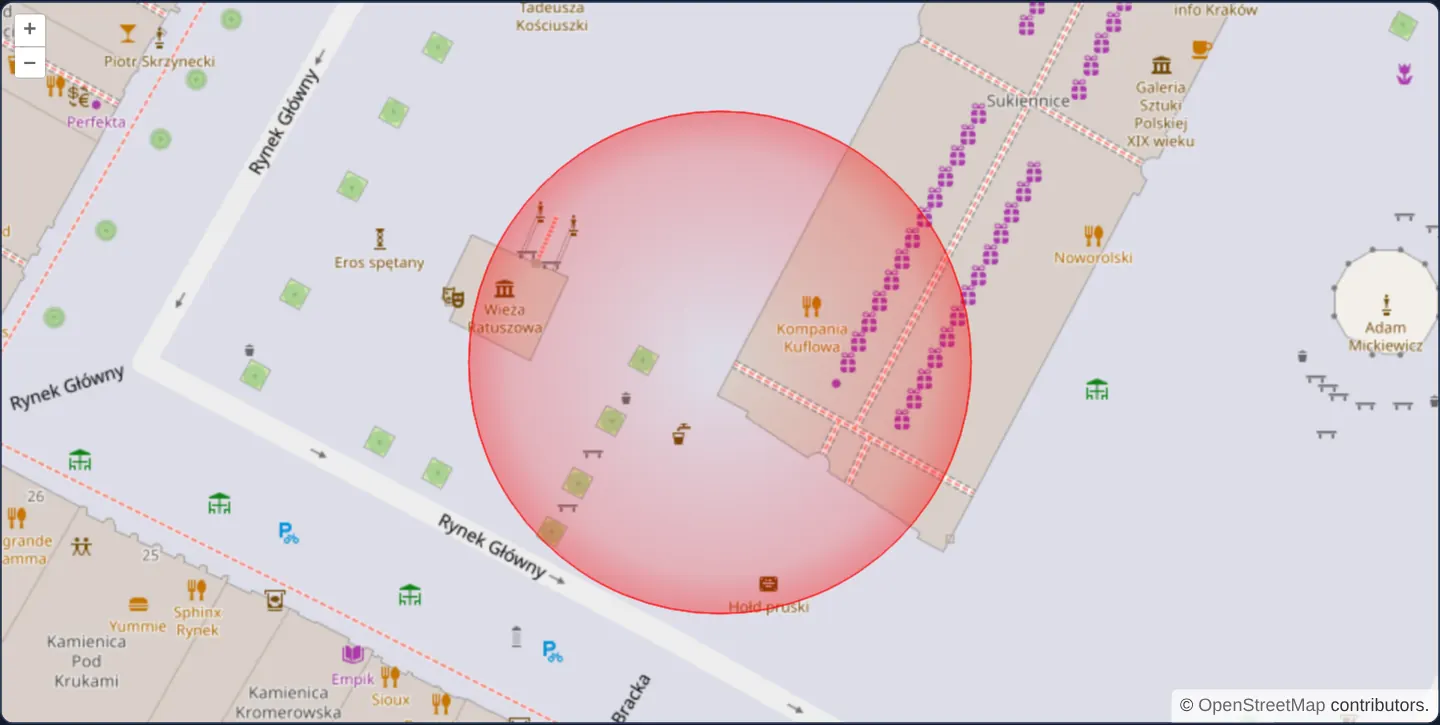
What this example shows
Zoomed closely to level 19 over Kraków’s Main Market Square on OpenStreetMap, a circle geometry renders with a bespoke radar-like appearance impossible with flat fills alone: crystal-clear in the middle, intensifying smoothly through a red radial gradient toward the perimeter, and finished with a crisp red outer stroke.
When you need it
Specialized geospatial visualisations—radar range rings, blast/noise attenuation zones, pulsing sensor halos and custom engineering symbols—require full Canvas 2D drawing control tied to real map-space geometries.
Style custom renderers receive pre-projected pixel coordinates on every frame so your Canvas 2D code scales and rotates automatically with the map.
The code
The example uses cc-openlayers, my Angular component library for OpenLayers: each aol-… element creates the OpenLayers object it names, updates it from its inputs and disposes of it with the component.
custom-circle-render.tsimport { ChangeDetectionStrategy, Component } from '@angular/core';
import {
CoordinateComponent,
DefaultControlComponent,
DefaultInteractionComponent,
FeatureComponent,
GeometryCircleComponent,
LayerTileComponent,
LayerVectorComponent,
MapComponent,
SourceOsmComponent,
SourceVectorComponent,
StyleComponent,
ViewComponent,
} from 'cc-openlayers';
import type { RenderFunction } from 'ol/style/Style';
/** A circle around Kraków's Main Square that a style renderer draws with a radial gradient and an outline. */
@Component({
selector: 'app-custom-circle-render',
imports: [
CoordinateComponent,
DefaultControlComponent,
DefaultInteractionComponent,
FeatureComponent,
GeometryCircleComponent,
LayerTileComponent,
LayerVectorComponent,
MapComponent,
SourceOsmComponent,
SourceVectorComponent,
StyleComponent,
ViewComponent,
],
changeDetection: ChangeDetectionStrategy.OnPush,
template: `
<aol-map height="480px">
<aol-interaction-default />
<aol-control-defaults />
<aol-view [zoom]="19"><aol-coordinate [x]="19.9368" [y]="50.0614" srid="EPSG:4326" /></aol-view>
<aol-layer-tile><aol-source-osm /></aol-layer-tile>
<aol-layer-vector>
<aol-source-vector>
<aol-feature>
<aol-geometry-circle [radius]="50">
<aol-coordinate [x]="19.9368" [y]="50.0614" srid="EPSG:4326" />
</aol-geometry-circle>
<aol-style [renderer]="renderer" />
</aol-feature>
</aol-source-vector>
</aol-layer-vector>
</aol-map>
`,
})
export class CustomCircleRender {
/** Fills the circle with a gradient that is clear in the middle and red at the rim, then outlines it. */
protected readonly renderer: RenderFunction = (coordinates, state) => {
const [[x, y], [x1, y1]] = coordinates as number[][];
const context = state.context;
const radius = Math.hypot(x1 - x, y1 - y);
const gradient = context.createRadialGradient(x, y, 0, x, y, radius * 1.4);
gradient.addColorStop(0, 'rgba(255,0,0,0)');
gradient.addColorStop(0.6, 'rgba(255,0,0,0.2)');
gradient.addColorStop(1, 'rgba(255,0,0,0.8)');
context.beginPath();
context.arc(x, y, radius, 0, 2 * Math.PI, true);
context.fillStyle = gradient;
context.fill();
context.arc(x, y, radius, 0, 2 * Math.PI, true);
context.strokeStyle = 'rgba(255,0,0,1)';
context.stroke();
};
} The React version uses the library's React adapter, cc-openlayers/react: each component creates the OpenLayers object it names when it mounts, updates it from its props and disposes of it when it unmounts.
custom-circle-render.react.tsximport {
CircleGeometry,
Coordinate,
DefaultControls,
DefaultInteractions,
Feature,
Map,
OSMSource,
Style,
TileLayer,
VectorLayer,
VectorSource,
View,
} from 'cc-openlayers/react';
import type { RenderFunction } from 'ol/style/Style';
/** Fills the circle with a gradient that is clear in the middle and red at the rim, then outlines it. */
const renderer: RenderFunction = (coordinates, state) => {
const [[x, y], [x1, y1]] = coordinates as number[][];
const context = state.context;
const radius = Math.hypot(x1 - x, y1 - y);
const gradient = context.createRadialGradient(x, y, 0, x, y, radius * 1.4);
gradient.addColorStop(0, 'rgba(255,0,0,0)');
gradient.addColorStop(0.6, 'rgba(255,0,0,0.2)');
gradient.addColorStop(1, 'rgba(255,0,0,0.8)');
context.beginPath();
context.arc(x, y, radius, 0, 2 * Math.PI, true);
context.fillStyle = gradient;
context.fill();
context.arc(x, y, radius, 0, 2 * Math.PI, true);
context.strokeStyle = 'rgba(255,0,0,1)';
context.stroke();
};
/** A circle around Kraków's Main Square that a style renderer draws with a radial gradient and an outline. */
export function CustomCircleRender() {
return (
<Map height="480px">
<DefaultInteractions />
<DefaultControls />
<View zoom={19}>
<Coordinate x={19.9368} y={50.0614} srid="EPSG:4326" />
</View>
<TileLayer>
<OSMSource />
</TileLayer>
<VectorLayer>
<VectorSource>
<Feature>
<CircleGeometry radius={50}>
<Coordinate x={19.9368} y={50.0614} srid="EPSG:4326" />
</CircleGeometry>
<Style renderer={renderer} />
</Feature>
</VectorSource>
</VectorLayer>
</Map>
);
}How the React version works
A 50 metre circle around the Main Square drawn by a style's renderer function with a radial gradient that grows red towards the rim and an outline.
What both versions share
OpenLayers renders the map and handles the interactions; the cc-openlayers/core layer gives both adapters the same view binding (MapViewBinding) and the same conversion of coordinates from EPSG:4326 to the map's projection.
From Angular to React
| Angular | React |
|---|---|
<aol-geometry-circle> | <CircleGeometry> |
<aol-style [renderer]> | <Style renderer> with the renderer function in the module |
Who creates, updates and disposes
Map creates the ol/Map in useLayoutEffect and disposes of it on unmount; each layer, source and interaction component adds its object to the parent it gets from context and removes it in its effect's cleanup, as ngOnDestroy does in Angular.
Architecture and OpenLayers mechanics
Configuring aol-style with a [renderer] callback hands full drawing responsibility to your function, supplying pixel-space geometry coordinates and render state (context, pixelRatio, rotation).
For an OpenLayers Circle geometry, the pixel array contains [center, rimPoint]; measuring Euclidean distance via Math.hypot yields the live pixel radius at any zoom, used to build a Canvas 2D radial gradient extending to 1.4 × radius clipped cleanly by the stroked circle.
How it works
aol-stylewith[renderer]delegates feature drawing to a custom Canvas 2D callback receiving pixel-space coordinates and render state.Math.hypotcomputes the live pixel radius between the projected circle centre and rim coordinate at every zoom level.- Extending the radial gradient to 1.4× the circle radius produces a soft ~37% red glow right inside the crisp outer rim.
Pitfalls
- Circle geometry radii in Web Mercator are expressed in projection units rather than true ground metres—at Kraków’s 50° N latitude, 50 projection units correspond to roughly 32 metres on the ground.
- By default OpenLayers reuses your
[renderer]callback for pointer hit-testing as well, so every non-transparent pixel inside the gradient disc counts as hitting the feature unless overridden via hitDetectionRenderer.
Related examples
The same feature in the OpenLayers examples .
Background: state and lifecycle of maps in Angular with OpenLayers, which the components of cc-openlayers take care of.