Essentials · Angular, React and OpenLayers
Move the map by tilting the device
Pan an OpenLayers map continuously by tilting a mobile device using alpha, beta and gamma orientation sensors and iOS Safari permission flow.
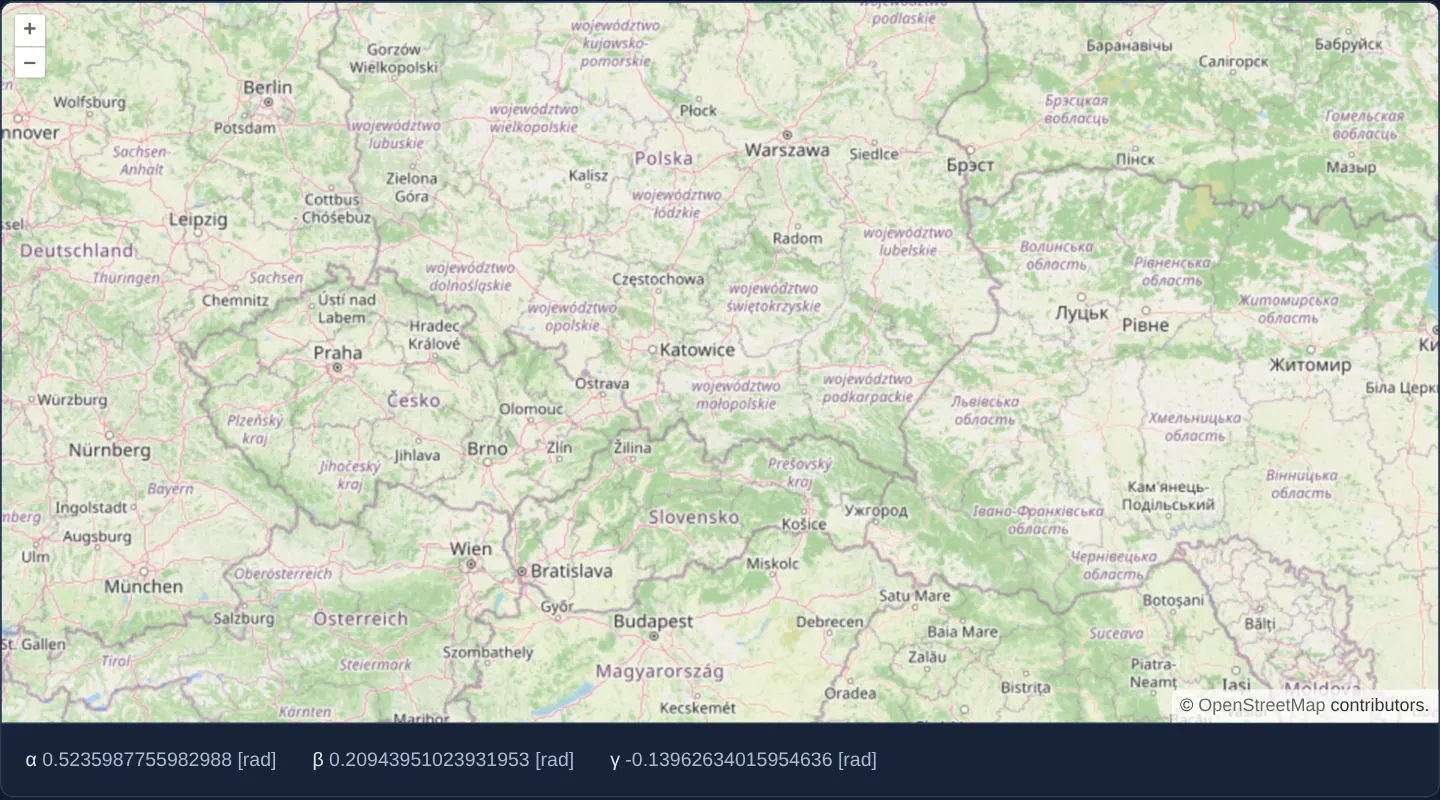
What this example shows
Opening at regional zoom 6 around Kraków, this example reads live gyroscope/accelerometer tilt angles (alpha, beta and gamma converted to radians in read-outs below the map) and glides the camera sideways and vertically in proportion to how far you tilt your phone or tablet.
On browsers such as Safari on iOS that gate motion sensors behind explicit user consent, an activation button appears first so permission can be requested inside a user tap.
When you need it
Interactive museum kiosks, handheld augmented-reality overlays, accessibility experiments and compass-aware field tools use physical device orientation to steer or align spatial views.
Integrating browser orientation events cleanly requires handling degree-to-radian math, resolution-independent pan speed, desktop browsers with null sensor payloads, and Apple’s mandatory user-gesture permission API.
The code
The example uses cc-openlayers, my Angular component library for OpenLayers: each aol-… element creates the OpenLayers object it names, updates it from its inputs and disposes of it with the component.
device-orientation.tsimport { ChangeDetectionStrategy, Component, signal, viewChild } from '@angular/core';
import { toRadians } from 'ol/math';
import {
CoordinateComponent,
DefaultControlComponent,
DefaultInteractionComponent,
LayerTileComponent,
MapComponent,
SourceOsmComponent,
ViewComponent,
} from 'cc-openlayers';
/** Safari on iOS sends device orientation events only once the user allows them, which takes a tap. */
interface AsksFirst {
requestPermission?: () => Promise<string>;
}
/** The map is moved by the tilt of the device, read from its device orientation events. */
@Component({
selector: 'app-device-orientation',
imports: [
CoordinateComponent,
DefaultControlComponent,
DefaultInteractionComponent,
LayerTileComponent,
MapComponent,
SourceOsmComponent,
ViewComponent,
],
changeDetection: ChangeDetectionStrategy.OnPush,
template: `
<aol-map height="480px">
<aol-interaction-default />
<aol-control-defaults />
<aol-view [zoom]="6">
<aol-coordinate [x]="19.9368" [y]="50.0614" srid="EPSG:4326" />
</aol-view>
<aol-layer-tile><aol-source-osm /></aol-layer-tile>
</aol-map>
<div class="example-controls">
@if (!supported) {
<p class="example-hint">Could not initialize sensors</p>
}
@if (permission() === 'ask') {
<button type="button" (click)="allow()">Allow motion sensors</button>
} @else if (permission() === 'denied') {
<p class="example-hint">The motion sensors were not allowed.</p>
}
<span>
α <output>{{ alpha() }}</output>
</span>
<span>
β <output>{{ beta() }}</output>
</span>
<span>
γ <output>{{ gamma() }}</output>
</span>
</div>
`,
host: { '(window:deviceorientation)': 'orient($event)' },
})
export class DeviceOrientation {
readonly alpha = signal('–');
readonly beta = signal('–');
readonly gamma = signal('–');
protected readonly supported = 'DeviceOrientationEvent' in window;
protected readonly permission = signal(
this.supported && (window.DeviceOrientationEvent as AsksFirst).requestPermission ? 'ask' : 'granted'
);
private readonly map = viewChild.required(MapComponent);
protected async allow(): Promise<void> {
const answer = await (window.DeviceOrientationEvent as AsksFirst).requestPermission?.();
this.permission.set(answer === 'granted' ? 'granted' : 'denied');
}
/** Tilting the device left and right, and forwards and back, moves the centre by 25 pixels per radian. */
protected orient(event: DeviceOrientationEvent): void {
if (event.alpha === null || event.beta === null || event.gamma === null) return;
const [alpha, beta, gamma] = [event.alpha, event.beta, event.gamma].map(toRadians);
this.alpha.set(`${alpha} [rad]`);
this.beta.set(`${beta} [rad]`);
this.gamma.set(`${gamma} [rad]`);
const view = this.map().instance.getView();
const center = view.getCenter();
const resolution = view.getResolution();
if (!center || resolution === undefined) return;
view.setCenter([center[0] - resolution * gamma * 25, center[1] + resolution * beta * 25]);
}
} The React version uses the library's React adapter, cc-openlayers/react: each component creates the OpenLayers object it names when it mounts, updates it from its props and disposes of it when it unmounts.
device-orientation.react.tsximport { useEffect, useRef, useState } from 'react';
import type OLMap from 'ol/Map.js';
import { toRadians } from 'ol/math.js';
import { Coordinate, DefaultControls, DefaultInteractions, Map, OSMSource, TileLayer, View } from 'cc-openlayers/react';
/** Safari on iOS sends device orientation events only once the user allows them, which takes a tap. */
interface AsksFirst {
requestPermission?: () => Promise<string>;
}
/** The map is moved by the tilt of the device, read from its device orientation events. */
export function DeviceOrientation() {
const [alpha, setAlpha] = useState('–');
const [beta, setBeta] = useState('–');
const [gamma, setGamma] = useState('–');
const [supported] = useState(() => 'DeviceOrientationEvent' in window);
const [permission, setPermission] = useState(() =>
supported && (window.DeviceOrientationEvent as AsksFirst).requestPermission ? 'ask' : 'granted'
);
const map = useRef<OLMap>(null);
const allow = async () => {
const answer = await (window.DeviceOrientationEvent as AsksFirst).requestPermission?.();
setPermission(answer === 'granted' ? 'granted' : 'denied');
};
useEffect(() => {
/** Tilting the device left and right, and forwards and back, moves the centre by 25 pixels per radian. */
const orient = (event: DeviceOrientationEvent) => {
if (event.alpha === null || event.beta === null || event.gamma === null) return;
const [alphaRadians, betaRadians, gammaRadians] = [event.alpha, event.beta, event.gamma].map(toRadians);
setAlpha(`${alphaRadians} [rad]`);
setBeta(`${betaRadians} [rad]`);
setGamma(`${gammaRadians} [rad]`);
const view = map.current?.getView();
const center = view?.getCenter();
const resolution = view?.getResolution();
if (!view || !center || resolution === undefined) return;
view.setCenter([center[0] - resolution * gammaRadians * 25, center[1] + resolution * betaRadians * 25]);
};
window.addEventListener('deviceorientation', orient);
return () => window.removeEventListener('deviceorientation', orient);
}, []);
return (
<>
<Map ref={map} height="480px">
<DefaultInteractions />
<DefaultControls />
<View zoom={6}>
<Coordinate x={19.9368} y={50.0614} srid="EPSG:4326" />
</View>
<TileLayer>
<OSMSource />
</TileLayer>
</Map>
<div className="example-controls">
{!supported ? <p className="example-hint">Could not initialize sensors</p> : null}
{permission === 'ask' ? (
<button type="button" onClick={allow}>
Allow motion sensors
</button>
) : permission === 'denied' ? (
<p className="example-hint">The motion sensors were not allowed.</p>
) : null}
<span>
α <output>{alpha}</output>
</span>
<span>
β <output>{beta}</output>
</span>
<span>
γ <output>{gamma}</output>
</span>
</div>
</>
);
}How the React version works
Tilting the phone pans the map by 25 pixels per radian, and the angles α, β and γ in radians appear below the map. Safari on iOS sends the events only after the user allows it, so the example then shows an “Allow motion sensors” button.
What both versions share
OpenLayers renders the map and handles the interactions; the cc-openlayers/core layer gives both adapters the same view binding (MapViewBinding) and the same conversion of coordinates from EPSG:4326 to the map's projection. The conversion of the angles (toRadians) and the shift of the centre are the same in both versions.
From Angular to React
| Angular | React |
|---|---|
host: { '(window:deviceorientation)': 'orient($event)' } | useEffect with addEventListener and removeEventListener in its cleanup |
signal for the angles and the permission | useState |
(click)="allow()" | onClick={allow} |
viewChild.required(MapComponent).instance | useRef<OLMap>(null) |
Who creates, updates and disposes
Map creates the ol/Map in useLayoutEffect and disposes of it on unmount; each layer, source and interaction component adds its object to the parent it gets from context and removes it in its effect's cleanup, as ngOnDestroy does in Angular. The deviceorientation listener belongs to the effect and goes away on unmount.
Architecture and OpenLayers mechanics
A (window:deviceorientation) listener receives Euler orientation angles in degrees (alpha around Z, front-to-back tilt beta around X, and left-to-right roll gamma around Y) and converts them via toRadians. Each event shifts the current view centre by resolution * gamma * 25 horizontally and resolution * beta * 25 vertically—scaling world-metre displacement by view resolution so tilt speed feels identical at zoom 6 and zoom 16.
Where requestPermission exists (iOS Safari), the UI surfaces a tap-triggered button to obtain permission before events begin streaming, while null sensor events on desktop hardware are safely ignored.
How it works
(window:deviceorientation)reads device Euler angles in degrees and converts them to radians withtoRadians.- Each sensor tick shifts the view centre by
resolution * gamma * 25sideways andresolution * beta * 25fore-and-aft (25 pixels per radian of tilt). - On iOS Safari,
requestPermissionis invoked inside a button click handler before orientation events are emitted. - Null checks ignore empty orientation events fired by desktop browsers without motion sensors.
Pitfalls
- Device orientation requires HTTPS, and standard
alphareadings measure relative yaw from initial page load rather than true magnetic north unless absolute orientation events are used. - Because tilt controls velocity rather than static position, holding the phone slightly angled keeps panning the map continuously until returned level—keep sensitivity multipliers conservative and consider a small dead-zone in production.
Related examples
The same feature in the OpenLayers examples .
Background: state and lifecycle of maps in Angular with OpenLayers, which the components of cc-openlayers take care of.