Essentials · Angular, React and OpenLayers
A loading spinner from the map's load events
Display a CSS loading spinner and accessible status text over an OpenLayers map using map-level loadstart and loadend events in Angular.
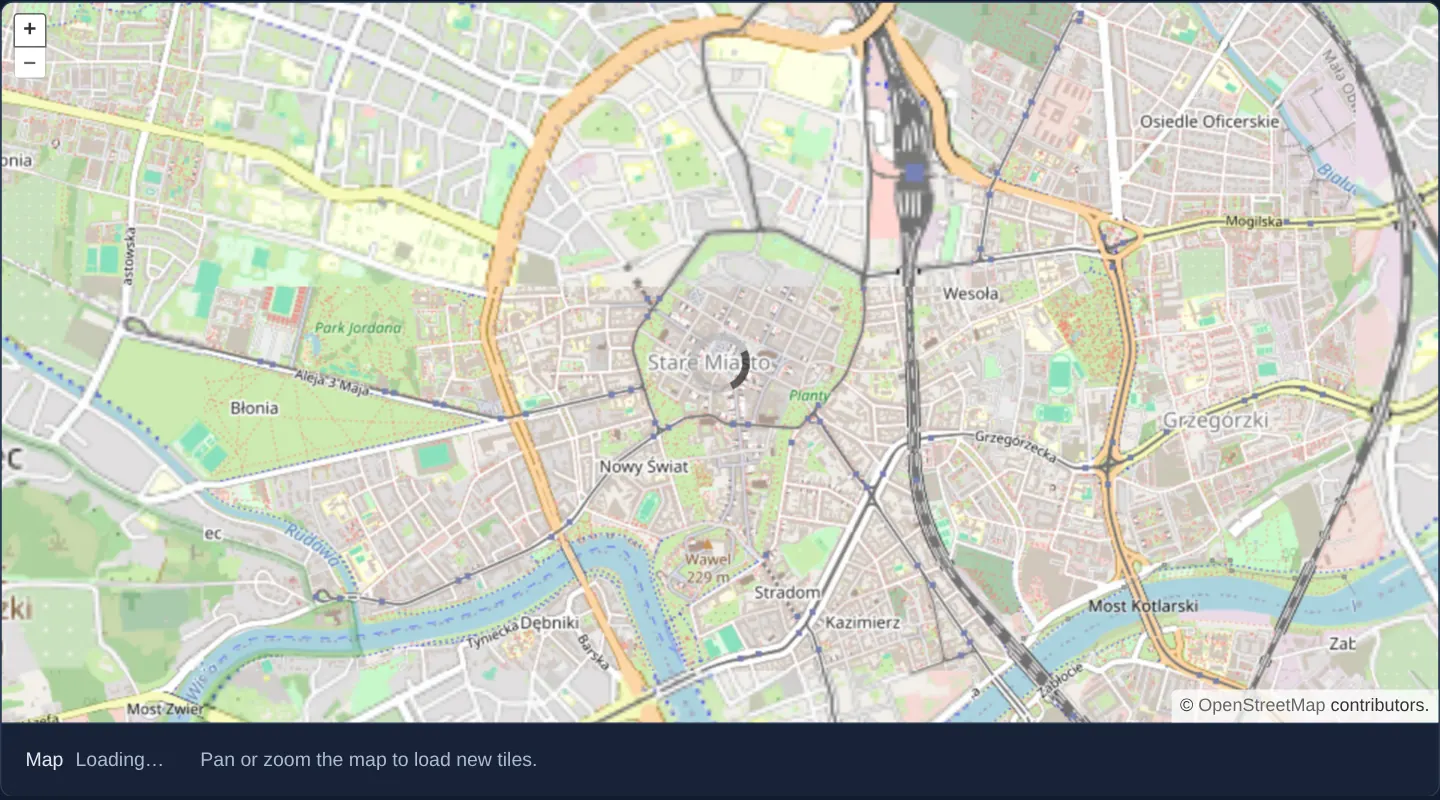
What this example shows
Centred on Kraków’s Old Town, panning or zooming into uncached areas overlays a clean spinning indicator across the map and updates an accessible status line below the canvas from Loaded to Loading… until every active layer finishes fetching its tiles and features.
When you need it
Over cellular field connections or heavy WMS/imagery backends, an unlabelled half-rendered canvas leaves users wondering whether the application froze or is still downloading data.
Pairing a visual spinner with a live text status tells both sighted and screen-reader users immediately when background map requests start and when the view is complete.
The code
The example uses cc-openlayers, my Angular component library for OpenLayers: each aol-… element creates the OpenLayers object it names, updates it from its inputs and disposes of it with the component.
load-events.tsimport { ChangeDetectionStrategy, Component, signal } from '@angular/core';
import {
CoordinateComponent,
DefaultControlComponent,
DefaultInteractionComponent,
LayerTileComponent,
MapComponent,
SourceOsmComponent,
ViewComponent,
} from 'cc-openlayers';
/** The map's load events (`loadstart`, `loadend`) show a spinner over the map and a loading status below it. */
@Component({
selector: 'app-load-events',
imports: [
CoordinateComponent,
DefaultControlComponent,
DefaultInteractionComponent,
LayerTileComponent,
MapComponent,
SourceOsmComponent,
ViewComponent,
],
changeDetection: ChangeDetectionStrategy.OnPush,
template: `
<aol-map height="480px" [class.spinner]="loading()" (loadStart)="loading.set(true)" (loadEnd)="loading.set(false)">
<aol-interaction-default />
<aol-control-defaults />
<aol-view [zoom]="13"><aol-coordinate [x]="19.9368" [y]="50.0614" srid="EPSG:4326" /></aol-view>
<aol-layer-tile><aol-source-osm /></aol-layer-tile>
</aol-map>
<div class="example-controls">
<label
>Map <output>{{ loading() ? 'Loading…' : 'Loaded' }}</output></label
>
<p class="example-hint">Pan or zoom the map to load new tiles.</p>
</div>
`,
})
export class LoadEvents {
protected readonly loading = signal(false);
} The React version uses the library's React adapter, cc-openlayers/react: each component creates the OpenLayers object it names when it mounts, updates it from its props and disposes of it when it unmounts.
load-events.react.tsximport { useState } from 'react';
import { Coordinate, DefaultControls, DefaultInteractions, Map, OSMSource, TileLayer, View } from 'cc-openlayers/react';
/** The map's load events (`loadstart`, `loadend`) show a spinner over the map and a loading status below it. */
export function LoadEvents() {
const [loading, setLoading] = useState(false);
return (
<>
<Map
height="480px"
className={loading ? 'spinner' : undefined}
onLoadStart={() => setLoading(true)}
onLoadEnd={() => setLoading(false)}
>
<DefaultInteractions />
<DefaultControls />
<View zoom={13}>
<Coordinate x={19.9368} y={50.0614} srid="EPSG:4326" />
</View>
<TileLayer>
<OSMSource />
</TileLayer>
</Map>
<div className="example-controls">
<label>
Map <output>{loading ? 'Loading…' : 'Loaded'}</output>
</label>
<p className="example-hint">Pan or zoom the map to load new tiles.</p>
</div>
</>
);
}How the React version works
The map's loadstart and loadend events show a spinner over the map and the status “Loading…” or “Loaded” below it.
What both versions share
OpenLayers renders the map and handles the interactions; the cc-openlayers/core layer gives both adapters the same view binding (MapViewBinding) and the same conversion of coordinates from EPSG:4326 to the map's projection. The spinner class is a global gallery style.
From Angular to React
| Angular | React |
|---|---|
(loadStart), (loadEnd) | onLoadStart, onLoadEnd |
[class.spinner]="loading()" on aol-map | className={loading ? 'spinner' : undefined} on Map |
signal(false) | useState(false) |
Who creates, updates and disposes
Map creates the ol/Map in useLayoutEffect and disposes of it on unmount; each layer, source and interaction component adds its object to the parent it gets from context and removes it in its effect's cleanup, as ngOnDestroy does in Angular.
Architecture and OpenLayers mechanics
OpenLayers aggregates loading state across all attached tile, image and vector sources into two high-level map events: (loadStart) when the map transitions from idle to busy, and (loadEnd) once the last pending request settles.
Binding those two outputs on aol-map toggles a single boolean loading signal that drives [class.spinner] on the viewport wrapper and updates the status output element cleanly.
How it works
(loadStart)and(loadEnd)onaol-maptoggle the reactiveloadingsignal across tile, image and vector layer activity.[class.spinner]attaches a CSS spinner overlay to the map container while requests remain in flight.- A companion text read-out below the viewport announces Loading… or Loaded for visual clarity and assistive technologies.
Pitfalls
- Map-level load events span every visible layer: a single slow third-party WMS overlay will keep the spinner active even after the base map is crisp.
- Failed tile requests also count toward finishing a load cycle, so
(loadEnd)still fires when an upstream server returns errors—pair with source error handlers if broken services need explicit warnings.
Related examples
The same feature in the OpenLayers examples .
Background: state and lifecycle of maps in Angular with OpenLayers, which the components of cc-openlayers take care of.