Essentials · Angular, React and OpenLayers
A map in a separate browser window
Move a live OpenLayers map into a separate multi-monitor browser popup window and back using window.open, setTarget and pagehide cleanup.
What this example shows
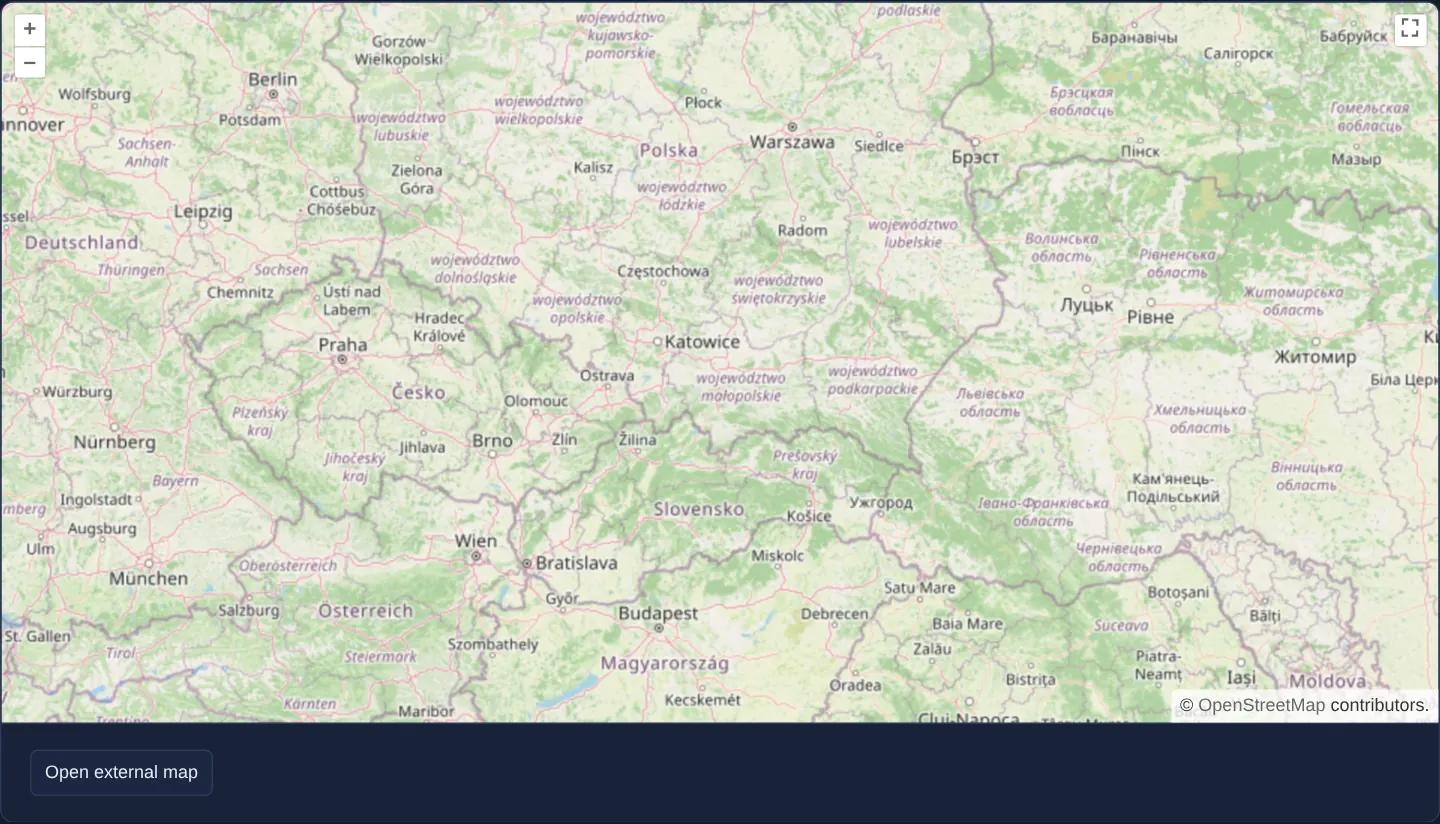
Opening at zoom 6 over southern Poland with a full-screen control and an Open external map button below the canvas, clicking the button launches a separate browser window, copies the page’s stylesheets into it, and moves the live OpenLayers map across windows.
Closing or reloading the popup window automatically returns the exact same map instance—at its latest panned and zoomed position—straight back into the main application page.
When you need it
Emergency dispatch centres, utility network operators and CAD/GIS analysts working across dual monitors often want forms and data tables on one screen and the interactive map maximised on a second monitor.
Reparenting the main application’s live OpenLayers instance into a child window avoids WebSocket or BroadcastChannel state-sync complexity between two separate browser tabs.
The code
The example uses cc-openlayers, my Angular component library for OpenLayers: each aol-… element creates the OpenLayers object it names, updates it from its inputs and disposes of it with the component.
external-map.tsimport { ChangeDetectionStrategy, Component, signal, viewChild } from '@angular/core';
import {
ContentComponent,
ControlComponent,
ControlFullScreenComponent,
CoordinateComponent,
DefaultControlComponent,
DefaultInteractionComponent,
LayerTileComponent,
MapComponent,
SourceOsmComponent,
ViewComponent,
} from 'cc-openlayers';
/** A map moved into a separate browser window, which goes unusable while the main page is hidden. */
@Component({
selector: 'app-external-map',
imports: [
ContentComponent,
ControlComponent,
ControlFullScreenComponent,
CoordinateComponent,
DefaultControlComponent,
DefaultInteractionComponent,
LayerTileComponent,
MapComponent,
SourceOsmComponent,
ViewComponent,
],
host: { '(document:visibilitychange)': 'updateOverlay()', '(window:pagehide)': 'closeMapWindow()' },
changeDetection: ChangeDetectionStrategy.OnPush,
template: `
<aol-map height="480px">
<aol-interaction-default />
<aol-control-defaults />
<aol-control-fullscreen />
<aol-control>
<aol-content>
<div class="ol-mask" hidden><div>Map not usable</div></div>
</aol-content>
</aol-control>
<aol-view [zoom]="6"><aol-coordinate [x]="19.9368" [y]="50.0614" srid="EPSG:4326" /></aol-view>
<aol-layer-tile><aol-source-osm /></aol-layer-tile>
</aol-map>
<div class="example-controls">
<button type="button" [disabled]="busy()" (click)="openMapWindow()">Open external map</button>
@if (blocked()) {
<p class="example-hint">
Could not open map in external window. If you are using a popup or ad blocker you may need to disable it for
this example.
</p>
}
</div>
`,
})
export class ExternalMap {
/** The button is disabled from the click until the map is back in the page. */
readonly busy = signal(false);
readonly blocked = signal(false);
private readonly map = viewChild.required(MapComponent);
private readonly mapWindow = signal<Window | undefined>(undefined);
protected openMapWindow(): void {
this.blocked.set(false);
this.busy.set(true);
const localTarget = this.map().instance.getTargetElement() as HTMLElement;
const resetMapTarget = () => {
localTarget.style.height = '';
this.map().instance.setTarget(localTarget);
this.busy.set(false);
};
// Reset the button and the map target in case the window did not load or open.
let timeout: number | undefined = window.setTimeout(() => {
timeout = undefined;
this.closeMapWindow();
resetMapTarget();
this.blocked.set(true);
}, 3000);
const mapWindow = window.open(
'assets/external-map-map.html',
'MapWindow',
'toolbar=0,location=0,menubar=0,width=800,height=600'
);
if (!mapWindow) return;
this.mapWindow.set(mapWindow);
mapWindow.addEventListener('DOMContentLoaded', () => {
const externalTarget = mapWindow.document.getElementById('map');
if (!externalTarget) return;
// The map keeps the styles of this page, OpenLayers' own included.
for (const style of document.head.querySelectorAll('link[rel="stylesheet"], style')) {
mapWindow.document.head.append(style.cloneNode(true));
}
localTarget.style.height = '0px';
this.map().instance.setTarget(externalTarget);
if (timeout !== undefined) {
window.clearTimeout(timeout);
timeout = undefined;
}
mapWindow.addEventListener('pagehide', () => {
resetMapTarget();
// Close the window in case the user reloads it.
this.closeMapWindow();
});
this.updateOverlay();
});
}
protected closeMapWindow(): void {
this.mapWindow()?.close();
this.mapWindow.set(undefined);
}
/** The external map takes keyboard input only while this page is visible, and is masked otherwise. */
protected updateOverlay(): void {
const target = this.mapWindow()?.document.getElementById('map');
if (!target) return;
if (document.visibilityState === 'visible') {
target.classList.remove('unusable');
target.setAttribute('tabindex', '0');
target.focus();
} else {
target.removeAttribute('tabindex');
target.classList.add('unusable');
}
}
} The React version uses the library's React adapter, cc-openlayers/react: each component creates the OpenLayers object it names when it mounts, updates it from its props and disposes of it when it unmounts.
external-map.react.tsximport { useCallback, useEffect, useRef, useState } from 'react';
import type OLMap from 'ol/Map.js';
import {
Coordinate,
CustomControl,
DefaultControls,
DefaultInteractions,
FullScreenControl,
Map,
OSMSource,
TileLayer,
View,
} from 'cc-openlayers/react';
/** A map moved into a separate browser window, which goes unusable while the main page is hidden. */
export function ExternalMap() {
/** The button is disabled from the click until the map is back in the page. */
const [busy, setBusy] = useState(false);
const [blocked, setBlocked] = useState(false);
const map = useRef<OLMap>(null);
const mapWindow = useRef<Window>(undefined);
const closeMapWindow = useCallback(() => {
mapWindow.current?.close();
mapWindow.current = undefined;
}, []);
/** The external map takes keyboard input only while this page is visible, and is masked otherwise. */
const updateOverlay = useCallback(() => {
const target = mapWindow.current?.document.getElementById('map');
if (!target) return;
if (document.visibilityState === 'visible') {
target.classList.remove('unusable');
target.setAttribute('tabindex', '0');
target.focus();
} else {
target.removeAttribute('tabindex');
target.classList.add('unusable');
}
}, []);
useEffect(() => {
document.addEventListener('visibilitychange', updateOverlay);
window.addEventListener('pagehide', closeMapWindow);
return () => {
document.removeEventListener('visibilitychange', updateOverlay);
window.removeEventListener('pagehide', closeMapWindow);
};
}, [updateOverlay, closeMapWindow]);
const openMapWindow = () => {
setBlocked(false);
setBusy(true);
const localTarget = map.current?.getTargetElement() as HTMLElement;
const resetMapTarget = () => {
localTarget.style.height = '';
map.current?.setTarget(localTarget);
setBusy(false);
};
// Reset the button and the map target in case the window did not load or open.
let timeout: number | undefined = window.setTimeout(() => {
timeout = undefined;
closeMapWindow();
resetMapTarget();
setBlocked(true);
}, 3000);
const opened = window.open(
'assets/external-map-map.html',
'MapWindow',
'toolbar=0,location=0,menubar=0,width=800,height=600'
);
if (!opened) return;
mapWindow.current = opened;
opened.addEventListener('DOMContentLoaded', () => {
const externalTarget = opened.document.getElementById('map');
if (!externalTarget) return;
// The map keeps the styles of this page, OpenLayers' own included.
for (const style of document.head.querySelectorAll('link[rel="stylesheet"], style')) {
opened.document.head.append(style.cloneNode(true));
}
localTarget.style.height = '0px';
map.current?.setTarget(externalTarget);
if (timeout !== undefined) {
window.clearTimeout(timeout);
timeout = undefined;
}
opened.addEventListener('pagehide', () => {
resetMapTarget();
// Close the window in case the user reloads it.
closeMapWindow();
});
updateOverlay();
});
};
return (
<>
<Map ref={map} height="480px">
<DefaultInteractions />
<DefaultControls />
<FullScreenControl />
<CustomControl>
<div className="ol-mask" hidden>
<div>Map not usable</div>
</div>
</CustomControl>
<View zoom={6}>
<Coordinate x={19.9368} y={50.0614} srid="EPSG:4326" />
</View>
<TileLayer>
<OSMSource />
</TileLayer>
</Map>
<div className="example-controls">
<button type="button" disabled={busy} onClick={openMapWindow}>
Open external map
</button>
{blocked ? (
<p className="example-hint">
Could not open map in external window. If you are using a popup or ad blocker you may need to disable it for
this example.
</p>
) : null}
</div>
</>
);
}How the React version works
A button opens a new window and moves the map into it together with the page's styles. While the page is hidden, a “Map not usable” mask covers the map in the window, and closing the window brings the map back to the page. A blocked window gives a message after three seconds and enables the button again.
What both versions share
OpenLayers renders the map and handles the interactions; the cc-openlayers/core layer gives both adapters the same view binding (MapViewBinding) and the same conversion of coordinates from EPSG:4326 to the map's projection. The window's page (assets/external-map-map.html) and the full-screen control with the mask are shared by both versions.
From Angular to React
| Angular | React |
|---|---|
<aol-control-fullscreen>, <aol-control> with <aol-content> | <FullScreenControl>, <Control> with the mask element |
host: { '(document:visibilitychange)': …, '(window:pagehide)': … } | useEffect with the listeners and their removal in its cleanup |
[disabled]="busy()" | disabled={busy} |
signal<Window | undefined> | useRef<Window>, because the window does not affect the view |
Who creates, updates and disposes
Map creates the ol/Map in useLayoutEffect and disposes of it on unmount; each layer, source and interaction component adds its object to the parent it gets from context and removes it in its effect's cleanup, as ngOnDestroy does in Angular. The map is not created again: setTarget moves it to the #map element in the new window and back; the page's listeners belong to the effect.
Architecture and OpenLayers mechanics
Inside a direct click handler (required to satisfy popup blockers), window.open opens a small example page holding a full-window map host element, clones the parent document’s stylesheets—including OpenLayers’ control styles—into the popup head, and calls setTarget to transfer the live viewport across documents.
Because JavaScript execution and animation frames remain owned by the opener window, hiding or minimising the opener tab throttles animation frames—so the popup displays an informational mask whenever the parent document is hidden. Listening to pagehide on both windows returns the map cleanly when the popup closes and closes the popup automatically if the main page unloads.
How it works
window.opencreates a child window holding amapcontainer, andsetTargettransfers the live OpenLayers viewport into it once ready.- Cloning parent stylesheets into the popup ensures OpenLayers zoom buttons, attributions and overlays keep their exact styling.
- Because the main window still drives the animation frames, the popup masks the map with a notice whenever the parent tab is hidden in the background.
pagehidelisteners return the map to the main page when the popup closes, and a separate 3-second timeout surfaces a message when the browser blocks the popup.
Pitfalls
- Browsers block
window.opencalls outside direct user click gestures; always trigger external windows from an explicit button click and surface clear feedback if a popup blocker intervenes. - Closing or refreshing the main application tab terminates the JavaScript context driving the popup map—always close the child window on parent
pagehideso users are not left with a dead window.
Related examples
The same feature in the OpenLayers examples .
Background: state and lifecycle of maps in Angular with OpenLayers, which the components of cc-openlayers take care of.