Interactions · Angular, React and OpenLayers
Hit a thin line with a tolerance
Make thin 1-pixel vector lines easy to tap and click in OpenLayers by passing a CSS-pixel hitTolerance radius to forEachFeatureAtPixel.
What this example shows
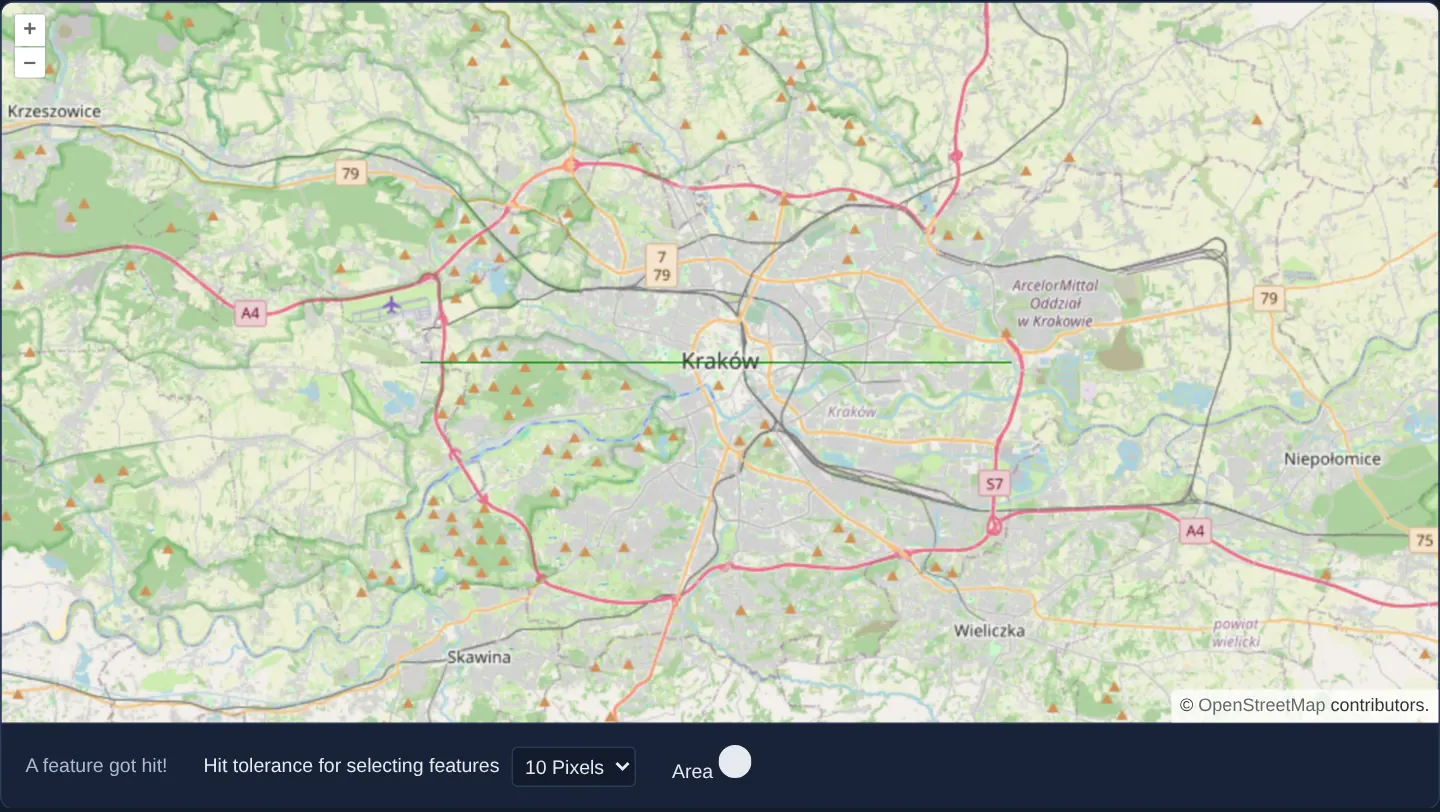
A hairline 1-pixel stroke crosses the Kraków map above a tolerance selector (0, 5 or 10 CSS pixels, visualised by a matching reference circle). At 0 tolerance, clicks must land on the exact painted pixel; raising tolerance to 5 or 10 pixels turns the line vivid green even when clicking slightly beside it.
When you need it
Utility pipes, cadastral lot lines, contour strokes and trail networks are frequently styled 1–2 pixels thin for cartographic clarity, making them nearly impossible to tap accurately with a fingertip on a phone or tablet.
Configuring CSS-pixel hitTolerance expands the invisible search radius around the pointer without thickening visual linework on the map.
The code
The example uses cc-openlayers, my Angular component library for OpenLayers: each aol-… element creates the OpenLayers object it names, updates it from its inputs and disposes of it with the component.
hit-tolerance.tsimport { ChangeDetectionStrategy, Component, computed, signal, viewChild } from '@angular/core';
import type MapBrowserEvent from 'ol/MapBrowserEvent';
import {
CollectionCoordinatesComponent,
CoordinateComponent,
DefaultControlComponent,
DefaultInteractionComponent,
FeatureComponent,
GeometryLinestringComponent,
LayerTileComponent,
LayerVectorComponent,
MapComponent,
SourceOsmComponent,
SourceVectorComponent,
StyleComponent,
StyleStrokeComponent,
ViewComponent,
} from 'cc-openlayers';
/** A thin line that turns green when a click falls within the chosen hit tolerance of it. */
@Component({
selector: 'app-hit-tolerance',
imports: [
CollectionCoordinatesComponent,
CoordinateComponent,
DefaultControlComponent,
DefaultInteractionComponent,
FeatureComponent,
GeometryLinestringComponent,
LayerTileComponent,
LayerVectorComponent,
MapComponent,
SourceOsmComponent,
SourceVectorComponent,
StyleComponent,
StyleStrokeComponent,
ViewComponent,
],
changeDetection: ChangeDetectionStrategy.OnPush,
template: `
<aol-map height="480px" (singleClick)="click($event)">
<aol-interaction-default />
<aol-control-defaults />
<aol-view [zoom]="11"><aol-coordinate [x]="19.9368" [y]="50.0614" srid="EPSG:4326" /></aol-view>
<aol-layer-tile><aol-source-osm /></aol-layer-tile>
<aol-layer-vector>
<aol-source-vector>
<aol-feature>
<aol-geometry-linestring>
<aol-collection-coordinates [coordinates]="line" srid="EPSG:4326" />
</aol-geometry-linestring>
<aol-style><aol-style-stroke [color]="color()" [width]="1" /></aol-style>
</aol-feature>
</aol-source-vector>
</aol-layer-vector>
</aol-map>
<div class="example-controls">
<output>{{ status() }}</output>
<label>
Hit tolerance for selecting features
<select (change)="hitTolerance.set(number($event))">
<option value="0" selected>0 Pixels</option>
<option value="5">5 Pixels</option>
<option value="10">10 Pixels</option>
</select>
</label>
<span>
Area
<svg [attr.width]="area()" [attr.height]="area()" aria-hidden="true">
<circle
[attr.cx]="hitTolerance() + 1"
[attr.cy]="hitTolerance() + 1"
[attr.r]="hitTolerance() + 0.5"
fill="currentColor"
stroke="currentColor"
/>
</svg>
</span>
</div>
`,
})
export class HitTolerance {
readonly hitTolerance = signal(0);
readonly color = signal('black');
readonly status = signal('Try to click the line in the map.');
protected readonly area = computed(() => 2 * this.hitTolerance() + 2);
protected readonly line = [
[19.8, 50.0614],
[20.07, 50.0614],
];
private readonly map = viewChild.required(MapComponent);
protected click(event: MapBrowserEvent): void {
const hit = this.map().instance.forEachFeatureAtPixel(event.pixel, () => true, {
hitTolerance: this.hitTolerance(),
});
this.color.set(hit ? 'green' : 'black');
this.status.set(hit ? 'A feature got hit!' : 'No feature got hit.');
}
protected number(event: Event): number {
return parseInt((event.target as HTMLSelectElement).value, 10);
}
} The React version uses the library's React adapter, cc-openlayers/react: each component creates the OpenLayers object it names when it mounts, updates it from its props and disposes of it when it unmounts.
hit-tolerance.react.tsximport { useRef, useState, type ChangeEvent } from 'react';
import type OLMap from 'ol/Map.js';
import type MapBrowserEvent from 'ol/MapBrowserEvent.js';
import {
CollectionCoordinates,
Coordinate,
DefaultControls,
DefaultInteractions,
Feature,
LineStringGeometry,
Map,
OSMSource,
Stroke,
Style,
TileLayer,
VectorLayer,
VectorSource,
View,
} from 'cc-openlayers/react';
const line = [
[19.8, 50.0614],
[20.07, 50.0614],
];
/** A thin line that turns green when a click falls within the chosen hit tolerance of it. */
export function HitTolerance() {
const [hitTolerance, setHitTolerance] = useState(0);
const [color, setColor] = useState('black');
const [status, setStatus] = useState('Try to click the line in the map.');
const map = useRef<OLMap>(null);
const area = 2 * hitTolerance + 2;
const click = (event: MapBrowserEvent) => {
const hit = map.current?.forEachFeatureAtPixel(event.pixel, () => true, { hitTolerance });
setColor(hit ? 'green' : 'black');
setStatus(hit ? 'A feature got hit!' : 'No feature got hit.');
};
const number = (event: ChangeEvent<HTMLSelectElement>) => parseInt(event.target.value, 10);
return (
<>
<Map ref={map} height="480px" onSingleClick={click}>
<DefaultInteractions />
<DefaultControls />
<View zoom={11}>
<Coordinate x={19.9368} y={50.0614} srid="EPSG:4326" />
</View>
<TileLayer>
<OSMSource />
</TileLayer>
<VectorLayer>
<VectorSource>
<Feature>
<LineStringGeometry>
<CollectionCoordinates coordinates={line} srid="EPSG:4326" />
</LineStringGeometry>
<Style>
<Stroke color={color} width={1} />
</Style>
</Feature>
</VectorSource>
</VectorLayer>
</Map>
<div className="example-controls">
<output>{status}</output>
<label>
Hit tolerance for selecting features
<select defaultValue="0" onChange={(event) => setHitTolerance(number(event))}>
<option value="0">0 Pixels</option>
<option value="5">5 Pixels</option>
<option value="10">10 Pixels</option>
</select>
</label>
<span>
Area
<svg width={area} height={area} aria-hidden="true">
<circle
cx={hitTolerance + 1}
cy={hitTolerance + 1}
r={hitTolerance + 0.5}
fill="currentColor"
stroke="currentColor"
/>
</svg>
</span>
</div>
</>
);
}How the React version works
A one pixel line along the parallel through Kraków that turns green when a click falls within the chosen hit tolerance; the tolerance area is drawn around the pointer.
What both versions share
OpenLayers renders the map and handles the interactions; the cc-openlayers/core layer gives both adapters the same view binding (MapViewBinding) and the same conversion of coordinates from EPSG:4326 to the map's projection.
From Angular to React
| Angular | React |
|---|---|
the tolerance <select>'s (change) and a computed | onChange and useState |
(singleClick) and viewChild of the map | onSingleClick with useRef<OLMap> for forEachFeatureAtPixel |
<aol-geometry-linestring> | <LineStringGeometry> |
Who creates, updates and disposes
Map creates the ol/Map in useLayoutEffect and disposes of it on unmount; each layer, source and interaction component adds its object to the parent it gets from context and removes it in its effect's cleanup, as ngOnDestroy does in Angular.
Architecture and OpenLayers mechanics
Inside (singleClick), calling forEachFeatureAtPixel with { hitTolerance } expands OpenLayers’ off-screen hit-detection canvas into a square window around the event pixel and checks concentric pixels outward until the callback returns true on the first hit, updating the reactive color signal.
Because hitTolerance is specified in density-independent CSS pixels, a 10-pixel touch cushion covers the exact same physical finger width on 1x monitors and 3x smartphones alike.
How it works
forEachFeatureAtPixelacceptshitToleranceonsingleClick, halting at the first matched feature when the callback returnstrue.- Updating the
colorsignal turns the 1-pixel line green immediately whenever a click falls inside the tolerance radius. - A companion UI circle visualises the exact search radius around the pointer for the chosen tolerance.
hitTolerancemeasures CSS pixels rather than device pixels, preserving consistent touch ergonomics across screen densities.
Pitfalls
- Leaving
hitToleranceat0on mobile touch screens makes 1–2 px lines frustratingly unresponsive—5 to 10 CSS pixels is a solid baseline for touch-friendly line selection. - Avoid excessive tolerances (> 15 px) on dense urban networks, where wide search circles may grab an adjacent street instead of the intended feature.
Related examples
The same feature in the OpenLayers examples .
Background: state and lifecycle of maps in Angular with OpenLayers, which the components of cc-openlayers take care of.