Essentials · Angular, React and OpenLayers
A map that lets the page scroll
Prevent an embedded OpenLayers map from hijacking mouse-wheel page scrolling until focused using onFocusOnly on the default interactions.
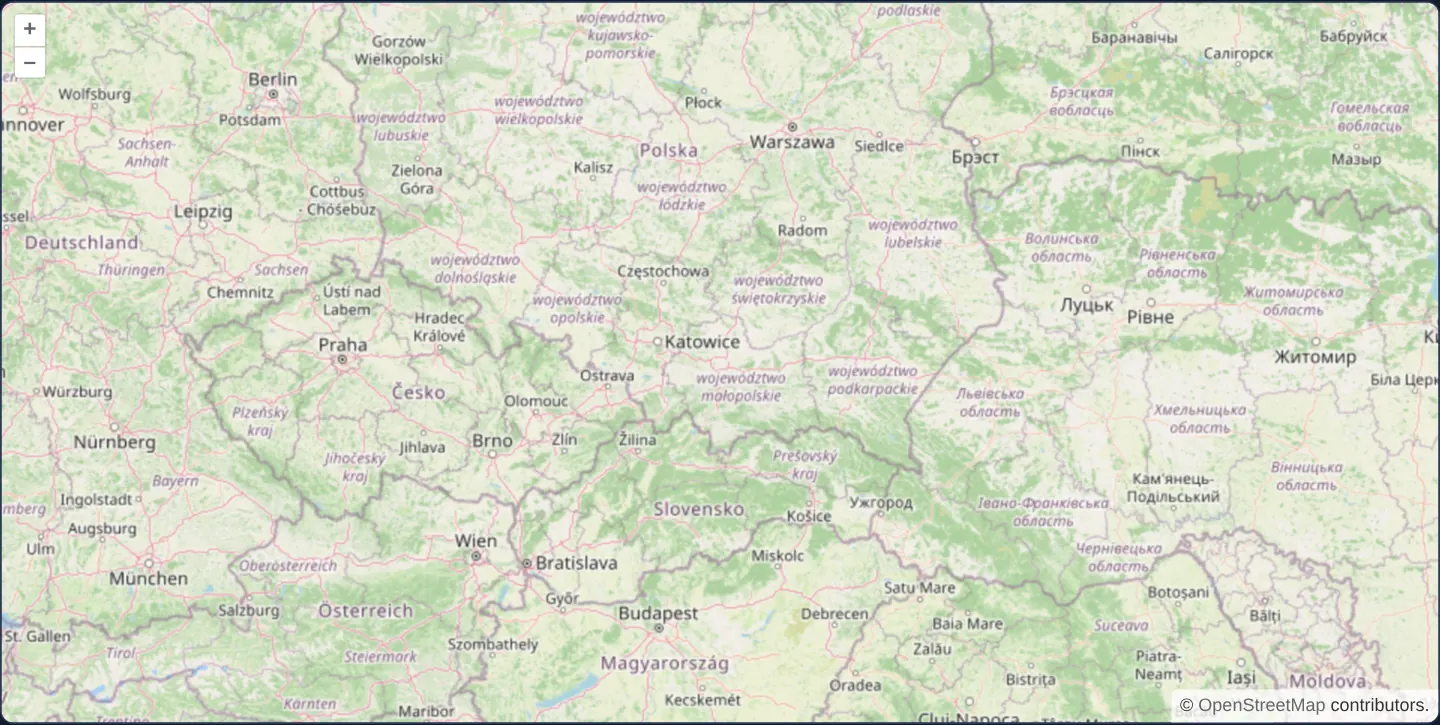
What this example shows
Embedded inside a scrolling article layout at zoom 6 over southern Poland, this map lets readers roll their mouse wheel or trackpad smoothly down the page right across the map canvas without accidentally zooming in or out.
As soon as the user intentionally clicks the map or focuses it with Tab, wheel zooming and drag panning wake up and operate normally until focus moves elsewhere.
When you need it
Long-form editorial articles, property listings, documentation pages and multi-section dashboards frequently embed full-width maps midway down a vertically scrolling document.
Nothing frustrates desktop readers more than a scroll trap: rolling down an article only to have the cursor cross a map that suddenly swallows wheel events and zooms into empty ocean. Deferring wheel and drag capture until focus keeps page reading effortless.
The code
The example uses cc-openlayers, my Angular component library for OpenLayers: each aol-… element creates the OpenLayers object it names, updates it from its inputs and disposes of it with the component.
page-scroll.tsimport { ChangeDetectionStrategy, Component } from '@angular/core';
import {
CoordinateComponent,
DefaultControlComponent,
DefaultInteractionComponent,
LayerTileComponent,
MapComponent,
SourceOsmComponent,
ViewComponent,
} from 'cc-openlayers';
/**
* A map in a page that scrolls: the wheel and drag pan act on the map only while it has the focus, so the wheel
* scrolls the page past it until a click or Tab focuses the map, whose element has a tabindex. A plain OpenLayers
* map built without interactions gets focus-only defaults; `aol-interaction-default` follows `defaults()`, which
* are not, so the example asks for them.
*/
@Component({
selector: 'app-page-scroll',
imports: [
CoordinateComponent,
DefaultControlComponent,
DefaultInteractionComponent,
LayerTileComponent,
MapComponent,
SourceOsmComponent,
ViewComponent,
],
changeDetection: ChangeDetectionStrategy.OnPush,
template: `
<aol-map height="480px">
<aol-interaction-default [onFocusOnly]="true" />
<aol-control-defaults />
<aol-view [zoom]="6">
<aol-coordinate [x]="19.9368" [y]="50.0614" srid="EPSG:4326" />
</aol-view>
<aol-layer-tile><aol-source-osm /></aol-layer-tile>
</aol-map>
`,
})
export class PageScroll {} The React version uses the library's React adapter, cc-openlayers/react: each component creates the OpenLayers object it names when it mounts, updates it from its props and disposes of it when it unmounts.
page-scroll.react.tsximport { Coordinate, DefaultControls, DefaultInteractions, Map, OSMSource, TileLayer, View } from 'cc-openlayers/react';
/**
* A map in a page that scrolls: the wheel and drag pan act on the map only while it has the focus, so the wheel
* scrolls the page past it until a click or Tab focuses the map, whose element has a tabindex. A plain OpenLayers
* map built without interactions gets focus-only defaults; `DefaultInteractions` follows `defaults()`, which are
* not, so the example asks for them.
*/
export function PageScroll() {
return (
<Map height="480px">
<DefaultInteractions onFocusOnly />
<DefaultControls />
<View zoom={6}>
<Coordinate x={19.9368} y={50.0614} srid="EPSG:4326" />
</View>
<TileLayer>
<OSMSource />
</TileLayer>
</Map>
);
}How the React version works
The mouse wheel and dragging act on the map only once it has focus, so scrolling the page does not stop at the map.
What both versions share
OpenLayers renders the map and handles the interactions; the cc-openlayers/core layer gives both adapters the same view binding (MapViewBinding) and the same conversion of coordinates from EPSG:4326 to the map's projection. The “focus only” condition is an option of OpenLayers' interaction defaults().
From Angular to React
| Angular | React |
|---|---|
<aol-interaction-default [onFocusOnly]="true" /> | <DefaultInteractions onFocusOnly /> |
Who creates, updates and disposes
Map creates the ol/Map in useLayoutEffect and disposes of it on unmount; each layer, source and interaction component adds its object to the parent it gets from context and removes it in its effect's cleanup, as ngOnDestroy does in Angular.
Architecture and OpenLayers mechanics
Passing [onFocusOnly]="true" to aol-interaction-default configures OpenLayers’ internal DragPan and MouseWheelZoom interactions with onFocusOnly enabled. Because the wrapper assigns a tabindex to the map container, browser focus lands on the map automatically on first click or keyboard Tab.
Until that element owns document.activeElement, wheel and single-drag events bubble undisturbed to the browser window for normal page scrolling, while explicit gestures such as zoom buttons, double-click zoom and two-finger pinch continue working immediately.
How it works
[onFocusOnly]="true"onaol-interaction-defaultsuspends mouse-wheel zoom and drag pan until the map element receives focus.- Because the map host carries a
tabindex, clicking inside the map or tabbing to it activates focus and unlocks wheel/drag navigation immediately. - Explicit controls—including on-map +/− buttons, double-click zoom and touch pinch—remain responsive even before prior focus.
Pitfalls
- Imperative new Map() constructors enable focus-only defaults automatically in newer OpenLayers releases, whereas
aol-interaction-defaultmirrors OpenLayers’defaults()helper whereonFocusOnlydefaults to false—set[onFocusOnly]="true"explicitly on embedded maps. - Users scrolling past may not guess why wheel zoom ignores them at first; keep visible zoom buttons or a brief focus hint beside embedded maps.
- Test focus ring styling so clicking the map does not draw a jarring browser outline if :focus-visible is more appropriate than :focus.
Related examples
The same feature in the OpenLayers examples .
Background: state and lifecycle of maps in Angular with OpenLayers, which the components of cc-openlayers take care of.