Essentials · Angular, React and OpenLayers
Two-finger panning in a scrolling page
Enable cooperative mobile two-finger panning and Cmd/Ctrl wheel zoom in OpenLayers so single-finger touch swipes and plain wheel events scroll the page.
What this example shows
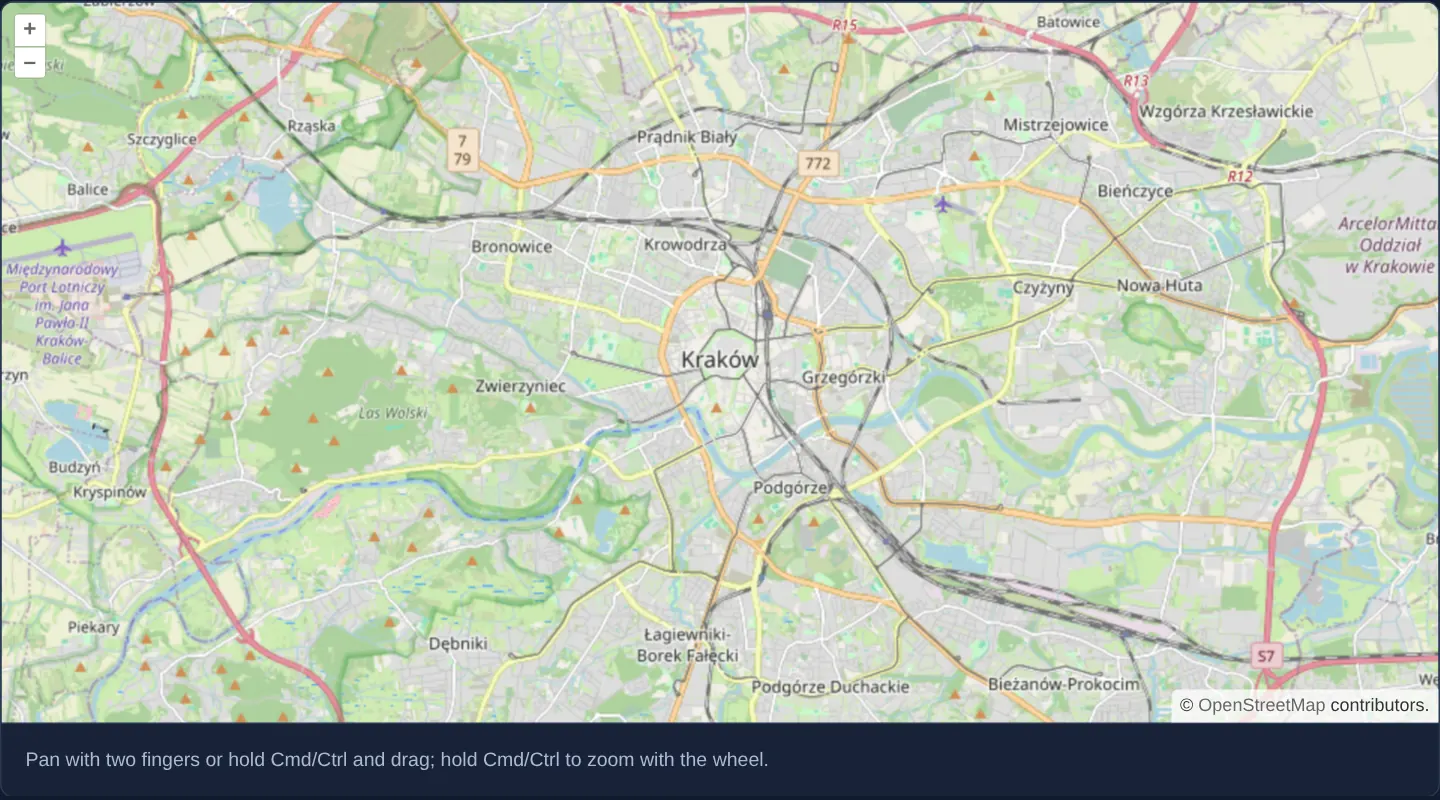
Centred on Kraków at zoom 12 with an explicit usage hint beneath the canvas, this map implements cooperative gesture handling: swiping with one finger on a phone or rolling an unmodified mouse wheel on desktop scrolls the surrounding web page smoothly.
Using two fingers on a touch screen—or holding Cmd on macOS / Ctrl on Windows and Linux while dragging or scrolling—pans and zooms the map itself.
When you need it
On smartphones, a full-width embedded map taller than half the screen becomes an inescapable touch trap if single-finger drags pan the map instead of scrolling the page.
Users conditioned by major consumer mapping embeds expect cooperative gestures: one finger moves the document, two fingers explore the map, and desktop modifier keys protect trackpad scrolling.
The code
The example uses cc-openlayers, my Angular component library for OpenLayers: each aol-… element creates the OpenLayers object it names, updates it from its inputs and disposes of it with the component.
two-finger-pan-scroll.tsimport { ChangeDetectionStrategy, Component } from '@angular/core';
import {
CoordinateComponent,
DefaultControlComponent,
DefaultInteractionComponent,
DragPanInteractionComponent,
LayerTileComponent,
MapComponent,
MouseWheelZoomInteractionComponent,
SourceOsmComponent,
ViewComponent,
} from 'cc-openlayers';
import { platformModifierKeyOnly } from 'ol/events/condition';
import type DragPan from 'ol/interaction/DragPan';
/** A map that lets the page scroll: it pans with two fingers or Cmd/Ctrl and zooms with the wheel only while Cmd/Ctrl is held. */
@Component({
selector: 'app-two-finger-pan-scroll',
imports: [
CoordinateComponent,
DefaultControlComponent,
DefaultInteractionComponent,
DragPanInteractionComponent,
LayerTileComponent,
MapComponent,
MouseWheelZoomInteractionComponent,
SourceOsmComponent,
ViewComponent,
],
changeDetection: ChangeDetectionStrategy.OnPush,
template: `
<aol-map height="480px">
<aol-interaction-default [dragPan]="false" [mouseWheelZoom]="false" />
<aol-interaction-dragpan [condition]="panCondition" />
<aol-interaction-mousewheelzoom [condition]="wheelCondition" />
<aol-control-defaults />
<aol-view [zoom]="12"><aol-coordinate [x]="19.9368" [y]="50.0614" srid="EPSG:4326" /></aol-view>
<aol-layer-tile><aol-source-osm /></aol-layer-tile>
</aol-map>
<div class="example-controls">
<p class="example-hint">Pan with two fingers or hold Cmd/Ctrl and drag; hold Cmd/Ctrl to zoom with the wheel.</p>
</div>
`,
})
export class TwoFingerPanScroll {
protected readonly panCondition = function (
this: DragPan,
event: Parameters<typeof platformModifierKeyOnly>[0]
): boolean {
return this.getPointerCount() === 2 || platformModifierKeyOnly(event);
};
protected readonly wheelCondition = platformModifierKeyOnly;
} The React version uses the library's React adapter, cc-openlayers/react: each component creates the OpenLayers object it names when it mounts, updates it from its props and disposes of it when it unmounts.
two-finger-pan-scroll.react.tsximport { platformModifierKeyOnly } from 'ol/events/condition';
import type DragPan from 'ol/interaction/DragPan';
import {
Coordinate,
DefaultControls,
DefaultInteractions,
DragPanInteraction,
Map,
MouseWheelZoomInteraction,
OSMSource,
TileLayer,
View,
} from 'cc-openlayers/react';
// OpenLayers calls the condition with the interaction as `this`; its `Condition` type does not declare it.
const panCondition = function (this: unknown, event: Parameters<typeof platformModifierKeyOnly>[0]): boolean {
return (this as DragPan).getPointerCount() === 2 || platformModifierKeyOnly(event);
};
const wheelCondition = platformModifierKeyOnly;
/** A map that lets the page scroll: it pans with two fingers or Cmd/Ctrl and zooms with the wheel only while Cmd/Ctrl is held. */
export function TwoFingerPanScroll() {
return (
<>
<Map height="480px">
<DefaultInteractions dragPan={false} mouseWheelZoom={false} />
<DragPanInteraction condition={panCondition} />
<MouseWheelZoomInteraction condition={wheelCondition} />
<DefaultControls />
<View zoom={12}>
<Coordinate x={19.9368} y={50.0614} srid="EPSG:4326" />
</View>
<TileLayer>
<OSMSource />
</TileLayer>
</Map>
<div className="example-controls">
<p className="example-hint">
Pan with two fingers or hold Cmd/Ctrl and drag; hold Cmd/Ctrl to zoom with the wheel.
</p>
</div>
</>
);
}How the React version works
On a phone the map pans with two fingers (or with Cmd/Ctrl and a mouse) while one finger scrolls the page; the wheel zooms only with Cmd/Ctrl held.
What both versions share
OpenLayers renders the map and handles the interactions; the cc-openlayers/core layer gives both adapters the same view binding (MapViewBinding) and the same conversion of coordinates from EPSG:4326 to the map's projection. The interaction conditions (platformModifierKeyOnly, the number of DragPan pointers) come from OpenLayers.
From Angular to React
| Angular | React |
|---|---|
[dragPan]="false" [mouseWheelZoom]="false" | dragPan={false} mouseWheelZoom={false} |
<aol-interaction-dragpan [condition]> | <DragPanInteraction condition={panCondition} /> |
| class fields holding the conditions | module constants (a stable reference) |
Who creates, updates and disposes
Map creates the ol/Map in useLayoutEffect and disposes of it on unmount; each layer, source and interaction component adds its object to the parent it gets from context and removes it in its effect's cleanup, as ngOnDestroy does in Angular. The conditions are module constants, because a new function on every render would make the adapter create the interaction again.
Architecture and OpenLayers mechanics
The template disables unconditional pan and wheel handlers inside the default interaction bundle via [dragPan]="false" and [mouseWheelZoom]="false", then mounts standalone aol-interaction-dragpan and aol-interaction-mousewheelzoom components configured with custom event conditions.
On the drag-pan interaction, panCondition evaluates this.getPointerCount() === 2 (two-finger touch) or platformModifierKeyOnly (Cmd/Ctrl + mouse drag). Crucially, panCondition is written as a classic function expression rather than an arrow function because OpenLayers invokes DragPan condition callbacks with the DragPan instance bound as this. When the condition returns false, OpenLayers leaves the native touch/wheel event uncancelled so the browser scrolls the page.
How it works
[dragPan]="false"and[mouseWheelZoom]="false"exclude unconditional pan and wheel handlers from the defaults whileaol-interaction-dragpanandaol-interaction-mousewheelzoomre-add them with modifier rules.panConditionactivates panning only whenthis.getPointerCount() === 2orplatformModifierKeyOnly(Cmd on macOS, Ctrl elsewhere) is true.- Declaring
panConditionas a regularfunctionpreserves OpenLayers’ dynamicthisbinding on the DragPan interaction instance. - Because OpenLayers only cancels browser touch-scroll when an interaction claims the gesture, rejected single-finger swipes scroll the page naturally.
Pitfalls
- Writing
panConditionas an arrow function lexically bindsthisto the outer Angular component or undefined, causinggetPointerCountto throw at runtime. - Always display clear user guidance (or a transient overlay banner) explaining two-finger / Cmd+Ctrl gestures so visitors do not think the map is frozen.
- Check CSS touch-action overrides on parent containers so custom stylesheets do not block native vertical page scrolling over the viewport.
Related examples
The same feature in the OpenLayers examples .
Background: state and lifecycle of maps in Angular with OpenLayers, which the components of cc-openlayers take care of.