Styling and labels · Angular, React and OpenLayers
Regular shapes as point symbols
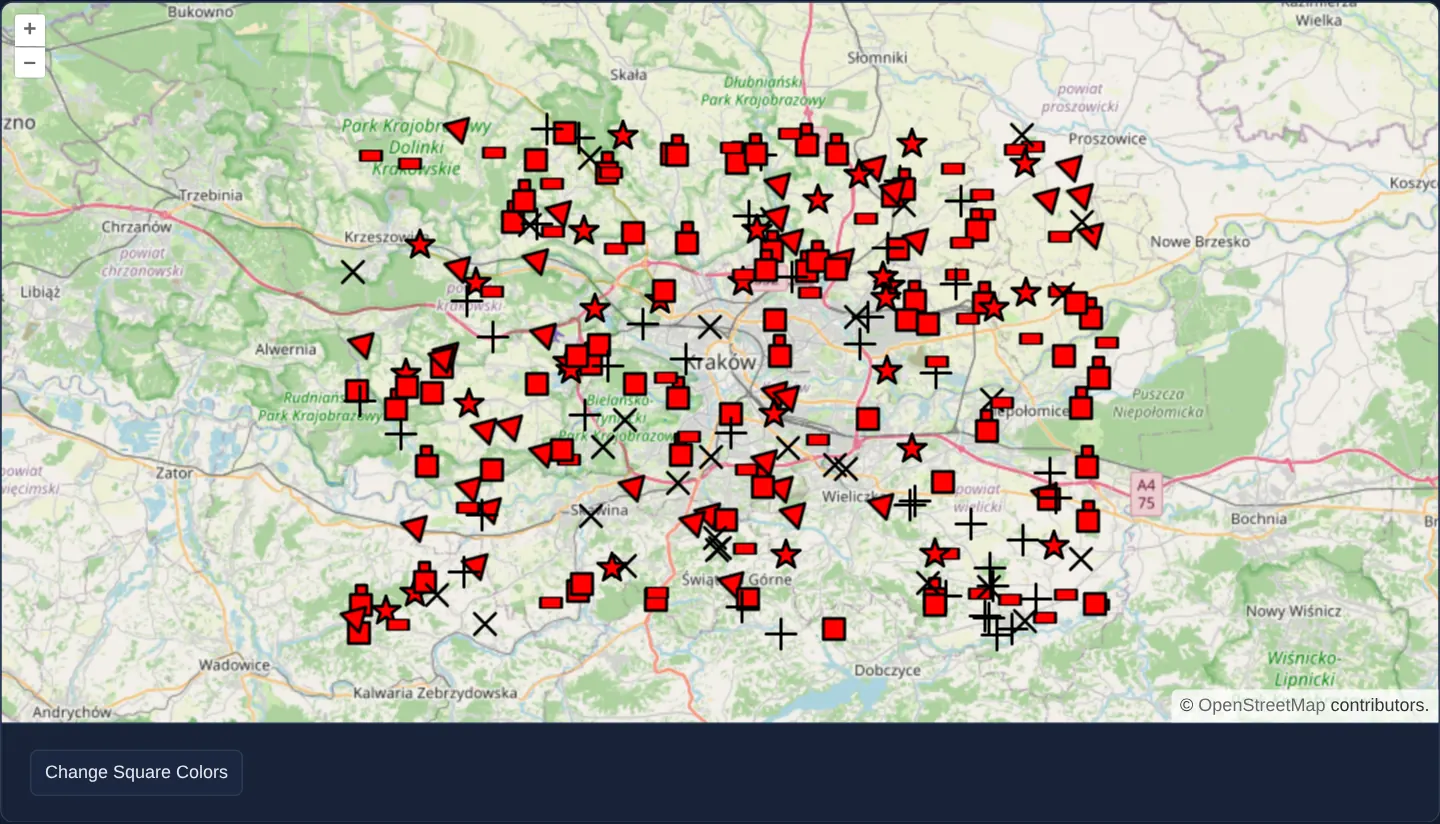
Render 250 crisp geometric markers—stars, crosses, triangles, squares, rectangles and stacked shapes—using OpenLayers RegularShape styles.
What this example shows
Across the Kraków region at zoom 10 over OpenStreetMap, 250 deterministic points (mulberry32(7)) display seven crisp geometric marker families—crosses, X-marks, five-pointed stars, triangles, upright squares, flattened rectangles and stacked double-squares—with an action button that recolours every square symbol dynamically.
When you need it
Scientific plots, geological borehole maps, network topology views and categorical sensor layers rely on classic cartographic geometric primitives that must stay razor-sharp at any Retina density and recolour instantaneously from data palettes.
OpenLayers’ RegularShape generates procedural vector polygons onto cached sprite canvases in memory—requiring zero external SVG or PNG files.
The code
The example uses cc-openlayers, my Angular component library for OpenLayers: each aol-… element creates the OpenLayers object it names, updates it from its inputs and disposes of it with the component.
regularshape.tsimport { ChangeDetectionStrategy, Component, signal } from '@angular/core';
import {
CoordinateComponent,
DefaultControlComponent,
DefaultInteractionComponent,
FeatureComponent,
GeometryPointComponent,
LayerTileComponent,
LayerVectorComponent,
MapComponent,
SourceOsmComponent,
SourceVectorComponent,
StyleComponent,
StyleFillComponent,
StyleRegularShapeComponent,
StylesComponent,
StyleStrokeComponent,
ViewComponent,
} from 'cc-openlayers';
const KINDS = ['x', 'cross', 'star', 'triangle', 'square', 'rectangle', 'stacked'] as const;
type Kind = (typeof KINDS)[number];
/** A quarter of a turn in radians: the angle that turns a square on its corner. */
const QUARTER = Math.PI / 4;
/** Two hundred and fifty points around Kraków drawn as x, cross, star, triangle, square, rectangle and stacked shapes. */
@Component({
selector: 'app-regularshape',
imports: [
CoordinateComponent,
DefaultControlComponent,
DefaultInteractionComponent,
FeatureComponent,
GeometryPointComponent,
LayerTileComponent,
LayerVectorComponent,
MapComponent,
SourceOsmComponent,
SourceVectorComponent,
StyleComponent,
StyleFillComponent,
StyleRegularShapeComponent,
StylesComponent,
StyleStrokeComponent,
ViewComponent,
],
changeDetection: ChangeDetectionStrategy.OnPush,
template: `
<aol-map height="480px">
<aol-interaction-default />
<aol-control-defaults />
<aol-view [zoom]="10"><aol-coordinate [x]="19.9368" [y]="50.0614" srid="EPSG:4326" /></aol-view>
<aol-layer-tile><aol-source-osm /></aol-layer-tile>
<aol-layer-vector>
<aol-source-vector>
@for (point of points; track $index) {
<aol-feature>
<aol-geometry-point><aol-coordinate [x]="point.x" [y]="point.y" srid="EPSG:4326" /></aol-geometry-point>
@switch (point.kind) {
@case ('square') {
<aol-style>
<aol-style-regularshape [points]="4" [radius]="10" [angle]="quarter">
<aol-style-stroke color="black" [width]="2" />
<aol-style-fill [color]="squareColor()" />
</aol-style-regularshape>
</aol-style>
}
@case ('rectangle') {
<aol-style>
<aol-style-regularshape
[points]="4"
[radius]="rectangleRadius"
[radius2]="10"
[angle]="0"
[scale]="[1, 0.5]"
>
<aol-style-stroke color="black" [width]="2" />
<aol-style-fill color="red" />
</aol-style-regularshape>
</aol-style>
}
@case ('triangle') {
<aol-style>
<aol-style-regularshape [points]="3" [radius]="10" [rotation]="quarter" [angle]="0">
<aol-style-stroke color="black" [width]="2" />
<aol-style-fill color="red" />
</aol-style-regularshape>
</aol-style>
}
@case ('star') {
<aol-style>
<aol-style-regularshape [points]="5" [radius]="10" [radius2]="4" [angle]="0">
<aol-style-stroke color="black" [width]="2" />
<aol-style-fill color="red" />
</aol-style-regularshape>
</aol-style>
}
@case ('cross') {
<aol-style>
<aol-style-regularshape [points]="4" [radius]="10" [radius2]="0" [angle]="0">
<aol-style-stroke color="black" [width]="2" />
<aol-style-fill color="red" />
</aol-style-regularshape>
</aol-style>
}
@case ('x') {
<aol-style>
<aol-style-regularshape [points]="4" [radius]="10" [radius2]="0" [angle]="quarter">
<aol-style-stroke color="black" [width]="2" />
<aol-style-fill color="red" />
</aol-style-regularshape>
</aol-style>
}
@case ('stacked') {
<aol-styles>
<aol-style>
<aol-style-regularshape [points]="4" [radius]="5" [angle]="quarter" [displacement]="[0, 10]">
<aol-style-stroke color="black" [width]="2" />
<aol-style-fill color="red" />
</aol-style-regularshape>
</aol-style>
<aol-style>
<aol-style-regularshape [points]="4" [radius]="10" [angle]="quarter">
<aol-style-stroke color="black" [width]="2" />
<aol-style-fill color="red" />
</aol-style-regularshape>
</aol-style>
</aol-styles>
}
}
</aol-feature>
}
</aol-source-vector>
</aol-layer-vector>
</aol-map>
<div class="example-controls">
<button type="button" (click)="changeSquareColors()">Change Square Colors</button>
</div>
`,
})
export class Regularshape {
/** The fill of the squares, which the button changes. */
readonly squareColor = signal('red');
protected readonly quarter = QUARTER;
protected readonly rectangleRadius = 10 / Math.SQRT2;
protected readonly points = randomPoints(250, mulberry32(7));
private readonly colors = ['blue', 'green', 'yellow', 'aqua', 'red'];
private nextColor = 0;
protected changeSquareColors(): void {
this.squareColor.set(this.colors[this.nextColor % this.colors.length]);
this.nextColor++;
}
}
/** Points of the box around Kraków (19.6 to 20.3 east, 49.9 to 50.2 north), each with a kind of shape. */
function randomPoints(count: number, random: () => number): { x: number; y: number; kind: Kind }[] {
const between = (from: number, to: number) => Math.round((random() * (to - from) + from) * 1e4) / 1e4;
return Array.from({ length: count }, () => ({
x: between(19.6, 20.3),
y: between(49.9, 50.2),
kind: KINDS[Math.floor(random() * KINDS.length)],
}));
}
/** A small seeded pseudo-random generator, so every render shows the same points. */
function mulberry32(seed: number): () => number {
return () => {
seed = (seed + 0x6d2b79f5) | 0;
let t = Math.imul(seed ^ (seed >>> 15), 1 | seed);
t = (t + Math.imul(t ^ (t >>> 7), 61 | t)) ^ t;
return ((t ^ (t >>> 14)) >>> 0) / 4294967296;
};
} The React version uses the library's React adapter, cc-openlayers/react: each component creates the OpenLayers object it names when it mounts, updates it from its props and disposes of it when it unmounts.
regularshape.react.tsximport { useMemo, useRef, useState } from 'react';
import {
Coordinate,
DefaultControls,
DefaultInteractions,
Feature,
Fill,
Map,
OSMSource,
PointGeometry,
RegularShapeStyle,
Stroke,
Style,
Styles,
TileLayer,
VectorLayer,
VectorSource,
View,
} from 'cc-openlayers/react';
const KINDS = ['x', 'cross', 'star', 'triangle', 'square', 'rectangle', 'stacked'] as const;
type Kind = (typeof KINDS)[number];
/** A quarter of a turn in radians: the angle that turns a square on its corner. */
const QUARTER = Math.PI / 4;
const RECTANGLE_RADIUS = 10 / Math.SQRT2;
const RECTANGLE_SCALE = [1, 0.5];
const STACK_DISPLACEMENT = [0, 10];
const COLORS = ['blue', 'green', 'yellow', 'aqua', 'red'];
/** Two hundred and fifty points around Kraków drawn as x, cross, star, triangle, square, rectangle and stacked shapes. */
export function Regularshape() {
/** The fill of the squares, which the button changes. */
const [squareColor, setSquareColor] = useState('red');
const nextColor = useRef(0);
const points = useMemo(() => randomPoints(250, mulberry32(7)), []);
const changeSquareColors = () => {
setSquareColor(COLORS[nextColor.current % COLORS.length]);
nextColor.current++;
};
/** The style of one point, by the kind of its shape. */
const style = (kind: Kind) => {
switch (kind) {
case 'square':
return (
<Style>
<RegularShapeStyle points={4} radius={10} angle={QUARTER}>
<Stroke color="black" width={2} />
<Fill color={squareColor} />
</RegularShapeStyle>
</Style>
);
case 'rectangle':
return (
<Style>
<RegularShapeStyle points={4} radius={RECTANGLE_RADIUS} radius2={10} angle={0} scale={RECTANGLE_SCALE}>
<Stroke color="black" width={2} />
<Fill color="red" />
</RegularShapeStyle>
</Style>
);
case 'triangle':
return (
<Style>
<RegularShapeStyle points={3} radius={10} rotation={QUARTER} angle={0}>
<Stroke color="black" width={2} />
<Fill color="red" />
</RegularShapeStyle>
</Style>
);
case 'star':
return (
<Style>
<RegularShapeStyle points={5} radius={10} radius2={4} angle={0}>
<Stroke color="black" width={2} />
<Fill color="red" />
</RegularShapeStyle>
</Style>
);
case 'cross':
return (
<Style>
<RegularShapeStyle points={4} radius={10} radius2={0} angle={0}>
<Stroke color="black" width={2} />
<Fill color="red" />
</RegularShapeStyle>
</Style>
);
case 'x':
return (
<Style>
<RegularShapeStyle points={4} radius={10} radius2={0} angle={QUARTER}>
<Stroke color="black" width={2} />
<Fill color="red" />
</RegularShapeStyle>
</Style>
);
case 'stacked':
return (
<Styles>
<Style>
<RegularShapeStyle points={4} radius={5} angle={QUARTER} displacement={STACK_DISPLACEMENT}>
<Stroke color="black" width={2} />
<Fill color="red" />
</RegularShapeStyle>
</Style>
<Style>
<RegularShapeStyle points={4} radius={10} angle={QUARTER}>
<Stroke color="black" width={2} />
<Fill color="red" />
</RegularShapeStyle>
</Style>
</Styles>
);
}
};
return (
<>
<Map height="480px">
<DefaultInteractions />
<DefaultControls />
<View zoom={10}>
<Coordinate x={19.9368} y={50.0614} srid="EPSG:4326" />
</View>
<TileLayer>
<OSMSource />
</TileLayer>
<VectorLayer>
<VectorSource>
{points.map((point, index) => (
<Feature key={index}>
<PointGeometry>
<Coordinate x={point.x} y={point.y} srid="EPSG:4326" />
</PointGeometry>
{style(point.kind)}
</Feature>
))}
</VectorSource>
</VectorLayer>
</Map>
<div className="example-controls">
<button type="button" onClick={changeSquareColors}>
Change Square Colors
</button>
</div>
</>
);
}
/** Points of the box around Kraków (19.6 to 20.3 east, 49.9 to 50.2 north), each with a kind of shape. */
function randomPoints(count: number, random: () => number): { x: number; y: number; kind: Kind }[] {
const between = (from: number, to: number) => Math.round((random() * (to - from) + from) * 1e4) / 1e4;
return Array.from({ length: count }, () => ({
x: between(19.6, 20.3),
y: between(49.9, 50.2),
kind: KINDS[Math.floor(random() * KINDS.length)],
}));
}
/** A small seeded pseudo-random generator, so every render shows the same points. */
function mulberry32(seed: number): () => number {
return () => {
seed = (seed + 0x6d2b79f5) | 0;
let t = Math.imul(seed ^ (seed >>> 15), 1 | seed);
t = (t + Math.imul(t ^ (t >>> 7), 61 | t)) ^ t;
return ((t ^ (t >>> 14)) >>> 0) / 4294967296;
};
}How the React version works
Two hundred and fifty points around Kraków drawn as x, cross, star, triangle, square, rectangle and a stack of two squares; a button changes the fill of the squares.
What both versions share
OpenLayers renders the map and handles the interactions; the cc-openlayers/core layer gives both adapters the same view binding (MapViewBinding) and the same conversion of coordinates from EPSG:4326 to the map's projection. A seeded generator draws the points, so every render shows the same ones.
From Angular to React
| Angular | React |
|---|---|
@for over the points with <aol-feature> | points.map(…) with <Feature key={index}>; the points come from useMemo |
<aol-style-regularshape> inside <aol-styles> | <RegularShapeStyle> inside <Styles> |
the button's (click) with the colour index in a field | onClick with the colour index in a useRef, because it changes only the shapes' fill, not the render |
Who creates, updates and disposes
Map creates the ol/Map in useLayoutEffect and disposes of it on unmount; each layer, source and interaction component adds its object to the parent it gets from context and removes it in its effect's cleanup, as ngOnDestroy does in Angular.
Architecture and OpenLayers mechanics
Every symbol is parameterised from regular polygon math: [points] sets vertex count at [radius], adding [radius2] alternates outer and inner vertices to form stars (or crisp crosses when [radius2]="0"), and [angle]="quarter" (π/4 rad) rotates a diamond onto flat horizontal/vertical sides or turns a + cross into an ×.
Non-uniform [scale]="[1, 0.5]" squashes an octagon/square setup into a 2:1 rectangle, while aol-styles pairs an offset small square ([displacement]="[0, 10]") beneath a main square for stacked symbols.
How it works
- Combining
[points],[radius]and[radius2]builds polygons, five-pointed stars and[radius2]="0"crosses. [angle]="quarter"(π/4 radians) aligns 4-point squares flat on their base and turns+crosses into diagonal × marks.[scale]="[1, 0.5]"compresses vertical height by half to turn an equilateral shape into a 2:1 rectangle.- Stacking two
RegularShapestyles insideaol-styleswith[displacement]="[0, 10]"creates composite multi-part markers. - Recolouring squares updates fill colour cleanly through OpenLayers’ parameter-keyed image cache, over 250 points from
mulberry32(7).
Pitfalls
- Four points at a single radius always form an equilateral square—use two-dimensional
[scale]([1, 0.5]) whenever you need a non-square rectangle. - OpenLayers caches rendered RegularShape bitmaps by style parameters: reusing a handful of categorical styles across hundreds of points shares just a few cached bitmaps, whereas assigning a unique random colour to every single point allocates a separate canvas per feature.
Related examples
The same feature in the OpenLayers examples .
Background: state and lifecycle of maps in Angular with OpenLayers, which the components of cc-openlayers take care of.