Styling and labels · Angular, React and OpenLayers
Scale, rotation and anchor of icons and labels
Stretch, mirror with negative scale, rotate around a custom anchor and synchronize view rotation on OpenLayers icons and multi-line text labels.
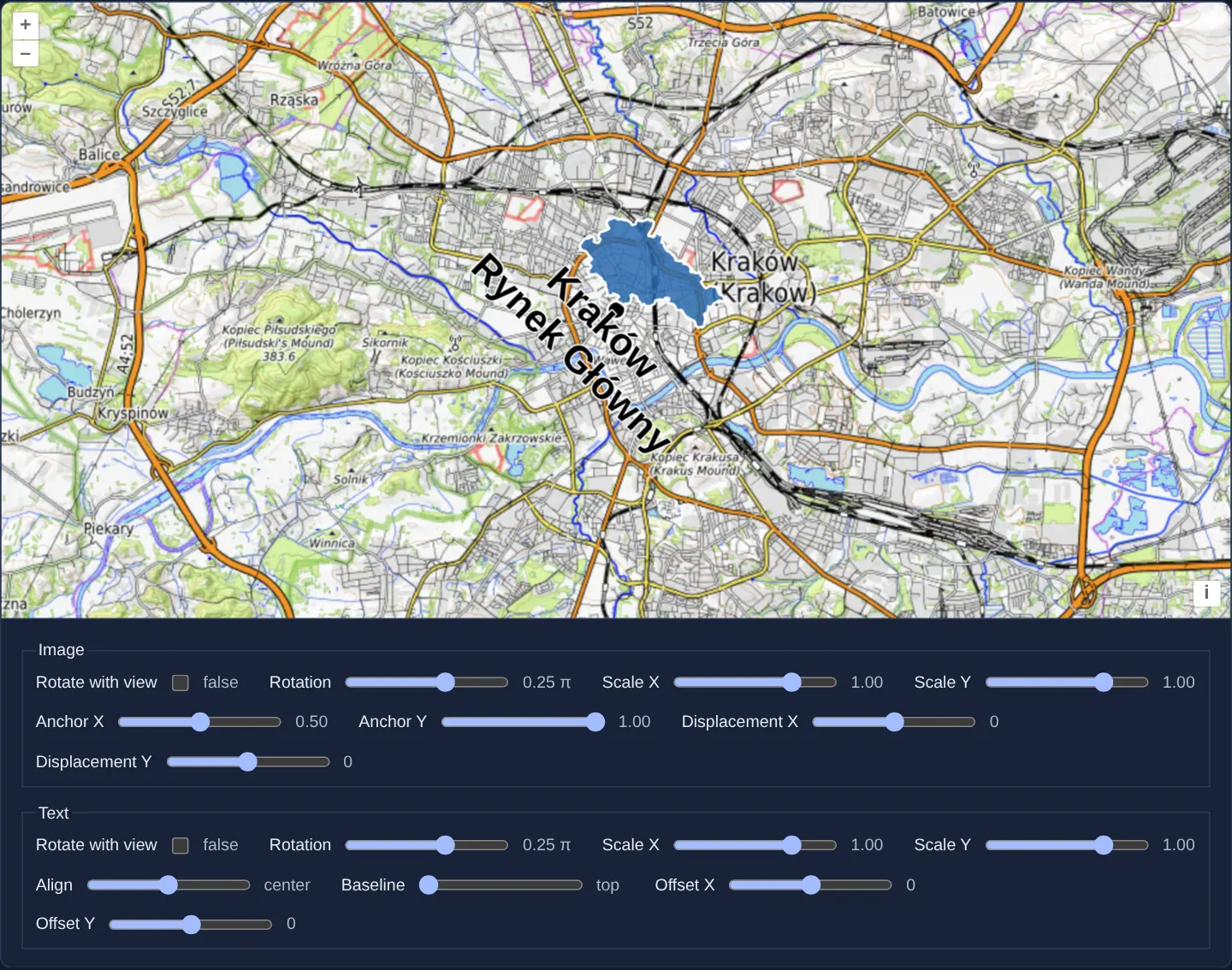
What this example shows
Over an OpenTopoMap backdrop of Kraków at zoom 12, an asymmetric silhouette icon of Kraków’s city boundary and a two-line label (Kraków / Rynek Główny) pivot 45 degrees around a black-and-white reference dot on the Main Market Square.
Interactive sliders below the map adjust X/Y scale (including negative values that mirror the icon and text across their anchor), rotation, fractional anchor coordinates and Rotate with view synchronization.
When you need it
Directional vehicle markers, security-camera field-of-view cones, asymmetrical maritime buoys and mirrored engineering symbols must rotate, stretch and flip around a precise registration point without shipping dozens of pre-rotated sprites.
Testing 2D [scaleX, scaleY], anchor, displacement and rotateWithView side by side clarifies how OpenLayers composes symbol transforms.
The code
The example uses cc-openlayers, my Angular component library for OpenLayers: each aol-… element creates the OpenLayers object it names, updates it from its inputs and disposes of it with the component.
icon-scale.tsimport { NgTemplateOutlet } from '@angular/common';
import { ChangeDetectionStrategy, Component, signal, viewChild } from '@angular/core';
import type MapBrowserEvent from 'ol/MapBrowserEvent';
import { ATTRIBUTION } from 'ol/source/OSM';
import {
CoordinateComponent,
DefaultControlComponent,
DefaultInteractionComponent,
FeatureComponent,
GeometryPointComponent,
LayerTileComponent,
LayerVectorComponent,
MapComponent,
SourceVectorComponent,
SourceXYZComponent,
StyleCircleComponent,
StyleComponent,
StyleFillComponent,
StyleIconComponent,
StylesComponent,
StyleStrokeComponent,
StyleTextComponent,
ViewComponent,
} from 'cc-openlayers';
const ALIGNMENTS: CanvasTextAlign[] = ['left', 'center', 'right'];
const BASELINES: CanvasTextBaseline[] = ['top', 'middle', 'bottom'];
/** A range control: its name, label and range, the value it starts at and the unit its value is shown in. */
interface Slider {
name: string;
label: string;
min: number;
max: number;
step: number;
start: number;
unit?: string;
}
const IMAGE: Slider[] = [
{ name: 'rotation', label: 'Rotation', min: -1, max: 1, step: 0.05, start: 0.25, unit: 'π' },
{ name: 'scaleX', label: 'Scale X', min: -2, max: 2, step: 0.1, start: 1 },
{ name: 'scaleY', label: 'Scale Y', min: -2, max: 2, step: 0.1, start: 1 },
{ name: 'anchorX', label: 'Anchor X', min: 0, max: 1, step: 0.01, start: 0.5 },
{ name: 'anchorY', label: 'Anchor Y', min: 0, max: 1, step: 0.01, start: 1 },
{ name: 'displacementX', label: 'Displacement X', min: -100, max: 100, step: 1, start: 0 },
{ name: 'displacementY', label: 'Displacement Y', min: -100, max: 100, step: 1, start: 0 },
];
const TEXT: Slider[] = [
{ name: 'textRotation', label: 'Rotation', min: -1, max: 1, step: 0.05, start: 0.25, unit: 'π' },
{ name: 'textScaleX', label: 'Scale X', min: -2, max: 2, step: 0.1, start: 1 },
{ name: 'textScaleY', label: 'Scale Y', min: -2, max: 2, step: 0.1, start: 1 },
{ name: 'textAlign', label: 'Align', min: 0, max: 2, step: 1, start: 1 },
{ name: 'textBaseline', label: 'Baseline', min: 0, max: 2, step: 1, start: 0 },
{ name: 'textOffsetX', label: 'Offset X', min: -100, max: 100, step: 1, start: 0 },
{ name: 'textOffsetY', label: 'Offset Y', min: -100, max: 100, step: 1, start: 0 },
];
/**
* Icons and labels scaled in both dimensions: the Main Market Square marked by a point and, above it, Kraków's own
* outline as an icon with the square's name. A negative scale flips the outline or the text around its anchor, which
* the city's shape, wider in the east, makes plain. The controls turn, scale, anchor and move the icon and the label.
*/
@Component({
selector: 'app-icon-scale',
imports: [
CoordinateComponent,
DefaultControlComponent,
DefaultInteractionComponent,
FeatureComponent,
GeometryPointComponent,
LayerTileComponent,
LayerVectorComponent,
MapComponent,
NgTemplateOutlet,
SourceVectorComponent,
SourceXYZComponent,
StyleCircleComponent,
StyleComponent,
StyleFillComponent,
StyleIconComponent,
StylesComponent,
StyleStrokeComponent,
StyleTextComponent,
ViewComponent,
],
changeDetection: ChangeDetectionStrategy.OnPush,
template: `
<aol-map height="480px" (pointerMove)="hover($event)">
<aol-interaction-default />
<aol-control-defaults />
<aol-view [zoom]="12">
<aol-coordinate [x]="19.9373" [y]="50.0617" srid="EPSG:4326" />
</aol-view>
<aol-layer-tile>
<aol-source-xyz url="https://tile.opentopomap.org/{z}/{x}/{y}.png" [maxZoom]="17" [attributions]="topography" />
</aol-layer-tile>
<aol-layer-vector>
<aol-source-vector>
<aol-feature>
<aol-geometry-point><aol-coordinate [x]="19.9373" [y]="50.0617" srid="EPSG:4326" /></aol-geometry-point>
<aol-styles>
<aol-style>
<aol-style-circle [radius]="7">
<aol-style-fill color="black" />
<aol-style-stroke color="white" [width]="2" />
</aol-style-circle>
</aol-style>
<aol-style>
<aol-style-icon
src="assets/krakow/outline.svg"
[anchor]="[value('anchorX'), value('anchorY')]"
[rotation]="value('rotation') * pi"
[rotateWithView]="rotateWithView()"
[scale]="[value('scaleX'), value('scaleY')]"
[displacement]="[value('displacementX'), value('displacementY')]"
/>
<aol-style-text
[text]="label"
font="bold 30px Calibri,sans-serif"
[rotation]="value('textRotation') * pi"
[rotateWithView]="textRotateWithView()"
[scale]="[value('textScaleX'), value('textScaleY')]"
[textAlign]="alignments[value('textAlign')]"
[textBaseLine]="baselines[value('textBaseline')]"
[offsetX]="value('textOffsetX')"
[offsetY]="value('textOffsetY')"
>
<aol-style-fill color="black" />
<aol-style-stroke color="white" [width]="2" />
</aol-style-text>
</aol-style>
</aol-styles>
</aol-feature>
</aol-source-vector>
</aol-layer-vector>
</aol-map>
<div class="example-controls">
<fieldset>
<legend>Image</legend>
<label>
Rotate with view
<input
name="rotateWithView"
type="checkbox"
[checked]="rotateWithView()"
(change)="rotateWithView.set(checked($event))"
/>
<output>{{ rotateWithView() }}</output>
</label>
@for (slider of image; track slider.name) {
<ng-container *ngTemplateOutlet="range; context: { $implicit: slider }" />
}
</fieldset>
<fieldset>
<legend>Text</legend>
<label>
Rotate with view
<input
name="textRotateWithView"
type="checkbox"
[checked]="textRotateWithView()"
(change)="textRotateWithView.set(checked($event))"
/>
<output>{{ textRotateWithView() }}</output>
</label>
@for (slider of text; track slider.name) {
<ng-container *ngTemplateOutlet="range; context: { $implicit: slider }" />
}
</fieldset>
</div>
<ng-template #range let-slider>
<label>
{{ slider.label }}
<input
type="range"
[name]="slider.name"
[min]="slider.min"
[max]="slider.max"
[step]="slider.step"
[value]="value(slider.name)"
(input)="set(slider.name, $event)"
/>
<output>{{ show(slider) }}</output>
</label>
</ng-template>
`,
})
export class IconScale {
protected readonly topography = [
'Map style © <a href="https://opentopomap.org/">OpenTopoMap</a> (<a href="https://creativecommons.org/licenses/by-sa/3.0/">CC-BY-SA</a>)',
ATTRIBUTION,
];
protected readonly label = 'Kraków\nRynek Główny';
protected readonly pi = Math.PI;
protected readonly alignments = ALIGNMENTS;
protected readonly baselines = BASELINES;
protected readonly image = IMAGE;
protected readonly text = TEXT;
protected readonly rotateWithView = signal(false);
protected readonly textRotateWithView = signal(false);
private readonly values = signal<Record<string, number>>(
Object.fromEntries([...IMAGE, ...TEXT].map((slider) => [slider.name, slider.start]))
);
private readonly map = viewChild.required(MapComponent);
protected value(name: string): number {
return this.values()[name];
}
protected set(name: string, event: Event): void {
const value = parseFloat((event.target as HTMLInputElement).value);
this.values.update((values) => ({ ...values, [name]: value }));
}
protected checked(event: Event): boolean {
return (event.target as HTMLInputElement).checked;
}
/** A slider's value as the original shows it: alignments by name, fractions with two decimals, turns of π. */
protected show(slider: Slider): string {
const value = this.value(slider.name);
if (slider.name === 'textAlign') return ALIGNMENTS[value];
if (slider.name === 'textBaseline') return BASELINES[value];
const shown = slider.step < 1 ? value.toFixed(2) : String(value);
return slider.unit ? `${shown} ${slider.unit}` : shown;
}
protected hover(event: MapBrowserEvent): void {
const map = this.map().instance;
(map.getTargetElement() as HTMLElement).style.cursor = map.hasFeatureAtPixel(event.pixel) ? 'pointer' : '';
}
} The React version uses the library's React adapter, cc-openlayers/react: each component creates the OpenLayers object it names when it mounts, updates it from its props and disposes of it when it unmounts.
icon-scale.react.tsximport { useState, type ChangeEvent } from 'react';
import type MapBrowserEvent from 'ol/MapBrowserEvent.js';
import { ATTRIBUTION } from 'ol/source/OSM.js';
import {
CircleStyle,
Coordinate,
DefaultControls,
DefaultInteractions,
Feature,
Fill,
IconStyle,
Map,
PointGeometry,
Stroke,
Style,
Styles,
TextStyle,
TileLayer,
VectorLayer,
VectorSource,
View,
XYZSource,
} from 'cc-openlayers/react';
const ALIGNMENTS: CanvasTextAlign[] = ['left', 'center', 'right'];
const BASELINES: CanvasTextBaseline[] = ['top', 'middle', 'bottom'];
/** A range control: its name, label and range, the value it starts at and the unit its value is shown in. */
interface Slider {
name: string;
label: string;
min: number;
max: number;
step: number;
start: number;
unit?: string;
}
const IMAGE: Slider[] = [
{ name: 'rotation', label: 'Rotation', min: -1, max: 1, step: 0.05, start: 0.25, unit: 'π' },
{ name: 'scaleX', label: 'Scale X', min: -2, max: 2, step: 0.1, start: 1 },
{ name: 'scaleY', label: 'Scale Y', min: -2, max: 2, step: 0.1, start: 1 },
{ name: 'anchorX', label: 'Anchor X', min: 0, max: 1, step: 0.01, start: 0.5 },
{ name: 'anchorY', label: 'Anchor Y', min: 0, max: 1, step: 0.01, start: 1 },
{ name: 'displacementX', label: 'Displacement X', min: -100, max: 100, step: 1, start: 0 },
{ name: 'displacementY', label: 'Displacement Y', min: -100, max: 100, step: 1, start: 0 },
];
const TEXT: Slider[] = [
{ name: 'textRotation', label: 'Rotation', min: -1, max: 1, step: 0.05, start: 0.25, unit: 'π' },
{ name: 'textScaleX', label: 'Scale X', min: -2, max: 2, step: 0.1, start: 1 },
{ name: 'textScaleY', label: 'Scale Y', min: -2, max: 2, step: 0.1, start: 1 },
{ name: 'textAlign', label: 'Align', min: 0, max: 2, step: 1, start: 1 },
{ name: 'textBaseline', label: 'Baseline', min: 0, max: 2, step: 1, start: 0 },
{ name: 'textOffsetX', label: 'Offset X', min: -100, max: 100, step: 1, start: 0 },
{ name: 'textOffsetY', label: 'Offset Y', min: -100, max: 100, step: 1, start: 0 },
];
const TOPOGRAPHY = [
'Map style © <a href="https://opentopomap.org/">OpenTopoMap</a> (<a href="https://creativecommons.org/licenses/by-sa/3.0/">CC-BY-SA</a>)',
ATTRIBUTION,
];
const LABEL = 'Kraków\nRynek Główny';
const PI = Math.PI;
function checked(event: ChangeEvent<HTMLInputElement>): boolean {
return event.target.checked;
}
function hover(event: MapBrowserEvent): void {
const map = event.map;
(map.getTargetElement() as HTMLElement).style.cursor = map.hasFeatureAtPixel(event.pixel) ? 'pointer' : '';
}
/**
* Icons and labels scaled in both dimensions: the Main Market Square marked by a point and, above it, Kraków's own
* outline as an icon with the square's name. A negative scale flips the outline or the text around its anchor, which
* the city's shape, wider in the east, makes plain. The controls turn, scale, anchor and move the icon and the label.
*/
export function IconScale() {
const [rotateWithView, setRotateWithView] = useState(false);
const [textRotateWithView, setTextRotateWithView] = useState(false);
const [values, setValues] = useState<Record<string, number>>(() =>
Object.fromEntries([...IMAGE, ...TEXT].map((slider) => [slider.name, slider.start]))
);
const value = (name: string): number => values[name];
const set = (name: string, event: ChangeEvent<HTMLInputElement>) => {
const next = parseFloat(event.target.value);
setValues((current) => ({ ...current, [name]: next }));
};
/** A slider's value as the original shows it: alignments by name, fractions with two decimals, turns of π. */
const show = (slider: Slider): string => {
const current = value(slider.name);
if (slider.name === 'textAlign') return ALIGNMENTS[current];
if (slider.name === 'textBaseline') return BASELINES[current];
const shown = slider.step < 1 ? current.toFixed(2) : String(current);
return slider.unit ? `${shown} ${slider.unit}` : shown;
};
const range = (slider: Slider) => (
<label key={slider.name}>
{slider.label}
<input
type="range"
name={slider.name}
min={slider.min}
max={slider.max}
step={slider.step}
value={value(slider.name)}
onChange={(event) => set(slider.name, event)}
/>
<output>{show(slider)}</output>
</label>
);
return (
<>
<Map height="480px" onPointerMove={hover}>
<DefaultInteractions />
<DefaultControls />
<View zoom={12}>
<Coordinate x={19.9373} y={50.0617} srid="EPSG:4326" />
</View>
<TileLayer>
<XYZSource url="https://tile.opentopomap.org/{z}/{x}/{y}.png" maxZoom={17} attributions={TOPOGRAPHY} />
</TileLayer>
<VectorLayer>
<VectorSource>
<Feature>
<PointGeometry>
<Coordinate x={19.9373} y={50.0617} srid="EPSG:4326" />
</PointGeometry>
<Styles>
<Style>
<CircleStyle radius={7}>
<Fill color="black" />
<Stroke color="white" width={2} />
</CircleStyle>
</Style>
<Style>
<IconStyle
src="assets/krakow/outline.svg"
anchor={[value('anchorX'), value('anchorY')]}
rotation={value('rotation') * PI}
rotateWithView={rotateWithView}
scale={[value('scaleX'), value('scaleY')]}
displacement={[value('displacementX'), value('displacementY')]}
/>
<TextStyle
text={LABEL}
font="bold 30px Calibri,sans-serif"
rotation={value('textRotation') * PI}
rotateWithView={textRotateWithView}
scale={[value('textScaleX'), value('textScaleY')]}
textAlign={ALIGNMENTS[value('textAlign')]}
textBaseline={BASELINES[value('textBaseline')]}
offsetX={value('textOffsetX')}
offsetY={value('textOffsetY')}
>
<Fill color="black" />
<Stroke color="white" width={2} />
</TextStyle>
</Style>
</Styles>
</Feature>
</VectorSource>
</VectorLayer>
</Map>
<div className="example-controls">
<fieldset>
<legend>Image</legend>
<label>
Rotate with view
<input
name="rotateWithView"
type="checkbox"
checked={rotateWithView}
onChange={(event) => setRotateWithView(checked(event))}
/>
<output>{String(rotateWithView)}</output>
</label>
{IMAGE.map(range)}
</fieldset>
<fieldset>
<legend>Text</legend>
<label>
Rotate with view
<input
name="textRotateWithView"
type="checkbox"
checked={textRotateWithView}
onChange={(event) => setTextRotateWithView(checked(event))}
/>
<output>{String(textRotateWithView)}</output>
</label>
{TEXT.map(range)}
</fieldset>
</div>
</>
);
}How the React version works
The Main Market Square marked by a point and, above it, Kraków's own outline as an icon with the square's name; the controls turn, scale, anchor and move the icon and the label, and a negative scale flips them around the anchor.
What both versions share
OpenLayers renders the map and handles the interactions; the cc-openlayers/core layer gives both adapters the same view binding (MapViewBinding) and the same conversion of coordinates from EPSG:4326 to the map's projection.
From Angular to React
| Angular | React |
|---|---|
<aol-styles> with a circle style and a style of an icon and a text | <Styles> with <Style> holding <CircleStyle>, and <Style> holding <IconStyle> and <TextStyle> |
the controls' (input)/(change) and signals | onChange and useState; array props such as the anchor are compared by value by the adapter |
<aol-source-xyz> for OpenTopoMap | <XYZSource> |
(pointerMove) setting the cursor | onPointerMove on Map with a module function that reads the map from the event |
Who creates, updates and disposes
Map creates the ol/Map in useLayoutEffect and disposes of it on unmount; each layer, source and interaction component adds its object to the parent it gets from context and removes it in its effect's cleanup, as ngOnDestroy does in Angular.
Architecture and OpenLayers mechanics
A single point feature combines a stationary reference dot style with the dynamic icon-and-text style driven by form sliders. Passing a two-element tuple to [scale] stretches X and Y independently—and passing a negative X or Y factor mirrors the graphic across its [anchor] point (set in fractional [0.5, 1] units and turned by π/4 radians).
Multi-line text uses an embedded newline ('Kraków\nRynek Główny'), while toggling Rotate with view locks symbol orientation to geographic map bearings rather than screen-up.
How it works
- Two styles on the same point render a fixed reference dot beneath the interactive city-outline icon and text label.
- Two-dimensional
[scale]stretches axes independently and mirrors the asymmetric city silhouette when given negative values. - Fractional
[anchor](0.5, 1) places the silhouette’s bottom midpoint on the dot so rotation pivots cleanly around that anchor. - An embedded newline (
'Kraków\nRynek Główny') formats the two-line label, and Rotate with view couples rotation to the map heading.
Pitfalls
- Icon
displacementoffsets are applied before rotation as part of the anchor transform—meaning a displaced icon orbits around the geographic coordinate in an arc as its rotation angle changes. - Negative scale factors mirror text characters backward as well.
Related examples
The same feature in the OpenLayers examples .
Background: state and lifecycle of maps in Angular with OpenLayers, which the components of cc-openlayers take care of.