Controls · Angular, React and OpenLayers
A scale line or a scale bar
Render an OpenLayers ScaleLine or segmented scale bar with 1 : N ratios across metric, imperial, US, nautical and degree units in Angular.
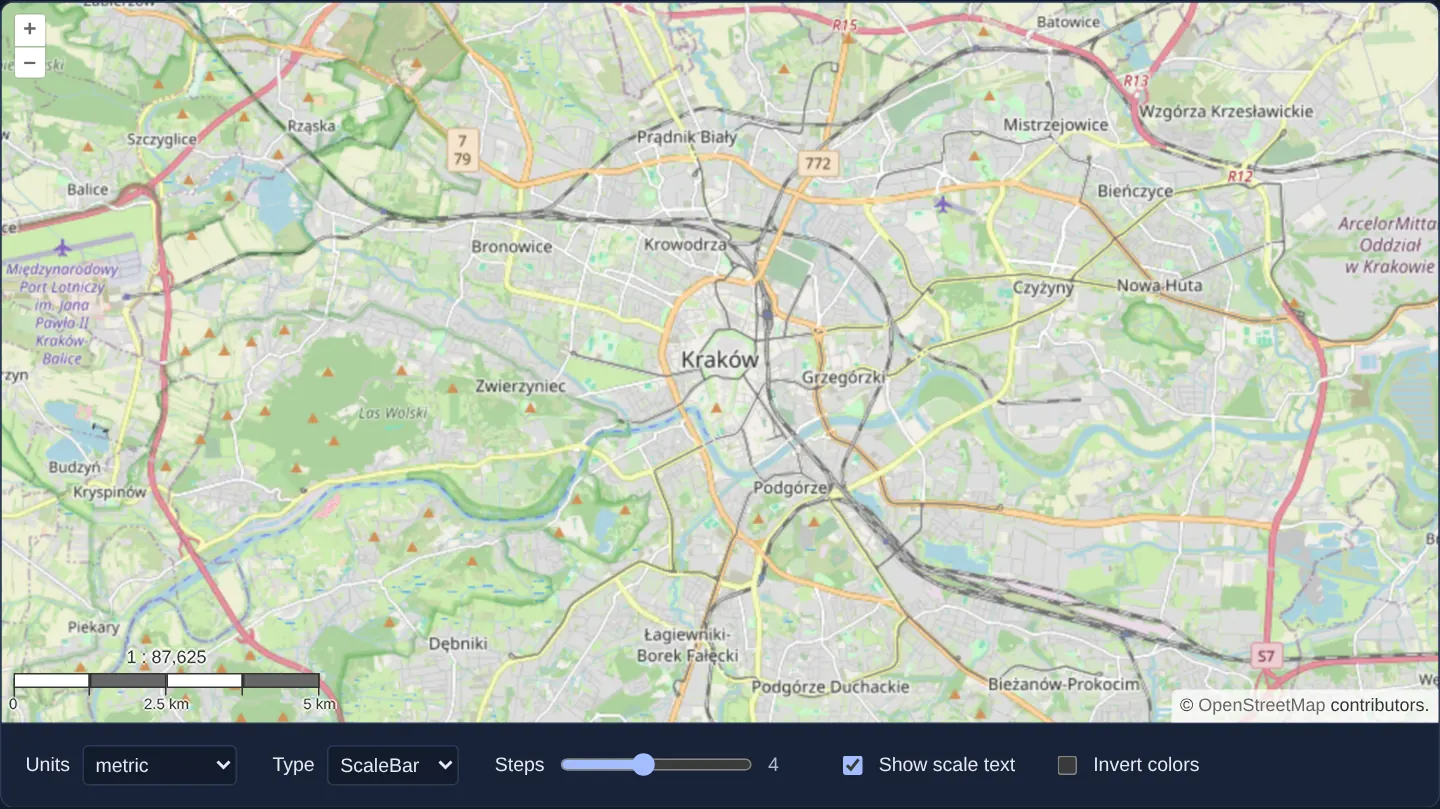
What this example shows
Over a street map of Kraków at zoom 12, controls beneath the viewport let you switch between OpenLayers’ classic minimal scale line and a cartographic multi-step scale bar complete with alternating black-and-white segments and a live 1 : N representative fraction above it.
Additional selectors switch measurement units across metric, imperial, US inch, nautical and geographic degrees, configure anywhere from 1 to 8 segments (default 4) and toggle inverted segment contrast.
When you need it
Property site plans, hiking maps, engineering printouts and cadastral viewers rely on an accurate visual scale so readers can judge real-world distances at a glance.
Interactive web screens usually favour a compact single-line indicator, whereas technical GIS views and exported PDFs expect a traditional segmented cartographic bar with a printed 1 : N ratio.
The code
The example uses cc-openlayers, my Angular component library for OpenLayers: each aol-… element creates the OpenLayers object it names, updates it from its inputs and disposes of it with the component.
scale-line.tsimport { ChangeDetectionStrategy, Component, ElementRef, inject, signal } from '@angular/core';
import {
ControlScaleLineComponent,
CoordinateComponent,
DefaultControlComponent,
DefaultInteractionComponent,
LayerTileComponent,
MapComponent,
SourceOsmComponent,
ViewComponent,
} from 'cc-openlayers';
type Units = 'degrees' | 'imperial' | 'us' | 'nautical' | 'metric';
type ScaleType = 'scaleline' | 'scalebar';
/** A scale line or a scale bar in the chosen units, whose steps, text and colours are set with the form. */
@Component({
selector: 'app-scale-line',
imports: [
ControlScaleLineComponent,
CoordinateComponent,
DefaultControlComponent,
DefaultInteractionComponent,
LayerTileComponent,
MapComponent,
SourceOsmComponent,
ViewComponent,
],
changeDetection: ChangeDetectionStrategy.OnPush,
template: `
<aol-map height="480px" (renderComplete)="invert()">
<aol-interaction-default />
<aol-control-defaults />
@if (type() === 'scalebar') {
<aol-control-scaleline [units]="units()" [bar]="true" [steps]="steps()" [text]="text()" [minWidth]="140" />
} @else {
<aol-control-scaleline [units]="units()" />
}
<aol-view [zoom]="12"><aol-coordinate [x]="19.9368" [y]="50.0614" srid="EPSG:4326" /></aol-view>
<aol-layer-tile><aol-source-osm /></aol-layer-tile>
</aol-map>
<div class="example-controls">
<label>
Units
<select name="units" (change)="units.set(value($event))">
@for (option of unitOptions; track option.value) {
<option [value]="option.value" [selected]="option.value === units()">{{ option.label }}</option>
}
</select>
</label>
<label>
Type
<select name="type" (change)="type.set(value($event))">
<option value="scaleline" [selected]="type() === 'scaleline'">ScaleLine</option>
<option value="scalebar" [selected]="type() === 'scalebar'">ScaleBar</option>
</select>
</label>
@if (type() === 'scalebar') {
<label>
Steps
<input name="steps" type="range" min="1" max="8" [value]="steps()" (input)="steps.set(number($event))" />
<output>{{ steps() }}</output>
</label>
<label>
<input name="text" type="checkbox" [checked]="text()" (change)="text.set(checked($event))" />
Show scale text
</label>
<label>
<input name="invert" type="checkbox" [checked]="inverted()" (change)="setInverted(checked($event))" />
Invert colors
</label>
}
</div>
`,
})
export class ScaleLine {
readonly units = signal<Units>('metric');
readonly type = signal<ScaleType>('scaleline');
readonly steps = signal(4);
readonly text = signal(true);
readonly inverted = signal(false);
protected readonly unitOptions: { value: Units; label: string }[] = [
{ value: 'degrees', label: 'degrees' },
{ value: 'imperial', label: 'imperial inch' },
{ value: 'us', label: 'us inch' },
{ value: 'nautical', label: 'nautical mile' },
{ value: 'metric', label: 'metric' },
];
private readonly host = inject<ElementRef<HTMLElement>>(ElementRef);
protected value<T extends string>(event: Event): T {
return (event.target as HTMLSelectElement).value as T;
}
protected number(event: Event): number {
return (event.target as HTMLInputElement).valueAsNumber;
}
protected checked(event: Event): boolean {
return (event.target as HTMLInputElement).checked;
}
protected setInverted(inverted: boolean): void {
this.inverted.set(inverted);
this.invert();
}
/** The inverted look is a class of the bar's element: a bar made anew by a changed option gets it on its first render. */
protected invert(): void {
this.host.nativeElement.querySelector('.ol-scale-bar')?.classList.toggle('ol-scale-bar-inverted', this.inverted());
}
} The React version uses the library's React adapter, cc-openlayers/react: each component creates the OpenLayers object it names when it mounts, updates it from its props and disposes of it when it unmounts.
scale-line.react.tsximport { useRef, useState, type ChangeEvent } from 'react';
import type OLMap from 'ol/Map.js';
import type { Units as ScaleLineUnits } from 'ol/control/ScaleLine.js';
import {
Coordinate,
DefaultControls,
DefaultInteractions,
Map,
OSMSource,
ScaleLineControl,
TileLayer,
View,
} from 'cc-openlayers/react';
type ScaleType = 'scaleline' | 'scalebar';
const unitOptions: { value: ScaleLineUnits; label: string }[] = [
{ value: 'degrees', label: 'degrees' },
{ value: 'imperial', label: 'imperial inch' },
{ value: 'us', label: 'us inch' },
{ value: 'nautical', label: 'nautical mile' },
{ value: 'metric', label: 'metric' },
];
/** A scale line or a scale bar in the chosen units, whose steps, text and colours are set with the form. */
export function ScaleLine() {
const map = useRef<OLMap>(null);
const [units, setUnits] = useState<ScaleLineUnits>('metric');
const [type, setType] = useState<ScaleType>('scaleline');
const [steps, setSteps] = useState(4);
const [text, setText] = useState(true);
const [inverted, setInverted] = useState(false);
/** The inverted look is a class of the bar's element: a bar made anew by a changed option gets it on its first render. */
const invert = (on: boolean) => {
map.current?.getTargetElement()?.querySelector('.ol-scale-bar')?.classList.toggle('ol-scale-bar-inverted', on);
};
const changeInverted = (event: ChangeEvent<HTMLInputElement>) => {
setInverted(event.target.checked);
invert(event.target.checked);
};
return (
<>
<Map ref={map} height="480px" onRenderComplete={() => invert(inverted)}>
<DefaultInteractions />
<DefaultControls />
{type === 'scalebar' ? (
<ScaleLineControl units={units} bar steps={steps} text={text} minWidth={140} />
) : (
<ScaleLineControl units={units} />
)}
<View zoom={12}>
<Coordinate x={19.9368} y={50.0614} srid="EPSG:4326" />
</View>
<TileLayer>
<OSMSource />
</TileLayer>
</Map>
<div className="example-controls">
<label>
Units
<select name="units" value={units} onChange={(event) => setUnits(event.target.value as ScaleLineUnits)}>
{unitOptions.map((option) => (
<option key={option.value} value={option.value}>
{option.label}
</option>
))}
</select>
</label>
<label>
Type
<select name="type" value={type} onChange={(event) => setType(event.target.value as ScaleType)}>
<option value="scaleline">ScaleLine</option>
<option value="scalebar">ScaleBar</option>
</select>
</label>
{type === 'scalebar' && (
<>
<label>
Steps
<input
name="steps"
type="range"
min="1"
max="8"
value={steps}
onChange={(event) => setSteps(event.target.valueAsNumber)}
/>
<output>{steps}</output>
</label>
<label>
<input name="text" type="checkbox" checked={text} onChange={(event) => setText(event.target.checked)} />
Show scale text
</label>
<label>
<input name="invert" type="checkbox" checked={inverted} onChange={changeInverted} />
Invert colors
</label>
</>
)}
</div>
</>
);
}How the React version works
A form chooses the units, the type (line or bar), the number of steps, the scale text and inverted bar colours. Changing the type creates the control again; the inverted colours are a class of the bar element, so they also reach a newly created control after its first render.
What both versions share
OpenLayers renders the map and handles the interactions; the cc-openlayers/core layer gives both adapters the same view binding (MapViewBinding) and the same conversion of coordinates from EPSG:4326 to the map's projection.
From Angular to React
| Angular | React |
|---|---|
@if with two variants of <aol-control-scaleline> | a JSX condition with two <ScaleLineControl> elements |
(renderComplete)="invert()" | onRenderComplete={() => invert(inverted)} |
host.nativeElement.querySelector('.ol-scale-bar') | map.current?.getTargetElement()?.querySelector('.ol-scale-bar') |
(change) and (input) of the form fields | onChange with useState |
Who creates, updates and disposes
Map creates the ol/Map in useLayoutEffect and disposes of it on unmount; each layer, source and interaction component adds its object to the parent it gets from context and removes it in its effect's cleanup, as ngOnDestroy does in Angular. The control is a child of Map, as in the Angular template; the adapter adds it to the map and removes it on unmount. The two branches of the condition are different elements, so a change of type unmounts one control and mounts the other.
Architecture and OpenLayers mechanics
aol-control-scaleline wraps OpenLayers’ ScaleLine control, continuously sampling ground resolution at the centre of the view and snapping bar width (at least [minWidth]="140" pixels) to clean 1, 2 or 5 × 10^n ground distances in the selected unit system.
Enabling [bar]="true" switches rendering from a simple bracketed line to an alternating [steps]-segment graphic with optional [text] ratio output. Because structural mode changes recreate the underlying OpenLayers control via @if, invert() reapplies the inverted-colour CSS class after renderComplete so custom styling persists across switches.
How it works
aol-control-scalelinemeasures ground distance at the view’s centre and snaps length to clean 1, 2 or 5 multiples in the active unit system.[bar]="true"renders an alternating[steps]-segment scale bar with[text]showing the 1 : N ratio above it and[minWidth]="140"enforcing legible width.- Conditional rendering recreates the control when switching between line and bar modes, while
invert()keeps colour-inversion classes synced onrenderComplete.
Pitfalls
- Web Mercator scale varies with latitude: the control’s length is exact at the vertical midpoint of the viewport, meaning a small-scale map spanning all of Poland differs by roughly 6–7% along its northern and southern edges.
- The 1 : N representative ratio assumes the OGC standard 0.28 mm pixel (~90.7 DPI), which is only approximate on physical monitors of varying pixel density; pass the target printer DPI explicitly when generating true-to-scale print exports.
Related examples
The same feature in the OpenLayers examples .
Background: state and lifecycle of maps in Angular with OpenLayers, which the components of cc-openlayers take care of.