Essentials · Angular, React and OpenLayers
A tile loading progress bar
Build an accessible tile-loading progress bar for an OpenLayers map by counting tileloadstart, tileloadend and tileloaderror source events.
What this example shows
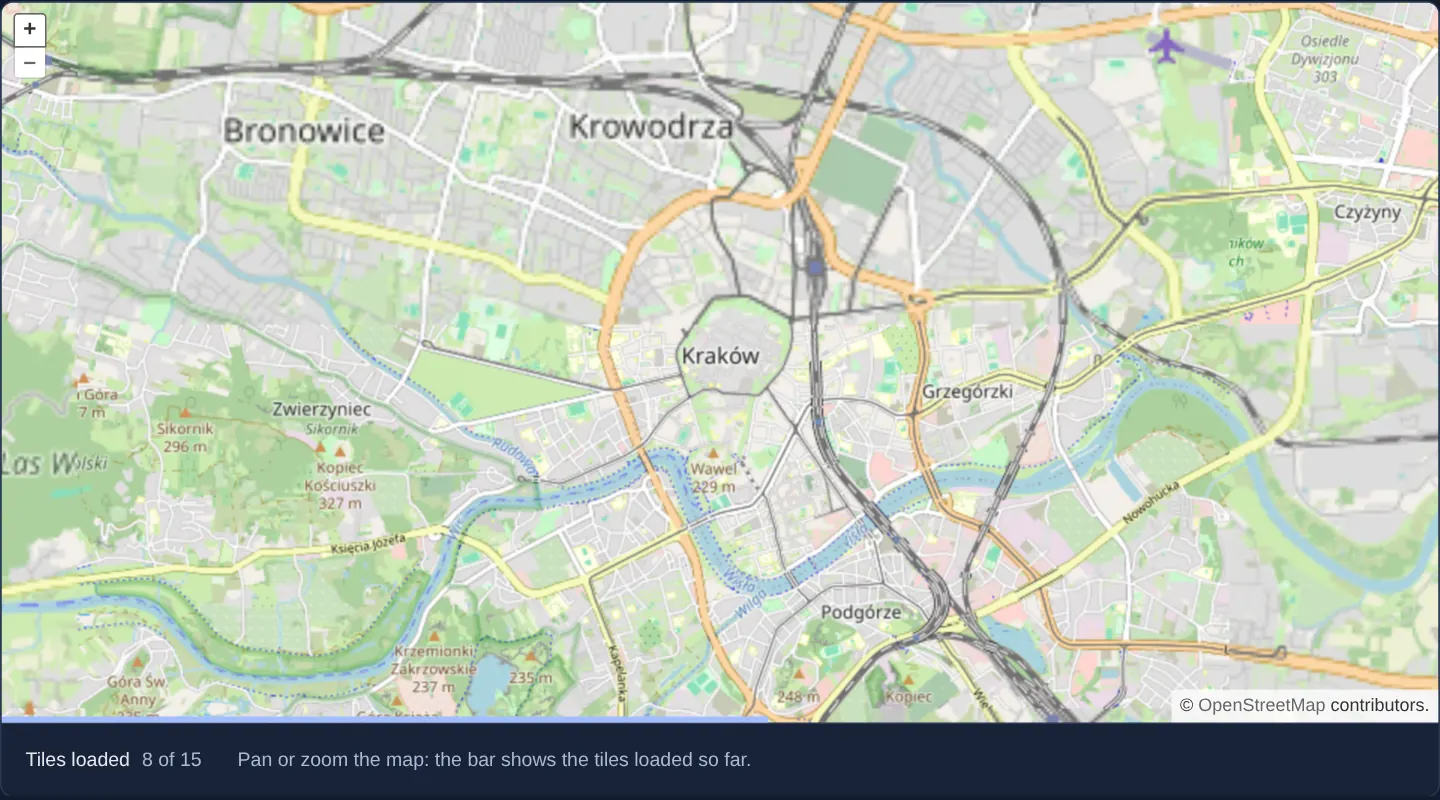
Along the bottom edge of a street map of Kraków, a slim progress bar advances smoothly from 0% to 100% during pans and zooms while a counter below reports exact tile progress (such as Tiles loaded 8 of 16), fading out a quarter-second after completion.
When you need it
High-resolution aerial imagery, multi-layer WMTS feeds and slow rural connections can queue dozens of tiles per zoom; a determinate progress bar shows steady forward momentum that an indeterminate spinner cannot convey.
Exposing exact completion percentages through standard ARIA progressbar attributes also gives assistive technology users clear feedback during heavy raster downloads.
The code
The example uses cc-openlayers, my Angular component library for OpenLayers: each aol-… element creates the OpenLayers object it names, updates it from its inputs and disposes of it with the component.
tile-load-events.tsimport { ChangeDetectionStrategy, Component, computed, signal } from '@angular/core';
import {
CoordinateComponent,
DefaultControlComponent,
DefaultInteractionComponent,
LayerTileComponent,
MapComponent,
SourceOsmComponent,
ViewComponent,
} from 'cc-openlayers';
/** A progress bar over the map, driven by the tile source's load events and shown while the map loads. */
@Component({
selector: 'app-tile-load-events',
imports: [
CoordinateComponent,
DefaultControlComponent,
DefaultInteractionComponent,
LayerTileComponent,
MapComponent,
SourceOsmComponent,
ViewComponent,
],
changeDetection: ChangeDetectionStrategy.OnPush,
template: `
<div class="example-progress-frame">
<aol-map height="480px" (loadStart)="show()" (loadEnd)="hide()">
<aol-interaction-default />
<aol-control-defaults />
<aol-view [zoom]="12">
<aol-coordinate [x]="19.9368" [y]="50.0614" srid="EPSG:4326" />
</aol-view>
<aol-layer-tile>
<aol-source-osm
(tileLoadStart)="requested()"
(tileLoadEnd)="loaded.update((count) => count + 1)"
(tileLoadError)="loaded.update((count) => count + 1)"
/>
</aol-layer-tile>
</aol-map>
<div
class="example-progress"
role="progressbar"
aria-label="Tile loading progress"
aria-valuemin="0"
aria-valuemax="100"
[attr.aria-valuenow]="percent()"
[style.width]="width()"
[style.visibility]="visible() ? 'visible' : 'hidden'"
></div>
</div>
<div class="example-controls">
<label>
Tiles loaded
<output>{{ loaded() }} of {{ loading() }}</output>
</label>
<p class="example-hint">Pan or zoom the map: the bar shows the tiles loaded so far.</p>
</div>
`,
})
export class TileLoadEvents {
readonly loading = signal(0);
readonly loaded = signal(0);
readonly visible = signal(false);
/** The share of the requested tiles that have finished, in per cent to one decimal. */
protected readonly percent = computed(() =>
this.loading() ? Math.round((this.loaded() / this.loading()) * 1000) / 10 : 0
);
/** The bar's width: the share while the map loads, nothing while the bar is hidden. */
protected readonly width = computed(() => (this.visible() && this.loading() ? `${this.percent()}%` : '0px'));
/** Whether the map has finished the load that the counts belong to. */
private ended = false;
private hiding?: ReturnType<typeof setTimeout>;
/** Counts a requested tile; the first one after a finished load starts the counts again. */
protected requested(): void {
if (this.ended) {
this.ended = false;
this.loading.set(0);
this.loaded.set(0);
}
this.loading.update((count) => count + 1);
}
/** Shows the bar; a load that starts while the one before is being hidden keeps it. */
protected show(): void {
clearTimeout(this.hiding);
this.visible.set(true);
}
/** Hides the bar a moment after the map has loaded, so the full bar can be seen. */
protected hide(): void {
this.ended = true;
this.hiding = setTimeout(() => this.visible.set(false), 250);
}
} The React version uses the library's React adapter, cc-openlayers/react: each component creates the OpenLayers object it names when it mounts, updates it from its props and disposes of it when it unmounts.
tile-load-events.react.tsximport { useRef, useState } from 'react';
import { Coordinate, DefaultControls, DefaultInteractions, Map, OSMSource, TileLayer, View } from 'cc-openlayers/react';
/** A progress bar over the map, driven by the tile source's load events and shown while the map loads. */
export function TileLoadEvents() {
const [loading, setLoading] = useState(0);
const [loaded, setLoaded] = useState(0);
const [visible, setVisible] = useState(false);
/** The share of the requested tiles that have finished, in per cent to one decimal. */
const percent = loading ? Math.round((loaded / loading) * 1000) / 10 : 0;
/** The bar's width: the share while the map loads, nothing while the bar is hidden. */
const width = visible && loading ? `${percent}%` : '0px';
/** Whether the map has finished the load that the counts belong to. */
const ended = useRef(false);
const hiding = useRef<ReturnType<typeof setTimeout>>(undefined);
/** Counts a requested tile; the first one after a finished load starts the counts again. */
const requested = () => {
if (ended.current) {
ended.current = false;
setLoading(0);
setLoaded(0);
}
setLoading((count) => count + 1);
};
/** Shows the bar; a load that starts while the one before is being hidden keeps it. */
const show = () => {
clearTimeout(hiding.current);
setVisible(true);
};
/** Hides the bar a moment after the map has loaded, so the full bar can be seen. */
const hide = () => {
ended.current = true;
hiding.current = setTimeout(() => setVisible(false), 250);
};
const finished = () => setLoaded((count) => count + 1);
return (
<>
<div className="example-progress-frame">
<Map height="480px" onLoadStart={show} onLoadEnd={hide}>
<DefaultInteractions />
<DefaultControls />
<View zoom={12}>
<Coordinate x={19.9368} y={50.0614} srid="EPSG:4326" />
</View>
<TileLayer>
<OSMSource onTileLoadStart={requested} onTileLoadEnd={finished} onTileLoadError={finished} />
</TileLayer>
</Map>
<div
className="example-progress"
role="progressbar"
aria-label="Tile loading progress"
aria-valuemin={0}
aria-valuemax={100}
aria-valuenow={percent}
style={{ width, visibility: visible ? 'visible' : 'hidden' }}
></div>
</div>
<div className="example-controls">
<label>
Tiles loaded
<output>
{loaded} of {loading}
</output>
</label>
<p className="example-hint">Pan or zoom the map: the bar shows the tiles loaded so far.</p>
</div>
</>
);
}How the React version works
A bar above the map is as wide as the share of tiles loaded, and a counter below the map shows “loaded of requested”. The bar disappears a quarter of a second after the map has loaded. It shows the source events (tileloadstart, tileloadend, tileloaderror) and the map events (loadstart, loadend).
What both versions share
OpenLayers renders the map and handles the interactions; the cc-openlayers/core layer gives both adapters the same view binding (MapViewBinding) and the same conversion of coordinates from EPSG:4326 to the map's projection. The bar classes (example-progress-frame, example-progress) are global gallery styles.
From Angular to React
| Angular | React |
|---|---|
(tileLoadStart), (tileLoadEnd), (tileLoadError) on aol-source-osm | onTileLoadStart, onTileLoadEnd, onTileLoadError on OSMSource |
(loadStart), (loadEnd) on aol-map | onLoadStart, onLoadEnd on Map |
[style.width], [style.visibility] | style={{ width, visibility }} |
computed for the percentage and width | values computed in the component body |
the class fields ended and the hide timer | useRef, because their changes do not change the view |
Who creates, updates and disposes
Map creates the ol/Map in useLayoutEffect and disposes of it on unmount; each layer, source and interaction component adds its object to the parent it gets from context and removes it in its effect's cleanup, as ngOnDestroy does in Angular.
Architecture and OpenLayers mechanics
The component listens directly to tile-source lifecycle hooks: (tileLoadStart) increments the total requested counter, while both (tileLoadEnd) and (tileLoadError) increment the settled counter so a single 404 or timeout never leaves the bar stuck at 95%.
Map-level (loadStart) reveals the bar and (loadEnd) schedules a 250 ms hide timeout so users briefly see 100% completion. Because OpenLayers dispatches the very first tile requests slightly before map (loadStart), counters reset cleanly on the first tile requested after a settled cycle, and role="progressbar" with aria-valuenow exposes percentage progress.
How it works
(tileLoadStart)counts requested tiles while(tileLoadEnd)and(tileLoadError)both count completed requests so failed tiles never stall completion.- Map
(loadStart)reveals the bar and(loadEnd)hides it 250 ms later so the 100% state remains briefly visible. - Counters reset on the first tile of a new load cycle because initial tile requests fire just ahead of the map’s loadstart event.
role="progressbar"andaria-valuenowcommunicate live percentage completion to screen readers.
Pitfalls
- Failing to reset counters between separate pan gestures causes cumulative totals to jump backward or start at 66% on the next move.
- Always clear the 250 ms hide timer if a new pan begins while the previous bar is still visible, otherwise the pending timeout hides the active bar mid-load.
Related examples
The same feature in the OpenLayers examples .
Background: state and lifecycle of maps in Angular with OpenLayers, which the components of cc-openlayers take care of.