Essentials · Angular, React and OpenLayers
Preloading low-resolution tiles
Compare two synchronized OpenLayers maps sharing a single view to see how preloading coarse parent tiles prevents blank squares on zoom.
What this example shows
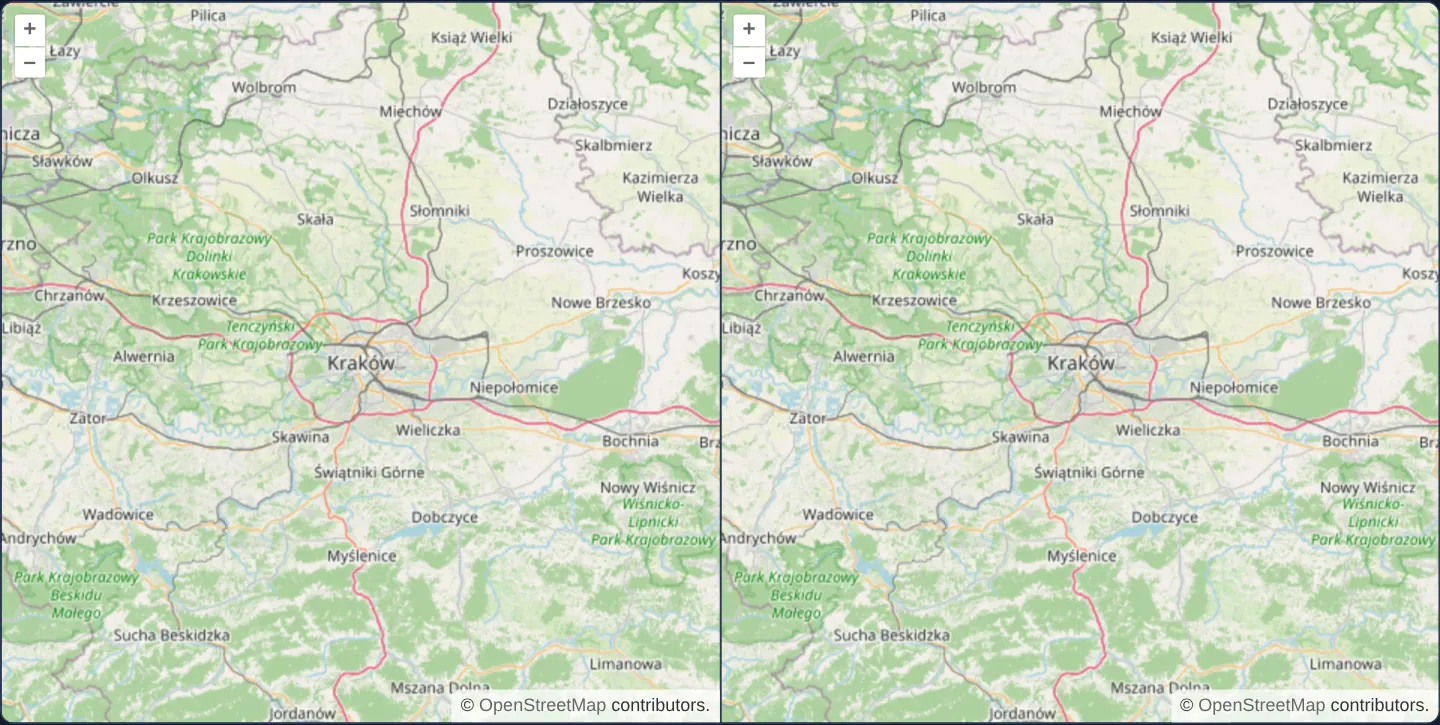
Two street maps of Kraków and Małopolska sit side by side sharing a single synchronised camera view: panning or zooming either map moves both identically. One map preloads all coarser parent zoom levels ([preload]="infinity"), while the companion map loads only the current zoom level ([preload]="0").
Rapidly zooming out or flick-panning across the region makes the trade-off immediately visible: the preloaded map fills uncovered areas instantly with soft low-resolution fallback tiles while sharp tiles stream in, whereas the zero-preload map briefly exposes blank background squares.
When you need it
Fast-moving interactive maps, guided fly-to tours and kiosk displays feel far smoother when rapid camera motion never flashes raw grey canvas cells.
Understanding the visual benefit versus extra HTTP request overhead lets teams tune tile preloading sensibly for desktop broadband versus metered mobile connections.
The code
The example uses cc-openlayers, my Angular component library for OpenLayers: each aol-… element creates the OpenLayers object it names, updates it from its inputs and disposes of it with the component.
preload.tsimport { afterNextRender, ChangeDetectionStrategy, Component, viewChild } from '@angular/core';
import {
CoordinateComponent,
DefaultControlComponent,
DefaultInteractionComponent,
LayerTileComponent,
MapComponent,
SourceOsmComponent,
ViewComponent,
} from 'cc-openlayers';
/** Two maps on one view, the upper preloading low resolution tiles and the lower loading none in advance. */
@Component({
selector: 'app-preload',
imports: [
CoordinateComponent,
DefaultControlComponent,
DefaultInteractionComponent,
LayerTileComponent,
MapComponent,
SourceOsmComponent,
ViewComponent,
],
changeDetection: ChangeDetectionStrategy.OnPush,
template: `
<div class="example-maps">
<aol-map height="480px">
<aol-interaction-default />
<aol-control-defaults />
<aol-view [zoom]="9">
<aol-coordinate [x]="19.9368" [y]="50.0614" srid="EPSG:4326" />
</aol-view>
<aol-layer-tile [preload]="infinity"><aol-source-osm /></aol-layer-tile>
</aol-map>
<aol-map #plain height="480px">
<aol-interaction-default />
<aol-control-defaults />
<aol-layer-tile [preload]="0"><aol-source-osm /></aol-layer-tile>
</aol-map>
</div>
`,
})
export class Preload {
protected readonly infinity = Infinity;
private readonly view = viewChild.required(ViewComponent);
private readonly plain = viewChild.required('plain', { read: MapComponent });
constructor() {
afterNextRender(() => this.plain().instance.setView(this.view().instance));
}
} The React version uses the library's React adapter, cc-openlayers/react: each component creates the OpenLayers object it names when it mounts, updates it from its props and disposes of it when it unmounts.
preload.react.tsximport { useEffect, useState } from 'react';
import type OLMap from 'ol/Map.js';
import type OLView from 'ol/View.js';
import { Coordinate, DefaultControls, DefaultInteractions, Map, OSMSource, TileLayer, View } from 'cc-openlayers/react';
/** Two maps on one view, the upper preloading low resolution tiles and the lower loading none in advance. */
export function Preload() {
// State, not refs: the effect below runs again once both objects exist, and again for replaced ones.
const [view, setView] = useState<OLView | null>(null);
const [plain, setPlain] = useState<OLMap | null>(null);
useEffect(() => {
if (view && plain) plain.setView(view);
}, [view, plain]);
return (
<div className="example-maps">
<Map height="480px">
<DefaultInteractions />
<DefaultControls />
<View ref={setView} zoom={9}>
<Coordinate x={19.9368} y={50.0614} srid="EPSG:4326" />
</View>
<TileLayer preload={Infinity}>
<OSMSource />
</TileLayer>
</Map>
<Map ref={setPlain} height="480px">
<DefaultInteractions />
<DefaultControls />
<TileLayer preload={0}>
<OSMSource />
</TileLayer>
</Map>
</div>
);
}How the React version works
Two maps share one view. The first preloads tiles of lower resolutions (preload: Infinity), so a zoom shows a blurred image at once; the second preloads none and shows gaps until the right tiles arrive.
What both versions share
OpenLayers renders the map and handles the interactions; the cc-openlayers/core layer gives both adapters the same view binding (MapViewBinding) and the same conversion of coordinates from EPSG:4326 to the map's projection.
From Angular to React
| Angular | React |
|---|---|
[preload]="infinity", [preload]="0" | preload={Infinity}, preload={0} |
viewChild of the view and the second map, afterNextRender(() => plain.setView(view)) | ref={setView} and ref={setPlain} (state) and a useEffect that attaches the view once both objects exist |
Who creates, updates and disposes
Map creates the ol/Map in useLayoutEffect and disposes of it on unmount; each layer, source and interaction component adds its object to the parent it gets from context and removes it in its effect's cleanup, as ngOnDestroy does in Angular. The first map's view is passed to the second in an effect; each Map disposes of its map on unmount.
Architecture and OpenLayers mechanics
On any OpenLayers tile layer, preload is a count of coarser pyramid levels to keep cached beneath the active view: [preload]="infinity" fetches every ancestor level up to zoom 0, whereas [preload]="0" disables ancestor prefetching completely. Because Angular template expressions do not expose global Infinity directly, the component exposes Infinity through a class property infinity.
To guarantee an exact apples-to-apples visual comparison, the second map omits its own declarative view and attaches the first map’s view instance via setView after initial render.
How it works
[preload]="infinity"prefetches every coarser ancestor tile level for the visible area, while[preload]="0"fetches only the active zoom level.- Calling
setViewbinds both maps to the exact same OpenLayers view instance so pans, zooms and animations run in lockstep. - Passing
Infinitythrough a component propertyinfinitykeeps template binding syntax clean and type-safe.
Pitfalls
- Setting preload to
Infinityfetches every ancestor pyramid tier up front, which can double initial tile request counts on small viewports; in bandwidth-sensitive mobile apps, preload 2 to 4 coarser levels rather than all the way to zoom 0.
Related examples
The same feature in the OpenLayers examples .
Background: state and lifecycle of maps in Angular with OpenLayers, which the components of cc-openlayers take care of.