Raster, GeoTIFF and WebGL · Angular, React and OpenLayers
Line styles drawn with WebGL
Draw and edit wide, dashed, offset and pattern-textured lines on the GPU in OpenLayers WebGLVectorLayer using live stroke style variables.
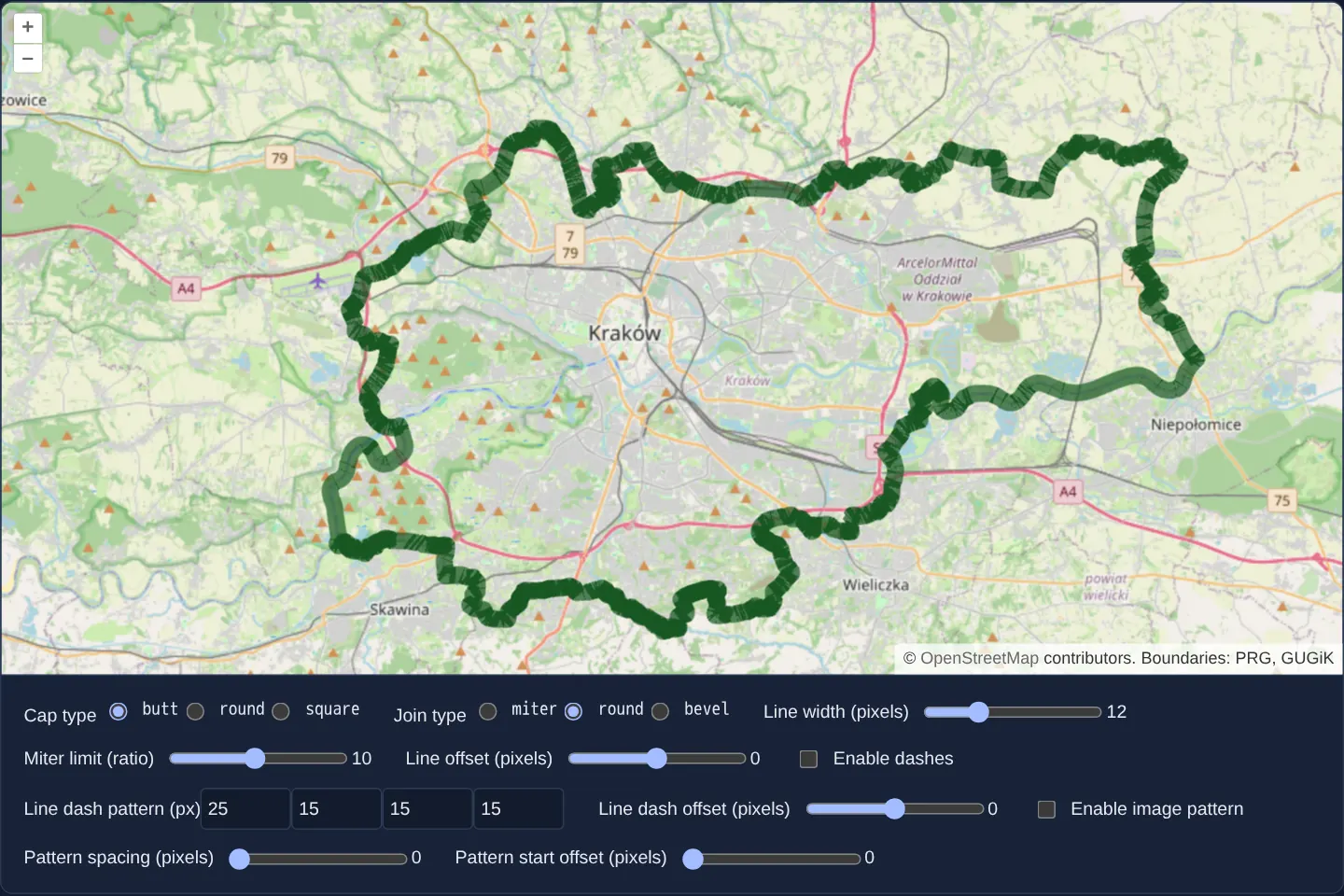
What this example shows
Tracing the administrative boundary of Kraków (assets/poland/krakow.geojson) over OpenStreetMap—and allowing you to sketch or modify lines interactively with snapping—a GPU WebGL vector layer renders wide strokes controlled live by width, offset, cap, join, miter-limit, dash and image-pattern controls.
When you need it
Road networks, pipeline corridors, railway tracks and administrative borders with wide casings, lateral offsets or repeating directional textures bog down 2D Canvas when thousands of complex polylines pan simultaneously.
WebGLVectorLayer extrudes wide, dashed and textured polylines directly in GPU geometry/vertex shaders while still working seamlessly with standard OpenLayers Draw, Modify and Snap interactions.
The code
The example uses cc-openlayers, my Angular component library for OpenLayers: each aol-… element creates the OpenLayers object it names, updates it from its inputs and disposes of it with the component.
webgl-draw-line.shared.tsimport type { FlatStyle, StyleVariables } from 'ol/style/flat.js';
/** The initial values of the stroke style variables. */
export const styleVariables: StyleVariables = {
width: 12,
offset: 0,
capType: 'butt',
joinType: 'miter',
miterLimit: 10, // ratio
dashLength1: 25,
dashLength2: 15,
dashLength3: 15,
dashLength4: 15,
dashOffset: 0,
patternSpacing: 0,
patternOffset: 0,
};
/**
* @param dash Include line dash
* @param pattern Include image pattern
* @return Generated style
*/
export const getStyle = (dash: boolean, pattern: boolean): FlatStyle => {
let newStyle: FlatStyle = {
'stroke-width': ['var', 'width'],
'stroke-color': 'rgba(24,86,34,0.7)',
'stroke-offset': ['var', 'offset'],
'stroke-miter-limit': ['var', 'miterLimit'],
'stroke-line-cap': ['var', 'capType'],
'stroke-line-join': ['var', 'joinType'],
};
if (dash) {
newStyle = {
...newStyle,
'stroke-line-dash': [
['var', 'dashLength1'],
['var', 'dashLength2'],
['var', 'dashLength3'],
['var', 'dashLength4'],
],
'stroke-line-dash-offset': ['var', 'dashOffset'],
};
}
if (pattern) {
delete newStyle['stroke-color'];
newStyle = {
...newStyle,
'stroke-pattern-src': 'assets/dot.svg',
'stroke-pattern-spacing': ['var', 'patternSpacing'],
'stroke-pattern-start-offset': ['var', 'patternOffset'],
};
}
return newStyle;
};
/** A slider over a style variable. */
export interface Range {
name: string;
label: string;
min: number;
max: number;
step: number;
}
/** The radio groups that pick a variable's value. */
export const choices = [
{ name: 'capType', label: 'Cap type', values: ['butt', 'round', 'square'] },
{ name: 'joinType', label: 'Join type', values: ['miter', 'round', 'bevel'] },
];
/** The sliders of the plain stroke. */
export const lineRanges: Range[] = [
{ name: 'width', label: 'Line width (pixels)', min: 1, max: 40, step: 1 },
{ name: 'miterLimit', label: 'Miter limit (ratio)', min: 1, max: 20, step: 0.1 },
{ name: 'offset', label: 'Line offset (pixels)', min: -40, max: 40, step: 1 },
];
/** The variables that hold the four dash lengths. */
export const dashLengths = ['dashLength1', 'dashLength2', 'dashLength3', 'dashLength4'];
/** The slider of the dash offset. */
export const dashOffset: Range = {
name: 'dashOffset',
label: 'Line dash offset (pixels)',
min: -200,
max: 200,
step: 1,
};
/** The sliders of the image pattern. */
export const patternRanges: Range[] = [
{ name: 'patternSpacing', label: 'Pattern spacing (pixels)', min: 0, max: 64, step: 1 },
{ name: 'patternOffset', label: 'Pattern start offset (pixels)', min: 0, max: 64, step: 1 },
];webgl-draw-line.tsimport { ChangeDetectionStrategy, Component, computed, signal } from '@angular/core';
import { NgTemplateOutlet } from '@angular/common';
import GeoJSON from 'ol/format/GeoJSON';
import type { StyleVariables } from 'ol/style/flat';
import {
CoordinateComponent,
DefaultControlComponent,
DefaultInteractionComponent,
LayerTileComponent,
MapComponent,
SourceOsmComponent,
SourceVectorComponent,
ViewComponent,
} from 'cc-openlayers';
import { DrawInteractionComponent, ModifyInteractionComponent, SnapInteractionComponent } from 'cc-openlayers/editing';
import { LayerWebGLVectorComponent } from 'cc-openlayers/webgl';
import {
choices,
dashLengths,
dashOffset,
getStyle,
lineRanges,
patternRanges,
styleVariables,
} from './webgl-draw-line.shared';
/**
* Kraków's boundary (PRG) drawn by a WebGL vector layer whose stroke options are style variables: the controls set
* the cap, the join, the width, the miter limit and the offset, and add a dash pattern or an image pattern to the
* style. The boundary can be modified and new lines drawn, snapping to the existing ones.
*/
@Component({
selector: 'app-webgl-draw-line',
imports: [
CoordinateComponent,
DefaultControlComponent,
DefaultInteractionComponent,
DrawInteractionComponent,
LayerTileComponent,
LayerWebGLVectorComponent,
MapComponent,
ModifyInteractionComponent,
NgTemplateOutlet,
SnapInteractionComponent,
SourceOsmComponent,
SourceVectorComponent,
ViewComponent,
],
changeDetection: ChangeDetectionStrategy.OnPush,
template: `
<aol-map height="480px">
<aol-interaction-default />
<aol-control-defaults />
<aol-view [zoom]="11">
<aol-coordinate [x]="19.96" [y]="50.06" srid="EPSG:4326" />
</aol-view>
<aol-layer-tile><aol-source-osm /></aol-layer-tile>
<aol-layer-webglvector [style]="style()" [variables]="variables()">
<aol-source-vector
#lines
url="assets/poland/krakow.geojson"
[format]="format"
attributions="Boundaries: PRG, GUGiK"
/>
</aol-layer-webglvector>
<aol-interaction-modify [source]="lines.instance" />
<aol-interaction-draw type="LineString" [source]="lines.instance" />
<aol-interaction-snap [source]="lines.instance" />
</aol-map>
<ng-template #slider let-range>
<div>
<label>
{{ range.label }}
<input
type="range"
[name]="range.name"
[min]="range.min"
[max]="range.max"
[step]="range.step"
[value]="variables()[range.name]"
(input)="set(range.name, $event)"
/>
</label>
<span [id]="'value-' + range.name">{{ variables()[range.name] }}</span>
</div>
</ng-template>
<div class="example-controls">
@for (choice of choices; track choice.name) {
<div>
{{ choice.label }}
@for (value of choice.values; track value) {
<label>
<input
type="radio"
[name]="choice.name"
[value]="value"
[checked]="variables()[choice.name] === value"
(input)="set(choice.name, $event)"
/>
<code>{{ value }}</code>
</label>
}
</div>
}
@for (range of lineRanges; track range.name) {
<ng-container *ngTemplateOutlet="slider; context: { $implicit: range }" />
}
<label>
<input type="checkbox" id="dashEnable" [checked]="dash()" (input)="dash.set(!dash())" />
Enable dashes
</label>
<div role="group" aria-labelledby="dash-pattern">
<span id="dash-pattern">Line dash pattern (px)</span>
@for (name of dashLengths; track name; let i = $index) {
<input
type="number"
[name]="name"
[attr.aria-label]="'Dash length ' + (i + 1)"
min="0"
max="100"
[value]="variables()[name]"
(input)="set(name, $event)"
/>
}
</div>
<ng-container *ngTemplateOutlet="slider; context: { $implicit: dashOffset }" />
<label>
<input type="checkbox" id="patternEnable" [checked]="pattern()" (input)="pattern.set(!pattern())" />
Enable image pattern
</label>
@for (range of patternRanges; track range.name) {
<ng-container *ngTemplateOutlet="slider; context: { $implicit: range }" />
}
</div>
`,
})
export class WebglDrawLine {
readonly variables = signal<StyleVariables>({ ...styleVariables });
readonly dash = signal(false);
readonly pattern = signal(false);
protected readonly style = computed(() => getStyle(this.dash(), this.pattern()));
protected readonly format = new GeoJSON();
protected readonly choices = choices;
protected readonly lineRanges = lineRanges;
protected readonly dashLengths = dashLengths;
protected readonly dashOffset = dashOffset;
protected readonly patternRanges = patternRanges;
protected set(variableName: string, event: Event): void {
const target = event.target as HTMLInputElement;
const value = target.type === 'radio' ? target.value : parseFloat(target.value);
this.variables.update((variables) => ({ ...variables, [variableName]: value }));
}
} The React version uses the library's React adapter, cc-openlayers/react: each component creates the OpenLayers object it names when it mounts, updates it from its props and disposes of it when it unmounts.
webgl-draw-line.react.tsximport { useMemo, useState, type ChangeEvent } from 'react';
import GeoJSON from 'ol/format/GeoJSON.js';
import type OLVectorSource from 'ol/source/Vector.js';
import type { StyleVariables } from 'ol/style/flat.js';
import {
Coordinate,
DefaultControls,
DefaultInteractions,
DrawInteraction,
Map,
ModifyInteraction,
OSMSource,
SnapInteraction,
TileLayer,
VectorSource,
View,
} from 'cc-openlayers/react';
import { WebGLVectorLayer } from 'cc-openlayers/react/webgl';
import {
choices,
dashLengths,
dashOffset,
getStyle,
lineRanges,
patternRanges,
type Range,
styleVariables,
} from './webgl-draw-line.shared';
const format = new GeoJSON();
/**
* Kraków's boundary (PRG) drawn by a WebGL vector layer whose stroke options are style variables: the controls set
* the cap, the join, the width, the miter limit and the offset, and add a dash pattern or an image pattern to the
* style. The boundary can be modified and new lines drawn, snapping to the existing ones.
*/
export function WebglDrawLine() {
const [variables, setVariables] = useState<StyleVariables>({ ...styleVariables });
const [dash, setDash] = useState(false);
const [pattern, setPattern] = useState(false);
const style = useMemo(() => getStyle(dash, pattern), [dash, pattern]);
// The source is made after the first commit, so the state carries it to the interactions.
const [lines, setLines] = useState<OLVectorSource | null>(null);
const set = (variableName: string, event: ChangeEvent<HTMLInputElement>) => {
const target = event.target;
const value = target.type === 'radio' ? target.value : parseFloat(target.value);
setVariables((current) => ({ ...current, [variableName]: value }));
};
const slider = (range: Range) => (
<div key={range.name}>
<label>
{range.label}
<input
type="range"
name={range.name}
min={range.min}
max={range.max}
step={range.step}
value={variables[range.name] as number}
onChange={(event) => set(range.name, event)}
/>
</label>
<span id={'value-' + range.name}>{variables[range.name]}</span>
</div>
);
return (
<>
<Map height="480px">
<DefaultInteractions />
<DefaultControls />
<View zoom={11}>
<Coordinate x={19.96} y={50.06} srid="EPSG:4326" />
</View>
<TileLayer>
<OSMSource />
</TileLayer>
<WebGLVectorLayer style={style} variables={variables}>
<VectorSource
ref={setLines}
url="assets/poland/krakow.geojson"
format={format}
attributions="Boundaries: PRG, GUGiK"
/>
</WebGLVectorLayer>
{lines ? (
<>
<ModifyInteraction source={lines} />
<DrawInteraction type="LineString" source={lines} />
<SnapInteraction source={lines} />
</>
) : null}
</Map>
<div className="example-controls">
{choices.map((choice) => (
<div key={choice.name}>
{choice.label}
{choice.values.map((value) => (
<label key={value}>
<input
type="radio"
name={choice.name}
value={value}
checked={variables[choice.name] === value}
onChange={(event) => set(choice.name, event)}
/>
<code>{value}</code>
</label>
))}
</div>
))}
{lineRanges.map(slider)}
<label>
<input type="checkbox" id="dashEnable" checked={dash} onChange={() => setDash(!dash)} />
Enable dashes
</label>
<div role="group" aria-labelledby="dash-pattern">
<span id="dash-pattern">Line dash pattern (px)</span>
{dashLengths.map((name, i) => (
<input
key={name}
type="number"
name={name}
aria-label={'Dash length ' + (i + 1)}
min="0"
max="100"
value={variables[name] as number}
onChange={(event) => set(name, event)}
/>
))}
</div>
{slider(dashOffset)}
<label>
<input type="checkbox" id="patternEnable" checked={pattern} onChange={() => setPattern(!pattern)} />
Enable image pattern
</label>
{patternRanges.map(slider)}
</div>
</>
);
}webgl-draw-line.shared.tsimport type { FlatStyle, StyleVariables } from 'ol/style/flat.js';
/** The initial values of the stroke style variables. */
export const styleVariables: StyleVariables = {
width: 12,
offset: 0,
capType: 'butt',
joinType: 'miter',
miterLimit: 10, // ratio
dashLength1: 25,
dashLength2: 15,
dashLength3: 15,
dashLength4: 15,
dashOffset: 0,
patternSpacing: 0,
patternOffset: 0,
};
/**
* @param dash Include line dash
* @param pattern Include image pattern
* @return Generated style
*/
export const getStyle = (dash: boolean, pattern: boolean): FlatStyle => {
let newStyle: FlatStyle = {
'stroke-width': ['var', 'width'],
'stroke-color': 'rgba(24,86,34,0.7)',
'stroke-offset': ['var', 'offset'],
'stroke-miter-limit': ['var', 'miterLimit'],
'stroke-line-cap': ['var', 'capType'],
'stroke-line-join': ['var', 'joinType'],
};
if (dash) {
newStyle = {
...newStyle,
'stroke-line-dash': [
['var', 'dashLength1'],
['var', 'dashLength2'],
['var', 'dashLength3'],
['var', 'dashLength4'],
],
'stroke-line-dash-offset': ['var', 'dashOffset'],
};
}
if (pattern) {
delete newStyle['stroke-color'];
newStyle = {
...newStyle,
'stroke-pattern-src': 'assets/dot.svg',
'stroke-pattern-spacing': ['var', 'patternSpacing'],
'stroke-pattern-start-offset': ['var', 'patternOffset'],
};
}
return newStyle;
};
/** A slider over a style variable. */
export interface Range {
name: string;
label: string;
min: number;
max: number;
step: number;
}
/** The radio groups that pick a variable's value. */
export const choices = [
{ name: 'capType', label: 'Cap type', values: ['butt', 'round', 'square'] },
{ name: 'joinType', label: 'Join type', values: ['miter', 'round', 'bevel'] },
];
/** The sliders of the plain stroke. */
export const lineRanges: Range[] = [
{ name: 'width', label: 'Line width (pixels)', min: 1, max: 40, step: 1 },
{ name: 'miterLimit', label: 'Miter limit (ratio)', min: 1, max: 20, step: 0.1 },
{ name: 'offset', label: 'Line offset (pixels)', min: -40, max: 40, step: 1 },
];
/** The variables that hold the four dash lengths. */
export const dashLengths = ['dashLength1', 'dashLength2', 'dashLength3', 'dashLength4'];
/** The slider of the dash offset. */
export const dashOffset: Range = {
name: 'dashOffset',
label: 'Line dash offset (pixels)',
min: -200,
max: 200,
step: 1,
};
/** The sliders of the image pattern. */
export const patternRanges: Range[] = [
{ name: 'patternSpacing', label: 'Pattern spacing (pixels)', min: 0, max: 64, step: 1 },
{ name: 'patternOffset', label: 'Pattern start offset (pixels)', min: 0, max: 64, step: 1 },
];How the React version works
Kraków's boundary drawn by a WebGL vector layer whose stroke width, colour, dashes and pattern are style variables set by controls; new lines are drawn, modified and snapped in the same source.
What both versions share
OpenLayers renders the map and handles the interactions; the cc-openlayers/core layer gives both adapters the same view binding (MapViewBinding) and the same conversion of coordinates from EPSG:4326 to the map's projection. OpenLayers draws the tiles with WebGL; the style expressions run on the GPU in both versions. Both versions import the variables, the style builder and the control ranges from the example's .shared.ts file, so the logic exists once.
From Angular to React
| Angular | React |
|---|---|
<aol-layer-webglvector [style] [variables]> | <WebGLVectorLayer style variables>, the style made in useMemo from the dash and pattern switches |
draw, modify and snap interactions given the source through the template reference #lines | DrawInteraction, ModifyInteraction and SnapInteraction given the source taken through ref={setLines} into useState |
Who creates, updates and disposes
Map creates the ol/Map in useLayoutEffect and disposes of it on unmount; each layer, source and interaction component adds its object to the parent it gets from context and removes it in its effect's cleanup, as ngOnDestroy does in Angular.
Architecture and OpenLayers mechanics
styleVariables initialises width: 12, capType: 'butt', joinType: 'miter' and miterLimit: 10, bound reactively via [variables]="variables()". Style builder getStyle wires ['var', 'width'] and sibling variables into stroke-width, stroke-offset, stroke-miter-limit, stroke-line-cap and stroke-line-join.
Structural checkboxes toggle stroke-line-dash or stroke-pattern-src via a computed style signal, while Draw, Modify and Snap share the vector source loaded from assets/poland/krakow.geojson.
How it works
styleVariablesstarts atwidth: 12,capType: 'butt',joinType: 'miter'andmiterLimit: 10, streamed via[variables]="variables()".getStylebinds['var', 'width']and companion variables tostroke-width,stroke-offset,stroke-miter-limit,stroke-line-capandstroke-line-join.- Checkboxes toggle
stroke-line-dashandstroke-pattern-srcinside acomputedstylesignal. - Modify, Draw and Snap interactions operate directly on the
assets/poland/krakow.geojsonsource.
Pitfalls
- Wide strokes (12 px) with
miterjoins and a highmiterLimit(10) project long spikes at acute river/boundary hairpins—switch toroundorbeveljoins (or lowermiterLimit) on jagged geographic borders. - Numeric/enum sliders update shader uniforms cheaply via
[variables], whereas toggling structural dash or pattern properties replaces[style]and recompiles shaders once per checkbox click.
Related examples
The same feature in the OpenLayers examples .
Background: state and lifecycle of maps in Angular with OpenLayers, which the components of cc-openlayers take care of.