Overlays and animation · Angular, React and OpenLayers
Animated globe marker
Render an animated spinning globe GIF as an OpenLayers point Icon symbol in Angular and React while keeping map panning and zooming smooth.
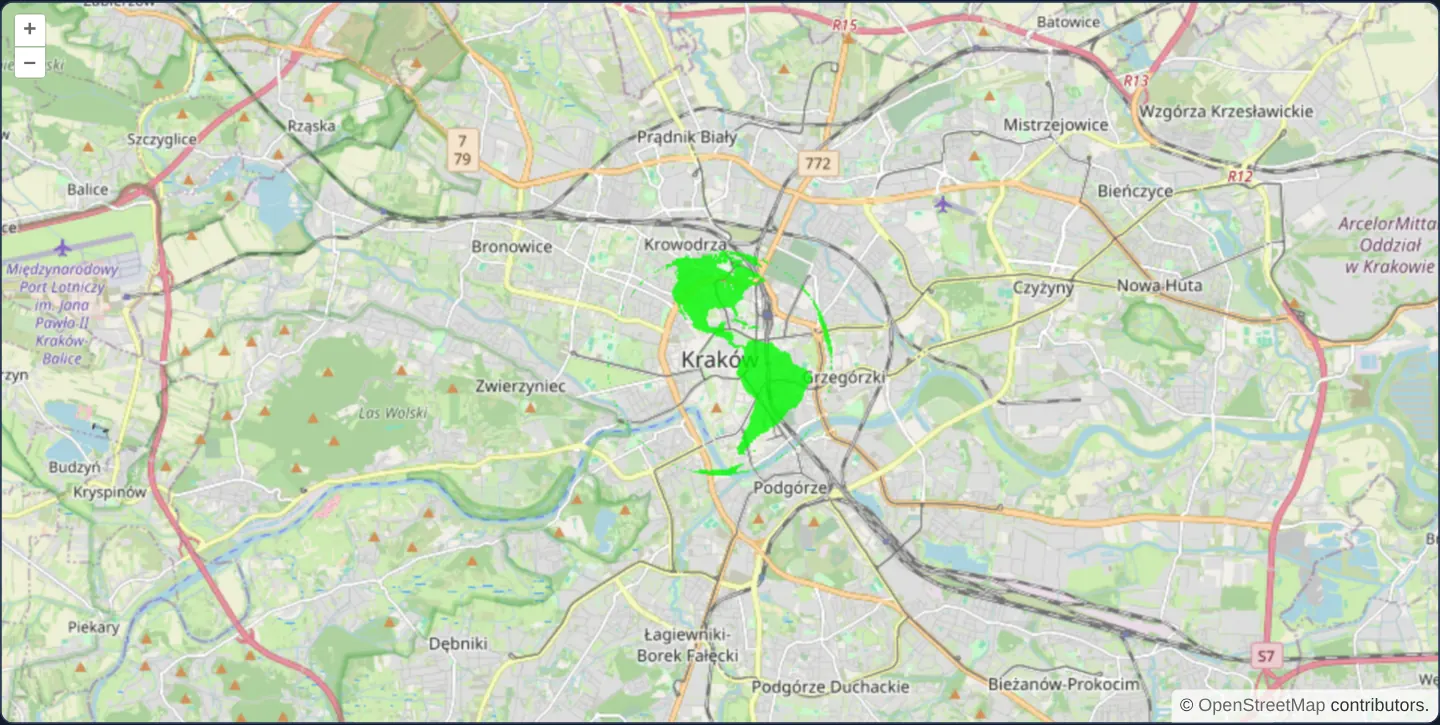
What this example shows
Over OpenStreetMap of Kraków, a point marker displays a continuously spinning animated GIF globe rendered directly inside OpenLayers’ canvas layer while standard drag-panning, wheel-zooming and pointer hit-testing remain completely responsive.
When you need it
Weather alerts, active emergency beacons or playful story-map markers occasionally use compact animated GIF assets that browser <img> canvas draws would otherwise freeze on their very first frame.
Decoding GIF frames onto an off-screen canvas lets OpenLayers’ native Icon symboliser paint animated sprites without adding floating HTML overlays.
The code
The example uses cc-openlayers, my Angular component library for OpenLayers: each aol-… element creates the OpenLayers object it names, updates it from its inputs and disposes of it with the component.
animated-gif.html<aol-map height="480px"
><aol-interaction-default /><aol-control-defaults /><aol-view [zoom]="12"
><aol-coordinate [x]="19.9368" [y]="50.0614" srid="EPSG:4326" /></aol-view
><aol-layer-tile><aol-source-osm /></aol-layer-tile
></aol-map>
@if (error()) {
<p role="alert">{{ error() }}</p>
}animated-gif.shared.tsimport 'gifler';
import type { Animator } from './gifler';
import type Map from 'ol/Map';
import Feature from 'ol/Feature';
import Point from 'ol/geom/Point';
import VectorLayer from 'ol/layer/Vector';
import VectorSource from 'ol/source/Vector';
import { fromLonLat } from 'ol/proj';
import Icon from 'ol/style/Icon';
import Style from 'ol/style/Style';
export function bind(map: Map, onError: (message: string) => void = () => undefined): () => void {
const icon = new Feature(new Point(fromLonLat([19.9368, 50.0614])));
const layer = new VectorLayer({ zIndex: 1, source: new VectorSource({ features: [icon] }) });
map.addLayer(layer);
let active = true;
let animator: Animator | undefined;
const gif = window.gifler('assets/package-ports/animated-gif/globe.gif');
if (gif.xhr)
gif.xhr.onerror = () => {
if (active) onError('GIF could not be loaded.');
};
gif.get((decoded) => {
if (!active) {
decoded.stop();
return;
}
animator = decoded;
const canvas = document.createElement('canvas');
decoded.onDrawFrame = (context, frame) => {
if (!active) return;
context.clearRect(0, 0, canvas.width, canvas.height);
context.drawImage(frame.buffer, frame.x, frame.y);
if (!icon.getStyle()) icon.setStyle(new Style({ image: new Icon({ img: canvas, opacity: 0.8 }) }));
map.render();
};
decoded.animateInCanvas(canvas);
});
return () => {
active = false;
gif.xhr?.abort();
animator?.stop();
map.removeLayer(layer);
layer.getSource()?.dispose();
layer.dispose();
};
}animated-gif.tsimport {
ChangeDetectionStrategy,
Component,
DestroyRef,
inject,
signal,
viewChild,
type AfterViewInit,
} from '@angular/core';
import {
MapComponent,
ViewComponent,
CoordinateComponent,
DefaultControlComponent,
DefaultInteractionComponent,
LayerTileComponent,
SourceOsmComponent,
} from 'cc-openlayers';
import { bind } from './animated-gif.shared';
@Component({
selector: 'app-animated-gif',
imports: [
MapComponent,
ViewComponent,
CoordinateComponent,
DefaultControlComponent,
DefaultInteractionComponent,
LayerTileComponent,
SourceOsmComponent,
],
changeDetection: ChangeDetectionStrategy.OnPush,
templateUrl: './animated-gif.html',
})
export class AnimatedGif implements AfterViewInit {
readonly error = signal('');
private readonly map = viewChild.required(MapComponent);
private readonly destroy = inject(DestroyRef);
ngAfterViewInit(): void {
this.destroy.onDestroy(bind(this.map().instance, (message) => this.error.set(message)));
}
}gifler-module.d.tsdeclare module 'gifler' {}gifler.d.tsimport './gifler-module';
export interface Frame {
width: number;
height: number;
x: number;
y: number;
buffer: HTMLCanvasElement;
}
export interface Animator {
stop(): void;
animateInCanvas(canvas: HTMLCanvasElement): void;
onDrawFrame?: (context: CanvasRenderingContext2D, frame: Frame) => void;
}
export type Gifler = (url: string) => { xhr: XMLHttpRequest; get(callback: (animator: Animator) => void): void };
declare global {
interface Window {
gifler: Gifler;
}
} The React version uses the library's React adapter, cc-openlayers/react: each component creates the OpenLayers object it names when it mounts, updates it from its props and disposes of it when it unmounts.
animated-gif.react.tsximport { useEffect, useState } from 'react';
import {
Map,
View,
Coordinate,
DefaultControls,
DefaultInteractions,
TileLayer,
OSMSource,
useMap,
} from 'cc-openlayers/react';
import { bind } from './animated-gif.shared';
export function AnimatedGif() {
const [error, setError] = useState('');
return (
<>
<Map height="480px">
<DefaultControls />
<DefaultInteractions />
<View zoom={12}>
<Coordinate x={19.9368} y={50.0614} srid="EPSG:4326" />
</View>
<TileLayer>
<OSMSource />
</TileLayer>
<PackageLayer onError={setError} />
</Map>
{error && <p role="alert">{error}</p>}
</>
);
}
function PackageLayer({ onError }: { onError: (message: string) => void }) {
const map = useMap();
useEffect(() => bind(map, onError), [map, onError]);
return null;
}animated-gif.shared.tsimport 'gifler';
import type { Animator } from './gifler';
import type Map from 'ol/Map';
import Feature from 'ol/Feature';
import Point from 'ol/geom/Point';
import VectorLayer from 'ol/layer/Vector';
import VectorSource from 'ol/source/Vector';
import { fromLonLat } from 'ol/proj';
import Icon from 'ol/style/Icon';
import Style from 'ol/style/Style';
export function bind(map: Map, onError: (message: string) => void = () => undefined): () => void {
const icon = new Feature(new Point(fromLonLat([19.9368, 50.0614])));
const layer = new VectorLayer({ zIndex: 1, source: new VectorSource({ features: [icon] }) });
map.addLayer(layer);
let active = true;
let animator: Animator | undefined;
const gif = window.gifler('assets/package-ports/animated-gif/globe.gif');
if (gif.xhr)
gif.xhr.onerror = () => {
if (active) onError('GIF could not be loaded.');
};
gif.get((decoded) => {
if (!active) {
decoded.stop();
return;
}
animator = decoded;
const canvas = document.createElement('canvas');
decoded.onDrawFrame = (context, frame) => {
if (!active) return;
context.clearRect(0, 0, canvas.width, canvas.height);
context.drawImage(frame.buffer, frame.x, frame.y);
if (!icon.getStyle()) icon.setStyle(new Style({ image: new Icon({ img: canvas, opacity: 0.8 }) }));
map.render();
};
decoded.animateInCanvas(canvas);
});
return () => {
active = false;
gif.xhr?.abort();
animator?.stop();
map.removeLayer(layer);
layer.getSource()?.dispose();
layer.dispose();
};
}How the React version works
Animate a GIF on an OpenLayers point symbol while the map remains interactive.
What both versions share
gifler decodes the bundled globe GIF into a canvas used by the icon. Each frame asks the map to render.
From Angular to React
| Angular | React |
|---|---|
| A map view query and ngAfterViewInit attach the animated symbol. | A child component reads useMap and attaches the symbol in useEffect. |
| An external Angular template declares the example. | JSX declares the example and its controls. |
| The Angular lifecycle releases the mounted resources. | Effect or subscription cleanup releases the mounted resources. |
Who creates, updates and disposes
The frame callback and icon canvas are shared. Cleanup stops the GIF animator and removes its layer.
Architecture and OpenLayers mechanics
Because HTML5 Canvas drawImage paints only frame 0 of an animated .gif, the gifler decoder streams decoded frames onto a dedicated off-screen <canvas> passed as the image backing the feature’s OpenLayers Icon style, calling map.render() after each frame and halting the decoder loop cleanly when the component unmounts.
How it works
- The gifler decoder paints each frame of the bundled globe GIF onto an off-screen canvas consumed by the OpenLayers Icon style, requesting a map render per frame.
Pitfalls
- Always stop the GIF frame decoder on component destroy—leaving an active decoder running after unmounting leaks timers and schedules background renders against a disposed map.
Related examples
The same feature in the OpenLayers examples .
Background: state and lifecycle of maps in Angular with OpenLayers, which the components of cc-openlayers take care of.