Controls · Angular, React and OpenLayers
Full screen for a map and its side panel
Expand both an OpenLayers map and its companion side panel into browser full screen together by passing a shared wrapper ID as the source.
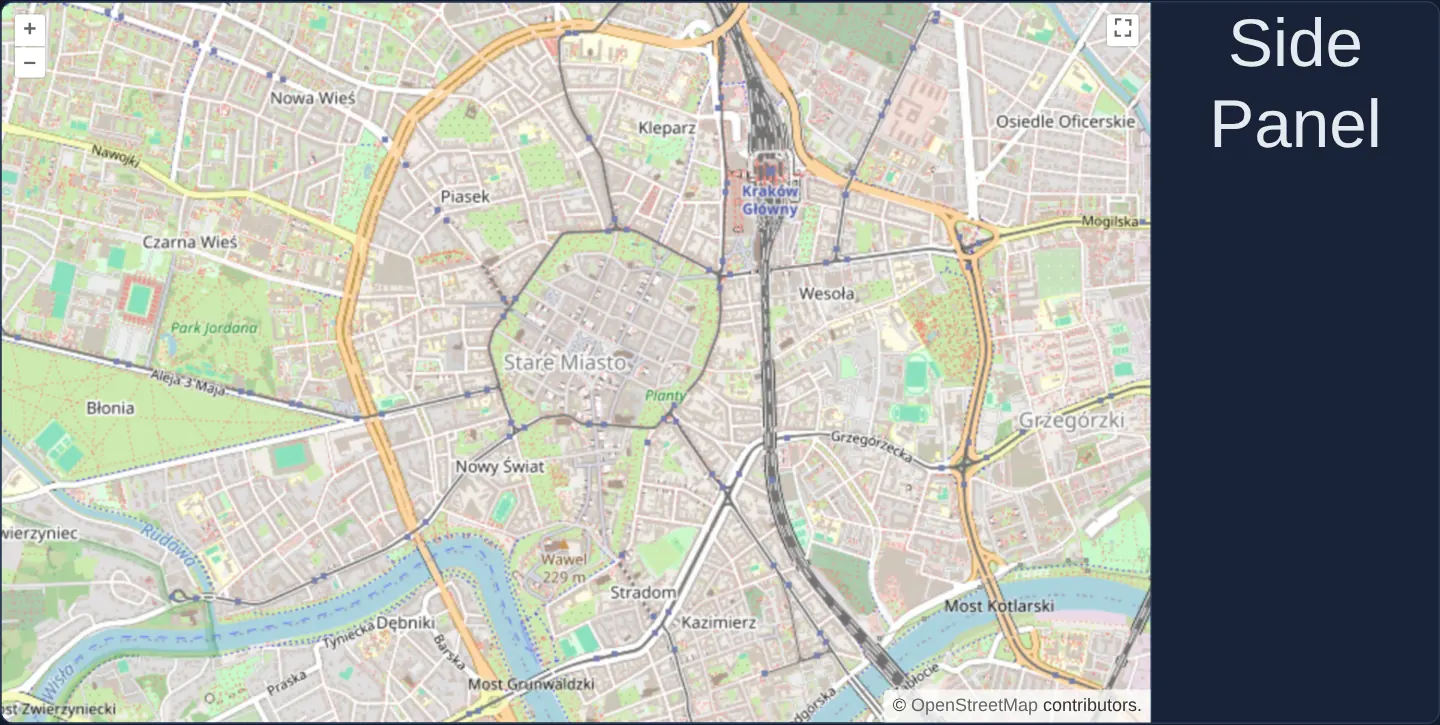
What this example shows
A street map of Kraków’s Old Town sits inside a flex row taking four-fifths of the width alongside a dark Side Panel occupying the remaining fifth. Clicking the full-screen button in the map’s top-right corner promotes the entire composite layout—both map and side panel—into full screen side by side.
When you need it
In real-world GIS workspaces, the map is inseparable from its layer legend, feature attribute table, search bar or measurement inspector.
Promoting only the map element to full screen hides every sibling Angular or React panel, forcing users out of full screen whenever they need to toggle a layer or read an attribute; targeting a shared wrapper element keeps the entire workspace functional.
The code
The example uses cc-openlayers, my Angular component library for OpenLayers: each aol-… element creates the OpenLayers object it names, updates it from its inputs and disposes of it with the component.
full-screen-source.tsimport { ChangeDetectionStrategy, Component } from '@angular/core';
import {
ControlFullScreenComponent,
CoordinateComponent,
DefaultControlComponent,
DefaultInteractionComponent,
LayerTileComponent,
MapComponent,
SourceOsmComponent,
ViewComponent,
} from 'cc-openlayers';
/** A full screen control whose source is the element holding the map and a side panel, so both go full screen. */
@Component({
selector: 'app-full-screen-source',
imports: [
ControlFullScreenComponent,
CoordinateComponent,
DefaultControlComponent,
DefaultInteractionComponent,
LayerTileComponent,
MapComponent,
SourceOsmComponent,
ViewComponent,
],
changeDetection: ChangeDetectionStrategy.OnPush,
template: `
<div id="fullscreen" class="fullscreen">
<aol-map height="100%">
<aol-interaction-default />
<aol-control-defaults />
<aol-control-fullscreen source="fullscreen" />
<aol-view [zoom]="14"><aol-coordinate [x]="19.9368" [y]="50.0614" srid="EPSG:4326" /></aol-view>
<aol-layer-tile><aol-source-osm /></aol-layer-tile>
</aol-map>
<div class="sidepanel">
<span class="sidepanel-title">Side Panel</span>
</div>
</div>
`,
})
export class FullScreenSource {} The React version uses the library's React adapter, cc-openlayers/react: each component creates the OpenLayers object it names when it mounts, updates it from its props and disposes of it when it unmounts.
full-screen-source.react.tsximport {
Coordinate,
DefaultControls,
DefaultInteractions,
FullScreenControl,
Map,
OSMSource,
TileLayer,
View,
} from 'cc-openlayers/react';
/** A full screen control whose source is the element holding the map and a side panel, so both go full screen. */
export function FullScreenSource() {
return (
<div id="fullscreen" className="fullscreen">
<Map height="100%">
<DefaultInteractions />
<DefaultControls />
<FullScreenControl source="fullscreen" />
<View zoom={14}>
<Coordinate x={19.9368} y={50.0614} srid="EPSG:4326" />
</View>
<TileLayer>
<OSMSource />
</TileLayer>
</Map>
<div className="sidepanel">
<span className="sidepanel-title">Side Panel</span>
</div>
</div>
);
}How the React version works
The source of the full screen is an element holding the map and a side panel, so both go full screen. The map is 100 % of the element's height.
What both versions share
OpenLayers renders the map and handles the interactions; the cc-openlayers/core layer gives both adapters the same view binding (MapViewBinding) and the same conversion of coordinates from EPSG:4326 to the map's projection. The fullscreen and sidepanel classes are in the gallery stylesheet.
From Angular to React
| Angular | React |
|---|---|
<aol-control-fullscreen source="fullscreen"> | <FullScreenControl source="fullscreen" /> |
<aol-map height="100%"> | <Map height="100%"> |
Who creates, updates and disposes
Map creates the ol/Map in useLayoutEffect and disposes of it on unmount; each layer, source and interaction component adds its object to the parent it gets from context and removes it in its effect's cleanup, as ngOnDestroy does in Angular. The control is a child of Map, as in the Angular template; the adapter adds it to the map and removes it on unmount.
Architecture and OpenLayers mechanics
Passing source="fullscreen" to aol-control-fullscreen tells OpenLayers to request browser fullscreen on the wrapper element whose id is fullscreen—the parent flex container wrapping both aol-map and the side panel—rather than on the map viewport alone.
Setting height="100%" on aol-map makes the map stretch dynamically from its 480-pixel page row height to 100% of the monitor height when that wrapper enters fullscreen, while OpenLayers’ fullscreen listener automatically re-measures the canvas.
How it works
source="fullscreen"directs the FullScreen control to promote the outer container holding both the map and the side panel.- In normal page flow the wrapper renders as a 480-pixel-tall row splitting width 80% for the map and 20% for the panel.
height="100%"lets the map grow vertically to fill the screen alongside the panel when the wrapper enters full screen.
Pitfalls
- Hardcoding a pixel height such as 480px directly on
aol-mapinstead ofheight="100%"leaves the map 480 pixels tall at the top of a mostly black monitor in full screen—put the fixed height on the outer wrapper in normal mode and let CSS stretch it in the :fullscreen rule. - Because
source="fullscreen"resolves a DOMid, ensure the ID is unique on the page (or pass an element reference directly when mounting multiple fullscreen workspaces).
Related examples
The same feature in the OpenLayers examples .
Background: state and lifecycle of maps in Angular with OpenLayers, which the components of cc-openlayers take care of.