Layers · Angular, React and OpenLayers
Swipe between WebGL map layers
Compare two GPU WebGLTileLayers—OpenStreetMap and Esri World Imagery—in OpenLayers using a swipe slider and WebGL gl.scissor() clipping.
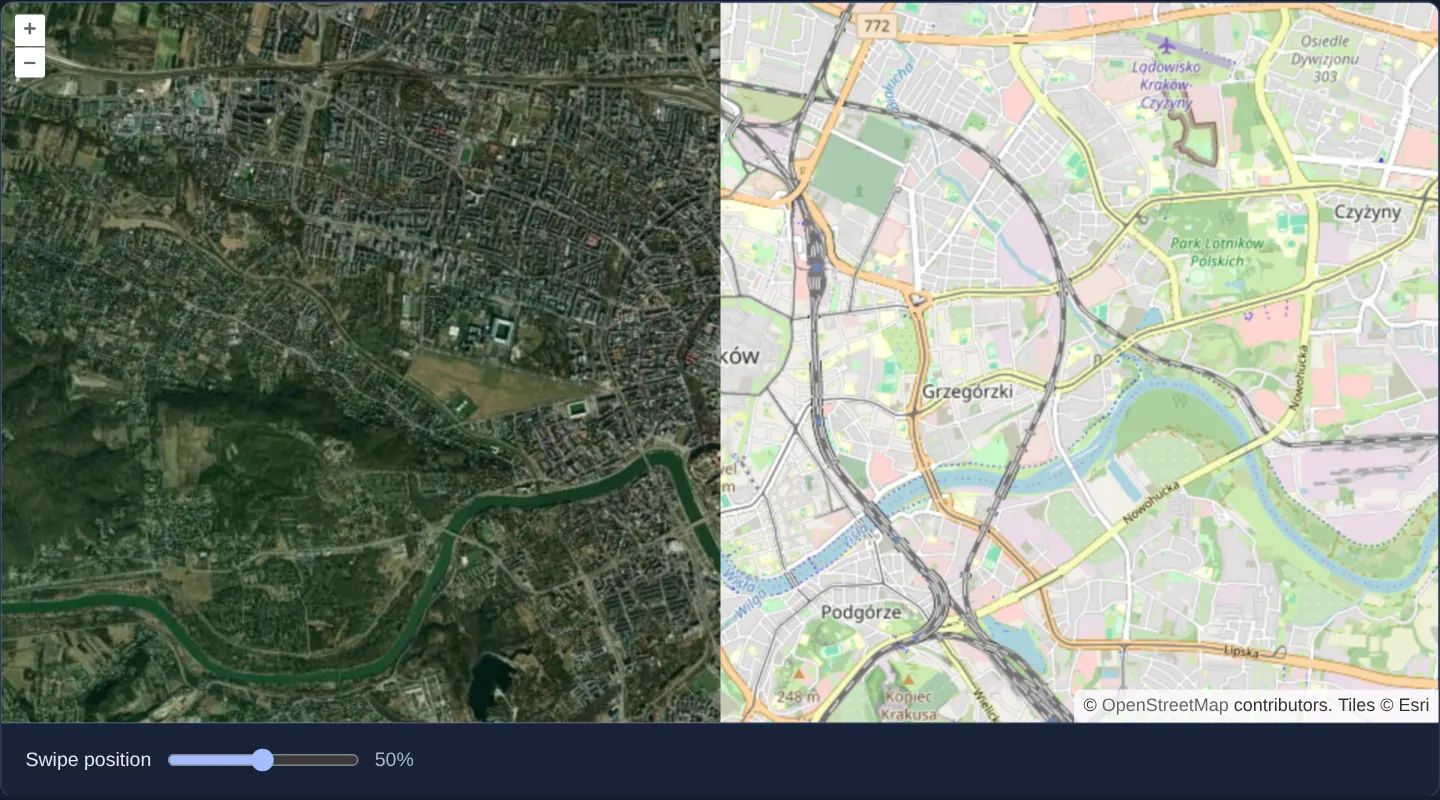
What this example shows
Over central Kraków at zoom 13, two GPU-accelerated WebGLTileLayer layers—OpenStreetMap underneath and Esri World Imagery revealed on the left—are split vertically by a 0–100% Swipe position slider (starting at 50%) that glides smoothly across Retina and standard screens alike.
When you need it
When your basemap and satellite/COG layers already run on WebGLTileLayer for GPU colour grading or band math, Canvas 2D ctx.clip() paths cannot clip a WebGL framebuffer.
Using WebGL’s hardware scissor test (gl.scissor) in prerender and postrender brings zero-copy before/after swipe curtains to pure-WebGL layer stacks.
The code
The example uses cc-openlayers, my Angular component library for OpenLayers: each aol-… element creates the OpenLayers object it names, updates it from its inputs and disposes of it with the component.
webgl-layer-swipe.shared.tsimport { getRenderPixel } from 'ol/render';
import type RenderEvent from 'ol/render/Event';
export function clipImagery(event: RenderEvent, size: number[] | undefined, position: number): void {
if (!size || !event.context || !event.inversePixelTransform) return;
const gl = event.context as WebGLRenderingContext;
const bottomLeft = getRenderPixel(event, [0, size[1]]);
const topRight = getRenderPixel(event, [size[0], 0]);
gl.enable(gl.SCISSOR_TEST);
gl.scissor(
bottomLeft[0],
bottomLeft[1],
Math.round(((topRight[0] - bottomLeft[0]) * position) / 100),
topRight[1] - bottomLeft[1]
);
}
export function resetScissor(event: RenderEvent): void {
const gl = event.context as WebGLRenderingContext | undefined;
gl?.disable(gl.SCISSOR_TEST);
}webgl-layer-swipe.tsimport { ChangeDetectionStrategy, Component, signal, viewChild } from '@angular/core';
import {
CoordinateComponent,
DefaultControlComponent,
DefaultInteractionComponent,
MapComponent,
SourceImageTileComponent,
SourceOsmComponent,
ViewComponent,
} from 'cc-openlayers';
import { LayerWebGLTileComponent } from 'cc-openlayers/webgl';
import type RenderEvent from 'ol/render/Event';
import { clipImagery, resetScissor } from './webgl-layer-swipe.shared';
/** A WebGL imagery layer clipped over OpenStreetMap with a swipe slider. */
@Component({
selector: 'app-webgl-layer-swipe',
imports: [
CoordinateComponent,
DefaultControlComponent,
DefaultInteractionComponent,
LayerWebGLTileComponent,
MapComponent,
SourceImageTileComponent,
SourceOsmComponent,
ViewComponent,
],
changeDetection: ChangeDetectionStrategy.OnPush,
template: `
<aol-map height="480px">
<aol-interaction-default />
<aol-control-defaults />
<aol-view [zoom]="13"><aol-coordinate [x]="19.9368" [y]="50.0614" srid="EPSG:4326" /></aol-view>
<aol-layer-webgltile><aol-source-osm /></aol-layer-webgltile>
<aol-layer-webgltile className="swipe-imagery" [prerender]="prerender" [postrender]="postrender">
<aol-source-imagetile
url="https://server.arcgisonline.com/ArcGIS/rest/services/World_Imagery/MapServer/tile/{z}/{y}/{x}"
attributions="Tiles © Esri"
/>
</aol-layer-webgltile>
</aol-map>
<div class="example-controls">
<label
>Swipe position <input type="range" min="0" max="100" [value]="position()" (input)="swipe($event)" /><output
>{{ position() }}%</output
></label
>
</div>
`,
})
export class WebglLayerSwipe {
readonly position = signal(50);
private readonly map = viewChild.required(MapComponent);
protected readonly prerender = (event: RenderEvent) =>
clipImagery(event, this.map().instance.getSize(), this.position());
protected readonly postrender = resetScissor;
protected swipe(event: Event): void {
this.position.set((event.target as HTMLInputElement).valueAsNumber);
this.map().instance.render();
}
} The React version uses the library's React adapter, cc-openlayers/react: each component creates the OpenLayers object it names when it mounts, updates it from its props and disposes of it when it unmounts.
webgl-layer-swipe.react.tsximport { useRef, useState } from 'react';
import type OLMap from 'ol/Map';
import type RenderEvent from 'ol/render/Event';
import {
Coordinate,
DefaultControls,
DefaultInteractions,
ImageTileSource,
Map,
OSMSource,
View,
} from 'cc-openlayers/react';
import { WebGLTileLayer } from 'cc-openlayers/react/webgl';
import { clipImagery, resetScissor } from './webgl-layer-swipe.shared';
/** A WebGL imagery layer clipped over OpenStreetMap with a swipe slider. */
export function WebglLayerSwipe() {
const [position, setPosition] = useState(50);
const positionRef = useRef(50);
const map = useRef<OLMap>(null);
const prerender = (event: RenderEvent) => clipImagery(event, map.current?.getSize(), positionRef.current);
return (
<>
<Map ref={map} height="480px">
<DefaultInteractions />
<DefaultControls />
<View zoom={13}>
<Coordinate x={19.9368} y={50.0614} srid="EPSG:4326" />
</View>
<WebGLTileLayer>
<OSMSource />
</WebGLTileLayer>
<WebGLTileLayer className="swipe-imagery" onPreRender={prerender} onPostRender={resetScissor}>
<ImageTileSource
url="https://server.arcgisonline.com/ArcGIS/rest/services/World_Imagery/MapServer/tile/{z}/{y}/{x}"
attributions="Tiles © Esri"
/>
</WebGLTileLayer>
</Map>
<div className="example-controls">
<label>
Swipe position{' '}
<input
type="range"
min="0"
max="100"
value={position}
onInput={(event) => {
positionRef.current = event.currentTarget.valueAsNumber;
setPosition(positionRef.current);
map.current?.render();
}}
onChange={() => {}}
/>
<output>{position}%</output>
</label>
</div>
</>
);
}webgl-layer-swipe.shared.tsimport { getRenderPixel } from 'ol/render';
import type RenderEvent from 'ol/render/Event';
export function clipImagery(event: RenderEvent, size: number[] | undefined, position: number): void {
if (!size || !event.context || !event.inversePixelTransform) return;
const gl = event.context as WebGLRenderingContext;
const bottomLeft = getRenderPixel(event, [0, size[1]]);
const topRight = getRenderPixel(event, [size[0], 0]);
gl.enable(gl.SCISSOR_TEST);
gl.scissor(
bottomLeft[0],
bottomLeft[1],
Math.round(((topRight[0] - bottomLeft[0]) * position) / 100),
topRight[1] - bottomLeft[1]
);
}
export function resetScissor(event: RenderEvent): void {
const gl = event.context as WebGLRenderingContext | undefined;
gl?.disable(gl.SCISSOR_TEST);
}How the React version works
Compare street mapping and imagery around Kraków with a slider that clips the imagery using the WebGL scissor test.
What both versions share
Both versions import the same clipping and reset functions. The functions translate CSS pixel positions to framebuffer coordinates, set a scissor rectangle before drawing the imagery and disable it afterwards. The framework adapters supply the map size and the current slider value.
From Angular to React
| Angular | React |
|---|---|
| signal for the slider value | useState for the slider value |
| viewChild of MapComponent | useRef of the OpenLayers map |
| prerender and postrender inputs | prerender and postrender props |
Who creates, updates and disposes
The map adapter creates and disposes both layers and their sources. The slider requests a redraw of the existing map. The post-render handler restores the shared GL state on each frame, so the clip does not affect other rendering.
Architecture and OpenLayers mechanics
Giving the upper imagery aol-layer-webgltile its own className="swipe-imagery" allocates a dedicated WebGL canvas above the OpenStreetMap WebGL layer. In [prerender], clipImagery enables gl.SCISSOR_TEST and restricts the WebGL scissor box to the strip from the left edge up to the slider percentage in physical framebuffer pixels; [postrender] (resetScissor) disables gl.SCISSOR_TEST immediately afterward, and dragging the slider calls render().
How it works
- Two
aol-layer-webgltilelayers share the view—OpenStreetMap below and Esri World Imagery (className="swipe-imagery") above. - Dragging the 0–100% slider updates the scissor split width in physical framebuffer pixels and calls
render(). postrenderdisables the WebGL scissor test immediately so subsequent passes are never clipped.
Pitfalls
- WebGL
gl.scissormeasures physical drawing-buffer pixels, reached here throughgetRenderPixel, not CSS pixels—using unscaled CSS width misplaces the curtain on 2x/3x HiDPI screens. - Canvas 2D ctx.clip() paths do not exist on a
WebGLRenderingContext; always pair WebGL layers withgl.enable(gl.SCISSOR_TEST)/ gl.disable(gl.SCISSOR_TEST) and a distinctclassNamewhen isolating layer contexts.
Related examples
The same feature in the OpenLayers examples .
Background: state and lifecycle of maps in Angular with OpenLayers, which the components of cc-openlayers take care of.